
Correspondence control is an enterprise content management discipline, not simply a way to send letters. ECM correspondence management automates correspondence from creation through archiving, while supporting capture, controlled access, and secure central storage. It gives organizations a structured way to manage incoming and outgoing business communications throughout their lifecycle.
That structure matters when teams need to route correspondence, track decisions, and retrieve the right record without losing control of sensitive information. A correspondence management system can integrate email and contextual notifications, automate routing and approvals, and connect each item to supporting documents and records. This guide explains what the system does, how it fits within enterprise content management, and how capture, storage, automation, and document control work together. It also outlines the capabilities and integration considerations that shape a practical enterprise approach in the United Arab Emirates.
Key Takeaways
- Understand how correspondence management coordinates records from creation through archival, with access controls for confidential information.
- Map how email, ERP, and document management integrations can connect correspondence to the systems and context teams rely on.
- Use automated routing, approvals, and communication tracking to move incoming and outgoing correspondence through defined workflows.
- Strengthen capture and retrieval with supporting documents, classification, reference numbers, and centralized storage.
- See how BitAffix Workflow Automation, Kanban Task Automation, and Secure Document Archiving can support structured correspondence processes.
What is a Correspondence Management System?
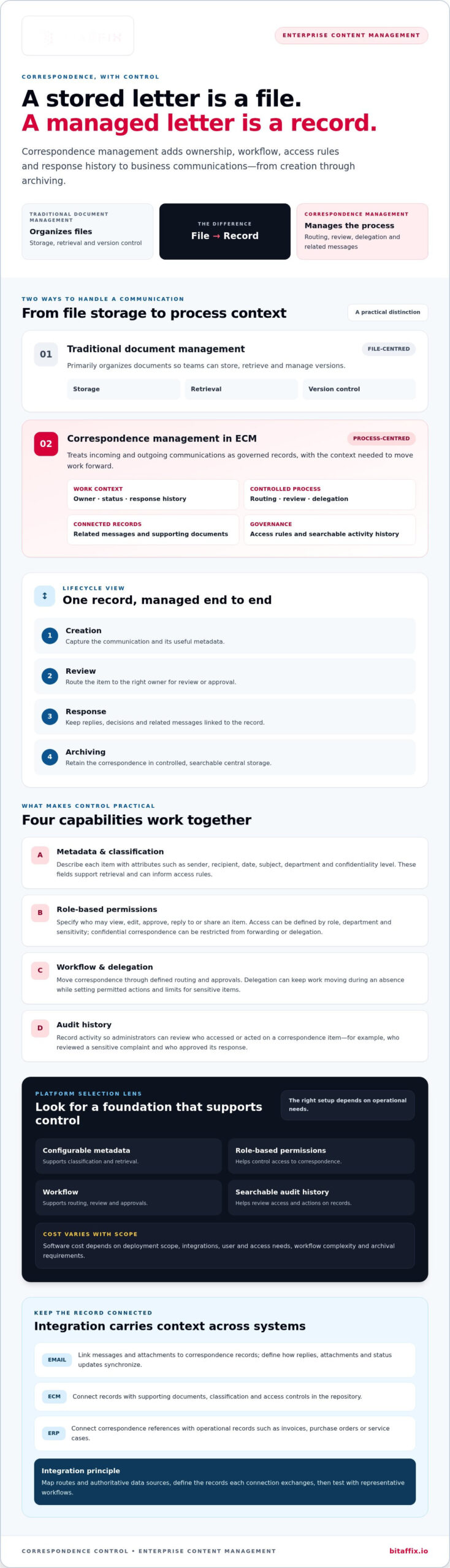
A correspondence management system controls business communications from creation through review, response, and archiving. ECM correspondence management brings that workflow into enterprise content controls, so departments manage correspondence as governed records rather than isolated files.
Confidential Correspondence Access
Centralized access gives authorized users one controlled place to find correspondence, while permissions limit who can open, forward, or delegate sensitive items. For example, a finance team can access a payment dispute while another department sees only correspondence assigned to it. Define access by role, department, and sensitivity, then apply those rules to each item. Confidential correspondence can be restricted from forwarding or delegation.
When assessing access controls, trace a record from receipt through archiving. Identify who may view it, who may act on it, and which actions require approval. This shows in practical terms whether the system can support confidential work, rather than relying on broad shared-folder permissions.
Metadata and Delegated Access
Metadata describes each item using useful attributes such as sender, recipient, date, subject, department, and confidentiality level. These fields support classification and retrieval, and can inform access rules. For example, an item marked confidential can be limited to specific roles instead of appearing in general department searches.
Delegation keeps work moving when an assigned employee is away or changes responsibilities. Set the delegate, permitted actions, and any limits for confidential items. The system can support leave delegation while preventing sensitive correspondence from being forwarded or delegated. Review metadata and delegation together: accurate classification and a narrowly defined delegate help protect access while maintaining continuity.
Permissions and Audit Trails
Permissions specify whether a user may view, edit, approve, reply to, or share a correspondence item. Audit trails record activity, helping administrators review who accessed or acted on a record. For a sensitive complaint, teams can distinguish the person who reviewed it from the person who approved the response.
Choose controls that match each stage of correspondence, then test them with representative user roles before launch. Consider risks such as excessive access, misclassified metadata, or untracked delegation. In the UAE, organizations should map applicable privacy, records, and sector requirements to their operations and jurisdiction before setting retention and access rules. Requirements can vary by sector and by the information handled.
ECM and Traditional Document Management
Traditional document management primarily organizes files for storage, retrieval, and version control. A correspondence system adds process context: it tracks incoming and outgoing communications, routes work, supports review and delegation, and links related messages. The difference is practical. A stored letter is a file; a managed letter can also have an owner, status, access rights, and response history.
For platform selection, prioritize an ECM foundation with configurable metadata, role-based permissions, workflow, and searchable audit history. These capabilities support centralized access and controlled correspondence handling. Benefits include clearer ownership, more consistent processing, and easier retrieval for informed decisions. Software cost depends on deployment scope, integrations, user and access needs, workflow complexity, and archival requirements; the price depends on the case and is given after a quote request.
Integration with email, ERP, and document management systems
A correspondence management system connects communication workflows with the enterprise systems that hold business context. Integrated email and contextual notifications help users act on correspondence without losing sight of related documents or status. Effective integration carries information from creation through archiving while preserving ownership and access rules across systems.
Organizations implement the system by mapping correspondence routes, identifying authoritative data sources, and defining which records each connection must exchange. They then configure and test interfaces with representative email, ERP, and document-management workflows. A pilot in one department can reveal duplicate records, missing metadata, and notification gaps before wider deployment.
Email integration links messages and attachments to managed correspondence records. Contextual notifications can alert an assigned user when an item needs review or approval. For example, an incoming customer email can be associated with a case record and routed for action, while the response remains linked to the original message. Define how replies, attachments, and status updates synchronize.
Enterprise Content Management integration supplies the repository and governance structure for correspondence. The management system can link a record to supporting documents, classification, and access controls within that environment. For a Microsoft 365 or SharePoint deployment, map the libraries, metadata, permissions, and record identifiers involved. Treat SharePoint as an integration context to assess, not an assumed connection: document the required exchange and validate it in testing.
ERP integration connects correspondence with operational records such as invoices, purchase orders, or service cases. In an ADGM organization, identify the ERP applications and business processes involved, then map each correspondence reference to the appropriate ERP record. Confirm which system owns each field and how updates return. This helps prevent competing data sources from creating mismatched customer, supplier, or transaction details.
CRM and HRMS connections require the same disciplined data mapping. A CRM link may associate a customer message with an account and case; an HRMS link may connect employee correspondence with a personnel record. Limit exchanged fields to what the workflow needs, align access rights across systems, and test how changes, corrections, and closed records appear to authorized users.
Integration quality depends on clear ownership, consistent identifiers, and reliable exception handling. Define how the system responds when an email address, ERP reference, or SharePoint record cannot be matched. For organizations shaping a controlled records environment, secure document archiving can complement correspondence workflows by supporting structured retention and retrieval.
Automating incoming and outgoing correspondence
A correspondence management system tracks incoming and outgoing business correspondence and makes it available according to user roles and access rights. From receipt, it captures and classifies an item, routes it for review, records decisions, links related replies, and archives it for later retrieval.
Automation streamlines repeatable steps while leaving people responsible for judgment, approvals, and exceptions. A defined workflow makes clear who owns each item and what action comes next.
Incoming and Outgoing Correspondence
For incoming correspondence, the system can route an item to the appropriate person or team. A customer complaint, for example, can go to the service team for review and then to an authorized approver. Within the workflow, users can review, reply, delegate, forward, reject, approve, or request clarification.
For outgoing correspondence, users can create messages from predefined templates. The system can assemble and deliver secure, personalized communications, and automatically generate replies to incoming correspondence when the workflow supports it. Define responsible roles, approval steps, and exception paths before automating a process. This keeps standard responses consistent without removing oversight from sensitive decisions.
Correspondence Tracking and Linking
Tracking gives each item a process status, responsible user, and next action. Teams can set due dates, delegate tasks, and schedule notifications to keep correspondence moving. If a draft needs revision, a reviewer can request clarification, and the assigned user can update the response within the same workflow.
Linking connects incoming correspondence with its related outgoing response. For example, a supplier inquiry and the organization’s reply can remain associated as one exchange. Users can retrieve the conversation through either record instead of searching separate mail folders. Linked correspondence also helps reviewers understand the context behind a decision.
Design workflows around the correspondence types, routing rules, approval points, and records each process creates. A routine request may follow a direct review-and-reply path, while a sensitive complaint may need an additional approval. Set permissions and delegation boundaries to match the process, especially when an item contains confidential information.
Test automation against ordinary cases and exceptions before a broad rollout. Confirm that messages reach the right team, approvals appear in sequence, and notifications prompt the intended action. Check that an unanswered request, rejected draft, or reassigned task remains visible to its owner. These tests can expose process gaps before they affect day-to-day correspondence.
Finally, define when a process is complete. A workflow should distinguish a sent response from a resolved correspondence item, then archive the exchange with its related records. This gives users a dependable process history and supports retrieval when a later decision depends on earlier communication.
Correspondence capture and storage
Reliable capture brings paper and digital correspondence into a controlled records process. Classification, supporting documents, and archival storage preserve context from intake through later retrieval.
Paper and Digital Correspondence Capture
For paper correspondence, scan the original and associate it with the relevant case or department. Barcode-based identification can help classify and locate the item. For example, a government office can capture a paper submission and attach its supporting documents to the same correspondence record.
Digital items need an equally consistent intake path. Users can attach supporting documents to correspondence, keeping email messages and related files together. Define metadata fields for the sender, subject, date, and correspondence type. Consistent fields make later searches more precise across incoming and outgoing records.
Capture should preserve the relationship between correspondence and its supporting evidence. For an invoice query, retain the original message, invoice, and any supporting document as linked items. Staff can then review the complete record before an approval or response, rather than reconstructing context from separate folders.
Automated Capture and Processing
Automated processing applies classification and routing rules after capture. A correspondence item can be identified by its barcode or selected metadata, then assigned to the relevant team. Staff can review the captured record, correct its metadata, and send it into the appropriate approval workflow.
Set clear rules for exceptions. If a barcode cannot identify an item, route it for manual classification instead of assigning an uncertain category. If supporting documents are missing, keep the correspondence visible for follow-up. These handling paths preserve control when intake does not match the expected pattern.
Storage completes the capture lifecycle. A secure, centralized repository keeps correspondence available to authorized users and supports later retrieval. Organize records using consistent folders, attributes, and classifications so users can find a government submission by reference or subject. Keep captured correspondence and its attachments together.
Before deployment, test representative paper and digital records from intake through archiving. Confirm that scanning creates readable records, barcode identification points to the correct item, and metadata supports retrieval. Then test access and approval paths with the roles that process correspondence. This end-to-end review can reveal gaps in capture, classification, or storage before teams depend on the process.
Check whether users can locate each record by reference, subject, or correspondence type, and whether attachments remain linked when the record is retrieved. Confirm that access and filing practices are clear to staff and that exceptions can be returned for correction without losing the original correspondence or its supporting context. The Correspondence Management System supports barcode-based identification, so include barcode-identified items in the review and verify that each resulting record is classified and retrievable as intended.
Keep the review focused on the full record, not just the scan. Confirm that the message, related files, and classification remain together through storage and retrieval. Document any intake adjustments, then repeat the check after changes to scanning or metadata procedures. This helps keep correspondence usable as a complete record and makes storage practices easier for staff to apply consistently.
Enterprise content management and document control
A correspondence management system runs on an Enterprise Content Management platform, joining workflow with governed records. This foundation lets an enterprise classify correspondence, control its movement, and retain a usable record of decisions. The distinction is operational: document control governs the record, while correspondence management also coordinates its actions and participants.
Start with a classification plan that reflects how internal teams work. An organization might classify records by department, correspondence type, subject, and sensitivity. Customizable folder trees, list views, document attributes, and classification plans make these structures usable across departments. Consistent classifications also help users retrieve records without relying on personal folder habits.
Reference numbers create a stable link between correspondence and related activity. Configure automatic reference-number generation and barcode labels to support identification and lookup. Barcode and QR integration can help classify documents or provide quick access. For example, a scanned letter can carry its reference into a case workflow, helping staff find the record without relying on a separate naming convention.
Document control also governs actions after intake. Teams can set due dates, track tasks, delegate correspondence, and schedule notifications. If routing changes, authorized users can stop distribution, add or remove action and information users, then resend notifications. Comments on correspondence tasks and a spell checker support review before an outgoing response proceeds.
Dashboards translate workflow activity into management insight. Correspondence dashboards can show process progress, turnaround times, and bottlenecks. The ADGM ECM project analyzed document types and classes across 27 departments and included deployment of 5 reports or dashboards. Those examples show why classification and reporting belong together: reliable reporting depends on consistent records and process stages.
Use a controlled design sequence: map record classes, assign attributes, define reference rules, configure routing, then validate reports against real work. For example, compare a correspondence item’s assigned team, due date, current status, and dashboard view. If these do not align, adjust the classification or workflow before expanding the process across the enterprise.
Secure document archiving extends this control beyond active processing. It keeps correspondence available in a structured repository, supporting retrieval after a task closes. Treat classification, routing, access, and reporting as one document-control model, not as separate configuration tasks.
Secure document archiving extends control beyond active processing by preserving the link between a record and its reference. The Correspondence Management System can recall reference numbers, helping users return to the identifier associated with earlier correspondence. Users can also comment on correspondence tasks, and the system includes a spell checker to support review in the same working context. These capabilities complement controlled classification, keeping retrieval and task discussion connected to the governed record rather than individual memory.
Knowledge workers spend about 2.5 hours per day searching for information, roughly 30% of the workday. These figures make classification, reference recovery, and governed reuse practical controls: improving findability can reduce wasted effort, while a reliable record can help limit unnecessary duplication.
BitAffix: Workflow Automation
BitAffix provides Workflow Automation for organizations seeking more structured correspondence processes. Turn to it when manual handoffs, recurring task coordination, or scattered records make workflows harder to manage. Kanban Task Automation can organize task progress, while Secure Document Archiving supports controlled storage and retrieval of correspondence records.
For financial institutions, Banking Sector Solutions provide a sector-focused way to address operational workflows. Start by identifying correspondence processes that need clearer task ownership, more consistent routing, or stronger archival structure. This helps connect the operational need with a relevant solution.
Visit bitaffix.io to discuss your correspondence workflow needs.
Build a More Governed Correspondence Operation
Make the next step an operational decision: identify where correspondence ownership, process visibility, or record control needs improvement. A clear priority helps teams align workflow design with governance needs and gives stakeholders a basis for evaluating progress.
ECM Correspondence Management can support this approach when teams treat correspondence as part of the organization’s operating model. BitAffix offers Workflow Automation, Kanban Task Automation, and Secure Document Archiving to support structured work, task coordination, and controlled records. Choose the capability that fits the process you want to strengthen, then define the outcome your teams need.
A deliberate starting point can help turn fragmented handling into a more consistent enterprise process. Move forward with clarity and build a correspondence operation that supports both control and efficient work.
Take the next step with confidence.
Frequently Asked Questions
What is ECM correspondence management?
ECM correspondence management is an enterprise content management approach for controlling business communications as operational records. It connects each correspondence item with its purpose, responsible team, and related decision. For example, an organization can preserve a formal request alongside the decision it prompted, giving authorized staff context when they review the matter later. Its value lies in managing the record and its business role together.
What are the main features of ECM correspondence management systems?
Key features include configurable classification, controlled access, correspondence workflows, and centralized archiving. Some systems also support multiple languages at the interface and data levels, which can help organizations working across language contexts. Image and document zooming supports closer review of scanned material. When comparing platforms, assess how these capabilities fit actual user tasks, such as reviewing a scanned letter or finding a record through its metadata.