
Banking process automation software turns high-volume, rules-based work into governed workflows. Banks use it for payment processing, account reconciliation, customer onboarding, KYC and AML checks, loan processing, and reporting. The goal is not automation for its own sake, but faster, more consistent execution with clear points for human review.
That focus matters in UAE banking, where operational improvements must work alongside established systems, control requirements, and accountable decision-making. Automation can handle routine steps while people retain oversight of exceptions and decisions that require judgment.
This article explains how banking automation works across front- and back-office operations, which processes are strong candidates, and how integration connects workflows with existing systems. It also covers audit trails, access controls, and change management, helping leaders weigh efficiency alongside governance and operational risk.
Key Takeaways
- Identify onboarding and other repetitive, rules-based tasks where automation can standardize processing while preserving human review for exceptions.
- Assess suitability by weighing process volume, error exposure, operational cost, and the need for judgment before selecting an automation use case.
- Connect automation with existing systems through API connectivity and workflow orchestration to reduce data silos without making replacement the default.
- Build auditability into workflows with clear business rules, permissions, traceable actions, and defined oversight responsibilities.
- Compare automation options by process, from reconciliation and loan operations to compliance reporting, to target improvements that matter to the bank.
What is banking automation and how do banks use it?
Bank automation coordinates repeatable tasks across onboarding, account servicing, and lending, while routing exceptions for human review. Banks can map a workflow, define rules and approvals, connect systems, pilot the process, then monitor outcomes before scaling.
Customer Onboarding and KYC
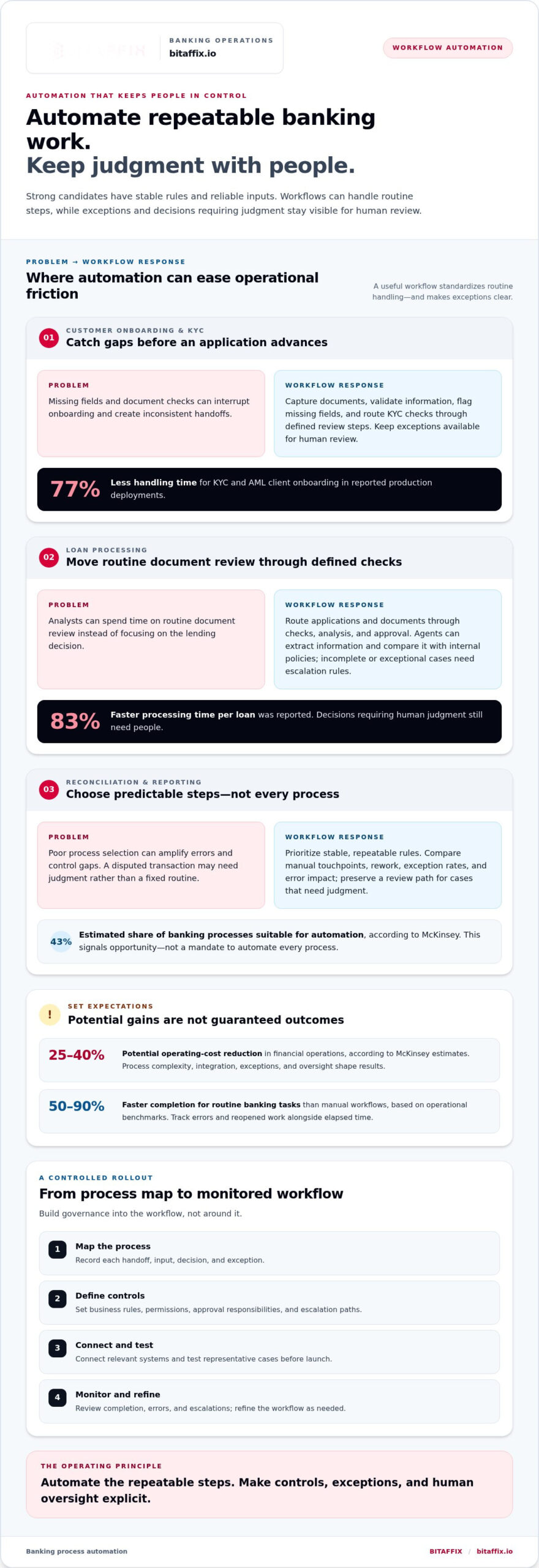
Customer onboarding automation collects and validates application information, then routes KYC checks through defined review steps. A submission portal can capture documents and flag missing fields before an application advances. Production deployments have cut KYC and AML client-onboarding handling time by 77%. The value comes from consistent checks, clear escalation paths, and governance that preserves human review for exceptions.
Account Opening and Maintenance
Account-opening automation moves an application through data capture, validation, required checks, and approval. Once an account is active, workflows can route maintenance requests, update records after approval, and alert the relevant team when information conflicts. This reduces repeated data entry and gives staff a clear view of each request’s status. For example, an address change can move from customer submission to verification and record update.
Loan Processing Automation
Loan processing automation routes applications and documents through defined checks, analysis, and approval stages. Agents can extract information from loan documents and compare it with internal policies, allowing analysts to focus on the decision rather than routine review. The reported processing time per loan was 83% faster. Banks still need defined escalation rules for incomplete documents, exceptions, and decisions requiring human judgment.
Implementing Process Automation
Implementation turns a defined banking process into a controlled digital workflow. Start by mapping each handoff, input, decision, and exception, then set business rules, permissions, and approval responsibilities. Connect the workflow to relevant systems and test representative cases before launch. Monitor completion, errors, and escalations, then refine the process. This sequence helps teams understand how changes affect service delivery and governance.
Customer experience improves when workflows reduce avoidable waits without removing meaningful human support. For example, a service request can be classified by type and routed to the right team, while customers receive status updates at relevant stages. Personalization depends on accurate customer information and clear rules for how teams use it. A well-designed process balances fast, consistent responses with staff review when a request needs judgment.
What are some challenges and risks in automation?
Automation can improve banking operations, but poor process selection can amplify errors and control gaps. In the UAE, pricing depends on workflow scope, integration complexity, data controls, and support requirements; the fee is provided after a quote request.
Start with a structured assessment: identify repetitive work, measure its handoffs and exceptions, then evaluate the financial impact of delays or errors. McKinsey estimates that 43% of banking processes are suitable for automation. That estimate signals opportunity, not a mandate to automate every process. Suitability depends on stable rules, reliable inputs, clear ownership, and an appropriate review path.
Automation Suitability and Costs
Automation suitability means choosing processes where repeatable rules can reduce manual effort without weakening controls. Efficiency gains depend on workflow quality, not simply on deploying technology. Reconciliation and report generation may have predictable steps, while disputed transactions require judgment. Banks can compare manual touchpoints, rework, exception rates, and error impact before prioritizing candidates.
Automation in financial operations can reduce operating costs by 25-40%, according to McKinsey estimates. Treat that as a potential outcome, not a universal forecast: process complexity, integration work, exception handling, and ongoing oversight shape results. A useful comparison includes the complete workflow, from data capture to approval, rather than counting only the task a robotic tool performs.
Operational Costs and Turnaround Times
Operational cost and turnaround time move together when automation removes queues, repeated entry, and avoidable handoffs. Routine banking tasks can be completed 50 to 90 percent faster than manual workflows, based on operational benchmarks. Faster processing can free staff capacity, but only if teams manage exceptions efficiently and avoid shifting delays to another department.
Map where a request waits, who reviews it, and what causes rework. For example, an incomplete invoice may pause processing until staff obtain missing information. Automated validation can flag the missing field earlier, while a defined escalation route handles unusual cases. Track elapsed time alongside error rates and reopened work to see whether a faster workflow also improves quality.
AI and machine learning add flexibility, but introduce different operational risks from fixed-rule automation. Traditional robotic process automation follows predefined instructions; intelligent tools can interpret varied data and support exception handling. That flexibility depends on data quality, clear decision boundaries, and active governance. If a model misclassifies a document, downstream workflows may route it incorrectly or delay a financial decision.
Risk mitigation starts with matching the tool to the decision. Use structured rules for stable, repeatable tasks, and reserve human approval for consequential exceptions. Define who can change workflow logic, how staff review flagged cases, and how teams record errors. These controls help prevent automation from silently repeating a faulty assumption across operations.
Measure outcomes before expanding a pilot. Compare processing time, manual effort, error correction, and exception volume against the original workflow. If one indicator improves while another degrades, refine the rules or escalation path before scaling. Workflow automation for banking operations can be a relevant next step when teams need to structure repeatable processes and coordinate task handling.
API connectivity and legacy system integration
Banking automation can connect existing systems rather than replace them. Compare platforms by API coverage, legacy connectivity, workflow controls, exception routing, and audit visibility, not feature counts alone.
Legacy Systems and Manual Processes
Legacy systems are established banking applications that may not exchange information smoothly with newer tools. When teams bridge these gaps manually, staff may re-enter transaction details, reconcile mismatched records, or move credit applications between queues. Each handoff creates another point where information can be delayed or become inconsistent.
Robotic process automation can perform repetitive actions through existing user interfaces, making it useful when direct integration is unavailable. For example, a bot might copy approved transaction details from one system into another. This can reduce repetitive handling, but depends on stable screens, predictable rules, and well-defined exception routes.
Institutions should distinguish temporary bridging from durable integration. If a legacy application changes its interface, a screen-based bot may need adjustment. Teams can map the process, identify where staff rekey data, and document which system owns each record. That map helps clarify whether automation should use an API, a controlled user-interface workflow, or a combination.
Keep manual review where the process needs judgment. A bot can transfer a credit application and flag a missing field, while an employee handles conflicting information. Clear ownership prevents duplicate records and helps staff trace a transaction from its source through downstream processing.
Integration with Existing Banking Systems
Integration connects automation workflows with banking applications so information can move between defined process stages. An API can support structured exchanges, while orchestration coordinates data across ERP, CRM, and legacy systems. The practical benefit is a more continuous process, rather than separate applications and manual handoffs.
For example, a transaction workflow might receive an instruction, validate required fields, send data to a banking system, and route exceptions for review. Teams should define which application provides authoritative customer or transaction data. They should also establish how the workflow handles unavailable services, rejected fields, and duplicate submissions.
Compare integration capabilities with the bank’s actual architecture. Review supported interfaces, data formats, authentication methods, error handling, and monitoring options. A broad connector catalogue matters less if it cannot support the systems or data exchanges required by the target workflow. Test representative cases, including incomplete submissions and rejected responses.
API connectivity does not remove the need for governance. Define permissions for each connection, limit data to what the process requires, and retain records of workflow actions. Map dependencies before changing a connected system, so teams understand which processes could be affected. A controlled rollout lets institutions validate data movement and exception handling before expanding automation across operations.
Integration decisions should reflect process ownership as well as technical compatibility. When a customer record changes, for instance, teams need a clear rule for which system updates first and how other applications receive that change. This clarity reduces conflicting records and helps maintain continuity across account servicing, transaction processing, and credit operations.
Automation risks, auditability and change management
Automation governance assigns owners, controls, and review points before a workflow executes. Banks should map each workflow to relevant compliance and data-protection obligations, then translate them into operational controls.
Governance, Audit Trails, and Access Control
Governance defines who may change, approve, and operate an automated process. It matters because a workflow can affect customer records, financial decisions, and regulatory reporting. Set business logic, permissions, compliance requirements, and service-level expectations before deployment. For example, restrict rule changes to authorized roles and require approval before a material change enters production.
Audit trails record what the system did, when it acted, and which rule guided the action. Configure logs to capture workflow events, data changes, approvals, and exception handling. Granular access controls limit who can view records or modify rules. Together, these controls help teams trace an outcome and determine whether a process followed its intended design.
Human Oversight and Traceability
Human oversight gives staff authority to review exceptions and intervene in consequential decisions. Define the handoff clearly: an automated check can flag conflicting customer information, while an employee assesses the case. A traceable workflow records the flag, reviewer, decision, and any override, creating a coherent record for internal examination.
Automated actions can be auditable and traceable to support AML, KYC, and data-protection controls. Design each step so teams can link an action to its input, rule, and approval. For instance, a compliance alert should retain the reason for escalation and the reviewer’s resolution. This evidence helps identify recurring errors and gaps in process execution.
Automation Risks and Change Management
Automation risk arises when incorrect inputs, weak rules, or unreviewed changes produce repeatable errors. A faulty customer-data mapping, for example, could send incorrect information through several connected steps. Assign a process owner, document dependencies, and test changes against representative cases before release. Risk classification should guide the depth of review and human oversight.
Change management prepares financial services teams to operate revised workflows without losing control of exceptions. Communicate what changed, which roles now review alerts, and how staff escalate failures. Keep a controlled record of rule versions and approvals. When a change affects access, business logic, or customer handling, assess its downstream impact before implementation.
Governance should continue after launch. Review audit logs, access permissions, exception patterns, and workflow performance on a defined schedule. Use findings to correct rules, refine staff guidance, and remove unnecessary access. This cycle strengthens accountability while preserving the ability to adapt processes as operational and regulatory expectations evolve.
Banking automation solutions by process
Process-based automation targets specific work, from payment controls to reporting. Map each business process to its inputs, decisions, outputs, and exceptions before selecting robotic process automation or other tools.
Payments and Reconciliation
Payment operations can automate transaction checks, data validation, and exception routing. For example, a workflow can compare payment details with required fields, then send mismatches for staff review. Merchant category code validation reached 98% automation in a reported case. The useful measure is not automation coverage alone, but whether the process identifies exceptions clearly and preserves appropriate review.
Reconciliation workflows compare records across accounts or systems, then flag differences for investigation. A bank can schedule matching, group unmatched transactions, and route each discrepancy to an assigned team. This reduces repeated manual comparisons and gives staff a focused queue. Define matching rules carefully, since an overly broad rule can conceal a genuine difference.
Invoices and Back-Office Operations
Invoice processing can extract key fields, validate them against records, and route approvals by business rules. One reported example automated 90% of invoice processing. Accounts payable and receivable workflows can reduce processing times by up to 80%. These results show why invoice volume, data quality, and approval complexity matter when prioritizing a process.
Automating an invoice business process should cover the full sequence, not just document capture. A workflow can identify a missing purchase reference, pause payment routing, and request correction. This shows how validation can prevent avoidable rework. Teams should also define how duplicate submissions and disputed amounts enter review, rather than letting routine automation proceed blindly.
Trade Finance, Guarantees, and Compliance
Trade finance automation coordinates document intake, validation, review, and approval. A leading bank improved trade finance turnaround time by 70% and reduced operational costs by 50% through automation. It also enhanced process visibility by 80%. These measures connect speed with oversight: teams can see where an application waits and which stage needs attention.
Bank guarantee workflows can similarly route closure requests through document checks and approvals. A leading bank reduced handling time by 45%, operational costs by 50%, and improved compliance by 80% through automation of its bank guarantee closure process. For compliance reporting, automated workflows can collect and organize data for review, while staff assess alerts requiring judgment.
Choose by Process, Not by Tool
Start with a defined task, such as invoice validation or trade document review, then identify its trigger, information sources, decision rules, and exception owner. Compare current processing time, errors, and visibility with the automated workflow. This helps banks select applications that address a specific operational constraint instead of automating disconnected tasks.
Use robotic process automation for stable, repetitive steps, and structured workflow routing where approvals or exceptions drive the process. For each use case, specify what the system may execute, what it must flag, and who resolves the alert. That distinction keeps faster processing aligned with controls, particularly when a transaction affects financial records or compliance reporting.
BitAffix: Workflow Automation
BitAffix provides Workflow Automation and Banking Sector Solutions for organizations planning how to structure banking processes. These offerings help teams coordinate recurring work and bring greater order to process handling. Kanban Task Automation supports task organization, while Secure Document Archiving supports structured document management.
Consider these solutions when your bank is prioritizing workflow consistency, task coordination, or document management alongside its automation strategy. Align the next step with the process you identified, such as routing internal tasks or organizing banking documents.
Contact BitAffix to discuss your banking automation priorities, or visit bitaffix.io.
Set the Next Automation Priority
Make the next move a focused one. Select a banking process with clear ownership, defined inputs, and an observable operational outcome. Then align the workflow design, integration approach, and oversight model before expanding its scope. This keeps the technology decision grounded in how your teams actually work.
Banking process automation software can support that direction when it fits the bank’s architecture and control environment. BitAffix offers Workflow Automation, Kanban Task Automation, and Secure Document Archiving to support process coordination, task visibility, and document handling within a broader banking operations strategy.
Bring forward a specific workflow, such as an approval sequence or document-handling process, and define what a better outcome means for your team. A clear starting point helps turn automation planning into a practical operational decision.
Build deliberately, keep accountability clear, and move forward with confidence.
Frequently Asked Questions
How do you design automation to handle edge cases and exceptions without human intervention?
Design automated handling for exceptions with known, testable outcomes. Define each exception type, the permitted action, retry conditions, and the point where processing must stop. For example, a missing non-critical field might trigger a request for updated information, while conflicting account details should block completion. Keep unfamiliar or high-impact cases outside unattended processing; forcing a system to resolve unknown conditions can spread errors.
How does AI-powered workflow automation differ from traditional RPA?
Traditional robotic process automation follows explicit rules and performs repeatable actions, while AI-powered automation can interpret less structured inputs. For example, a rules-based bot can move information from a standard form, while an AI component can classify a customer message before routing it. Banks should set boundaries for each capability: define approved actions, test outputs against representative cases, and retain oversight for decisions with material consequences.
What can be automated in finance?
Finance teams can automate recurring work such as invoice capture, payment preparation, expense checks, reconciliations, and management reporting. A workflow might extract supplier details, compare them with purchase records, route discrepancies, and prepare a validated item for approval. Start with processes that have clear inputs and rules. Keep authorization decisions separate from data handling, so faster preparation does not bypass the bank’s approval responsibilities.
What’s Slowing Banks Down Today?
Banking work often slows at handoffs, duplicate data entry, incomplete submissions, and queues awaiting review. A credit application, for example, may pause when information arrives in different formats or teams interpret requirements differently. Fragmented systems can add further delays if staff transfer records manually. Mapping where work waits, what causes rework, and who owns each decision helps distinguish process bottlenecks from technology constraints.
Where can RPA be used in the banking industry?
RPA suits repetitive tasks that follow stable steps across banking applications. Teams can use it to transfer approved data, compile routine reports, compare records, or update workflow statuses. For example, a bot can move a validated payment record between systems and flag a rejected entry. RPA works best when screen layouts and process rules remain stable; frequent interface changes can disrupt automated actions and require maintenance.
What is banking process automation software and how does it work?
Banking process automation software coordinates tasks, rules, data exchanges, and approvals across a banking workflow. A process can begin when an application arrives, validate required information, assign a review task, and record the outcome. The software may connect with existing systems through APIs or other integration methods. Its design determines which actions run automatically, which require approval, and how teams can inspect completed work.
What banking processes can automation software handle?
Automation can support customer servicing, payment operations, finance administration, compliance data handling, lending, and document workflows. The right fit depends on how consistently the process follows defined rules and how exceptions affect customers or financial records. For example, a service-request workflow can categorize a request, assign the responsible team, and track its progress. Banks should assess each process separately rather than assume one approach suits every department.
What are the main benefits and ROI metrics of banking process automation?
Automation can reduce repetitive handling, improve workflow visibility, and support more consistent execution. To evaluate return, compare the process before and after implementation using measures such as staff time per case, cost per completed transaction, rework volume, exception rates, and service turnaround. Include integration and ongoing oversight effort in the assessment. A balanced scorecard also tracks control quality, so efficiency gains do not obscure rising errors or unresolved exceptions.