
The most pressing workflow automation implementation risks are weak data access controls, failed integrations, poor process design, limited oversight, and low user adoption. These risks can compound when automation handles sensitive information or moves decisions between systems without clear ownership. Assess them before rollout, then monitor them as workloads and connected systems change.
Automation can reduce repetitive handoffs, but speed alone does not make a workflow reliable. If approvals are unclear, data is scattered, or manual bottlenecks are hidden, automation can amplify those weaknesses and make failures harder to detect.
This guide shows how to assess integration and scalability, prepare employees for new workflows, maintain human review for critical decisions, and control which systems and people can access data. It also explains how to map a process, start with a focused pilot, and use monitoring to identify issues before expanding across your organisation in the UAE.
Key Takeaways
- Map system connections and reporting needs before rollout, then test whether the workflow can support future growth.
- Start with a well-defined, high-value process and expand only after the pilot reveals where adjustments are needed.
- Involve employees who will use the workflow so practical input informs design, training, and adoption.
- Keep human review in place for critical decisions, with clear steps to pause automation and resume manual handling when issues arise.
- Limit data access to appropriate users and systems, and use security controls and audit logs to strengthen oversight.
1. Evaluating integration, scalability, and reporting capabilities
Start with a process map, not a software demonstration. Record each trigger, task owner, approval, data source, and handoff. A banking application workflow, for example, may rely on customer records, identity checks, and a final approval system. Mapping these dependencies reveals where information changes format, where staff intervene, and which connections must work before launch.
Compare the process map with the platform’s integration options. Identify which existing systems connect directly, which require an application programming interface (API), and which need middleware. Test a sample transaction through every handoff. A successful connection should preserve required fields, route exceptions to a responsible person, and record whether each step is complete.
Break complex processes into smaller tasks when one integration cannot support the full sequence. For instance, separate document intake, validation, and approval instead of treating them as one opaque automation. This structure helps teams isolate failures and refine individual steps without disrupting the entire workflow. Include error handling for unavailable systems and incomplete records.
Test scalability against projected workloads, not just current volumes. A forecasting workflow might need to handle ten million records per prediction cycle in two or three years. Use that scenario to assess processing capacity, queue delays, reporting speed, and the impact of concurrent users. Identify dependencies that could constrain future expansion.
Reporting should reveal how the process operates. Track completion times, failed handoffs, exception causes, and manual interventions. Process data can show where tasks stall and which steps need refinement. Assign an owner to review reports regularly; without visibility, problems can go undetected for days or weeks.
How should businesses compare workflow automation platforms and vendors? Use the same process map and test cases for each evaluation. Compare integration coverage, scalability, reporting detail, access controls, and the effort required to maintain connections. Then assess the results against business goals and process complexity.
How can businesses measure workflow automation ROI and implementation success? Set a baseline before launch, then compare time saved, turnaround time, error rates, and user satisfaction after implementation. Review these measures alongside exception volumes, so faster processing does not mask poorer outcomes.
Include auditors and systems integrators in design reviews before production. Auditors can assess whether logs capture decisions and handoffs; integrators can test APIs, data mappings, and recovery from failures. For workflows using third-party generative AI, the National Institute of Standards and Technology (NIST) notes that component errors can affect downstream accuracy and robustness.
For UAE teams documenting this architecture, the workflow automation overview provides a relevant reference point. Use the evaluation to set acceptance criteria, assign integration owners, and decide which reporting signals must remain visible after rollout.
2. Starting with high-value processes and scaling gradually
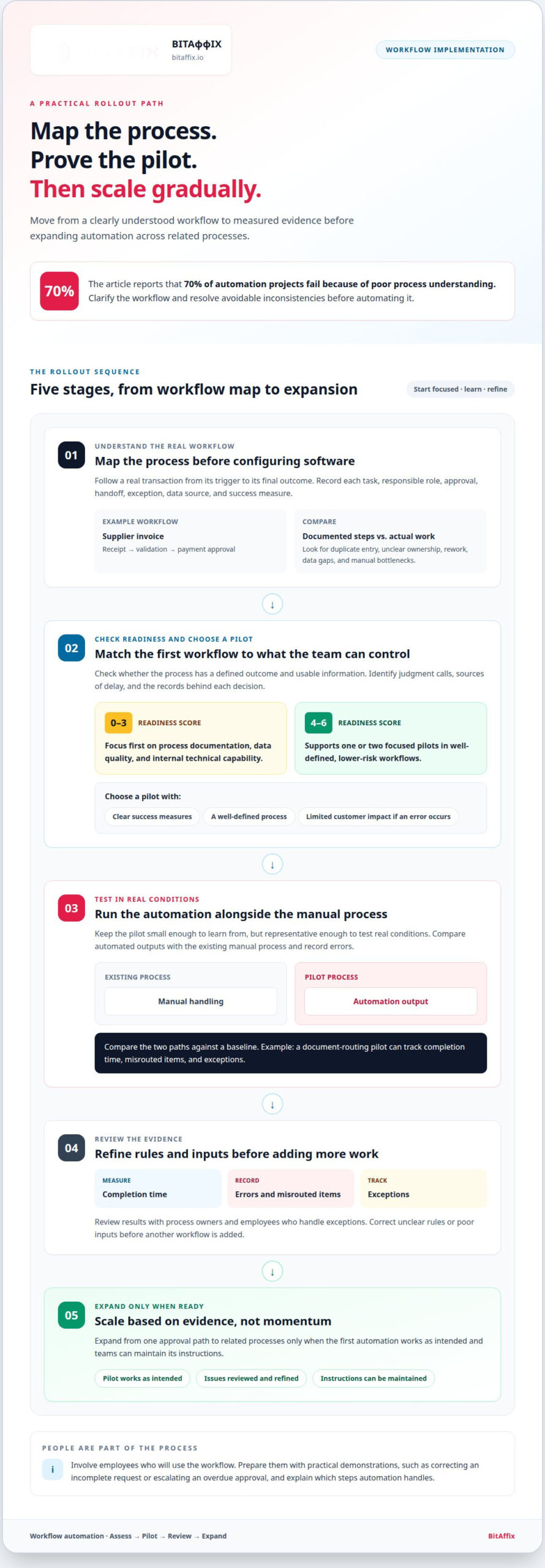
Automate a sound process, not a confusing one. Before configuring software, map how work moves from request to completion. Record each task, responsible role, start trigger, approval, handoff, and exception. For example, document how a supplier invoice moves from receipt through validation to payment approval. This exposes duplicate entry, unclear ownership, and manual bottlenecks that automation might otherwise reproduce.
Assess whether the process has a defined outcome and usable information. Identify where staff make judgment calls, what causes delays, and which records support each decision. The research findings for this topic report that 70% of automation projects fail because of poor process understanding. Treat workflow automation implementation risks as process-design issues first: clarify the workflow and resolve avoidable inconsistencies before automating it.
How can businesses assess processes before automating them? Follow a real transaction from its trigger to its final outcome, then compare the documented steps with how staff actually work. Note handoffs, rework, exceptions, data gaps, and the metric that indicates whether the process is working.
Choose a first workflow by balancing value with controllable risk. A readiness assessment scoring 0-3 points should lead teams to focus first on process documentation, data quality, and internal technical capability. A score of 4-6 points supports one or two focused pilots in well-defined, lower-risk workflows. Select a pilot with clear success measures and limited customer impact if an error occurs.
Keep the pilot small enough to learn from, but representative enough to test real conditions. Run the automation alongside the existing manual process. Compare the outputs, record errors, and measure performance against a baseline. For example, a document-routing pilot can track completion time, misrouted items, and exceptions before manual handling is replaced.
Scale based on evidence, not momentum. Review pilot results with process owners and employees who handle exceptions. Correct unclear rules or poor inputs before adding another workflow. Expand from one approval path to related processes only when the first automation works as intended and teams can maintain its instructions.
Prepare employees for changed responsibilities. Use practical demonstrations based on real cases, such as correcting an incomplete request or escalating an overdue approval. Explain which steps automation handles and where people retain judgment. A change-management plan should identify training needs, process owners, support routes, and how staff feedback will be collected.
Document the workflow as it operates, including triggers, roles, decision rules, and recovery steps. Name an owner who can update the instructions when responsibilities or systems change. This record supports continuity if the original designer leaves and gives future teams a sound basis for reviewing workflow automation implementation risks and improving the process.
For teams planning a controlled rollout, schedule a workflow automation discussion to map a suitable starting process and its success measures.
3. Employee involvement, resistance, and user adoption
Adoption starts with the people who do the work. Invite frontline employees, supervisors, and process owners to review the proposed workflow before configuration. A claims team, for example, can identify missing information fields or approval handoffs that a process diagram overlooks. Their input turns operational knowledge into design requirements.
Give stakeholders specific ways to shape decisions. Ask employees to walk through real cases, identify exceptions, and describe where they currently use judgment. Record their feedback in a decision log, then show which changes the project team accepted. This makes it clear how staff experience informs the new workflow.
How can organisations manage employee resistance and change during automation? Explain which tasks will change, which decisions remain with employees, and how teams can raise issues. Demonstrate the new workflow using familiar cases, then provide clear routes for feedback and escalation during rollout.
Resistance often signals a practical concern, not simple opposition. An employee may worry that automation will route incomplete requests, remove necessary discretion, or make accountability unclear. Ask teams to describe these failure scenarios before launch. Turn each concern into a test case, an assigned owner, or a revised workflow rule.
Prepare supervisors to support the transition. Give them a role map showing who handles routine tasks, exceptions, and approvals after launch. For example, a finance team may need to know when an automated invoice proceeds and when a person must review it. Clear ownership prevents requests from getting stuck between roles.
Train users with realistic tasks rather than feature tours. Have employees submit a sample request, correct an incomplete record, and escalate a blocked case. This practice reveals confusing labels and missing instructions before live use. Keep quick-reference guidance beside the workflow so staff can act without relying on memory.
Measure adoption through work practices, not login activity alone. Review whether employees complete assigned tasks in the new workflow, use the exception path correctly, and report recurring friction. Consider these observations alongside completion times and user feedback. Lower usage may point to a process defect, unclear training, or an unsuitable handoff.
During rollout, hold regular feedback sessions with representatives from each affected team. Review open issues, assign owners, and explain what changed in response. If a redesigned approval step remains confusing, revise its instructions and demonstrate the update. This makes adoption an ongoing responsibility rather than a one-time launch activity.
Keep the discussion focused on the people who will use the automated workflows. Their input can help shape effective systems and support adoption. Invite them to review changes, identify practical needs, and revisit unresolved concerns as the workflow develops, so participation continues beyond the initial design.
4. Maintaining human oversight for critical decisions
Automation can route work consistently, but critical decisions still need accountable review. Define which outcomes require human approval before configuring the workflow. For example, a team might route routine requests automatically while sending disputed claims to an authorised reviewer. This preserves human judgment when context, exceptions, or significant consequences matter.
Set review triggers that people can apply consistently. Send records with missing evidence, conflicting data, or unusual values to a named reviewer. Provide the source information, workflow history, and clear action options. The reviewer should be able to approve, correct, reject, or escalate the case without losing its audit trail.
Accuracy figures show why exception handling matters. A workflow with 90% accuracy handling 1,000 requests produces 100 exceptions. At 95% accuracy, a workflow handling 10,000 requests produces 500 exceptions. Organizations must size review capacity for exception volume, not accuracy alone, and monitor how complex cases affect service levels.
What compliance and regulatory requirements apply to workflow automation in the UAE? Identify obligations relevant to the data, sector, and decision, then translate them into access controls, approval rules, retention practices, and audit records. Apply those controls to each workflow rather than assuming one policy covers every process.
What are the typical costs and timelines for implementing workflow automation? Cost depends on the case and is given after a quote request; scope, integrations, data readiness, testing, and training shape the work. Timelines depend on those same factors, especially process complexity and the number of systems involved.
What are the best practices for testing, deploying, and monitoring automated workflows? Test normal cases, exceptions, access permissions, and recovery steps before deployment. Run the workflow alongside the manual process and compare outcomes, then monitor errors and performance after launch.
Prevent business disruption with a documented stop-and-recovery procedure. Assign an owner who can pause a faulty workflow, notify affected teams, and activate manual backup procedures. For example, if an approval automation routes cases to the wrong role, stop new routing and review items already in the queue. Resume only after correcting and retesting the rule.
Use staged deployment to limit operational impact. Begin with a small group or process segment, review the outputs, and resolve defects before widening access. Keep a rollback path for changes to decision rules or system connections. Record each change, its approver, test result, and release date so an audit can trace what changed.
Monitor decision quality as well as efficiency. Compare automated outcomes with reviewer decisions, track exception reasons, and investigate repeated overrides. If reviewers regularly correct the same outcome, revise the rule or input criteria. For UAE operations, document how each workflow handles personal or sensitive information and assigns responsibility for review.
5. Workflow automation data access and authorization risks
Automation can connect systems faster than teams can review every access path. Start by listing the data each workflow reads, changes, and sends onward. For a document approval process, decide whether the automation needs the full file or only its status and required fields. Limit access to what the process needs to do its job.
Assign permissions to specific roles and workflow identities. A service account that routes invoices should not automatically have broad access to unrelated finance records. Separate permissions for reading, editing, approving, and exporting data. Test each permission with an account that lacks access, then confirm the workflow blocks unauthorised actions.
Protect data as it moves between connected systems. Use encryption, access controls, and audit logs to safeguard information handled by workflow tools. For each integration, record which system sends data, which receives it, and which identity authorises the transfer. Review the map whenever a system connection or workflow purpose changes.
Control credentials used by APIs and integration layers. Define each connection’s purpose, restrict its permissions, and document its owner. If a workflow only needs to create a task, its connection should not also be able to delete records. Include credential changes in release procedures and test that updated connections still respect approved access boundaries.
AI-enabled workflows introduce risks from both inputs and outputs. Treat external documents, emails, and retrieved content as untrusted inputs. Security layers and input sanitisation can reduce prompt injection risks, including data extraction or unauthorised actions. Validate retrieved information before using it, apply confidence scoring where appropriate, and check structured outputs before downstream systems accept them.
Trace each consequential action back to its inputs and authorisation. An audit log should show which identity accessed a record, what action followed, and whether a person approved an exception. For example, if an automated workflow changes a customer’s status, retain the source fields and rule that triggered the update. This gives reviewers evidence to investigate unexpected outcomes.
Test access boundaries before production using both permitted and denied scenarios. Use sample records to confirm that users see only their assigned work and automations cannot cross role boundaries. After deployment, review access logs for unusual activity, failed authorisation attempts, or unexpected data movement. Assign an owner to investigate alerts and update permissions as duties change.
For enterprise governance, build data access into workflow design, testing, and ongoing review. A clear permission model links the process purpose to each system action and keeps authorisation reviewable as workflows evolve.
BitAffix: Workflow Automation
BitAffix provides Workflow Automation for organisations that need to coordinate tasks across people and systems. Consider it when your process map, access rules, and review points are defined, but manual handoffs still cause delays or inconsistent routing.
For team-based task flows, Kanban Task Automation can organise work around visible statuses and handoffs. Secure Document Archiving supports document-focused processes, while Banking Sector Solutions are designed for workflows in banking. Choose the offering that fits the process you are preparing to operationalise, rather than automating every workflow at once.
Bring your documented process, integration requirements, and oversight needs to BitAffix. Contact the team to discuss the workflow you want to automate.
Make risk ownership part of the operating model
Automation governance should evolve alongside the workflows it governs. Assign owners to review process changes, access permissions, and exception patterns whenever connected systems or responsibilities change. This keeps oversight active beyond launch and gives teams a clear way to address emerging issues.
Treat workflow automation implementation risks as an ongoing management concern, not a one-time project checklist. Set regular reviews where process owners, technology teams, and control stakeholders can assess whether the workflow still meets its purpose. Use the findings to decide what to refine, pause, or expand.
BitAffix can discuss how its automation capabilities fit your operational requirements and rollout priorities. Bring the process you want to improve and the controls it needs to the conversation. This gives your team a clear next step from risk assessment to a considered implementation plan.
Build with intent, maintain visibility, and give every automated process a clear owner.
Frequently Asked Questions
What are the most pressing process and automation risks today?
The most pressing risks arise when automation uses unreliable inputs or has more authority than intended. A supplier-payment workflow, for example, could pass an incorrect bank detail through several connected steps before staff notice. Treat source quality, permission scope, decision authority, and recovery difficulty as related control concerns. Consider how one bad input could affect later tasks, records, and approvals.
What are the most common risks of implementing workflow automation?
Common risks include automating an unstable process, overlooking exceptions, and relying on connections that fail when systems change. A customer onboarding workflow may break if a required field appears differently across two applications. Identify who owns each rule and connection, then document how updates are approved. This clarifies responsibility when teams reorganise, system interfaces change, or a workflow produces an unexpected result.
What data security and privacy risks arise with workflow automation?
Automation can expose sensitive records through excessive permissions, misrouted outputs, or poorly controlled integrations. For example, a workflow might attach a full customer file when the receiving team needs only a status update. Limit each user and system connection to the data and actions needed for its task. Review access logs for unusual activity and retain enough records to trace who accessed or changed information.
How can workflow automation integrate with legacy systems and existing software?
Connect legacy systems through supported APIs or middleware that translates data and manages handoffs. First, document the fields each system sends and receives, including required formats and error responses. Then test representative transactions, such as an invoice moving from an older finance database into an approval queue. Confirm that the receiving system acknowledges updates and that failed transfers create visible exceptions instead of silent gaps.