
Thirty thousand digitized pages are not useful simply because they are stored. A searchable enterprise document archive turns scans into machine-readable text and indexes that content, so teams can search by keyword, metadata, or filters instead of browsing folders. Search quality depends on readable documents and an index built around the information people need.
That distinction matters when contracts, records, and operational files are spread across repositories and formats. Scanning creates digital copies; indexing makes their contents discoverable. Permissions and governance help ensure retrieval follows access rules.
Full-text search, repository integrations, AI-assisted classification, and cloud, on-premises, or hybrid deployment all shape document discovery. The sections ahead explain how these elements work together, how OCR and metadata improve retrieval, and what to consider when designing an enterprise archive in the UAE.
Key Takeaways
- Apply access controls at retrieval time so search results, snippets, and previews respect each user’s permissions.
- Unify discovery across repositories while preserving the security rules of each connected system.
- Combine full-text indexing with useful metadata, and use OCR to make scanned documents searchable.
- Choose cloud, on-premises, or hybrid architecture according to data custody, access needs, and scaling priorities.
- Assess retrieval quality with representative questions and their correct source documents before relying on search for daily work.
What is Searchable Document Archives?
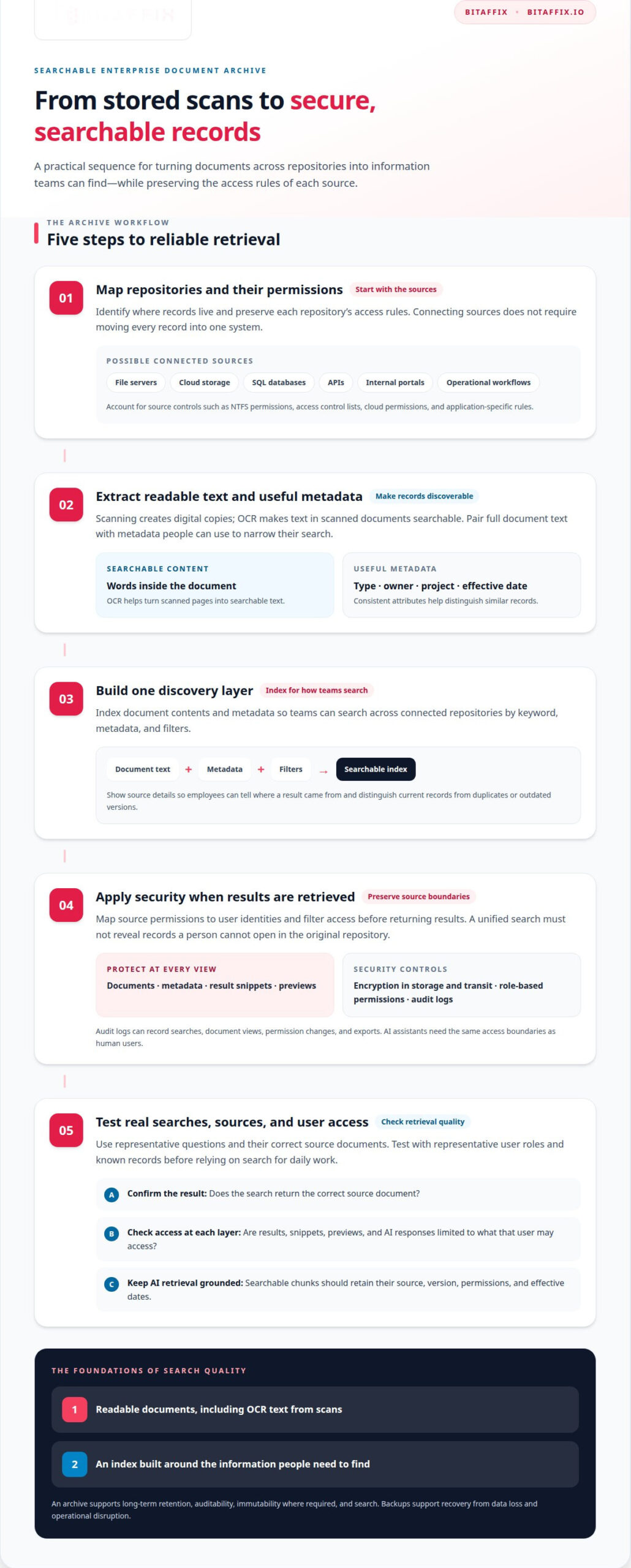
A searchable enterprise document archive indexes document contents so teams can retrieve records by keyword, metadata, and filters. Start by mapping repositories and preserving source permissions, then extract text and metadata, build the index, and test representative searches. Protect content with encryption, role-based permissions, retrieval-time security trimming, and audit logs.
Secure Document Storage
Secure document storage preserves archived files and enforces access controls during retrieval. This matters because contracts, employee records, and operational knowledge may contain sensitive information. For example, a finance employee should retrieve authorized contract records while restricted files remain hidden from search results. Apply permissions to documents, metadata, snippets, and previews, not just the archive interface.
Role-Based Permissions and Audit Logs
Role-based permissions grant access according to job responsibilities, while encryption protects documents in storage and transit. Audit logs record activity such as searches, document views, permission changes, and exports. Together, these controls help administrators trace access to a specific record and identify changes for review. For example, a log can connect a user account to a contract view and its timestamp.
Build the security model around each repository’s access rules. A hybrid environment may include NTFS permissions, access control lists, cloud permissions, and application-specific controls. Map these rules to user identities and apply them before returning results. That prevents restricted filenames or metadata from appearing in previews and ensures a unified search experience does not weaken the protections of the original repository.
AI assistants need the same access boundaries as human users. In a retrieval-augmented generation workflow, the search layer retrieves document chunks before an assistant prepares an answer. Each searchable chunk should retain its source, version, permissions, and effective dates. The system can then filter retrieval according to the requesting user’s access. Without this step, an answer could reveal information from a document the user cannot open.
Governance also determines whether search returns reliable information. Duplicate files can produce conflicting answers, while outdated records may appear relevant unless versions and effective dates are clear. Define workflows for classifying records, updating permissions, and managing retention or deletion. Then test access with representative user roles and known documents. Check permissions across result lists, snippets, previews, and AI-generated responses.
An archive and a backup serve different purposes. A document archive supports long-term retention, auditability, immutability where required, and search; backups support recovery from data loss and operational disruption. Enterprise search should cover structured and unstructured content, support metadata filtering and searches within documents, respect permissions, and protect sensitive information. In hybrid environments, it should honor role-based access controls, NTFS permissions, ACLs, cloud permissions, and repository-specific access models. Security trimming prevents users from seeing unauthorized results, metadata, snippets, or previews. This retrieval layer also supports knowledge discovery, semantic search, and Retrieval-Augmented Generation (RAG) for AI assistants.
Archive integrations across repositories and applications
Integration connects document repositories to one discovery layer without requiring every record to move into a single system. A searchable enterprise document archive can index content from file servers, cloud storage, SQL databases, APIs, internal portals, and operational workflows. Employees search connected sources while each repository remains responsible for its stored records.
Compare archive pricing by scope, not by a headline figure. Connector count, data volume, OCR requirements, migration complexity, and security controls all shape the work. Pricing depends on the project and is provided after a quote request.
In the UAE, organizations should map applicable data-protection, sector, and records-retention obligations to each record type. A bank, school, and energy company, for example, may need different retention workflows. Configure repository integrations to preserve approved retention schedules and access rules instead of applying one assumption across every source.
Federated search lets employees query multiple connected repositories through one interface. A supplier-contract search could return an authorized file-server record and a related cloud document. The search layer should direct users to the source system, preserve its permissions, and show clear source details. This helps teams distinguish current records from duplicates stored elsewhere.
Natural-language search lets employees make requests in ordinary terms, such as “find the latest maintenance contract for the Abu Dhabi site.” The system translates the request into searches across indexed text and metadata. Results improve when records have consistent attributes, such as document type, owner, project, and effective date. Without those fields, similar contracts can be difficult to distinguish.
AI questions across selected documents rely on controlled retrieval, not unrestricted access to every repository. A team can select authorized records, ask about their contents, and receive an answer grounded in retrieved passages. The answer should identify its source documents so employees can review the original contract or policy before acting. Source links can also reveal conflicts between documents.
Migration can introduce permission mismatches, duplicate files, missing metadata, and OCR errors. A scanned contract with a blurred signature or multi-column table may yield incomplete searchable text. Map source permissions and metadata before transfer, then test representative records and searches. After migration, process new or changed documents incrementally rather than repeatedly indexing unchanged content.
For organizations connecting legacy repositories to operational applications, a scoped integration plan can clarify sources, access rules, and retrieval needs. Discuss archive integration requirements as a practical next step.
AI-powered document classification and indexing
AI, optical character recognition (OCR), and metadata improve enterprise search by converting scanned pages into text and assigning useful fields. OCR can make a scanned invoice searchable, for example, while tags identify its supplier, date, and document type.
Full-text indexing analyzes document text so employees can search for words, phrases, and specific terminology inside files. A query for a clause can find its wording within a contract, even if the filename contains only a project code. Preserve each document’s source and version in the index so results point to the correct record.
Metadata adds searchable context beyond the file contents. Index fields such as owner, department, classification, project, sensitivity, and effective date. Employees can then filter results to contracts owned by procurement or policies effective during a specific period. Consistent field values matter: “Human Resources” and “HR” may otherwise split similar records into separate filter groups.
Automated classification can use document content, repository location, business rules, and workflow context. A system might classify a signed agreement as a contract, then assign fields for business unit and sensitivity. Review uncertain classifications before relying on them for retention or access decisions. This gives AI a defined role without treating every prediction as authoritative.
Fuzzy matching helps retrieve documents when users enter spelling variations, partial phrases, or inconsistent names. A search for a misspelled supplier name may still surface records containing the correct spelling. Combine fuzzy matching with metadata filters; otherwise, broad matches can return unrelated files from across folders.
Natural-language batch indexing lets administrators describe desired classifications and fields in plain language. For example, an instruction can identify invoices, extract supplier names, and assign a department field. Apply the same schema across selected folders, then review sample results before processing the full collection. This supports consistent indexing across documents created in different workflows.
OCR quality affects what the index can retrieve. Blurred scans, handwritten notes, tables, and multi-column layouts can lead to recognition errors. A scanned policy may therefore omit a key term from its searchable text. Preserve the original file, inspect extracted text across representative document types, and improve source scans where practical.
Measure search quality with known questions and their correct source documents. Test exact phrases, misspellings, metadata filters, and natural-language requests against contracts, policies, and invoices. Check whether the expected record appears and whether its indexed fields support refinement. This shows whether the archive’s indexing helps employees find and verify relevant information.
Cloud, on-premises, and hybrid archive models
Deployment determines where archived records and search services operate, who manages the infrastructure, and how teams access them. In the UAE, organizations weigh data custody, network access, scaling needs, and operational workflows when choosing a model.
Cloud and On-Premises Deployment
A cloud archive runs on vendor-managed infrastructure, while an on-premises archive operates within the organization’s environment. This choice shapes access, scaling, and infrastructure responsibilities. Cloud storage and compute can scale on demand; on-premises capacity requires physical investment. AWS and Azure are examples of cloud platforms organizations may assess against their architecture and governance requirements.
Cloud access generally requires an internet connection, supporting authorized teams working across locations. An on-premises archive is typically available through an internal network or VPN, which can align with established infrastructure and data-custody priorities. For example, a team could retain an archive in its internal environment and restrict remote access through network controls.
Accountability differs, too. Cloud services use a shared-responsibility model: the provider manages infrastructure, while the organization remains responsible for its data, access policies, and governance choices. With on-premises deployment, the organization retains data custody and manages its infrastructure. These distinctions affect operational planning, not just where files reside.
Keep backup separate from archiving. An archive supports long-term retention, auditability, and retrieval; a backup supports recovery after data loss or operational disruption. Retaining a contract in an archive helps staff locate it, while a backup supports restoration if the working system fails. A sound architecture gives each function a clear role.
Hybrid Archive Models
Hybrid deployment combines cloud and on-premises environments, placing repositories or workloads according to organizational needs. It can suit teams that need both local data custody and cloud scaling. For example, an organization might keep selected records in its own environment and use cloud capacity for other archive workloads, subject to its governance design.
Hybrid deployment adds coordination work. Search must connect relevant repositories, and identity and permissions need consistent handling across environments. A manual process that works in one repository can create gaps when repeated across separate systems. Define where each record is stored, how indexing is updated, and how users access authorized results.
Historical repositories also shape deployment choices. A legacy document system may rely on local applications or folder structures, while newer workflows use cloud storage. A staged migration can first connect existing repositories, then move selected content as governance and operational requirements allow. This avoids treating every historical file as if it needs the same destination.
Choose a model by matching data custody, user access, scaling, and recovery needs to each workload. A searchable archive in the UAE should fit the organization’s governance and operational architecture, rather than defaulting to cloud-first or on-premises deployment.
Which enterprise document archive platforms are best for search and retrieval?
No single platform is right for every archive. The best fit depends on repository types, document formats, search methods, and governance needs. For an organization in the UAE, compare how each option connects existing systems and handles records across its operating environment. Evaluate retrieval quality with known questions and correct source documents, not feature lists alone.
Search engines such as Solr and Elasticsearch can build inverted indexes over recognized text. Blacklight can provide a discovery interface for indexed collections. These are search-engine options, not complete archive strategies: organizations still need to connect repositories, process documents, preserve metadata, and manage access. Match the engine to the archive architecture and the skills available to operate it.
OCR is essential for collections that include scanned or image-based files. It converts visible text into machine-readable content that an index can search. Test representative PDFs, including tables and multi-column layouts, because recognition errors can hide important terms. A strong platform should make it practical to inspect extracted text and identify documents that need better scans or processing.
Faceted search narrows results using fields such as department, owner, classification, date range, file type, business unit, and project. A policy search, for example, can be refined by department and document type. Useful facets depend on consistent metadata. Check whether the platform supports the fields your teams use and lets users combine filters without losing relevant matches.
Semantic search finds conceptually related content even when a query lacks the exact wording in a document. A query about supplier termination could surface a contract clause titled “ending the agreement.” Hybrid retrieval combines semantic results with BM25 keyword retrieval, balancing meaning with exact terms. A vector database can store embeddings for semantic retrieval, while a reranker can reorder candidate passages for greater precision.
Assess each platform using a test collection and representative questions. Record the expected source for each question, then check whether search retrieves and usefully ranks it. Include exact phrases, synonyms, scanned files, and metadata filters. For AI-assisted retrieval, verify that answers cite relevant source passages. This evaluation exposes search gaps before teams rely on results in daily workflows.
For a practical platform assessment, compare integration fit, indexing controls, retrieval methods, and test results with your archive requirements.
BitAffix: Workflow Automation
BitAffix provides Secure Document Archiving and Workflow Automation for organizations that need structured document management alongside automated business processes. These services suit teams addressing document retention and process consistency as connected operational priorities.
For example, an organization evaluating an archive can consider how its document-management needs connect with existing workflows. BitAffix also provides Kanban Task Automation and Banking Sector Solutions for related operational requirements. The focus should reflect the processes and records the organization needs to manage.
Visit bitaffix.io to explore BitAffix’s secure document archiving and workflow automation services.
Set a Clear Path to Better Document Discovery
Make the next step an operational decision, not another technology review. Identify the records slowing work today, the teams that need them, and the decisions those documents support. A searchable enterprise document archive creates lasting value when its search experience reflects real responsibilities and daily processes.
Use that priority list to define a focused evaluation. Specify the repositories, access boundaries, document types, and representative questions that matter most. Then assess whether the approach supports those needs and fits your wider governance and operating model. This gives stakeholders a shared basis for moving from discovery to implementation.
BitAffix helps organizations explore how document archiving and workflow automation fit their operational priorities. Start a conversation about your archive requirements and the practical next step.
With a clear scope and aligned stakeholders, your organization can move toward more controlled and efficient document discovery.
Frequently Asked Questions
What Happens When You Need to Digitize 30,000 Pages?
Start by separating page volume from document count: 30,000 pages may represent very different numbers of files. Sort material by type and condition, scan it, apply OCR, and attach the fields staff need. A searchable enterprise document archive can then make the resulting text discoverable. Sample extracted text and test searches against known documents, such as verifying that an invoice appears by supplier name before processing similar batches.
What Is Enterprise Search?
Enterprise search lets employees retrieve relevant information across an organization’s repositories through a shared search experience. A procurement employee, for example, could search approved policies and supplier records without opening each system separately. A useful implementation connects the sources teams rely on, recognizes business terms and metadata, and returns results appropriate to each user’s access. The outcome depends on how well the organization connects, indexes, and governs its content.
What is a searchable enterprise document archive?
A searchable archive is a governed repository that lets authorized users find information inside stored documents. Teams can locate a specific clause, policy version, or invoice without relying on someone to remember its folder. For example, a records manager could find agreements by counterparty and effective date. The archive’s value depends on usable indexes, clear document ownership, and processes for managing changes.
What features should enterprise document archive software include?
Prioritize features that support accurate retrieval and operational control: OCR for scanned files, full-text search, metadata fields, filters, version history, and permission-aware results. A searchable enterprise document archive should also record activity so administrators can review it. Incremental indexing keeps changed documents current without repeatedly processing unchanged files. For an invoice archive, useful fields might include supplier, date, and department. Test with real staff questions and expected source records.
How do cloud and on-premises document archive solutions compare?
Cloud deployment can suit teams needing access across locations and flexible storage capacity; on-premises deployment can suit organizations prioritizing data custody within their own environment. Compare these models against network access, infrastructure responsibilities, repository connections, and recovery plans. For example, map where historical records reside before deciding whether to retain, move, or connect them through a hybrid design.
How much does enterprise document archiving cost in the UAE?
Pricing depends on project scope, including connector count, data volume, OCR requirements, migration complexity, and security controls. A quote is provided after a request.