
A document’s revision history and audit trail answer different questions. A DMS that edits Word and PDF files with an audit trail records who acted, what they did, when it happened, and which document or version was involved. Version history, by contrast, tracks revisions so teams can compare changes or restore an earlier version.
That distinction matters when a document moves through review and approval. A saved revision shows what changed, while an audit trail can establish who viewed, edited, shared, or approved the file and when. Together, these records clarify document activity without confusing content changes with user actions.
This article explains what a document management audit trail can capture, how it supports approval workflows, and how it differs from version history. It also covers how audit records relate to retention, helping you assess the controls needed to manage Word and PDF documents with greater accountability.
Key Takeaways
- Identify which document events an audit trail can capture, from edits and approvals to access and sharing.
- Use workflow records to understand how review and approval activity can support accountability and reveal process bottlenecks.
- Distinguish an audit trail, which records activity, from version history, which tracks document revisions.
- Align audit-log retention with document lifecycle policies, applicable requirements, and any legal hold.
- See how Workflow Automation and Secure Document Archiving can support more structured document governance.
What Is an Audit Trail in Document Management?
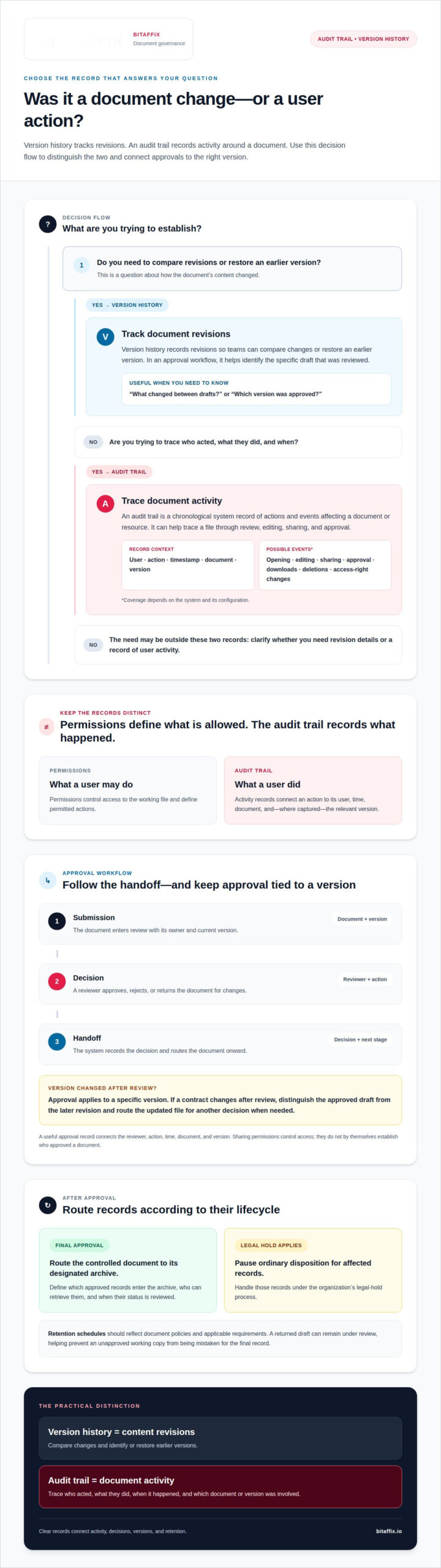
A DMS that edits Word and PDF files with an audit trail records activity linked to each document. Entries can show who acted, what happened, when it occurred, and which version was involved. This context helps teams trace a file through review, editing, sharing, and approval.
Audit Trail Definitions and Workflow Events
An audit trail is a chronological system record of actions and events affecting a document or resource. It helps teams understand how a document moved through a workflow, rather than relying only on email or manually maintained notes.
For example, a DMS may record a user opening a contract, editing a clause, and sending it for approval. Entries can identify the user, timestamp, action, document, and version. Depending on the system and its configuration, the activity history may also record downloads, deletions, or access-right changes.
Permissions and audit records serve different purposes. Permissions define what a user may do; the audit trail records what they did. A DMS that edits Word and PDF files with an audit trail can help teams connect permitted work with actual document activity.
Audit Trail Coverage and DMS Considerations
Audit trail coverage describes which document and approval actions a system records. It matters because a record of edits alone may not show whether a reviewer approved the specific version that entered the workflow.
A useful entry can include the event, user, timestamp, document, version, and relevant context. Workflow rules may route a file for review, approval, or archiving, while the activity record shows the actions taken at each stage. ISO 9001 expects organizations to control documented information and show how documents are approved and changed.
The Digital Operational Resilience Act has applied to banks, insurers, and their ICT providers since January 17, 2025, according to the European Union. For these organizations, document controls sit within a wider operational governance environment.
SharePoint and OneDrive support document storage and collaboration involving Word files and PDFs. Editing options and audit details depend on the platform, file type, and configuration. Some browser-based environments support in-browser editing; others require an installed application or a downloaded file.
DMS costs depend on licensing, users, storage, integrations, editing capabilities, and audit-log retention. When choosing a DMS that edits Word and PDF files with an audit trail, assess these trade-offs alongside the need to record approvals, protect logs, and retain relevant versions.
Other limitations may include incomplete event coverage, restricted search or export options, and workflows that do not match internal review practices. Assessing these factors helps organizations determine whether a system’s document controls and editing approach fit their governance needs.
Why are audit trails useful for approvals?
Approval workflows rely on clear handoffs between reviewers, decision-makers, and records managers. Logging each transition helps teams trace decisions, identify delays, and link approval to the correct document version.
Version Tracking in Approvals
Version tracking records document revisions so reviewers can assess the current draft and preserve earlier versions. It matters because approval applies to a specific version, not just a filename. If a contract changes after review, teams can distinguish the approved draft from the later revision and route the updated file for another decision.
For example, a procurement team might review a vendor agreement and then receive revised payment terms. The workflow should link approval to the version reviewed and show whether the new terms reopened review. This clarifies internal accountability and reduces ambiguity when colleagues share files across departments.
Workflow rules can assign reviewers and move a document to its next stage after an action. A practical approval sequence might include:
- Submission: The document enters review with its owner and current version.
- Decision: A reviewer approves, rejects, or returns it for changes.
- Handoff: The system records the decision and routes the document onward.
These events create a useful approval record. Logging should connect the reviewer, action, time, and document version, while sharing permissions control access to the working file. This separation helps teams trace an approval without treating everyone with file access as an approver.
Review and Retention Workflows
Review and retention workflows connect document decisions with the organization’s record lifecycle. After final approval, a process can route a controlled document to its designated archive; a returned draft can remain under review. This distinction supports consistent handling and helps prevent an unapproved working copy from being mistaken for the final record.
Retention rules should reflect the organization’s document policies and applicable requirements. For example, a records manager can define which approved contracts enter an archive, who can retrieve them, and when their status is reviewed. If a legal hold applies, ordinary disposition should pause for affected records under the organization’s hold process.
Approval data can also reveal workflow bottlenecks. Teams can examine where documents repeatedly return for revisions, which stage accumulates pending decisions, or whether sharing creates unnecessary handoffs. These patterns support focused process changes, such as clarifying review responsibilities or adjusting routing rules, instead of automatically adding more approval steps.
For teams structuring these handoffs, discuss approval workflow requirements as part of the process design.
DMS audit trail data can help teams optimize workflows, identify bottlenecks, and improve process efficiency. It provides a practical basis for refining approval paths over time.
Is an audit trail the same as version control?
No. Version control tracks document revisions, while an audit trail records activity and events around the document. For UAE operations, assess a DMS against applicable sector and organizational requirements, including controls for logging, permissions, and documented information.
Version Control and Audit Trail Differences
Version control preserves successive document states; an audit trail records actions linked to those states. This distinction matters during contract review because a revised file and a record of who changed or approved it address different accountability needs.
For example, a shared supplier agreement may go through several revisions as teams negotiate terms. Version history helps reviewers compare drafts or restore an earlier version. The audit trail can link a review, edit, approval, or sharing event to a user, timestamp, and document version. Together, these records provide a clearer lifecycle history than either feature alone.
Contract Version Accountability
Contract version accountability means linking each review and decision to the exact draft considered. It helps teams distinguish an approved version from later changes throughout the contract lifecycle.
Suppose legal reviewers approve a draft, then procurement changes a delivery clause. The revised version should go through the required review again, while the earlier version remains identifiable. Users should be able to filter events by document, user, or date range to trace relevant activity. This structure supports internal review without treating a filename as proof of approval.
For UAE organizations, ISO 27001 includes logging and monitoring among its information security controls. ISO 9001 clause 7.5 addresses control of documented information, including how documents are approved and changed. These standards inform different control needs; organizations should align system configuration with their applicable sector requirements and internal policies.
Set up version control, permissions, and audit trails as connected controls:
- Define versions: Preserve earlier drafts and make the current working version identifiable.
- Assign permissions: Set who can view, edit, share, or approve each document.
- Enable event logging: Record relevant edits, approvals, access, and sharing activity.
- Connect review stages: Route changed contracts back to the appropriate reviewers.
- Retain evidence: Keep the approval record associated with the corresponding document version.
These controls support oversight in regulated businesses, but a DMS feature alone does not establish compliance. For a finance team, for example, access restrictions, retained versions, and searchable event records must work alongside the organization’s governing policies. Clear configuration makes it easier to reconstruct contract decisions and identify which version informed them.
Retention schedules, legal holds, and record lifecycle
A DMS tracks Word and PDF changes by recording actions against a document, such as edits, access, sharing, and approval. Entries can identify the user, timestamp, action, document, version, and relevant context, creating an activity record for later review.
Retention connects that history to the document’s lifecycle. An organization defines how long each record category and its audit evidence remain available, based on applicable requirements and business policies. Audit records should be retained at least as long as the documents they describe, subject to relevant industry and country retention periods.
A retention schedule can identify the record category, the event that starts its retention period, and the planned outcome. For example, a team might classify a signed contract separately from a working draft, then apply its policy to each category. The schedule should account for associated audit records, not just the file itself.
A legal hold changes the normal disposition path for affected records. If a contract becomes relevant to a dispute or investigation, the organization can suspend routine deletion for that record and preserve its associated activity history. The hold’s scope, affected documents, and release decision should be documented within the organization’s process.
Useful audit entries answer who acted, what happened, when it happened, and why the event matters. A contract entry might show that a named user viewed or downloaded a particular version at a recorded time. The action and document context help distinguish routine access from a change, approval, or sharing event.
Audit coverage varies by system and configuration. A DMS can record document creation, access, modification, sharing, and deletion; some platforms also include downloads in activity history. For a Word or PDF edit, the record should link the modifying user and action to the relevant document version. Separate version history can preserve earlier content for comparison.
Searchable records make retention controls useful during an audit or internal review. Administrators can filter logs by user, document, or date range, then export relevant entries for examination. For example, a search for a contract can bring together its access events and recorded changes without relying on a manually maintained list.
Protect the logs as well as the files. Secure, read-only storage helps prevent routine users from altering audit evidence, while restricted access limits who can view or manage records. A scheduled review can flag unusual activity, such as frequent deletions or access by unauthorized users, and support investigation of errors or suspected breaches.
At the end of a record’s retention period, the organization’s policy determines whether it remains archived or is securely deleted. A legal hold or applicable retention requirement can change that decision, so disposition should follow the relevant policy and leave a traceable record of the action.
Audit trails compared with version history
Version history follows a document’s content through revisions. An audit trail records activity around that document, including edits, access, approvals, sharing, and deletion. A document management system supports stronger accountability when both records link actions to the relevant version.
Consider a signed supplier agreement revised after approval. Version control can preserve the earlier draft and show how the wording changed. The audit trail can record who edited the file, when it happened, and whether the revised version entered review. The first record explains the content; the second traces the activity.
The distinction becomes clearer through common document events:
- Content revision: Version history preserves the changed document and may support comparing or restoring an earlier version.
- User action: An audit trail records events such as viewing, editing, sharing, or approval.
- Permission change: The audit record can show who changed access rights and the resulting settings.
- Deletion: An activity record can identify who deleted a file, while retained versions may preserve earlier content.
Neither record answers every question on its own. A version may show that a clause changed, but not establish who shared the draft or approved it. An audit entry may show that an edit occurred, but not display the precise wording difference. For contract review, teams need both the revision and its associated activity events.
That connection also matters when users work on shared Word documents or PDFs. A reviewer can compare successive drafts, while an administrator can filter activity by document, user, or date range. If a permission change restricted access before approval, the log can help reconstruct who had access during the review period.
For a signed record, preserve the approved version alongside its related review and approval events. If a later amendment creates a new version, link its workflow activity to that revision rather than treating the original approval as approval of every subsequent change. This keeps the record’s lifecycle clear during an internal review.
When evaluating controls, consider whether the system can retain earlier versions, identify relevant users and actions, and make event records searchable. Confirm how the platform handles Word and PDF edits, shared access, permission changes, and deletion. Configuration matters: logging should cover the events the organization relies on, while version control should preserve the content states needed for comparison.
The practical takeaway is simple: version history answers, “Which content changed?” The audit trail answers, “Who acted, and what happened around that change?” For reliable document accountability, connect both records to the same file and approval process.
BitAffix
BitAffix helps organizations structure document processes through Workflow Automation and Secure Document Archiving. These offerings are a fit when teams need approval workflows connected to controlled document storage, rather than isolated file activity.
For example, an organization can map how a document moves through review, approval, and archiving, then define workflow and records practices for each stage. Banking Sector Solutions also support organizations managing document processes in banking operations.
Turn to BitAffix when you’re ready to align document workflows and archiving with your operational requirements. Contact BitAffix to discuss your document management needs.
Make document governance part of the operating model
Choosing a DMS that edits Word and PDF files with an audit trail is an operating-model decision, not just a file-management choice. Align document handling with how teams assign review responsibilities, manage work, and preserve records. Clear ownership helps make governance part of everyday operations, rather than a process added after issues arise.
BitAffix offers Kanban Task Automation for organizations coordinating work across teams. Consider how task coordination fits alongside document processes, especially when review responsibilities span different roles. A coherent approach can help teams keep operational work and document governance in step.
Define the process you want to strengthen, then explore how it fits your organization’s document controls and working practices. A focused conversation can clarify operational requirements and the next practical step. Build a deliberate foundation for document governance with a process your teams can use confidently.
Frequently Asked Questions
Hey Doxi, what are the benefits of an audit trail?
An audit trail helps teams reconstruct document activity and investigate discrepancies. For example, if a department finds an outdated policy in circulation, activity records can help establish when it was shared and which users handled it. Teams can also use recurring patterns to improve document processes, such as clarifying ownership when reviews stall. Its value lies in usable, searchable evidence, not in logging events nobody reviews.
How Do Audit Trails Help With Team Collaboration?
Audit trails give colleagues a shared account of activity as a document moves between teams. In a finance review, for example, a colleague can distinguish a comment or revision from a formal approval, then follow the recorded handoff. This reduces reliance on email recollections and helps resolve confusion about who owns the next action. Clear permissions complement that record by limiting editing or sharing to authorized roles.
How do you audit who has accessed or changed a contract after signing?
Start with the signed contract’s record in the DMS, then examine its activity history for later views, edits, downloads, sharing, or deletion. Filter by document and relevant time period, then compare recorded events with retained versions. This helps distinguish access from a content change. Preserve the signed copy and associated records under the organization’s retention process, especially if a later review or dispute makes the activity relevant.
What Information Does an Audit Trail Record?
A document audit trail can record the user, action, timestamp, document, and version involved. Depending on the system and configuration, it may also capture an IP address or device, access-right changes, sharing details, or downloads. For instance, a permission update can help explain why a reviewer gained access. Available fields matter because administrators need enough context to interpret an event, not just a timestamp.
What are the key features of a document management system?
A useful DMS brings document storage, search, access controls, version handling, workflow, audit logging, and retention together. Metadata and indexing can help staff find a file by title, author, tag, or content. For example, a records team should be able to locate a policy, identify its approved copy, and apply the relevant access rules. The right combination depends on document types, collaboration patterns, and governance needs.