
A platform without per-seat pricing can still scale costs with process volume or computing capacity. For UAE organizations, alternatives may use process-based, volume-based, or CPU-based licensing. The key distinction is what drives costs as workflows grow.
Look beyond user count: pricing should align with how your organization builds, runs, and governs workflows. Compare what teams can access for free, which development tools support delivery, and whether the platform offers BPMN capabilities for process modeling.
This comparison examines those factors across workflow options, helping you distinguish a different billing structure from a better operational fit. See how each option approaches pricing, free access, development, and process modeling, then use the decision guide to identify the model that fits your workflows and governance priorities.
Key Takeaways
- Identify whether a platform’s costs scale with seats, process volume, or computing capacity before comparing its overall fit.
- Assess free access and trial terms by what they let teams test, including workflow limits and development capabilities.
- Match no-code and low-code tools to the balance of business-user autonomy, technical control, and governance your workflows require.
- Use BPMN support and workflow functionality as separate comparison criteria, then weigh them against the processes you need to model and run.
- Apply the decision guide to shortlist platforms by pricing driver, development approach, and process requirements.
Process-based pricing versus volume- and CPU-based licensing
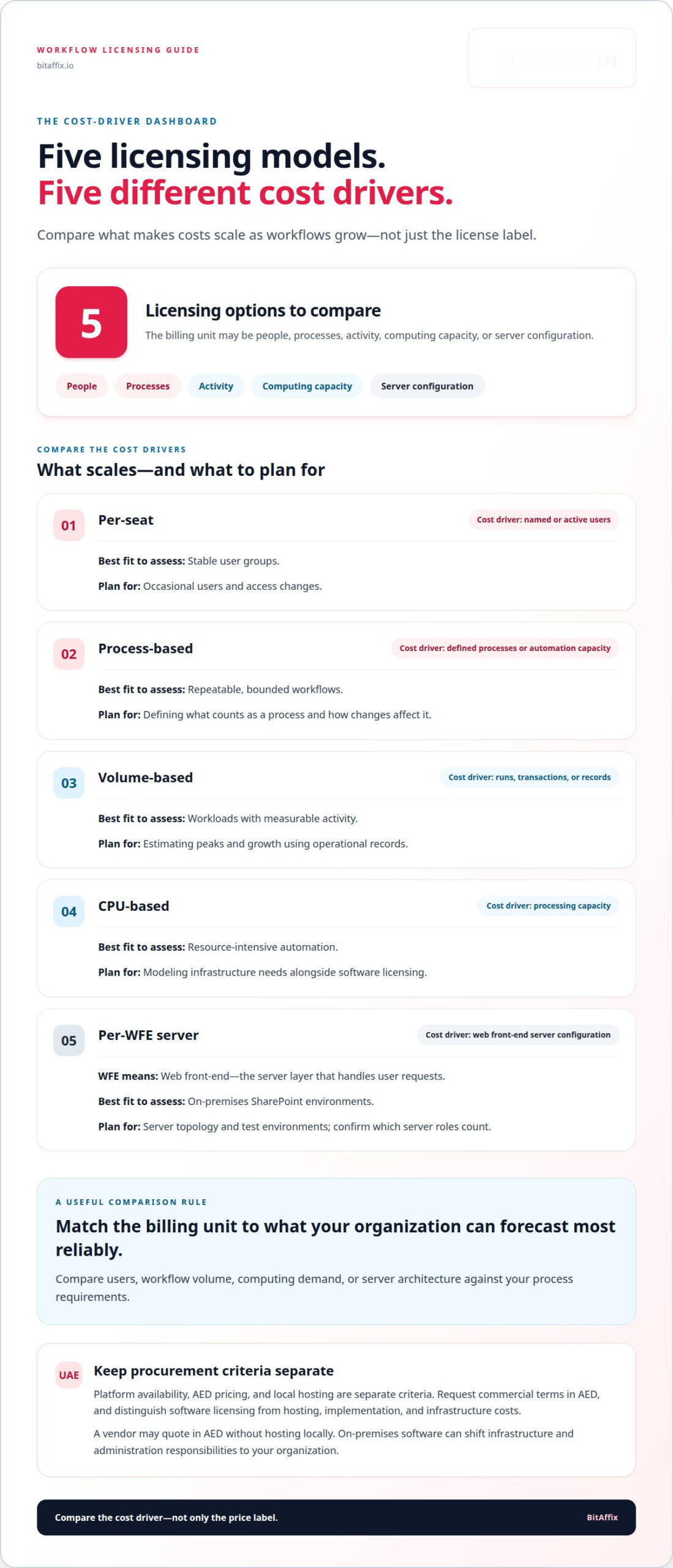
Per-seat licensing ties software costs to named users. Nintex workflow alternatives without per seat pricing shift the billing unit to work, activity, or infrastructure. A process-based model charges around defined processes or automation capacity. A volume-based model tracks transactions, runs, or records. CPU-based licensing ties costs to computing resources. Each model changes how an organization forecasts spending as workflows grow.
Microsoft Power Automate is a Microsoft option to assess for Microsoft 365 and SharePoint workflows. Moving existing flows still involves mapping triggers, actions, permissions, data, and exception paths to the target platform. A migration label alone does not establish that every workflow transfers unchanged. Review a representative SharePoint approval flow and its Microsoft 365 connections before planning broader automation.
For UAE procurement, platform availability, AED pricing, and local hosting are separate criteria. Compare deployment options and commercial terms independently: a vendor may quote in AED without hosting locally, while on-premises software can shift infrastructure and administration responsibilities to your organization.
Per-WFE-server licensing is another alternative to per-seat pricing for on-premises software. WFE means web front-end, the server layer that handles user requests. Licensing under this model depends on the WFE server configuration rather than the number of people using the system. For example, adding capacity to a SharePoint environment could affect licensing even if user numbers remain stable. Confirm which server roles count and how non-production environments fit the licensing terms.
Use this comparison to identify the cost driver, not to assume every vendor offers every model:
| Licensing option | Cost driver | Best fit to assess | Key planning consideration |
|---|---|---|---|
| Per-seat | Named or active users | Stable user groups | Account for occasional users and access changes. |
| Process-based | Defined processes or automation capacity | Repeatable, bounded workflows | Define what counts as a process and how changes affect it. |
| Volume-based | Runs, transactions, or records | Workloads with measurable activity | Estimate peaks and growth using operational records. |
| CPU-based | Processing capacity | Resource-intensive automation | Model infrastructure needs alongside software licensing. |
| Per-WFE server | Web front-end server configuration | On-premises SharePoint environments | Include server topology and test environments in planning. |
Choose a model by matching its billing unit to the factor your organization can forecast most reliably: users, workflow volume, computing demand, or server architecture.
For a UAE comparison, request commercial terms in AED and separate software licensing from hosting, implementation, and infrastructure costs. Organizations evaluating Nintex workflow alternatives without per seat pricing should compare these cost factors against their process requirements. The workflow automation pricing approach also illustrates why scope and process requirements matter when evaluating automation.
Free plans and trial availability
A free plan and a trial serve different evaluation needs. A free plan provides ongoing access within defined limits, while a trial provides temporary access to selected capabilities. For a workflow platform, test a basic SharePoint approval first, then assess whether the evaluation environment supports more complex processes involving several roles, Microsoft 365 connections, and exception paths.
Compare access terms rather than relying on the label “free.” Review the included features, any limits on workflow runs or integrations, and what happens when trial access ends. These terms determine whether teams can test the real process or only a simplified example. Demonstrating one approval route does not establish whether process automation can support broader operational requirements.
Use a representative process as your evaluation baseline. For example, map a purchase request from submission through review, decision, and record storage. Document its roles, conditions, notifications, connected systems, and exception handling. Assess the same requirements on each platform under consideration. This gives evaluators a consistent basis for comparing capabilities without assuming similarly named features work alike.
Before activating a trial, define what the evaluation must establish. A team might assess whether process owners can adjust an approval route, administrators can control access, and the platform records activity. Keep the scope focused on these outcomes. Testing unrelated sample automations can consume evaluation time without clarifying whether the platform fits the organization’s requirements.
- Record trial duration, eligibility, and feature restrictions in the evaluation plan.
- Test the integrations the process depends on, such as SharePoint or Microsoft 365 connections.
- Determine how workflows, data, and configuration can be retained when access ends.
- Assign process owners and technical reviewers to assess usability and administration.
For UAE procurement, capture commercial terms in AED and separate trial access from eventual licensing, deployment, and hosting decisions. A temporary evaluation does not establish production costs or operational readiness. Record those topics separately, alongside security review and ownership, so the trial remains a focused assessment rather than a substitute for production planning.
Close the evaluation with a decision record naming the process tested, integrations exercised, limits encountered, and design questions still open. Compare equivalent evidence across platforms instead of relying only on vendor demonstrations. This record can guide a controlled next step, such as mapping another high-priority process or involving the team responsible for integration design.
To structure an evaluation around your workflow requirements, discuss an evaluation approach.
No-code and low-code workflow development
No-code and low-code tools differ mainly in how teams express workflow logic. No-code development uses visual configuration for steps such as routing a request or collecting an approval. Low-code development adds options for technical users to handle specialized rules or integrations. With Microsoft Power Automate, compare the specific capabilities and licensing of the version under consideration rather than assuming every workflow transfers directly.
Start with a concrete process, such as a purchase request routed by department and value. Map the trigger, decision points, approvers, notifications, records, and exception paths. Then identify which steps business users can configure and which require technical input. This reveals whether a platform’s visual designer supports the process or only its simplest path.
A useful comparison separates creation from control. A business analyst may build a basic approval, while an administrator manages access, environments, and change approvals. For an enterprise workflow, define who can create, publish, revise, and retire each automation. This reduces uncontrolled changes without preventing process owners from making routine updates.
Assess each feature against a real requirement. A form designer matters when a workflow collects structured information; conditional routing matters when different cases need different reviewers. If Microsoft 365 or SharePoint supplies data, include those connections in the design review. Treat each integration as part of the workflow, not as an optional demonstration detail.
- Model the process: document the request, decisions, handoffs, and completion record.
- Assign roles: identify the business owner, builder, approver, and platform administrator.
- Test changes: compare the current version with a revised route before publishing.
- Review exceptions: test missing information, rejected requests, and reassignment scenarios.
- Record dependencies: list connected systems, data sources, and any custom logic.
These steps also clarify the effort involved in a switch. A simple workflow may rely on standard connectors and a few decisions. A complex process may involve custom logic, legacy data, or several approval paths. Inventorying these dependencies helps teams estimate redesign work before committing to a new platform.
Finally, examine how the software handles versions and ownership. Teams need a clear way to identify the active workflow, review modifications, and restore an approved design if a change causes problems. Compare that governance model with the organization’s release process. A polished builder alone does not establish that enterprise controls meet operational needs.
Choose no-code when process owners need to configure standardized steps within defined controls. Choose low-code when technical specialists must extend logic or integrations. Judge both approaches using the same process map, roles, data sources, and change scenario.
Workflow and BPMN capabilities
Alternatives differ in workflow building blocks, integrations, forms, and approval routing. Compare each against a real business process, such as a SharePoint request that collects information, routes decisions, and records an outcome.
Workflow Feature Coverage
Workflow features determine how a process moves from trigger to completion. Compare each platform’s support for conditions, branching, notifications, task assignment, and exception handling using the same request example. Microsoft 365 connectivity may suit an organization centered on Microsoft tools, while other environments may prioritize broader integration options. Treat each capability as a test criterion, not an assumed feature.
Forms shape the information entering a workflow. For a procurement request, assess whether fields, required responses, and conditional questions capture the necessary details. Then trace how form data reaches an approval task and its final record. A replacement that handles routing but disrupts form data can complicate migration and weaken the end-to-end process.
Approval Capabilities
Approval design varies in how it handles sequential review, parallel decisions, reassignment, rejection, and escalation. Use a concrete case, such as a request requiring a manager’s decision before finance review. Compare how each candidate represents the route, records the decision, and returns rejected requests for correction. This reveals operational differences that a simple “approval supported” label can hide.
Integrations also affect how approvals operate. Map each handoff to its source system, such as SharePoint or another record repository, and identify the data each step needs. During migration, compare the original workflow’s triggers, connectors, forms, permissions, and exception paths with the replacement design. Similar feature names do not establish equivalent behavior.
BPMN, or Business Process Model and Notation, provides a visual way to represent process steps and decisions. Compare native BPMN modeling with platforms that support workflow automation without the same modeling approach. If your team uses process diagrams for analysis, examine whether they can represent the actual workflow, including branches, handoffs, and exceptions.
Separate modeling from execution. A BPMN diagram can document a process, while the automation platform must still run tasks, manage data, and connect systems. Test whether the chosen solution keeps the model understandable to process owners and useful to technical teams. Organizations with an established BPMN practice should also assess how existing diagrams fit into migration planning.
- Trace one process from form submission through final record storage.
- Compare approval paths, rejection handling, and reassignment behavior.
- Map integrations to their source systems and required data.
- Review BPMN modeling separately from workflow execution.
Use these checks to compare complete business-process coverage, not isolated features. The easier replacement is the one that preserves essential steps and integrations while clarifying ownership and future changes.
Workflow pricing and per-seat pricing
A per-seat model links platform charges to licensed users, while non-seat plans shift the billing measure. A vendor may price by workflow, task volume, automation runs, processing capacity, or server configuration. For example, a document approval used across a broad workforce may fit a process-based model better than one charging for every occasional reviewer. The right comparison depends on who uses the system and what the platform measures.
Potential costs include implementation, hosting, support, connector access, and technical work to move existing workflows. For a UAE comparison, record quoted charges in AED and separate recurring software costs from setup and infrastructure. A platform’s headline license may not cover every dependency needed to run a production process.
Build a total-cost view around a specific workflow, such as an invoice moving from submission to approval and document storage. List its required connectors, the systems it touches, and the people who administer it. Then compare each vendor’s charging unit against those requirements. A connector fee matters if the workflow relies on an external system; hosting matters if the organization supplies infrastructure or selects a hosted environment.
Non-seat plans can still impose task, workflow, or automation limits. These depend on the plan’s defined measures, such as workflow count, task volume, executions, storage, or connector access. Review how the platform counts completed and failed runs, and whether caps apply to one process or the whole account.
Use a cost worksheet to make the assumptions behind each proposal clear:
- Implementation: capture process mapping, configuration, migration, and testing work.
- Hosting: distinguish vendor-hosted service from customer-managed premises infrastructure.
- Support: compare included support scope with separately charged assistance.
- Connectors: identify integrations that need a separate subscription or license.
- Usage: record task, workflow, automation, storage, and concurrency limits.
- Administration: include technical effort for access controls, monitoring, and changes.
Next, model how usage could change. An approval process might start with one department, then expand across business units. A seat-based plan may respond to more users; a usage-based plan may respond to more runs or documents. Compare both scenarios using the same process assumptions and the vendor’s stated charging rules. This shows whether the cost driver matches expected growth.
Finally, check how the contract handles overages, renewals, test environments, and inactive workflows. These terms can affect the operating budget even when the main pricing model appears predictable. Compare the complete platform cost, not just its license label.
BitAffix: Workflow Automation
BitAffix provides Workflow Automation for organizations seeking to structure operational processes and coordinate work across teams. Turn to this offering when your evaluation points to a need for defined workflows rather than a standalone task list. For team-based task coordination, Kanban Task Automation can support a visual approach; Secure Document Archiving addresses document retention workflows.
For example, map an internal request from submission through review and approval, then identify where automation and document handling fit. BitAffix’s Banking Sector Solutions provide a sector-specific option for banking workflows. The right starting point depends on the process you need to organize and the operational outcome it must support.
Contact BitAffix to discuss your workflow requirements.
Make the Next Workflow Decision Deliberate
Choose a platform based on how well it supports the processes your organization expects to run and change. A licensing model creates value only when it aligns with operational needs, governance, and the people responsible for maintaining workflows. Ground the decision in real process requirements, not just a feature checklist.
For UAE teams assessing Nintex workflow alternatives without per seat pricing, connect platform evaluation with an implementation priority. Identify the workflow with the clearest operational need, define what success looks like, and establish who will own its design and ongoing governance. This gives technical and business stakeholders a shared basis for moving forward.
BitAffix can help frame that discussion around your workflow requirements and operational priorities. Bring a process you want to improve, and use it to guide the conversation.
Clear ownership and a focused starting point give your next workflow initiative a stronger foundation.
Frequently Asked Questions
Which workflow automation platforms offer flat-rate, usage-based, or unlimited-user pricing?
Include Microsoft Power Automate in a pricing comparison alongside workflow vendors whose plans bill by process, transaction volume, or computing capacity. These models are not interchangeable, and unlimited-user access does not necessarily mean unlimited workflows or runs. Shortlist platforms by the billing unit stated for the specific plan, then compare its limits and deployment options. For UAE procurement, record quoted amounts in AED.
How can an organization estimate total cost when comparing per-seat and flat-rate workflow software?
Estimate total cost by applying each plan’s billing rules to the same expected workload. For example, model a departmental workflow with regular users, occasional approvers, document handling, and required integrations. Include implementation, hosting, support, connector access, administration, and usage caps in the calculation. Then test how the estimate changes if more departments adopt the process. This reveals whether user count or workflow activity drives costs more strongly.
Which alternatives support Microsoft 365, SharePoint, and Power Automate migration?
Microsoft Power Automate is an option to assess for Microsoft 365 and SharePoint workflows. Before planning migration, map triggers, actions, permissions, data, and exception paths; workflows may not transfer unchanged.