
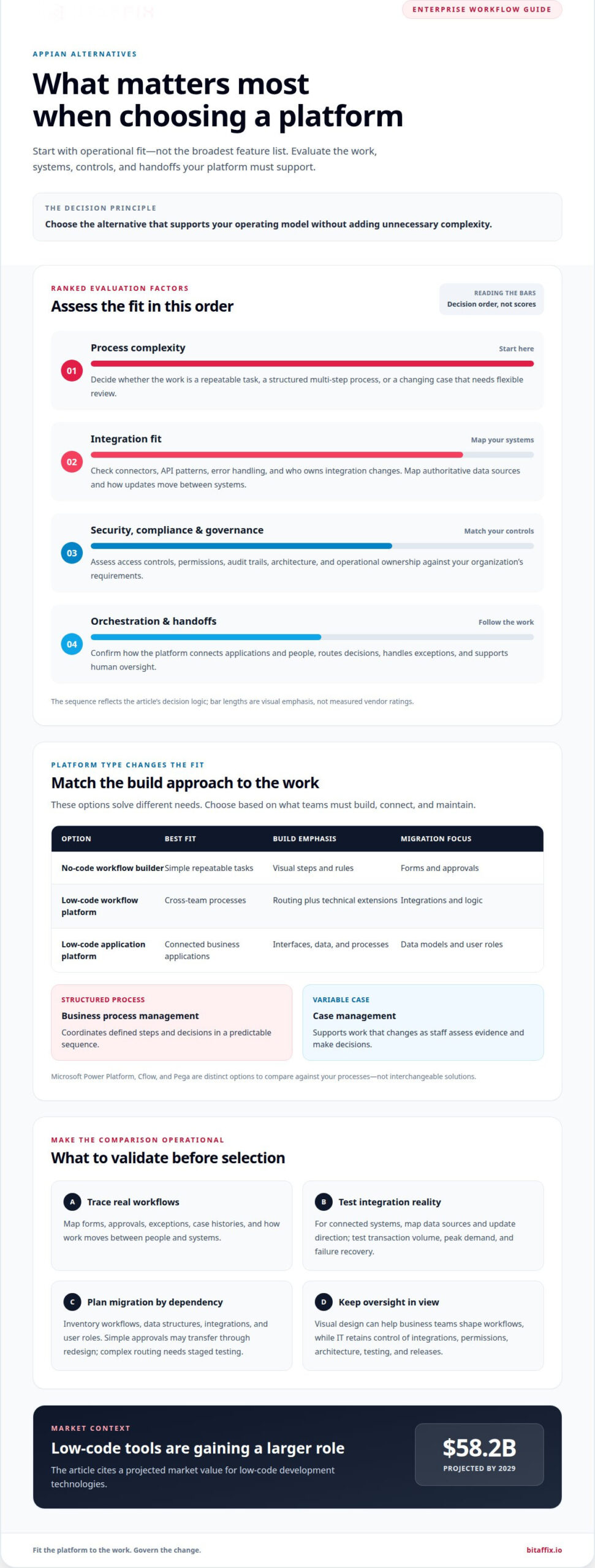
The strongest Appian alternative isn’t automatically the platform with the broadest feature list. Choosing Appian alternatives for enterprise workflow automation starts with fit: process complexity, integrations, security and compliance requirements, and how work must move between systems and people. The right choice is the one that supports your operating model without adding unnecessary complexity.
It’s reasonable to expect an enterprise platform to do more than digitise individual tasks. It should support governed processes, connect existing applications, and help teams manage exceptions and handoffs. The right alternative to Appian depends on whether your priority is visual process design, business orchestration, or automation across established systems.
This comparison explains how enterprise workflow automation platforms differ in use cases, integration, security, compliance, and orchestration. Use the decision guide to narrow the options against your requirements and identify where workflow automation can improve day-to-day operations.
Key Takeaways
- Match platform type to process complexity: low-code design, task automation, and cross-system orchestration solve different needs.
- Compare alternatives by integration fit and the way each option supports handoffs, exceptions, and human oversight.
- Assess security, compliance, access controls, and audit trails against your organisation’s governance requirements.
- Use a decision guide to narrow the shortlist around your workflows, existing systems, and operational priorities.
- See where BitAffix Workflow Automation, Kanban Task Automation, and Secure Document Archiving fit into enterprise operations.
Low-code and no-code workflow automation platforms
Low-code and no-code platforms use visual tools to turn business rules into workflows or applications. Moving from Appian may be straightforward for simple processes, but complex integrations, data models, and routing rules need careful redesign and testing.
Low-Code Workflow Builders
A visual workflow builder models steps, approvals, conditions, and routing. No-code platforms let teams configure workflows without writing code; low-code platforms may also support technical extensions. For example, a purchase request can go from submission to manager approval, then route to finance if its value exceeds an internal threshold.
These builders suit teams standardising repeatable processes, such as document reviews or employee requests. Citizen developers can configure forms and simple rules, while IT teams retain control over integrations, permissions, and releases. That division helps business users shape workflows without making every change a separate development project. The low-code development technologies market is projected to reach $58.2 billion by 2029, reflecting the expanding role of these tools.
Low-Code Application Development
Low-code application development goes beyond task routing. Teams can assemble an application using forms, data, user roles, and process steps, then connect its interface to the workflow. This suits operations that need a coordinated user experience, such as case management that tracks submissions, supporting documents, and decisions.
Compared with a workflow builder, an application platform puts more emphasis on the complete software experience. It can bring screens, data, and process logic together, but requires strong architecture and governance. Before choosing this route, evaluate how the platform manages reusable components, testing, access, and changes. Visual design does not remove the need for technical oversight when applications connect to core systems.
Migration effort depends on how much of the Appian implementation uses platform-specific components. Start by inventorying workflows, data structures, integrations, and user roles, then map each process to the target platform. Simple approvals may transfer through redesign; complex routing and connected applications need staged testing to preserve business rules.
| Option | Best fit | Build emphasis | Migration focus |
|---|---|---|---|
| No-code workflow builder | Simple repeatable tasks | Visual steps and rules | Forms and approvals |
| Low-code workflow platform | Cross-team processes | Routing plus extensions | Integrations and logic |
| Low-code application platform | Connected business applications | Interfaces, data, and processes | Data models and roles |
For a UAE evaluation, map workflow scope, integrations, and migration dependencies through a workflow automation assessment before selecting a platform.
Choose a no-code builder for controlled, repeatable tasks, and consider low-code when technical extensions or connected applications are central to the requirement.
Appian alternatives compared by use case and integrations
Compare platforms against process demands, the application landscape, and the work each team needs to manage. The strongest fit depends on how workflows connect systems, customer interactions, and human decisions.
Low-Code, BPM, and Case Management
Low-code platforms support visual application design, while business process management coordinates structured steps and decisions. Case management adds flexibility when work changes as staff review each situation. Microsoft Power Platform, Cflow, and Pega are distinct options, not interchangeable solutions. Compare how each handles forms, approvals, exceptions, and case histories against your processes.
For example, customer onboarding may involve document collection, identity review, and approval routing. A BPM-led design suits a predictable sequence; case management can better accommodate varied evidence and agent decisions. Evaluate how each platform models both paths and whether teams can manage exceptions without rebuilding the entire process.
Integrations, Scalability, and Performance
Integration strength depends on the systems involved, not a universal vendor ranking. For Microsoft 365 and SharePoint environments, assess how an alternative connects document libraries, user identities, and existing business applications. Cflow is another option to evaluate for workflow features and integrations. Compare supported connectors, API patterns, error handling, and ownership of integration changes.
Unified data takes more than connecting endpoints. A customer record may appear in a CRM, finance application, and service platform, each using different identifiers. Before implementation, map the authoritative source, the data exchanged, and the direction of updates. Then test transaction volume, peak demand, and failure recovery with representative workloads. These checks show whether the design can scale without duplicate records or delayed routing.
Enterprise Fit, Implementation, and Skills
For large UAE enterprises, fit rests on architecture, governance, integration coverage, and operational ownership. Microsoft-centred organisations may prioritise compatibility with Microsoft 365 and SharePoint. Complex case operations may favour platforms built around configurable case handling. No option is automatically best for every enterprise; select against your systems, teams, and control requirements.
Implementation time depends on workflow complexity, data quality, integrations, migration scope, and testing. A simple approval flow generally needs less redesign than a multi-system process with exception paths. Delivery teams typically include process analysts, platform specialists, integration engineers, and business owners. Citizen developers can support configuration, while technical teams remain responsible for architecture and production controls.
Appian alternatives differ across low-code design, BPM, and case management, so assess each against the process model you need. For integration and API support, prioritise platforms that fit your actual applications and interface requirements rather than assuming one vendor leads in every connection. A structured evaluation can map workflows, systems, and ownership before migration planning begins.
Simple app delivery is only one part of platform selection; teams should also define how they will judge whether automation improves the work. McKinsey’s 2025 workplace research found that nearly 90% of companies had invested in AI, while fewer than 40% reported measurable gains. Treat that gap as a reason to set outcome measures before implementation. Compare how each alternative supports clear ownership, process monitoring, and review of results, so investment can be assessed against operational goals rather than the presence of features alone.
Enterprise security, compliance, and audit trails
Security comparisons should examine how each platform protects workflow data, records decisions, and controls access. In the UAE, assess these capabilities against your organization’s internal governance and the requirements relevant to its sector.
Workflow Compliance and Audit Trails
An audit trail records workflow events such as submission, review, approval, and change. Compare the detail each platform captures, how users retrieve records, and whether entries identify the action and its source. For a supplier approval, teams may need to trace a document update, a reviewer’s decision, and the approval path in one process history.
Compliance also depends on how the organization configures and operates its workflows. Define required approvals, retention practices, and escalation paths before deployment. Then test a sample process, such as a finance review, to confirm that each decision leaves usable evidence. Clear records can help reviewers reconstruct events, but they do not replace the organization’s own compliance controls.
Role-Based Access and Security
Role-based access assigns capabilities according to users’ responsibilities. Compare how alternatives define roles, restrict sensitive records, and separate workflow administration from business approvals. In a hiring process, for example, a recruiter may manage candidate details while a hiring manager sees decision materials. Granular permissions can reduce unnecessary access without blocking legitimate handoffs.
Assess identity management, authentication, permission changes, and administrative logs as connected controls. A role change should update access consistently across relevant applications and workflow steps. Test scenarios such as an employee leaving, a temporary approver taking over, and a case being reassigned. These examples reveal whether access policies stay aligned with actual responsibilities.
Security, Compliance, and Reliability
Security covers protections for data and access; reliability concerns whether workflows continue and recover as designed. Compare each vendor’s documented controls, incident processes, backup approach, and service commitments. Then map those capabilities to a process such as customer onboarding, where unavailable records or missed approvals could interrupt operations.
Use a structured evaluation rather than relying on a feature checklist alone:
- Access: Test role changes and restricted records using representative user accounts.
- Evidence: Trace an approval from request creation through final decision.
- Recovery: Review how the workflow handles a failed integration or interrupted task.
- Governance: Assign owners for permissions, process changes, and audit reviews.
These checks distinguish platforms with similar security features. A system may log approvals but offer limited visibility into integration failures. Another may provide strong access controls but require separate procedures for process review. Match each capability to a named control owner, and document how exceptions reach the right team.
In the UAE, enterprise requirements vary across organizations and sectors. A banking approval flow may need different access boundaries from an internal facilities request. Compare alternatives against each process’s data, decision roles, audit needs, and recovery expectations. This helps security and operations teams assess the same risks before selecting a platform.
Enterprise process automation and business orchestration
Enterprise process automation coordinates people, applications, and decisions across a business process. Orchestration connects those steps when finance, operations, and customer teams share work. A loan application may require 30 minutes of actual work but take two weeks to process, revealing delays between tasks and handoffs.
Replacing Appian can expose risks such as missed business rules, broken integrations, and incomplete process history. Map dependencies, identify process owners, and test exception paths before migration. Move workflows in controlled stages so teams can address failures before they affect connected operations.
Enterprise BPM and Process Orchestration
Business process management defines how work moves through tasks, approvals, and exceptions. Orchestration coordinates those steps across systems and teams. For a loan application, the process might collect documents, assign a review, request missing information, and route a decision to the appropriate owner.
Design for reliable automation, not maximum automation. A resilient workflow can automate 80% of volume and route complex cases to a human expert. That balance supports repeatable processing while preserving judgment for unusual finance or customer cases. It also gives process owners a defined path for resolving exceptions.
Limitations of Robotic Process Automation
Robotic process automation works best for stable, repeatable tasks. A bot that relies on screen positions can fail after even a small interface change. This fragility makes RPA less suitable as the sole orchestration layer for processes that span applications and teams or depend on changing business rules.
Use RPA selectively for repetitive work where direct integration is unavailable or impractical. Define an exception route, monitor failed runs, and assign an owner for bot maintenance. Avoid a 100% automation target. Human review for unusual cases can make a process more resilient than forcing every request through a rigid path.
BPMN Modeling and Process Monitoring
Business Process Model and Notation (BPMN) gives teams a shared visual language for process steps, gateways, and events. Model a procurement approval with supplier submission, finance review, and a decision gateway. Business and technical teams can then review the same process before configuration begins.
Monitoring compares the intended model with actual execution. Track queue delays, repeated rework, and cases waiting for approval. A procurement team, for example, can identify whether requests stall during document review or finance approval. That evidence helps process owners prioritise targeted changes instead of redesigning every workflow.
Process Mining and Workflow Analysis
Process mining uses event data to show how work moves through systems. Analysts can compare a documented BPMN model with records from an ERP or case system. Repeated returns to finance, for example, may point to missing information at intake rather than slow approval alone.
Use these findings to prioritise redesign before automation. Confirm the process boundary, identify systems that produce event records, and distinguish normal exceptions from avoidable rework. Then update the model and monitor the original bottleneck. This sequence helps streamline a business process without simply speeding up a flawed handoff.
A small user-interface change can break an RPA bot, so screen-dependent tasks need monitored failure paths and an accountable owner. They should not serve as the process’s only coordination layer.
Workflow automation alternatives
Choose a replacement based on operating needs, not feature volume. A finance process may combine document intake, approvals, system updates, and exception handling. A shortlist of Appian alternatives for enterprise workflow automation should show how each option coordinates these steps, gives teams process visibility, and supports controlled implementation.
Start with one process that crosses departments, such as supplier onboarding. Map where the request starts, who makes decisions, what information is needed, and the final outcome. Then identify where employees re-enter data or rely on manual follow-up. This process map gives the evaluation team a concrete basis for comparing platform capabilities and clarifying what must change during migration.
Make Process Visibility the First Test
Visibility helps operations teams identify ownership and stalled work. In a customer service case, for example, staff need to distinguish a missing document from a pending approval. Compare how each alternative displays case status, current owner, and next action to employees and managers.
Trace a representative request from intake to closure. Record each handoff, application switch, and manual update. These observations show whether a platform should connect existing systems, simplify a fragmented handoff, or support broader process redesign. Assess Appian alternatives for enterprise workflow automation against that real workflow, not just a demonstration scenario.
Keep AI Agents Inside Governed Workflows
AI agents can assist with tasks such as extracting fields from documents or summarising a case. Define their role in the process: specify which source information they can use, when a person reviews their output, and how the workflow handles missing or inconsistent data.
For instance, an agent may classify an incoming request, while an employee confirms the category before routing. This preserves a visible decision point. Compare how each alternative connects AI-assisted steps with permissions, case records, and human review, rather than treating an agent as a substitute for process orchestration.
Reduce Implementation Risk in Stages
Begin implementation with a defined process and accountable owners. Document the current workflow, map system dependencies, configure the new process, and test typical and exceptional cases. A purchase approval pilot should include incomplete submissions, returned requests, and reassigned approvers.
Assess operational fit as well as interface quality. Confirm whether staff can track pending work, integrations transfer the required information, and administrators can manage routing changes. Record issues before expanding to connected processes. This staged approach gives decision-makers practical evidence about adoption, governance, and migration effort.
The strongest alternative addresses a defined operational constraint. Prioritise visibility when teams lose track of cases, integration when systems fragment information, or governed AI agents when document handling creates manual work. Tie every feature to a process owner and a clear business need before advancing the shortlist.
BitAffix: Workflow Automation
BitAffix helps organisations coordinate repeatable processes with Workflow Automation. It suits teams seeking clearer task routing, consistent approvals, or structured document handling. Kanban Task Automation provides visual task coordination, while Secure Document Archiving supports controlled document storage. Banking Sector Solutions provide a sector-specific option for banking operations.
Turn to BitAffix when your evaluation points to operational workflow needs rather than a standalone application builder. Define the process, systems involved, approval paths, and document requirements; these details clarify the scope of an automation project. For a closer look at how workflow automation can support your operations, contact BitAffix to discuss your requirements.
Set a clear direction for your next workflow platform
Choosing among Appian alternatives for enterprise workflow automation is about operational fit, not feature volume. Define the outcomes your organisation needs, then align the platform, integration approach, and governance model around them. A focused first workflow can set practical priorities for broader automation without locking teams into an unsuitable design.
BitAffix offers Workflow Automation, Kanban Task Automation, and Secure Document Archiving. These capabilities can help organisations coordinate operational tasks, track work, and manage business documents within their processes. A clear discussion of your workflows and priorities is a practical next step.
Move forward with a defined process, accountable owners, and a platform aligned with how your teams work. That foundation gives enterprise automation a purposeful path to scale.
Frequently Asked Questions
What security, compliance, and data-residency features should enterprises compare?
Compare access controls, encryption, audit records, data location, retention, and recovery capabilities. For a UAE organisation, identify where workflow data, attachments, backups, and integration logs are stored and processed. Check how the platform restricts administrator access, records permission changes, and supports data export or deletion. Before approving a platform for sensitive processes, assign each requirement to an internal owner, such as security, legal, or records management.
Which Appian alternatives offer the strongest integrations and API support?
There is no universal strongest option. Compare supported connectors, API patterns, error handling, and integration-change ownership against your existing applications; Microsoft-centred organisations can assess compatibility with Microsoft 365 and SharePoint, while Cflow is another option to evaluate.