
The strongest ServiceNow alternative may be the platform that removes operational friction, not the one that reproduces every module. The right ServiceNow process automation alternatives for regional enterprises depend on how well a platform connects with existing systems, governs workflows, and meets enterprise requirements without adding unnecessary complexity.
ServiceNow can support broad operational needs, but another platform may fit better when an organisation prioritises particular workflows, integrations, or governance controls. This comparison explains how alternatives differ in workflow management, business-system integrations, approvals, escalation rules, and implementation. It also shows how to narrow the options for a UAE enterprise, from broad service-management suites to platforms focused on business process or document management. Use these criteria to identify a practical fit, assess migration decisions, and plan an evaluation around clear operational priorities.
Key Takeaways
- Assess platforms against security, compliance, audit traceability, and the workflow controls your enterprise actually needs.
- Prioritise integrations that connect Microsoft 365, Teams, Jira, and core business systems while limiting custom code and ongoing maintenance.
- Define approval ownership, service-level expectations, and escalation paths so automated workflows remain controlled and accountable.
- Reduce migration risk by moving one function at a time, then piloting the platform against your top ten request types before expanding.
- Use organisational scale and customization needs to guide the shortlist; BPM- and ECM-based options can suit leaner governance requirements.
Requirements for business process automation platforms
Evaluate each platform against governance, integration, workflow control, and operational fit. For UAE and Gulf enterprises, security and data handling belong in the selection criteria from the outset.
Pricing and Deployment Timelines
Pricing models may charge by user, workflow volume, module, or platform tier, so compare the cost structure against intended use. A focused approvals workflow has a different scope from a multi-department migration. Deployment time also depends on integration work, data migration, and process complexity. A regional enterprise can assess a workflow automation platform against a defined initial process before expanding.
Licensing and Total Cost
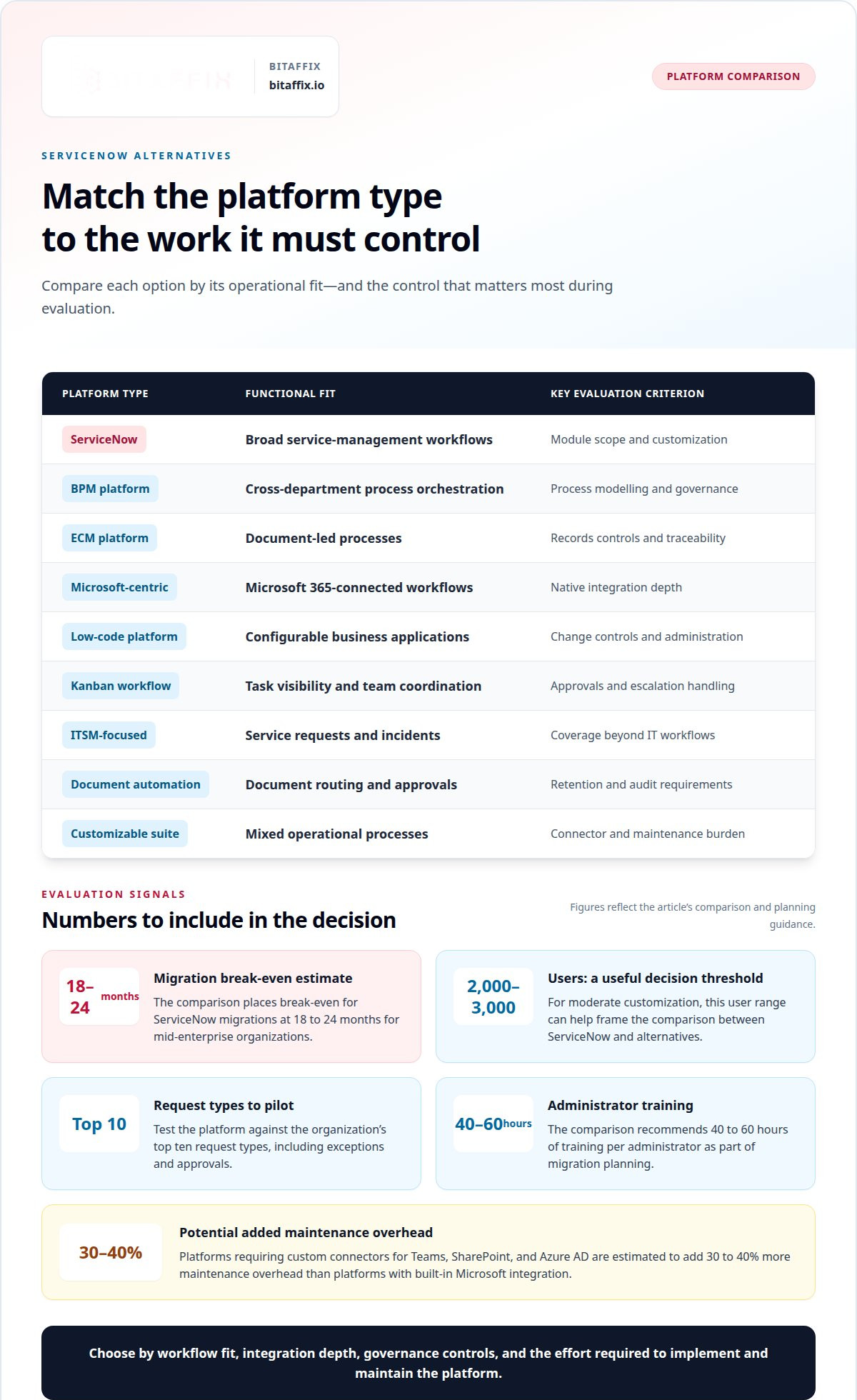
Separate recurring licence charges from implementation, integration, migration, administration, and training effort. A lower entry licence can carry higher operating costs if teams maintain custom connectors or duplicate controls. Model total cost of ownership across the planned use case, not just the first department. For ServiceNow migrations, the estimate in this comparison puts break-even at 18 to 24 months for mid-enterprise organizations.
For UAE and Gulf operations, assess data location, access controls, retention, and audit records against applicable sector and jurisdiction requirements. Require traceability for information created, edited, accessed, or deleted, supported by security, compliance, and auditing layers.
Adoption and Scalability
Scalability means more than handling additional users. Evaluate whether teams can standardize approvals, permissions, and reporting across business units without making routine changes dependent on specialists. Enterprises with 2,000 to 3,000 users and moderate customization reach a useful decision threshold for comparing ServiceNow with alternatives. A Microsoft-centric organization may prioritize familiar administration, while a lean governance team may prefer a focused BPM or ECM platform.
Implementation and Migration Effort
Implementation time and migration effort depend on workflow complexity, integrations, data quality, and the number of processes moving together. A phased approach moves one function, validates its workflows, then expands. A pilot should exercise the organization’s top ten request types, including exceptions and approvals. Migration planning also includes administrator readiness: the comparison recommends 40 to 60 hours of training per administrator. Partner availability matters because local implementation capacity affects delivery planning and ongoing support.
Compare platform types by the controls and operating models they support. Not every enterprise needs the same depth of features.
| Option | Functional fit | Key evaluation criterion |
|---|---|---|
| ServiceNow | Broad service-management workflows | Module scope and customization |
| BPM platform | Cross-department process orchestration | Process modelling and governance |
| ECM platform | Document-led processes | Records controls and traceability |
| Microsoft-centric platform | Microsoft 365-connected workflows | Native integration depth |
| Low-code platform | Configurable business applications | Change controls and administration |
| Kanban workflow platform | Task visibility and team coordination | Approvals and escalation handling |
| ITSM-focused platform | Service requests and incidents | Coverage beyond IT workflows |
| Document automation platform | Document routing and approvals | Retention and audit requirements |
| Customizable workflow suite | Mixed operational processes | Connector and maintenance burden |
Choose a platform whose controls, integration model, and implementation effort match your priority workflows and governance needs.
Integration with Microsoft 365, Teams, Jira, and business systems
Integration determines whether an automation platform connects operational work or creates another data silo. For ServiceNow process automation alternatives for regional enterprises, start by mapping the systems that own requests, approvals, employee records, and assets. Identify each authoritative record and the processes that depend on it across regional teams.
Native Microsoft connections and connector maintenance
Assess how each alternative handles Microsoft 365, Teams, SharePoint, and Azure AD. Platforms requiring custom connectors for Teams, SharePoint, and Azure AD are estimated to add 30 to 40% more maintenance overhead than platforms with built-in Microsoft integration. Test which events, fields, and permissions flow in each direction. A notification-only connector may not support the process configuration teams require.
For organisations evaluating ServiceNow process automation alternatives for regional enterprises, Microsoft integration depth can affect daily administration. An approval started in Teams may need to update a SharePoint record while preserving its access controls. Test the full transaction, including failures and retries, rather than simply counting connectors. If Jira manages software work, map how requests enter Jira and how status updates return to the originating workflow.
Migration, business systems, and user adoption
Migration involves more than transferring records. Inventory active workflows, attachments, identities, permissions, and asset-management references, then map each field to its destination. Reconcile sample records and train users on new submission and approval paths before expanding. For SAP, Oracle, or other business systems, establish which platform owns each field to prevent conflicting updates.
Integrations with Salesforce, finance, and HR systems should support defined process needs. A Salesforce opportunity might trigger an internal review, while an employee record supplies routing information. Email and portals can remain intake channels; Slack or Teams can surface assignments and decisions. Keep the system of record authoritative, even when users act through collaboration tools.
Evaluate the integration pattern
Compare native connections, middleware, and custom connectors by transaction coverage, error handling, ownership, and maintenance effort. Middleware can coordinate systems without direct connections, but adds another component to govern. Document exchanged data, permissions, failure alerts, and responsible teams. Organizations comparing ServiceNow process automation alternatives for regional enterprises can include middleware integration approaches in that assessment. To discuss integration priorities, schedule an integration discussion.
Evaluate integration platforms for robust capabilities that minimise custom code, extra transaction costs, third-party dependencies, and implementation effort.
Workflow automation, SLAs, approvals, and escalation rules
Strong workflow capabilities combine automated task handling with clear ownership. Compare how each platform governs approvals, service levels, exceptions, and cross-department handoffs.
Workflow Orchestration
Workflow orchestration coordinates steps, people, and systems from request intake through completion. Business process automation uses technology to automate repetitive tasks, such as routing an employee access request to a manager for approval and then to IT for fulfilment. Compare broad process engines with ITSM-focused tools: the former can span departments, while the latter centre on service operations. Assess how agents and human approvers share work, handle exceptions, and maintain governance throughout the process.
Workflow Design and Administrative Controls
Workflow design defines triggers, decision paths, permissions, and escalation conditions. For example, a finance request can pass through budget review, approval, and payment preparation, with each decision recorded. Compare visual low-code configuration with specialist administration: flexible design can speed changes, while centralised controls can help standardise them. Check how each platform manages role-based access, version changes, audit trails, and delegated approvals when teams update workflows.
Automation Capability Areas
Alternatives may offer low-code process design, ITSM request handling, HR onboarding, finance approvals, and customer-service case routing. Capabilities vary by process depth: an ITSM tool may excel at incidents, while a BPM platform may coordinate finance and HR handoffs. Compare the controls available to business users and technical administrators. For each use case, map a request from submission to resolution and identify its owners and exceptions.
Set service-level expectations around business impact, not just queue speed. A customer-service case may need escalation if it remains unassigned, while an infrastructure incident may follow a separate path based on severity. Define when the clock starts, when it pauses, how ownership transfers, and who receives escalations. Then test breached and reopened requests to see whether alerts reach the right agents and managers.
ServiceNow Workflow Data Fabric is a named element to evaluate alongside workflow controls, not a replacement for process design. Compare how each platform connects data to workflow decisions, preserves record ownership, and handles failed updates. For a UAE enterprise, document which system remains authoritative for each request. This helps governance teams assess whether cross-department automation preserves consistent records and accountable approvals.
Business process automation implementation approaches
Implementation should protect daily operations while replacing manual work and legacy routing. Start with a process inventory that identifies owners, inputs, decisions, exceptions, and connected systems. For example, map how an employee submits an access request, who approves it, and how the service desk fulfils it. Record current tickets, queues, and handoffs before changing the workflow. This baseline helps teams distinguish essential controls from inherited complexity.
Assign an executive sponsor, process owner, platform administrator, and operational representatives before configuration begins. The process owner defines decision rights; administrators configure roles, forms, and routing; operational teams validate real cases. Map each step to its source system and accountable role. For advanced workflows, document exception paths as well as the standard route. This prevents a technically complete design from failing when a request lacks information or needs additional approval.
Use a phased rollout to limit disruption. Move one function at a time, validate its workflows, then expand to another area. An IT service desk can pilot request intake before teams introduce employee onboarding or finance approvals. During validation, compare completed cases with expected routing, permissions, notifications, and records. Resolve defects before extending the new process to more departments or business units.
Build a pilot around the organization’s top ten request types. Include common requests, incomplete submissions, rejected approvals, and cases requiring escalation. Confirm each request reaches the correct queue and preserves its status history. Test employee and administrator roles separately, then review results with process owners. A pilot should establish clear acceptance criteria, such as correct routing, complete records, and usable reporting, before the implementation expands.
Plan migration as a controlled sequence, not a single data transfer. Classify active workflows, open tickets, user roles, attachments, and records that operations still need. Map each field to its destination, resolve duplicate values, and reconcile sample records after import. Keep old and new service desk processes aligned during the transition, with a defined route for requests entering either system. This reduces confusion about ownership and status.
Prepare employees for changed intake and approval paths with role-based guidance. Train requesters on forms, approvers on decision queues, and service desk agents on assignment and escalation handling. Track recurring questions during rollout and update instructions where teams encounter friction. Expand only after the pilot shows that employees can complete routine work and administrators can maintain the configured workflows.
ServiceNow alternatives for enterprise process automation
ServiceNow alternatives suit different operating models, from broad service management to targeted process automation. ServiceNow, Microsoft Power Automate, Jira Service Management, and BMC Helix differ in emphasis. Compare workflow coverage, integration needs, governance, and licensing against your priority processes.
Microsoft Power Automate
Microsoft Power Automate is worth assessing when Microsoft tools anchor enterprise operations. Compare its fit for connected workflows with Jira Service Management’s service-desk focus and BMC Helix’s enterprise IT-management orientation. The practical distinction is process scope: a Microsoft-centric organisation may prioritise Microsoft-connected tasks, while cross-platform requirements call for close scrutiny of connectors, administration, and licensing.
BMC Helix
BMC Helix belongs on a shortlist where enterprise IT service management and operational control matter. Compare its role with Jira Service Management for service-desk workflows and Microsoft Power Automate for business process automation across connected tools. The right fit depends on whether teams need service-operations depth, broader workflow coverage, or a focused way to automate existing tasks.
ServiceNow provides a broad service-management platform. Jira Service Management centres on service requests and service-desk processes, while Microsoft Power Automate supports automation across an organisation’s connected applications. BMC Helix offers another enterprise IT-management option. These are different starting points, not interchangeable feature lists. Map each platform’s ability to support essential request types, service workflows, and records.
For a regulated enterprise, distinguish product scope from verified compliance fit. The evaluation covered eight alternatives, and four meet regulated-industry compliance requirements. Treat that as a shortlist filter, then assess each platform’s governance controls, audit evidence, access model, and document handling against your own obligations. A broad feature set does not automatically satisfy a specific sector’s control requirements.
Scale also changes the decision. Around 2,000 to 3,000 users with moderate customization marks a useful threshold for comparing ServiceNow with alternatives. Below or above it, complexity still depends on workflow variation, integrations, and administration. Leaner risk, compliance, and governance scenarios may suit BPM- or ECM-based solutions instead of more complex modules. Those platforms can focus on process control or document management without requiring a full service-management model.
Compare total licensing requirements with the processes each platform will actually run. A service-desk team may value ticket handling and knowledge workflows; a finance team may prioritise approvals and records. Count required modules, user groups, administrative responsibilities, and integrations. Then assess how each platform can support future departments without duplicating controls or fragmenting ownership.
For a regional enterprise, shortlist by operating model: service management for broad service operations, Microsoft Power Automate for connected task automation, Jira Service Management for service-desk workflows, BMC Helix for enterprise IT management, and BPM or ECM for focused process or document governance.
BitAffix
BitAffix helps regional enterprises connect process automation decisions to practical operational needs. Its Workflow Automation and Kanban Task Automation support structured workflows and visible task coordination, while Secure Document Archiving addresses controlled document handling. For banking organizations, Banking Sector Solutions offer a sector-focused route to process improvement.
Turn to BitAffix when your shortlist points toward streamlined workflows, coordinated tasks, or secure document management rather than a broad service-management suite. Discuss the processes and governance priorities shaping your platform decision as the next step.
Set the Direction for Your Next Automation Move
Choose a platform decision that strengthens the operating model, not simply one that replaces existing software. For UAE decision-makers assessing ServiceNow process automation alternatives for regional enterprises, the next step is to define the processes that matter most, assign clear ownership, and connect platform selection to measurable operational priorities.
Build the decision around a focused implementation path. Identify the workflows creating the greatest friction, determine which controls must remain consistent, and establish how teams will assess adoption after launch. This gives technology and business leaders a shared basis for sequencing change and expanding automation responsibly.
BitAffix can help align workflow priorities with an appropriate automation approach. Bring your process requirements and governance objectives to a discussion about the next step.
Move forward with a clear mandate, sound controls, and an implementation plan your teams can sustain.
Frequently Asked Questions
Why Look Beyond ServiceNow?
Enterprises look beyond ServiceNow when its breadth or operating model exceeds their process needs. A company focused on employee requests may prefer a narrower workflow platform, while a service desk may prioritize service-management functions. The decision should reflect the processes teams actually run, the systems they depend on, and the governance they must preserve. A replacement makes less sense if it adds complexity without resolving a defined operational constraint.
What are key requirements from the best BPA platforms?
The best business process automation platform supports controlled change, clear ownership, and reliable records. For example, a procurement approval should show who submitted it, who authorized it, and what document supports the decision. Assess role permissions, exception handling, audit history, and reporting alongside workflow design. In UAE operations, include the organization’s data handling and sector requirements in the assessment, then confirm that the chosen configuration supports those needs.
Which workflow automation platforms scale for large, multi-entity regional enterprises?
Platforms scale across multiple entities when they standardise shared processes while preserving appropriate differences in ownership and permissions. Compare enterprise suites, BPM platforms, and configurable workflow tools against a real cross-entity process, such as supplier onboarding with local approval paths. Evaluate administration, reporting, and change control across business units. Fit depends on process variation and governance needs, not just user-base size.
Which alternatives integrate with SAP, Oracle, Microsoft 365, and legacy systems?
Integration fit depends on available connectors, middleware options, and the specific data exchanged. Include Microsoft Power Automate and Jira Service Management in the assessment, but test each required SAP, Oracle, Microsoft 365, or legacy-system connection against a defined workflow. For example, validate whether an approved request updates the correct business record and returns status to the originating process. Document ownership, error handling, and synchronization expectations for every connection.
What risks and limitations should enterprises consider when replacing ServiceNow?
Replacement risks include losing useful process history, overlooking permissions, and disrupting work that still depends on existing queues. Before transition, identify records employees need for active cases, map who can access them, and document integrations that trigger downstream actions. A parallel operating period can expose missed handoffs, but it also requires clear ownership to prevent duplicate work. Define how teams will handle unresolved cases during cutover.
What steps should a regional enterprise follow to evaluate, pilot, and migrate to an alternative?
Start by documenting business outcomes and process owners, then shortlist platforms against required controls and integrations. Select a representative workflow for a pilot, define success criteria, and involve employees who submit, approve, and fulfil requests. Use pilot findings to refine configuration and migration mapping. Before rollout, assign support ownership, prepare role-specific guidance, and set a decision point for expanding, adjusting, or pausing the transition.
How do leading alternatives compare on implementation time, migration effort, and partner availability?
Implementation time and migration effort depend on workflow complexity, integrations, data quality, and how many processes move together. A phased migration moves one function at a time, while local partner availability can affect delivery planning and ongoing support.