
A system’s age need not limit its value. Legacy system integration middleware connects older business software with modern applications so they can exchange data and coordinate processes. It bridges differences in protocols, formats, and architectures, without making replacement the only route to modernization.
Keeping established systems can preserve familiar workflows, but disconnected software leaves teams working with fragmented data and manual handoffs. The right integration approach connects the operating environment while accounting for compatibility, security, and continuity.
This guide explains what legacy system integration involves, how middleware supports communication, and where approaches such as APIs, an enterprise service bus, and event-driven integration fit. It also covers common challenges and the benefits of connecting legacy software, from easier data access to smoother cross-system workflows. For organisations in the United Arab Emirates, the goal is practical modernization: make existing systems work more effectively with newer technologies while maintaining control over core operations.
Key Takeaways
- Understand how APIs, middleware, and enterprise service buses connect older software with modern applications.
- Identify integration risks such as isolated data, incompatible formats, security gaps, and operational disruption.
- See how RPA, anti-corruption layers, and point-to-point links serve different integration needs.
- Assess how connecting legacy software can improve data access and coordinate workflows across systems.
- Explore how middleware and workflow automation can support a more connected business environment.
What is Legacy System Integration?
Legacy system integration connects established software with modern applications so they can share data and functionality. A legacy system may use an older protocol or data format, while a cloud application expects a different interface. Middleware bridges these differences by translating and routing information, without requiring every system to communicate directly. The aim is practical interoperability with less disruption to core operations.
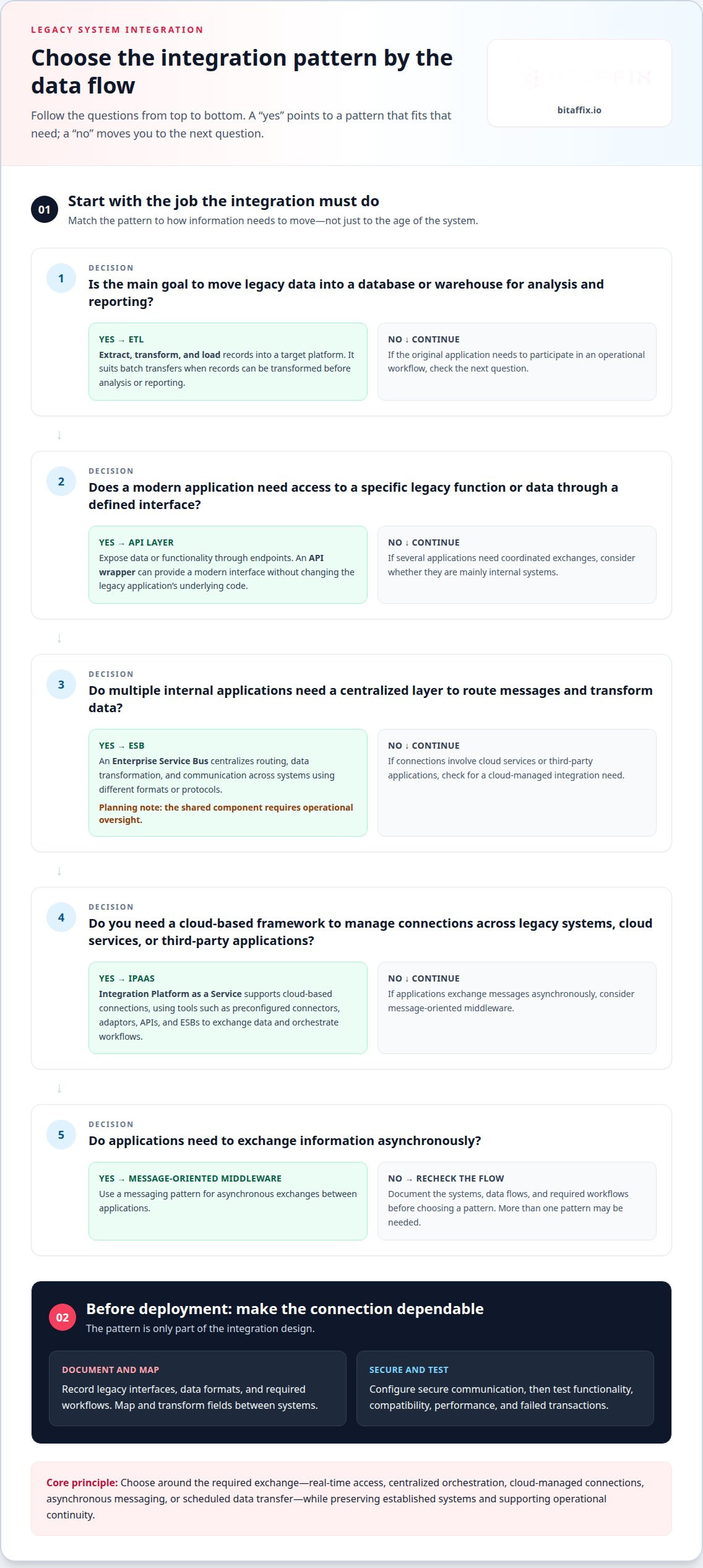
Which middleware platforms are best for legacy system integration? The right fit depends on the systems, data flows, and architecture. An API layer suits defined application functions, an Enterprise Service Bus (ESB) coordinates multiple internal systems, and Integration Platform as a Service (iPaaS) supports cloud-based connections. Message-oriented middleware can handle asynchronous exchanges between applications.
APIs expose an application’s data or functionality through endpoints that other applications can access using standard methods and formats. An API wrapper can give a legacy application a modern interface without changing its underlying code. For example, a cloud application can request a customer record through an endpoint instead of connecting directly to the legacy database. This approach can also expose functions not designed for broad programmatic access.
An ESB is a middleware architecture that connects multiple applications through a centralized integration layer. It can route messages, transform data, and mediate communication between systems using different formats or protocols. For example, an ESB could receive an order from a modern application, transform its fields, and send it to an older fulfilment system. Central orchestration can standardize exchanges, but the shared component requires operational oversight.
iPaaS provides a cloud-based framework for developing, executing, and managing integrations across different systems. It can use preconfigured connectors, adaptors, APIs, and ESBs to exchange data and orchestrate workflows. An organisation connecting a legacy finance system to a cloud reporting application could use an iPaaS connector, then define how records move between them. Unlike an ESB, which commonly focuses on internal systems, iPaaS can also support cloud services and third-party applications.
ETL, meaning extract, transform, and load, moves legacy data into a modern database or data warehouse for analysis and reporting. It suits batch transfers where the destination needs transformed records, rather than immediate interaction with the original application. Service-oriented architecture takes another approach by exposing business functions as reusable services. A billing function, for instance, can serve multiple applications through a defined interface.
How do you integrate a legacy system with modern cloud applications step by step? First, document the legacy system’s interfaces, data formats, and required cloud workflows. Then select an API, middleware, or ETL pattern that suits the exchange. Map and transform fields, configure secure communication, and test functionality, compatibility, performance, and failed transactions before deployment.
A legacy system integration middleware layer brings these patterns together where needed, rather than forcing every application into one design. The architecture should reflect whether systems need real-time API access, centralized ESB orchestration, cloud-managed iPaaS connections, or scheduled ETL transfers. This distinction helps preserve established software while extending its role across modern business workflows.
Integration challenges, including security and data silos
Legacy integration can reveal incompatible formats, undocumented processes, and access paths that older software was not designed to govern. In the UAE, sound planning addresses data handling, security controls, and operational continuity together.
Integration Approaches for Legacy Data
iPaaS, database integration, ETL, and data pipelines move information between older systems and modern applications using different patterns. The choice matters: a reporting workflow may need scheduled data loads, while an operational application may require current records.
Database integration connects systems to exchange or access records, while ETL extracts, transforms, and loads data into a target platform. A data pipeline can coordinate these stages as information moves toward analytics or another application. iPaaS can provide connectors and tools to manage integrations across cloud and legacy environments, but each connection still needs compatible formats and clear error handling.
Data Silos and Transformation
Legacy data silos form when systems operate in isolation, limiting access across teams and applications. Transformation maps incompatible fields and formats, such as converting an older customer record into the structure expected by a cloud workflow.
Change Data Capture identifies changes in a source database and passes them to another system, helping keep records aligned without relying solely on full data transfers. Data virtualisation presents a unified view across sources without moving every record into one repository. Both approaches depend on reliable source definitions, so outdated documentation or inconsistent records can undermine results.
Security and governance add another challenge. Older systems may lack modern identity and access features, while middleware introduces a new component that must also be secured and operated. In the UAE, security, compliance, and data-residency requirements depend on the organisation’s sector, data, and obligations. Integration design should classify information, define permitted storage and transfer locations, and apply access controls to each connection.
Make ownership explicit. Assign responsibility for integration logs, authoritative identity records, and source-of-truth data. If a customer address differs between a legacy billing system and a cloud CRM, a named owner and reconciliation rule can prevent silent conflicts. Logging should capture failures and changes in enough detail for investigation, while access should follow least-privilege principles.
Test the integration against project requirements for functionality, performance, reliability, security, compatibility, and interoperability. Include failed transactions and unavailable-system scenarios, then monitor errors and troubleshoot them in operation. Maintenance also means updating or upgrading middleware when necessary and reviewing interface changes before they disrupt dependent workflows.
For UAE organisations, this disciplined approach connects data without treating every system as equally authoritative. A focused middleware integration discussion can help frame the systems, data boundaries, and operational controls involved.
RPA, anti-corruption layers, and point-to-point integration
Legacy systems can connect to modern workflows through direct links, interface layers, or automated user interactions. The best pattern depends on available interfaces, required functionality, and how much change the existing infrastructure can support.
Middleware for legacy system integration is a communication layer between older software and modern applications. It routes messages, adapts protocols or data formats, and can coordinate exchanges without requiring each application to connect directly to every other system.
Protocols and data formats vary between systems. Middleware can mediate interfaces using standards such as SOAP or REST, while message-oriented middleware can support different protocols and formats. The integration design must match the actual endpoints and handle transformations between their data structures.
Point-to-point integration creates a direct connection between two systems. For example, a legacy inventory application could send stock updates straight to an online ordering platform. This can work for a limited exchange, but each additional connection increases dependencies. A change to one interface may require updates across several links, making the architecture harder to maintain as systems grow.
An anti-corruption layer protects a modern application from legacy rules and structures. It translates older data and operations into a model the newer system can use. For example, it could convert a legacy status code into a clear business state before a cloud workflow acts on it. This boundary preserves modern application logic instead of spreading legacy assumptions through new services.
The Strangler Fig pattern enables gradual replacement. New functionality is built around the legacy application, and requests move to modern services as those capabilities become ready. A routing layer can direct a new customer lookup to a modern service while sending an unchanged billing operation to the original system. The legacy stack stays active until its responsibilities have been transitioned.
RPA, or robotic process automation, interacts with software through the same screens and controls staff use. It can bridge a gap when an older application lacks an accessible API or database interface. For example, a bot could copy approved invoice details from a legacy screen into a modern workflow. Unlike an API-based connection, this approach depends on stable screens and predictable steps, so interface changes can disrupt the automation.
These approaches solve different problems. Point-to-point links suit narrow exchanges; an anti-corruption layer contains legacy complexity; the Strangler Fig pattern supports incremental replacement; and RPA automates screen-based tasks. Middleware can provide shared routing and transformation across these connections, but teams still need clear ownership of interfaces, errors, and changes.
A practical design starts by identifying the required business operation, then confirming the legacy interface and expected data. The integration can route a request, translate its payload, and return a response or log an error for handling. For example, an order workflow should define what happens when the inventory system rejects a stock update, rather than leaving the modern application in an inconsistent state.
Business benefits of connecting legacy software
Connecting legacy software can extend the value of systems that still support essential operations. An organisation can make established records and business functions available to modern workflows, instead of maintaining isolated processes or replacing every component at once. For example, linking a legacy order system with a current reporting application can give operations and finance teams a shared view of order status.
The first benefit is better access to business information. When sales, finance, and operations systems exchange relevant records, teams can reduce repeated data entry and reconcile fewer disconnected versions. A customer update entered into one system, for instance, can flow to another application that relies on the same record. This helps workflows cross environments without treating each department’s software as a separate island.
Integration can also coordinate transactions between systems. An approved purchase order might trigger an inventory update and a finance record, while an exception is returned for review. These linked actions reduce manual handoffs and make process status easier to follow. The value comes from a defined business flow, not simply from connecting more applications.
Set goals before measuring success. A service team might aim to reduce the time between receiving a request and updating its case record. A finance team might target fewer mismatches between invoice and payment data. Baseline cycle times, error rates, and operating costs provide a comparison point; AI integration efforts should track these measures within the first two weeks.
Integration also supports change at a controlled pace. An organisation can connect a modern service to selected legacy functions, then expand the scope as operational needs evolve. Enterprise-wide legacy integration efforts often take 12-36 months, so phased delivery can make progress visible while limiting the impact of each release. Each phase should have defined outcomes and milestones.
Continuity planning matters because integration creates dependencies between systems. Define what happens when a connected application becomes unavailable: queue a transaction, retry it, or route it for manual handling. For example, an order workflow should preserve the request if the inventory system is temporarily offline. Clear recovery behaviour prevents an interruption from silently creating incomplete records elsewhere.
Costs extend beyond implementation. Maintaining and upgrading older systems can consume resources, while an integration adds middleware that teams must monitor and maintain. Compare the effort of sustaining a manual process with the work required to operate the connected flow. Include testing, support ownership, data quality, and future interface changes in that assessment.
Useful success measures connect technical performance to business goals. Track transaction completion, processing time, error resolution, and manual handoffs for the integrated workflow. If a reporting pipeline supplies management data, assess whether teams receive consistent records in time to make decisions. These measures show whether integration improves daily operations, not merely whether two systems exchange messages.
Connecting legacy software can improve access, coordination, and process visibility while preserving useful capabilities. The strongest case ties each integration to a defined outcome, measures the existing workflow, and plans for outages and ongoing maintenance. This discipline helps an organisation modernise its operating model without treating system connection as the goal in itself.
Benefits of integrating legacy systems
Integration makes established software an active part of a connected operating model. For example, a legacy customer database can supply verified account details to a modern service workflow while the older application continues its core role. The benefit is not connection alone. It is the ability to use existing business information and functions in processes that previously could not access them.
Better access to combined data can strengthen analysis. A retailer could bring sales records from a legacy point-of-sale system together with current inventory data, giving planners a clearer view of product movement. Shared information helps teams examine patterns across sources instead of making decisions from one isolated application. The value depends on consistent definitions: the same product or customer must mean the same thing across connected interfaces.
Integration can also make an existing business function available to more applications. A legacy billing system, for instance, may calculate charges reliably but lack a modern interface. An API wrapper can expose that function to a customer portal or internal workflow without requiring the portal to reproduce billing logic. This preserves established rules and reduces duplicated implementations across the organisation.
Connected systems can support more coherent service delivery. Consider an insurance claim that moves from intake to assessment and payment. Linking the relevant applications lets each stage use the same claim reference and pass the information needed for the next action. Teams gain a clearer process trail, and customers are less likely to be asked again for details already recorded elsewhere.
Integration can also provide a staged path to modernization. Instead of replacing an entire legacy platform, an organisation can connect selected functions to newer applications and expand as business priorities change. For example, it might first expose account lookup, then connect payment status in a later release. Each addition should serve a defined operating need and include a way to handle failures or conflicting records.
These benefits are strongest when integration improves a measurable business outcome. A logistics team could track whether connecting dispatch and order systems reduces delayed status updates. A finance team could monitor whether shared invoice records reduce reconciliation exceptions. Such measures show whether connected data changes the work itself, rather than merely increasing the number of interfaces.
The central takeaway is strategic: integration helps an organisation get more value from proven systems while extending their reach. It can improve cross-source analysis, reuse established functionality, and support gradual change. A well-scoped connection links a specific source to a defined business purpose, with clear ownership of data quality and operational behaviour.
BitAffix: Middleware
BitAffix provides middleware to help businesses connect legacy systems with modern applications and coordinate information across workflows. It is relevant when disconnected software creates manual handoffs or limits how teams use established business data. Consider the integration approach in relation to the systems involved, the information they exchange, and the processes that depend on it.
Where connected operations need more structure, BitAffix also offers Workflow Automation and Kanban Task Automation. Secure Document Archiving supports business document management within a wider digital workflow. Together, these offerings address connected process needs while keeping integration grounded in the organisation’s operational requirements.
Contact BitAffix to discuss your middleware integration needs.
Turn Integration Priorities Into a Practical Roadmap
Modernization begins with a decision about what the business needs to improve next. Choose a process where disconnected systems create friction, define the desired outcome, and use it to set the integration scope. This keeps architecture decisions tied to operational priorities rather than connection for its own sake.
A legacy system integration middleware strategy can provide a foundation for gradual change, connecting existing capabilities to newer workflows at the organisation’s pace. The next step is to align technical design with the people, processes, and data that depend on each connection. That alignment makes future enhancements easier to govern and sustain.
BitAffix can help organisations consider middleware as part of a broader approach to operational automation. Discuss your integration priorities with BitAffix to identify a practical direction for your business.
Move forward with clarity, control, and a roadmap built around your business.
Frequently Asked Questions
What Should Businesses Consider Before Integration?
Start with the business process and identify which decisions or actions the connection must support. For example, a service team may need verified account status before approving a request. Consider system ownership, data sensitivity, interface access, transaction patterns, and how teams handle exceptions. Establish who approves changes to mappings and workflows. These decisions clarify the integration’s scope and reduce conflicting assumptions between business and technical teams.
Why is data mapping important?
Data mapping defines how information in one system corresponds to fields in another. It prevents a valid-looking transfer from changing a record’s meaning. For example, one application might store a customer’s full name in one field, while another separates given and family names. Mapping also needs rules for missing values, duplicate records, and status codes, so downstream reports and workflows interpret transferred data consistently.
What are the main types of legacy integration middleware?
The main types include API management layers, Enterprise Service Buses, cloud-based integration platforms, and message-oriented middleware. Each connects software differently: APIs expose functions, an ESB coordinates application exchanges, iPaaS manages integrations through a cloud platform, and message brokers queue asynchronous messages. Database connectivity and ETL tools also support data movement, especially when applications exchange records rather than invoke live functions.
How do APIs, ESBs, iPaaS, and message brokers compare for legacy integration?
APIs suit defined requests, such as retrieving an account balance; an ESB suits coordinated routing across internal applications. iPaaS can manage connections spanning cloud and on-premises environments, while message brokers decouple senders and receivers through queued exchanges. A retailer sending inventory updates may favour queued messaging if the receiving application processes them later. Selection depends on interaction patterns, control needs, existing interfaces, and the operating model.
What does legacy system integration middleware cost, including licensing and implementation?
The price depends on the case and is given after a quote request. Cost factors include licensing terms, the number and complexity of interfaces, data transformation requirements, deployment environment, testing scope, and ongoing support needs. Connecting one well-documented system differs from coordinating several applications with inconsistent records. Include maintenance and monitoring in the financial assessment, not just initial setup, so operating needs remain visible.
What are the common risks and failure points in legacy system integration?
Common failure points include undocumented field meanings, authentication mismatches, duplicate transactions, and unhandled timeouts. A payment request retried after a delayed response, for example, could be processed twice unless the design detects repeat messages. Risks also arise when teams disagree about which system owns a record. Define error handling, reconciliation procedures, access boundaries, and operational ownership before the integration carries business-critical activity.
How can organizations assess legacy system compatibility and integration readiness?
Assess readiness by documenting available interfaces, supported protocols, data structures, authentication methods, and change constraints. Then trace a representative transaction from source to destination, including validation and error handling. For example, follow a supplier update through the legacy database and procurement workflow, noting each transformation and decision. Review system documentation with operational users too, because actual behaviour may differ from written specifications or remembered procedures.
What performance, scalability, and availability metrics should be evaluated?
Evaluate response time, throughput, queue depth, error rate, recovery time, and the age of data at its destination. Match each measure to the business process: a live approval flow depends on prompt responses, while a reporting feed may prioritize complete, timely batches. Test normal and peak operating patterns, then examine what happens during a network interruption or system outage. Set thresholds based on business requirements and record a baseline for comparison.