
A slow approval process doesn’t automatically call for a custom build. Workflow automation without custom development uses no-code or low-code tools to configure triggers, decision rules, notifications, and handoffs across routine business processes. Teams can standardize approvals and reduce manual coordination while keeping workflows visible and manageable.
This approach fits processes with clear rules and systems that support the required connections. It can handle practical tasks such as invoice approvals, document reviews, and request routing. It is also important to recognize its limits: complex dependencies, specialized requirements, or governance needs may call for a different architecture. The choice is not simply speed versus control, but the right level of flexibility for the process.
This guide explains what no-code and low-code tools do, how they manage approval flows and broader business processes, and which capabilities to assess. It also covers when custom software may be worth considering, helping you match a solution to operational complexity without adding unnecessary development overhead.
Key Takeaways
- Assess whether a process has clear rules and manageable system dependencies before selecting a no-code or low-code platform.
- Use conditional routing to direct approvals according to thresholds, request details, and decision authority.
- Identify practical automation opportunities across follow-ups, task assignment, inventory alerts, and other repeatable operations.
- Weigh platform flexibility against the ownership, maintenance, and specialized requirements involved in custom software.
- Compare tools by how clearly they manage integrations, execution progress, errors, and workflow changes.
What makes the ideal no-code AI workflow automation tool?
No-code and low-code platforms turn defined business rules into connected steps without requiring a custom-coded application. For workflow automation without custom development, the right fit depends on process complexity, integration needs, and governance.
No-Code Automation Fundamentals
No-code workflow automation uses visual tools to connect a trigger, conditions, and actions. Low-code platforms also allow limited coding for specialized steps. Both help teams configure internal processes without building every component from scratch. For example, submitting an expense form can trigger a review, route an approval, and update a record. This is useful when teams need consistent execution and clear ownership without extensive development.
Workflows Suited to No-Code Tools
No-code tools suit repeatable workflows with clear triggers, manageable exceptions, and supported integrations. A user-interface workflow can start after a mouse or keyboard action; an API server workflow can begin when it receives a request at a URL. CI/CD workflows can start after a repository commit or manual action. Processes involving three or more systems where order matters may exceed a simple no-code setup. Choose based on dependencies, not just the number of steps.
AI-enabled actions can classify incoming text, such as a support request, before rules route it to a team. Keep decision criteria and human review points explicit, especially when an incorrect classification could delay a sensitive request. Workflow automation software can also create real-time reports from live data, helping teams monitor processing instead of relying on periodic manual updates.
Comparing Platform Features and Ease of Use
Compare platforms by how they connect systems, define conditions, manage errors, and show execution history. A visual builder may simplify routine tasks, while enterprise workflows also need clear permissions and controlled changes. Some tools can run tasks in parallel by specifying which earlier tasks each task must wait for. Execution views can show progress, surface errors, and support reruns from a selected task.
For UAE organisations, applicable personal-data and sector requirements depend on the entity, information, and processing context. Map those obligations, access controls, and retention needs before routing personal data through an automated process. The platform should make governance practical to apply, rather than leaving controls outside the workflow.
Setting Up a Workflow Without Coding
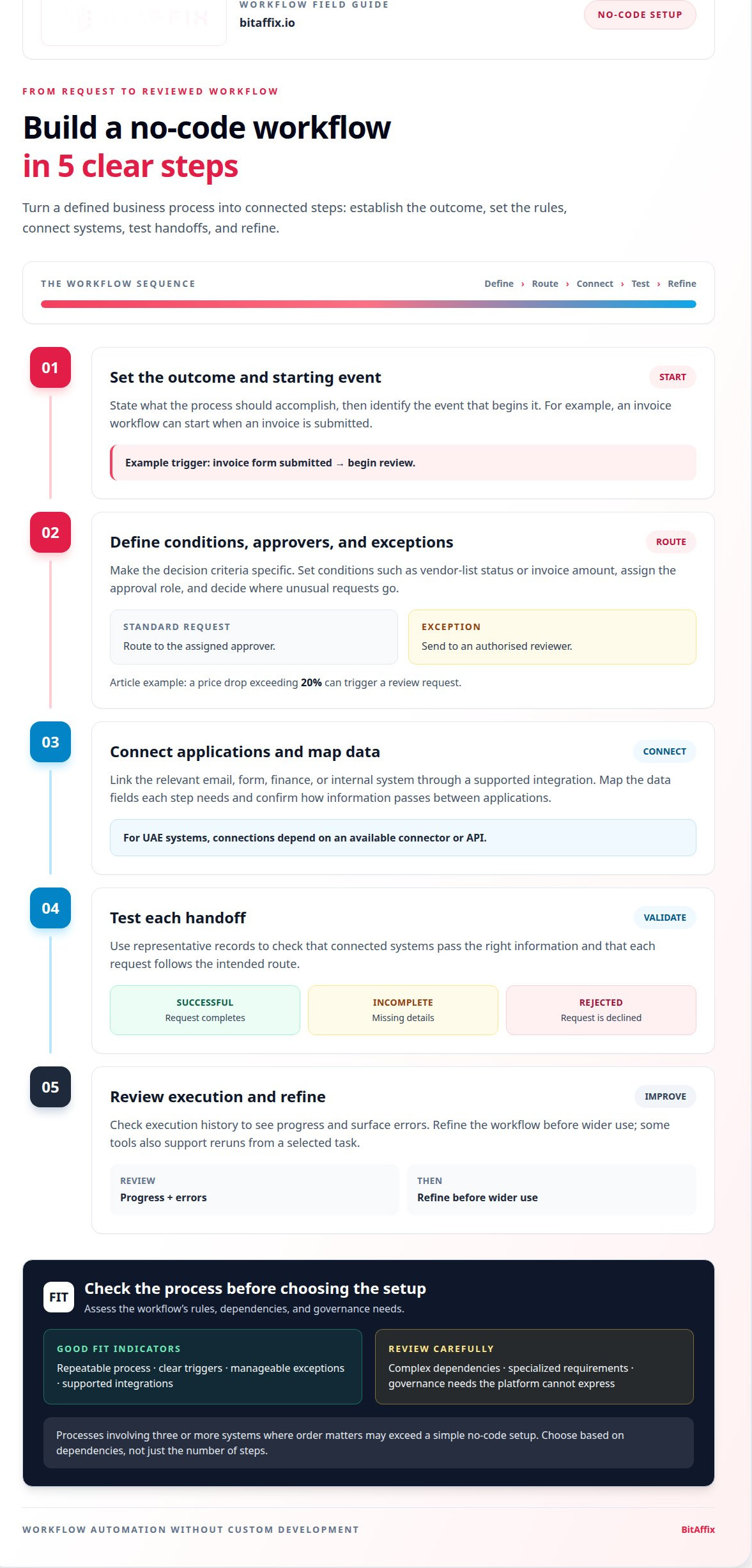
A business can configure a workflow by defining its outcome, trigger, rules, actions, and exception path. To use workflow automation without custom development, start with one process, such as routing an invoice after submission, then map each decision and responsible role. Connect the relevant email, form, finance, or internal system through a supported integration. For UAE systems, connections depend on an available connector or API; test each handoff with representative records before launch.
- Set the process outcome and identify its starting event.
- Define conditions, approval roles, and exception handling.
- Connect the required applications and map their data fields.
- Test successful, incomplete, and rejected requests.
- Review execution history, then refine the workflow before wider use.
For 2026, pricing plans and free-tier availability vary by platform. Compare plan limits against required integrations, workflow runs, collaboration, and governance features; assess the total fit in AED before selecting an option. Teams managing UAE operations can also consider UAE workflow automation when structuring connected business processes.
Approval flows and threshold-based requests
Approval automation applies conditions to requests, then routes each one to the right decision-maker. A procurement workflow might check vendor-list status and invoice amount before assigning an approval. This replaces manual forwarding with consistent rules and makes exceptions visible, so unusual requests do not disappear into shared inboxes.
No-code tools can struggle with complex exceptions, specialized integrations, or controls the platform cannot express. A custom approach may suit processes that demand unique logic or tightly controlled data handling. The trade-off is ownership: production changes, testing, and documentation require technical capacity. Choose custom software only when standard configuration cannot meet the requirements.
Thresholds turn policy into clear routing. For example, a price drop exceeding 20% can trigger a review request. An invoice rule can route requests differently according to vendor-list status and a defined amount threshold. Conditional scenarios can assign routine cases automatically while sending exceptions to a manager. Keep each condition specific, so similar requests receive consistent treatment.
Build an audit trail into the approval flow. Record the request details, decision, responsible role, timestamps, and any exception reason. A version history helps explain which rule applied when the decision occurred. Attach supporting records to the request, rather than relying on separate email threads. For durable records, connect approvals to secure document archiving.
- Define the rule: specify the trigger, threshold, and required approver.
- Set the route: direct standard requests to the assigned role and exceptions to an authorised reviewer.
- Capture the evidence: retain decision details, comments, and supporting documents.
- Test edge cases: include missing data, duplicate submissions, and conflicting conditions.
Security and privacy risks include excessive access, unclear retention, and data passing through systems with different controls. UAE data-residency risk depends on where a platform stores or processes information and how connected services handle it. Map data flows, limit permissions, and establish retention and audit requirements before production use.
Use custom development when an approval process needs unique logic, system behaviour, or governance that a configured platform cannot support. For a structured review of approval paths and exceptions, discuss your workflow requirements.
When configuring a threshold-based request, keep the amount and vendor-list condition explicit, then define the decision or route for each outcome. Conditional scenarios can automate decisions or routing, giving the workflow a defined response to the conditions it checks. The $2,000 example threshold is for routing invoice approvals according to vendor-list status. It can serve as a concrete illustration when documenting the intended approval path and checking that the configured route matches the stated rule.
Business process automation use cases
Business process automation connects a trigger to actions across routine work. An incoming email, completed form, or inventory change can start a defined sequence. This approach suits repeatable processes with clear inputs and outcomes, helping teams standardize execution while keeping exceptions visible.
Email handling is a practical starting point. A process can begin when a message arrives with a specific subject, then assign it, update a record, and send a confirmation. Another example checks Gmail every 15 minutes for messages requiring action. Automated follow-up emails and reminders can reduce missed handoffs, while staff retain responsibility for decisions that need judgement.
Marketing operations can start when a user fills out a form. The workflow can capture the submission, organize its details, and notify the responsible team. Keep each action aligned with the form’s purpose. A request for information, for example, may need different follow-up from a support enquiry. Clear routing preserves relevance as lead volume changes.
Task routing can account for employee availability and skills. Instead of assigning every request to a fixed person, a process can direct work to a suitable, available employee. This supports flexible workload distribution across teams. In HR operations, HR workflow processes can help organize employee-related requests and handoffs.
Manufacturing processes connect operational signals with follow-on actions. An inventory workflow can send an email when stock falls below 10 units. Another can check stock and trigger reordering, then update delivery schedules and notify logistics and production teams. The same process can generate invoices for clients or alert teams when machine maintenance or quality checks are due.
These examples show why process automation depends on reliable triggers and well-defined exceptions. If an inventory record is incomplete, the workflow should route it for review rather than initiate an incorrect reorder. If a form submission lacks required information, it can prompt the user to correct it. Document these paths alongside the standard process.
Fisher & Paykel saved 3,300 hours per month through workflow automation and cut service representative training time by 76%. Those figures illustrate potential operational impact, not a guaranteed outcome for every process. Results depend on the tasks automated, the quality of process design, and how teams manage exceptions.
Scalability depends on more than adding actions. As a workflow expands across teams, review access, ownership, and system connections. Keep a version history so changes remain traceable, and test updates against real process scenarios before production. A controlled release helps maintain continuity when a trigger, integration, or business rule changes.
Start with a contained process, such as a form-to-team notification, then identify where delays or manual re-entry remain. Expand only when the next action and its owner are clear. This builds flexibility without obscuring accountability and gives teams a practical basis for deciding whether the platform still fits the operation.
Custom software versus off-the-shelf tools
Off-the-shelf platforms provide configurable components for common processes; custom software is built around specific requirements. For invoice handling, a platform may already support form intake, routing, approvals, and reporting. Workflow automation without custom development suits this standard work when the available components meet operational needs. Custom development becomes relevant when required rules, integrations, or controls exceed those components. The decision depends on fit, ownership, and long-term operating demands.
Start by separating standard work from genuinely distinctive requirements. Automation platforms can handle processes matching 80% of what other businesses in an industry do. That makes them a practical starting point for repeatable requests, notifications, and approvals. Map the remaining requirements, such as a specialized calculation or a system connection that standard integration cannot support. Those gaps indicate where adaptation or custom engineering may add value.
Custom software involves a different delivery and maintenance commitment. Custom software development can involve a substantial period of planning, testing, and deployment before production. During that period, teams must define requirements, test functionality, and plan deployment. After launch, the organization remains responsible for updates, technical support, and compatibility as connected systems change. Include these ongoing responsibilities in the comparison, not just the initial build.
Use a five-year-or-longer roadmap to assess whether the economics of custom ownership outweigh platform costs. Account for recurring platform charges, internal support capacity, integration work, and the cost of adapting processes. Treat projected savings as estimates, not certainties. Test assumptions against actual workflow volume, required maintenance, and expected changes to business rules.
A practical approach is to automate 80% of a business’s workflows before building custom software for requirements platforms cannot address. Begin with repeatable processes, then record exceptions that remain manual. For example, a standard request may follow visual routing rules, while an unusual case needs specialist review. This staged use of workflow automation without custom development avoids customising requirements that existing tools already handle.
For each candidate process, compare these operational factors:
- Process fit: identify which rules and actions need configuration, and which require unique behaviour.
- Integration: map every system involved and the data each handoff must carry.
- Governance: define access, review, and compliance controls before deployment.
- Reporting: determine whether existing dashboards capture the operational measures teams need.
- Ownership: assign responsibility for updates, troubleshooting, and documentation.
For UAE organisations, include internal governance and applicable compliance needs in the assessment. A platform may suit a process if its controls, integrations, and reporting support the operating model. A custom build may be justified when required behaviour remains outside those capabilities. Reviewing platform core features against specific workflow requirements helps make that boundary concrete.
How do no-code workflow automation tools compare on features and ease of use?
Compare tools against the work they must coordinate, not just their appearance. For an employee request, one platform may offer simple forms, while another supports parallel tasks, execution tracking, and version control. The better fit is the one that makes required steps clear and manageable for process owners and technical teams.
Begin with the workflow structure. A tool should let teams define which earlier tasks each action depends on. For example, a request can send identity checks and budget review to separate teams in parallel, then hold final approval until both are complete. This can reduce unnecessary waiting without removing required controls.
Next, assess how the platform handles execution. A useful interface shows current progress, identifies errors, and allows a rerun from a selected task. If an employee notification fails after a record update, operators need to see where it failed and recover without repeating completed actions. Clear execution history also helps teams distinguish process issues from integration problems.
Version control matters when workflows change. Documented versions let teams track revisions to routing rules, actions, and dependencies. For example, a revised onboarding process can be tested as a new version before replacing the active workflow. This provides a clearer change path than editing a live process without recording the previous logic.
Use the same evaluation tasks for each platform:
- Build a sample: create a form submission that triggers a review and notification.
- Test parallel work: configure two checks that must finish before final approval.
- Simulate an error: interrupt one action and inspect the recovery options.
- Review changes: revise a condition and examine how the platform records versions.
- Check usability: ask a process owner to locate status and explain the next step.
Ease of use depends on who maintains the workflow. A visual builder may help operational staff follow a process, while technical users may need more control over conditions and connections. Assess both roles using the same example. If only the original builder can diagnose a failed step, the workflow may create a new dependency instead of removing one.
For task-based processes, a Kanban task board can make ownership and movement between stages visible. Compare this model with automated routing by testing a request that changes status, owner, or required action. The right choice keeps work visible while matching the team’s operating discipline.
Choose a platform that makes dependencies, failures, and revisions understandable to the people responsible for them.
84% of organizations use low-code or no-code tools. The page recommends defining detailed, prioritized features with input from stakeholders across departments when developing custom workflow automation software.
BitAffix: Workflow Automation
BitAffix offers workflow automation for organisations seeking to coordinate approvals, handoffs, and repeatable business processes. Turn to this approach when teams need more consistent execution across operational tasks, without making every process a custom software project.
For work that moves through visible stages, Kanban Task Automation can support task coordination. Secure Document Archiving helps organize business records, while Banking Sector Solutions apply automation to sector-specific operations. The right fit depends on the process, its decision points, and the systems involved.
Contact BitAffix to discuss how workflow automation could support your business processes.
Set a clear direction for your next workflow
Choose a process whose outcome, owner, and decision path are already understood. Then define how the workflow should handle exceptions, who can change its rules, and what information teams need to review. This gives a workflow automation without custom development approach a clear operating boundary, while leaving room to reassess requirements as the process evolves.
BitAffix offers Workflow Automation, Kanban Task Automation, and Secure Document Archiving. These services can support process orchestration, task visibility, and document handling as connected operational needs. The next step is to align your process objective with the controls and coordination your organisation requires.
Bring that priority to a focused discussion and move forward with a practical direction for automation.
With a well-defined starting point, your team can move ahead with greater clarity and control.
Frequently Asked Questions
What Are No-Code/Low-Code Tools?
No-code and low-code tools let teams configure digital processes with visual builders and reusable components. No-code users create workflows without writing code; low-code tools also allow code for specialized logic. For example, a supplier onboarding flow could collect registration details, assign document review, and notify procurement when information is ready. These tools help business and technical teams shape process steps while keeping the workflow structure visible.
What is workflow automation without custom development?
It means configuring a platform to coordinate work rather than commissioning bespoke software. Teams define a trigger, rules, and actions, then connect the systems involved. For example, a contract renewal date could prompt a task for its owner and send a reminder to the relevant team. This approach works when the platform can express the required process; behaviour beyond its capabilities may need another solution.
Which business processes are best suited to no-code workflow automation?
Processes with repeatable steps, clear inputs, and predictable handoffs are usually the strongest candidates. Examples include employee onboarding, supplier registration, contract review, and support-ticket assignment. A new employee record, for instance, can prompt equipment and access requests for the relevant teams. Processes with frequent exceptions or decisions based on unstructured judgement need careful human oversight, even when routine portions can be automated.