
Custom code is not automatically the more controlled choice. For government workflows, a governed low-code workflow engine can standardise routine processes and connect existing systems. Custom code may be a better fit for specialised algorithms, performance-intensive backend logic, or complex exceptions. The decision depends on how often the process changes, how difficult its integrations are, and how much exception handling it requires.
Both approaches require disciplined security and operational ownership. Low-code helps teams design and update workflows visually, but governance must control access, testing, releases, and changes so flexibility does not lead to fragmented or unmanaged applications.
This comparison explains where each approach fits across deployment, security, design, and business process needs. It also shows how requirements vary by industry, from approvals and document handling to processes with intricate logic. Use these criteria to identify which model suits the work, where a low-code platform needs stronger controls, and when custom code is a better foundation.
Key Takeaways
- Choose between low-code and custom code by weighing workflow change frequency, integration complexity, and exception handling.
- Map how workflows exchange data with existing business systems before settling on a design or deployment model.
- Assess governance, resilience, and ongoing operational responsibility alongside security controls and release practices.
- Compare open-source, self-hosted, and SaaS deployment against your organisation’s control, maintenance, and operational needs.
- Define tasks, decision points, triggers, and actions clearly to support consistent workflow design across business processes.
What is the difference between building government workflows with traditional coding and using a low-code platform?
Traditional coding gives development teams direct control over logic; low-code brings common workflow components together visually. Enterprise pricing may be based on subscriptions, user tiers, usage, or implementation scope, with costs affected by integrations, deployment, support, and complexity. Measure return by comparing baseline and current cycle times, completion rates, rework, errors, and operating effort.
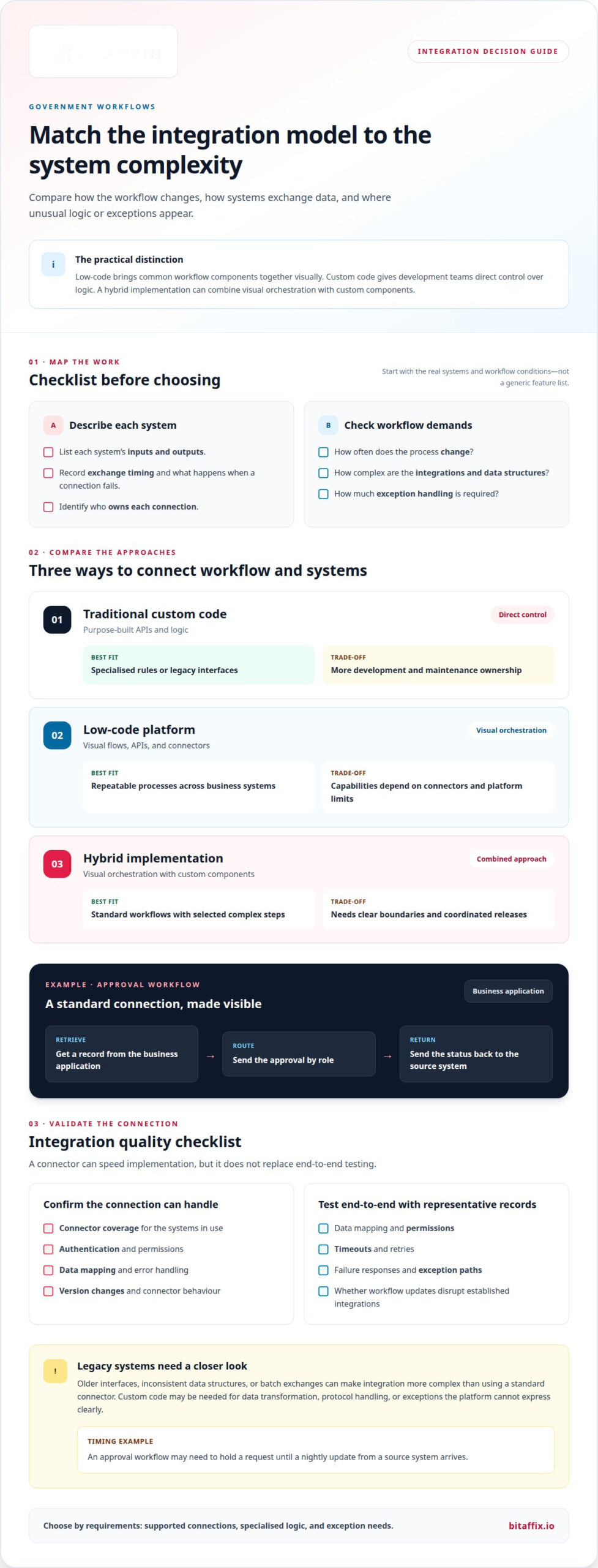
For government workflows, the choice depends on how systems exchange data and how often processes change. Integration design should account for existing applications, exceptions, and who owns each connection.
Low-Code Connectors and Orchestration
A low-code platform can combine visual workflow steps with API integrations and enterprise connectors. For example, an approval can retrieve a record from a business application, route it by role, and return its status to the source system. Service orchestration coordinates these exchanges; custom code gives teams more direct control over unusual logic and connector behaviour.
Assess connector coverage, authentication needs, data mapping, error handling, and version changes. A connector can accelerate implementation, but it doesn’t remove the need to test end-to-end behaviour. A middleware integration solution can help connect applications when the workflow crosses system boundaries.
Legacy-System Integration Complexity
Legacy systems may use older interfaces, inconsistent data structures, or batch exchanges instead of modern APIs. Integrating them can be more complex than setting up a standard connector. A low-code engine may still coordinate the process, while custom code may be needed for data transformation, protocol handling, or exceptions the platform cannot express clearly.
Map each system’s inputs, outputs, timing, and failure responses before choosing an approach. For example, an approval workflow may need to hold a request until a nightly update from a source system arrives.
| Option | Integration approach | Best fit | Trade-off |
|---|---|---|---|
| Traditional custom code | Purpose-built APIs and logic | Specialised rules or legacy interfaces | More development and maintenance ownership |
| Low-code platform | Visual flows, APIs, and connectors | Repeatable processes across business systems | Capabilities depend on connectors and platform limits |
| Hybrid implementation | Visual orchestration with custom components | Standard workflows with selected complex steps | Requires clear boundaries and coordinated releases |
Compare connector capabilities with the systems you actually use, rather than relying on a generic feature list. Test data mapping, permissions, timeouts, retries, and exception paths with representative records. For changing processes, confirm that teams can update workflow rules without disrupting established integrations.
Choose low-code for repeatable orchestration with supported connections. Use custom code for specialised integration logic, or combine the two when requirements differ.
What deployment and security options matter most?
Deployment choices determine where workflow data runs and who operates its controls. Before implementation, compare access, auditability, change management, resilience, and data handling.
Governed platforms vary in their security controls, audit trails, testing capabilities, and integration safeguards. Compare these with custom code, where teams control the implementation directly but also take responsibility for its security and maintenance.
For UAE operations, data residency depends on the deployment model and the organisation’s applicable obligations. Establish where data is stored and processed, who can access it, and how the platform supports those requirements.
Security and Access Controls
Role-based access control separates workflow design, approval, and administration duties. Secrets management protects credentials used by integrations, while access reviews help identify unnecessary permissions. The National Institute of Standards and Technology (NIST) identifies NIST Cybersecurity Framework 2.0 as relevant guidance for governance, resilience, and ongoing operational responsibility in technology choices.
Compare platform controls and custom code tools for identity, permissions, and integration access. A workflow that handles critical records needs clear ownership for every role and connection.
Auditability and Change Control
Auditability records who changed a workflow, what changed, and when a release took effect. NIST SP 800-53 Rev 5 provides security and privacy control guidance relevant to access control, audit logging, and configuration discipline for workflows, according to the National Institute of Standards and Technology (NIST).
Use version history, documented approvals, and repeatable tests to govern changes. A custom code change may affect shared components or connected services, while a visual edit can have effects that are not immediately obvious. Both approaches need controlled releases.
Scalability and Compliance
Scalability depends on workload, connected services, and the platform’s operating model. Before expanding automation across departments, assess how the system handles increased activity, failures, and recovery. A compliance review should also consider data access, retention, and the evidence needed for internal oversight.
A SaaS model shifts some infrastructure operations to the provider; self-hosting gives the organisation more direct control over its environment. Neither option removes the need to assign responsibility for monitoring, upgrades, and incident response.
Low-code can create transparency risks if teams cannot inspect generated source code or understand platform dependencies. Unmanaged citizen development can also lead to shadow IT, particularly when a department builds an external-facing workflow without central oversight. Set ownership, review, and release processes before teams publish applications.
- Define workflow owners and decision rights.
- Limit access by role and business need.
- Log changes and retain test evidence.
- Review integration permissions and stored credentials.
- Test recovery, migration, and release procedures.
These controls help teams manage complexity without treating automation as a substitute for security review. Discuss workflow governance and deployment needs as you assess the right operating model.
Open Source, Self-Hosted or SaaS?
Implementing a governed low-code workflow engine starts with defining deployment needs, mapping environments, and assigning operational ownership. Then configure the workflow, test it against representative cases, address bottlenecks, and release it through a controlled process.
Deployment flexibility affects where workflow components and data run. A SaaS platform is operated by its provider, while self-hosted software runs in an environment managed by the organisation. Cloud, virtual private cloud, and on-premises models set different boundaries for infrastructure, access, and internal operations. A UAE enterprise should align its chosen model with its data-handling requirements and existing architecture.
Open-source and self-hosted describe different things. Open source concerns access to source code under licence terms; self-hosting concerns who operates the software environment. An open-source platform may be self-hosted, and a commercial platform may also support customer-managed deployment. Assess licence obligations, update processes, support responsibilities, and the skills needed to maintain each environment.
SaaS reduces the organisation’s direct infrastructure workload, but makes platform operations dependent on the provider’s service model. Self-hosting gives internal teams more direct control over deployment schedules and environment configuration, while adding responsibility for upgrades, monitoring, backups, and recovery. A hybrid or multicloud design can distribute components across environments, but requires coordination across identity, networking, and release processes.
Use a staged implementation to connect deployment decisions with operational practice:
- Document workflow owners, data flows, integrations, and operating needs.
- Select SaaS, self-hosted, cloud, VPC, or on-premises environments.
- Configure access, connections, and workflow rules for the chosen model.
- Test expected paths, exceptions, and system failures with representative cases.
- Approve the release, monitor results, and define update responsibilities.
Testing matters before deployment. Run the workflow in a test environment with realistic records, including incomplete submissions and delayed responses. Confirm that each task reaches the right role, connected systems receive the expected data, and failures produce a usable response. This helps identify issues and bottlenecks before users rely on the process.
For example, test a procurement approval with a complete request, a missing field, and an unavailable internal system. Compare the results across development, test, and production environments. Keep configuration and release records aligned so teams can trace which version is running in each environment.
Choose SaaS when provider-operated infrastructure fits the organisation’s operating model. Choose self-hosting when direct control over the environment outweighs the added operational responsibility. Select open source based on licence terms and the team’s capacity for coding, maintenance, and updates. The right model balances flexibility with the enterprise’s ability to test, operate, and support workflows consistently.
Visual workflow and database schema design
Visual workflow design turns process steps into connected components on screen. Teams can arrange tasks and decision points, then define how information moves between them. The interface makes a process easier to inspect, but sound design still depends on accurate rules and data structures.
Start with one operational process, such as a staff leave request. Map the submission, manager review, decision, and notification steps before assembling them visually. For every step, define its owner, required input, possible outcomes, and next action. This exposes missing decisions before they become workflow defects.
Design the database schema alongside the workflow. A leave request record might include an employee identifier, dates, leave category, status, and approver. Specify which fields are mandatory, which values come from a controlled list, and how each request links to its employee record. Clear relationships reduce duplicate entries and inconsistent status updates.
- Trigger: A submitted form starts the request.
- Condition: A complete submission moves to review; missing information returns for correction.
- Action: The system assigns the request to the designated manager.
- Decision: Approval updates the status and starts the next step.
- Record: The workflow stores the outcome with the request details.
Triggers, conditions, and actions make workflow automation explicit. A visual canvas can show how a request moves from submission to resolution, while labels explain each component’s purpose. Use consistent names for statuses such as submitted, under review, approved, and declined. This makes operational reports easier to interpret.
Visual tools can speed up assembly, but they do not remove design trade-offs. Assess whether the schema supports reporting, retention, and future process changes. A field that combines several values in one text entry may simplify a form but make filtering or analysis harder. Structured fields preserve meaning more clearly.
Complex behaviour may require more than drag-and-drop components. Modern low-code platforms can support custom scripting within visual components, condition-based behaviour, and extensions to built-in elements. Reserve these capabilities for rules that visual configuration cannot express clearly, while keeping ordinary workflow steps visible to maintainers.
Before release, test the full flow with representative records: a complete request, a missing date, and a declined decision. Confirm that each condition routes correctly, every status change is saved, and users see the right next step. Compare the displayed process with its underlying data model to catch mismatches between labels, fields, and stored values.
A governed design keeps the visual workflow, database schema, and operational ownership aligned. Document the purpose of each component and field, then version changes so teams can trace how the process has evolved.
Business process management across industries
Business process management brings people, rules, and systems together around repeatable work. A governed low-code workflow can coordinate approvals, service requests, and operational handoffs across departments. The process may look similar across organisations, but decision rules vary by industry. A finance approval, for example, needs different information and routing from a school enrolment request. Low-code provides a shared structure while letting teams configure distinct steps.
In banking, a workflow can route a customer service request through review, approval, and document handling. An insurance process might send a claim through assessment, exception review, and a final decision. Energy operations may use workflows to coordinate maintenance requests, assign responsible teams, and record completion. These examples show why business process management must reflect actual roles and decisions, rather than simply digitising a paper form.
Role-based routing puts those distinctions into practice. An order approval can go to a manager or finance department based on the submitter’s job role. A school procurement request could go through department review before finance approval, while an automotive service request may need a technical assessment before authorisation. Connectors can link workflow steps to business applications, allowing data exchange instead of isolated task tracking.
Enterprise-grade low-code applications can extend beyond simple forms. Examples include 3D digital twin dashboards, real-time map-based routing systems, enterprise inventory platforms with bespoke workflows, and compliance dashboards. Each use case has different needs: a routing system depends on current location data, while an inventory workflow depends on accurate item records and approval rules. Teams should match workflow capabilities to the process’s decisions and operational data.
- Banking: Route an account-service request for review and approval.
- Insurance: Track a claim through assessment and exception handling.
- Energy: Assign a maintenance task and record its completion.
- Education: Coordinate an enrolment or procurement request across departments.
After implementation, monitor workflow performance using completion data, process analytics, and user feedback. Teams can, for example, identify where requests wait for approval or are returned for missing information. Use these findings to prioritise process changes. A revised rule should preserve necessary approvals while removing avoidable handoffs; teams can then assess its effect in subsequent workflow results.
The practical approach is to standardise common process patterns while preserving meaningful industry differences. Use visual workflow components for routine approvals and handoffs; reserve technical extensions for specialised rules or performance-intensive requirements. This lets enterprise teams improve digital processes without forcing banking, insurance, energy, education, and automotive operations into one inflexible model.
BitAffix: Workflow Automation
BitAffix helps organisations turn repeatable business processes into structured digital workflows. Its Workflow Automation offering helps teams coordinate approvals, tasks, and handoffs through clear process flows. Banking Sector Solutions address sector-specific process needs, while Secure Document Archiving supports the management of workflow-related records.
Turn to BitAffix when a process needs more than a visual diagram, especially when teams need to connect defined steps with operational responsibilities. Start by identifying the process, its decision points, and the handoffs that create friction. This gives the workflow discussion a practical scope without assuming every process needs the same design.
Contact BitAffix to discuss your workflow automation needs.
Put your next workflow into motion
Choose a process with clear ownership and a practical improvement goal. A governed low-code workflow engine can help when teams need controlled changes without losing visibility across the work. Keep the initial scope focused, then use what the process reveals to guide wider adoption.
BitAffix offers Workflow Automation for structured processes, Kanban Task Automation for coordinating task flows, and Secure Document Archiving for managing records. Banking Sector Solutions address banking process needs. Each offering meets a distinct operational requirement, so first define the workflow challenge you want to solve.
Bring the process, its decision points, and the systems involved into a focused discussion. This gives the next conversation a concrete starting point.
With a clear first use case, your organisation can move from process design toward more consistent execution.
Frequently Asked Questions
Why Are Traditional Developers Turning to Low-Code for Complex, Enterprise-Grade Applications?
Developers use low-code to assemble repeatable application patterns and reserve custom code for specialised logic. For example, a team can configure standard request routing visually, then add code for a complex calculation or unusual system event. This can focus engineering effort on areas that need deeper technical control. Developers still need to review integrations, test edge cases, and maintain the application’s underlying architecture.
Why Are Enterprises On Board?
Enterprises adopt low-code when departments need to digitise processes without creating disconnected applications for every team. A shared platform can support a standard onboarding flow while allowing HR, IT, and finance to handle distinct approvals. The value depends on clear ownership and reusable components. IT can define approved patterns, while departments configure workflows to suit their operating requirements.
What Is a Governed Low-Code Workflow Engine?
A governed low-code workflow engine is software for designing and running business processes with administrative controls built into its operating model. It combines visual workflow configuration with controls for access, change, and oversight. Teams use it to coordinate tasks such as a purchase request moving through department review and finance approval. Governance clarifies who can create, change, approve, and operate each workflow.
What Governance Features Should a Low-Code Workflow Engine Include?
Prioritise role-based access, audit records, version history, release approvals, and control over integration credentials. In a procurement process, the person who edits approval rules should not automatically approve the resulting purchase. Teams also need named workflow owners, test environments, and a record of changes. These controls make responsibilities visible and help administrators trace a process change to its approval and release.
Which Low-Code Workflow Engines Support Governance, Audit Trails, and Role-Based Access?
BitAffix Platform includes governance, security, audit trails, and role-based access. It supports deployment on-premises, in private cloud, or in hybrid environments. These capabilities suit organisations that need workflow controls alongside deployment choices. Compare platform controls with specific operating needs, such as separating workflow administration from business approvals or reviewing access to sensitive process records.
How Can IT Teams Manage Approvals, Version Control, and Deployment in Low-Code Workflows?
IT teams can define a release path that separates workflow design, review, testing, and production approval. For example, a process owner proposes a change, an administrator reviews its impact, and a test run checks affected routes before release. Maintain version records and link each deployment to its approver. This gives teams a traceable way to assess changes and restore an earlier configuration if needed.
What Are the Security and Operational Risks of Low-Code Workflow Automation?
Risks include unapproved applications, excessive user permissions, limited visibility into generated code, and platform outages that interrupt business processes. A workflow can also expose data if its connectors or access rules grant broader permissions than the task requires. Assign an owner to each application, restrict access by role, review integrations, and plan recovery procedures so operational teams know how to respond to an interruption.