
Automation works only when each task reaches the right system or person under the right controls. A banking workflow management system coordinates work across banking processes, connecting applications, approvals, and staff. Robotic process automation (RPA) can handle repeatable, rule-based actions, while AI can support decisions and exception handling within a governed workflow.
The distinction matters: core banking systems record transactions, while workflow orchestration coordinates the work around them. Banks need both operational speed and clear oversight, particularly when processes span teams, legacy applications, and compliance checkpoints.
This guide explains how workflow orchestration works, which core systems it can connect, and how to structure access, approvals, audit trails, and exception routes. It also clarifies where RPA and AI fit, how their roles differ, and what UAE financial institutions should consider when planning an integrated approach.
Key Takeaways
- Map each process from initiation to completion, including approvals and exception paths, before automating handoffs.
- Streamline account opening by connecting onboarding steps with identity verification and routing incomplete cases for staff review.
- Plan integrations across core banking, CRM, ERP, lending, and document systems so workflow data moves consistently.
- Build security and audit controls into each process, and use the NIST Cybersecurity Framework 2.0 as a risk-assessment reference.
- Apply RPA to repeatable, rule-based tasks and use AI within governed workflows, with clear human oversight for exceptions.
1. What is banking workflow orchestration?
Banking workflow orchestration coordinates tasks, people, and applications across a banking process. A banking workflow management system can route an application from intake through verification and approval to recordkeeping. It applies defined business rules at each handoff, so staff can see who owns a task, its status, and the next step. The platform governs the process, while connected banking systems continue performing their specialized functions.
This coordination can reduce repeated data entry and manual follow-ups. For example, when a customer submits a loan application, the workflow can check required fields, request missing documents, and route a complete file to an authorized reviewer. If a credit score meets a configured threshold, the bank can automate an approval; otherwise, the workflow can prompt further staff review. These branches make decisions and exceptions visible instead of leaving them buried in disconnected inboxes.
Approval routing turns policy into an ordered process. A bank can assign reviews by application type, authority level, or exception status. The workflow records each action and sends unresolved cases to the designated role. For example, a file with incomplete identity information can return to onboarding, while a complete file proceeds to underwriting. Clear routes help teams identify delays and provide customers with specific next steps.
RPA and end-to-end workflow automation address different parts of the process. RPA handles repeatable, rule-based tasks, such as copying verified information between applications without direct integration. Workflow automation coordinates the broader journey, including human approvals, deadlines, system handoffs, and exception paths. A bank might use an RPA bot to transfer application data while the workflow platform assigns the case and tracks its approval.
Machine learning can complement these approaches by finding patterns in data and producing classifications or risk scores. For example, a model may flag an application for review, while workflow rules determine who receives it and what evidence must be recorded. The model informs a decision but does not replace approval authority or process controls. Banks should define how staff review flagged cases and how the workflow records that review.
Automate a mapped process, not an isolated task. First, document the steps, decision points, responsible roles, and exceptions. Next, identify repetitive actions suited to RPA and handoffs suited to orchestration. Then test routine and exception scenarios before expanding the workflow. This sequence connects efficiency with governance and keeps customer-facing steps, staff decisions, and system actions traceable.
2. What is banking process automation?
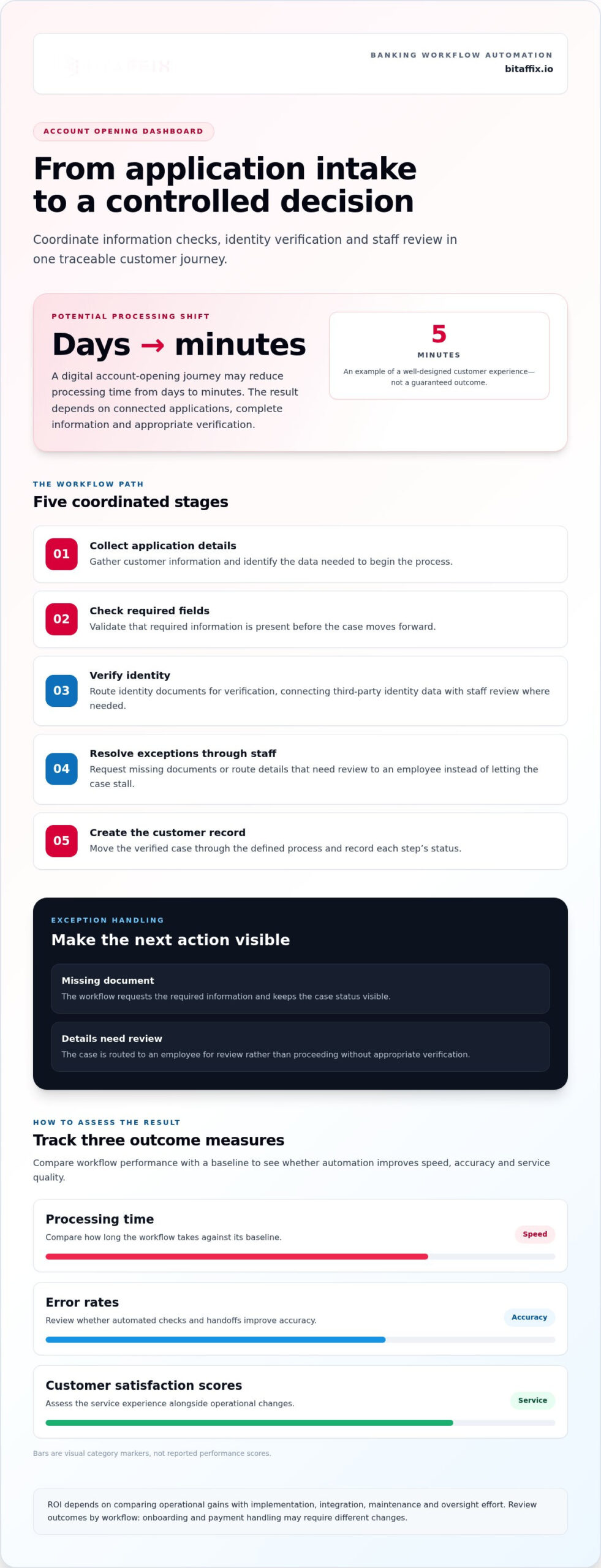
Banking process automation uses technology to complete operational steps with less manual intervention. In account opening, a workflow can collect application details, check required fields, route identity documents for verification, and create a customer record. An onboarding path can connect third-party identity databases with staff review, helping teams handle Know Your Customer and Anti-Money Laundering checks consistently. Each step records its status, so employees can identify pending information without searching separate inboxes.
Customer service benefits when customers receive clear progress updates and face fewer repeated requests. A digital account-opening journey may reduce processing from days to minutes; a five-minute experience illustrates the potential of a well-designed process. That outcome depends on connected applications, complete information, and appropriate verification. If a document is missing, the workflow can request it; if details need review, it can route the case to an employee rather than letting it stall without notice.
Key features of banking workflow management software include process design, automated routing, configurable approvals, integration with banking applications, monitoring, and audit records. Role-based access and exception handling direct each task to an authorized user, while status tracking shows where work stands. For example, a loan application can move through intake, document validation, underwriting, approval, and customer notification in a controlled sequence.
Payment workflows use similar capabilities for a different operational need. A payment instruction can pass through validation, approval, processing, and reconciliation, with exceptions routed for investigation. Customer service teams can use workflow automation to assign service requests, track ownership, and escalate overdue work. These controls reduce unnecessary handoffs and give employees a shared view of the next action, while supporting more consistent customer updates.
Effective workflow design starts with the actual process, not a generic template. Map each onboarding step, decision, responsible role, data source, and exception before configuring the platform. Then tailor approval paths to customer type, product, or missing evidence. Test routine applications and exceptions, such as mismatched identity details or incomplete payment instructions. This aligns automation with bank policy and lets teams adjust rules as operational needs change.
Measure outcomes against a baseline using processing time, error rates, and customer satisfaction scores. These indicators show whether automation improves speed, accuracy, and service quality; ROI depends on comparing those operational gains with implementation, integration, maintenance, and oversight effort. Review the measures by workflow, since faster onboarding may require different changes than payment handling. For banks planning process improvements, workflow automation can provide a structured way to coordinate tasks, approvals, and exceptions.
3. Workflow integration with core banking, ERP, and CRM systems
Integration lets a workflow coordinate data and actions across banking applications. Core banking systems record transactions and maintain financial data. A workflow platform can receive a task, route it for approval, and pass the outcome to connected systems. For example, a completed customer request can update a CRM record and trigger a servicing task. This separates transaction processing from the business process that moves work between departments.
Lending shows why connected systems matter. A loan origination system captures an application, while a loan management system supports servicing after approval. A workflow can coordinate document collection, credit review, approval routing, and the transfer of approved loan details. It can also pass relevant information to core banking applications. If a required field or document is missing, the process can return the case to the responsible employee instead of advancing incomplete data.
CRM integration gives customer-facing teams a clearer operational view. When a customer requests a service change, the CRM can provide the details while the workflow assigns tasks to the relevant department. Once complete, the action can update the case status and return the result to the CRM. ERP integration supports internal processes such as procurement or finance approvals, linking requests to the records those teams use. Each connection should define which application owns each data field.
Legacy banking systems require deliberate integration design. First, map the applications involved, the data each holds, and the events that trigger work. Then determine whether existing interfaces can exchange information reliably or whether middleware should coordinate communication. Define what happens if a system is unavailable, a record fails validation, or data conflicts. These routes prevent a failed connection from leaving a payment, loan, or customer request unresolved without notice.
For banks in the UAE, a suitable system integrates with core banking, lending, CRM, ERP, and compliance applications while supporting the bank’s security and process controls. No single platform fits every organization. Key decision factors include legacy-system compatibility, data ownership, workflow configurability, and operational scale. Evaluate an actual process, such as loan approval, from initial data capture through final system updates.
Test integrations before expanding deployment. Use representative cases to confirm that the workflow receives accurate data, applies the intended business rules, and records completed actions. Include exceptions such as duplicate customer details or a rejected system response. Assign owners across technology, lending, operations, and customer service so each department can validate its handoffs. A banking workflow management system should connect applications without obscuring record ownership or who must resolve an exception.
4. Compliance, audit trails, and risk assessments
Compliance controls work best when built into the process. For an account opening, software can record identity checks, document status, reviewer actions, and reasons for exceptions. That sequence gives compliance teams a traceable record instead of scattered notes and manual follow-ups. It also helps operational staff see where a case paused and what action remains.
Fragmented systems make oversight harder. A customer record may sit in one application, verification evidence in another, and approval details in a third. Map these sources during implementation, then define which system owns each record and how the workflow captures handoffs. For example, a failed identity check should create a review task, preserve relevant evidence, and prevent the case from advancing until it has been reviewed.
For a UAE bank, identify the applicable Central Bank of the UAE requirements and data-protection rules for its activities and information. Translate each relevant requirement into a control, process owner, evidence record, and review step. This connects regulatory expectations to the software configuration instead of relying on general statements that do not guide daily operations.
The National Institute of Standards and Technology explains that the NIST Cybersecurity Framework 2.0 provides a reference for assessing cybersecurity risks and aligning technology decisions with broader risk management practices. A bank can use that reference when reviewing a workflow’s access controls, system connections, monitoring, and recovery arrangements. It supports structured assessment; it does not replace requirements that apply to a UAE institution.
Build audit trails around specific events. Record who submitted a request, which rule routed it, who approved or changed it, and when each action occurred. Include the reason for an override or exception. Role-based access, multi-factor authentication, encryption, secure API communication, activity monitoring, data backup, and disaster recovery help protect workflows and records. Assign owners to review access and investigate unusual activity.
Compliance checks can also support regulatory reporting. A reporting workflow can gather information from designated systems, validate required fields, compile data in the required format, and route the report for approval before its deadline. Retain evidence of source data, changes, review decisions, and submission status. If validation fails, route the issue to a named owner for correction instead of allowing incomplete information to proceed.
Assess risk before deployment and after material process changes. Involve compliance, security, operations, and technology teams in reviewing data flows, permissions, exception paths, and third-party connections. Test scenarios such as unauthorized access, conflicting customer records, and unavailable applications. Document findings, assign owners to remediation, and retain evidence of completed actions. This makes governance part of implementation and ongoing operational review.
The applicable obligations depend on the bank’s activities and the information its workflows handle. Configure controls to reflect the relevant Central Bank of the UAE requirements and data-protection rules for those activities and information.
5. Workflow management systems, RPA, and AI
These technologies play different roles in a bank’s operating model. A workflow management system coordinates tasks, rules, approvals, and application handoffs. RPA performs repeatable actions inside digital applications, while AI analyzes data to produce classifications or recommendations. Treating them as interchangeable creates gaps: a bot can move information, but it cannot govern an entire process without orchestration.
Start with the process model. BPMN provides a standardized graphical notation for representing business processes, helping teams document events, decisions, and handoffs. A workflow engine then executes the designed path, assigns work, and records status. For example, a loan workflow can route an application to document review, underwriting, and approval, while directing exceptions to a designated employee.
RPA is suited to a narrow, defined action. A bot can transfer data between applications, validate a field against a rule, or retrieve a document from a digital system. It can reduce manual steps where older applications lack direct integration. The workflow should control when the bot starts, verify the result, and route failures for resolution. This prevents an automation error from advancing a case without notice.
AI adds pattern recognition to this structure. A model can classify incoming documents, identify unusual transaction patterns, or assign a risk score for review. The workflow determines what happens next: request evidence, send the case to an investigator, or continue a standard process. Keep decision authority, thresholds, and review responsibilities explicit. The audit record should distinguish a model’s recommendation from a human approval.
Combined automation can change processing speed. Loan-decision workflows can move from weeks to hours when banks automate suitable steps and coordinate required reviews. Initial banking automation workflows can be deployed in weeks, while enterprise-wide rollouts take several months. Start with a contained process, test routine and exception cases, then expand after measuring processing time, error rates, and customer satisfaction. Banks expect AI-driven processes to create 40-70 percent capacity, but operational design determines where that capacity can be used.
Use a clear sequence: model the process, assign actions to people or software, connect RPA where repetitive interaction remains, and introduce AI only for defined analytical tasks. Monitor failed actions, exception volumes, and process outcomes after deployment. This discipline lets a banking workflow management system coordinate digital work while RPA and AI contribute focused capabilities under governed rules.
BitAffix: Workflow Automation
BitAffix is a practical next step when a bank is ready to structure recurring operational work. Its Banking Sector Solutions and Workflow Automation support process coordination, while Kanban Task Automation improves task visibility. Secure Document Archiving helps organize the retention of banking documents.
Use these capabilities when teams need clearer task ownership, consistent process handling, or structured document records. Start by identifying a process with defined steps, such as an internal approval or document review. Then consider how workflow automation and task tracking can support it alongside existing systems and controls.
Discuss your banking workflow needs with BitAffix or visit bitaffix.io.
Build the Next Stage of Banking Operations
Make the next step a deliberate operational decision. Select a process with clear ownership, system boundaries, and review responsibilities. Then define measures that reflect the intended improvement, such as fewer manual handoffs, clearer case status, or more consistent document handling. This gives teams a practical basis for refining operations as business needs evolve.
A banking workflow management system should support progress without separating automation from accountability. BitAffix offers Workflow Automation, Kanban Task Automation, and Secure Document Archiving to help organize tasks and records. Consider these capabilities when teams need structured coordination alongside document management. A well-governed banking workflow management system can provide a clear foundation for extending automation to additional processes.
Strengthen your operating model one well-governed process at a time. With clear ownership and purposeful automation, your teams can build a more coordinated foundation for change.
Frequently Asked Questions
What is banking workflow orchestration?
Banking workflow orchestration coordinates a process across people, rules, and applications. Its value becomes clear when a request crosses operational boundaries, such as a customer address change requiring verification, account updates, and notification. The orchestrator assigns each action, tracks completion, and handles exceptions. Managers gain a process-level view instead of piecing together updates from separate team queues, helping them identify where coordination or ownership needs attention.
What is banking process automation?
Banking process automation uses technology to execute or coordinate operational tasks with less manual handling. A banking workflow management system can support customer servicing, lending, payment operations, and internal approvals. For example, a service request can be classified, assigned to a team, and tracked through resolution. Automation works best when the bank defines the intended outcome, required information, and staff response for cases outside standard rules.
What is a banking workflow management system and how does it work?
It is software for designing, running, and monitoring banking processes. Teams configure stages, responsibilities, decision rules, and exception routes, then connect the workflow to relevant applications. The system moves work according to those rules and records process activity. For example, operations managers can review a queue of stalled service cases, identify the responsible stage, and direct attention to unresolved work without piecing together updates from separate teams.
How do banking workflow platforms compare by features and deployment options?
Compare platforms by integration fit, access controls, audit records, configurability, reporting, scalability, usability, and support. Assess deployment options against the bank’s architecture, data governance, and operational requirements. A feature checklist alone can miss practical gaps, so use a representative process to test handoffs, exception handling, and administrator visibility. Include technical teams and the employees who will operate the workflows in the evaluation.
How much does banking workflow management software cost?
Software cost depends on the platform and the bank’s implementation scope, and is given after a quote request. Factors include process volume, user needs, integrations, deployment model, maintenance, and expected growth. For a sound comparison, estimate total costs over three to five years and include implementation, integrations, maintenance, and expansion. Assess those costs against operating outcomes, such as processing time, error rates, and reduced manual handling.
How does workflow automation integrate with core banking systems, CRM, and payment platforms?
A banking workflow management system connects process steps with applications that hold records or perform transactions. It can receive a customer request from a CRM, coordinate approvals, and pass an authorized instruction to a payment platform or core banking application. Define which application owns each data field, how updates are validated, and what happens after a failed response. Test duplicate records and incomplete messages before routine operation.
What are the security, operational, and compliance risks of banking workflow automation?
Risks include excessive access, exposed data, failed integrations, inaccurate routing, and incomplete audit evidence. For a UAE bank, map relevant regulatory and data-protection obligations to specific controls, owners, and records. Restrict permissions by role, monitor activity, and test how processes handle system outages or unusual requests. Review workflow changes before release, because a changed rule can affect approvals, customer handling, and the evidence retained for review.