
The strongest alternative to MuleSoft may be a platform that solves a narrower problem more effectively. For midsize enterprise integration, shortlist no more than four or five vendors, then compare how each fits your systems, governance requirements, and hybrid environment. This keeps the evaluation focused on practical MuleSoft alternatives for midsize enterprise integration.
Choosing an integration platform means balancing dependable connections and clear API governance against operational complexity. Start with the workflows and systems that matter most, then assess each platform against real requirements, including ownership, monitoring, and maintenance.
This guide explains how to define integration needs, compare platform types, and assess API governance and hybrid use cases in the UAE context. Use the criteria table and decision guide to distinguish broad integration suites from middleware and more focused options, so your shortlist reflects the architecture you need, not feature volume alone.
Key Takeaways
- Define the systems, workflows, and integration outcomes that matter before comparing platforms; a clear scope keeps evaluation criteria tied to operational needs.
- Assess API-led integration by how it supports reusable services, consistent governance, and collaboration across teams.
- Distinguish iPaaS, API gateways, and data-connectivity layers by the role each plays in your architecture, rather than treating them as interchangeable.
- Map hybrid requirements across cloud and on-premises environments, including how existing connections fit into daily operations.
- Use a decision guide to weigh platform fit against governance, interoperability, and the complexity your team can sustain.
Evaluating integration platforms through problem definition and market assessment
Start with the operational problem, not a vendor feature list. Compare platforms against the integrations required, automation priorities, governance controls, and implementation effort.
MuleSoft and Anypoint Platform
MuleSoft’s Anypoint Platform supports integration across applications, data, and APIs. Assess it as a platform for connecting systems and managing API work, not as a simple point-to-point connector. For example, map how a customer update moves between a CRM, finance system, and reporting service. Record each handoff, owner, and governance requirement before comparing alternatives.
That baseline shows whether you need broad integration management or a more focused capability. Keep the formal shortlist to four or five vendors. This leaves room for meaningful demonstrations and architecture reviews without turning selection into an open-ended market scan.
Integration and Automation Alternatives
Alternatives differ in the work they prioritize. An iPaaS may connect cloud applications and coordinate workflows, while an API gateway focuses on controlling and managing API traffic. Data-connectivity layers address access to and movement between systems. These categories can overlap, so compare each platform’s outcomes against a concrete process, such as synchronizing an order and triggering its approval.
Include Boomi, an enterprise iPaaS and agent platform, in the assessment. Compare its integration and automation fit with MuleSoft’s Anypoint Platform, then test both against the same process and governance criteria. Treat AI agents as a separate use case: define the task, data access, and oversight required before assigning value to agent capabilities.
Use a consistent comparison matrix to distinguish product categories from vendor names:
| Option | Primary role | Evaluation criteria |
|---|---|---|
| MuleSoft Anypoint Platform | Integration and API management | API governance and system fit |
| Boomi | Enterprise iPaaS and agent platform | Integration, automation, and agent use cases |
| iPaaS | Application and workflow connections | Connector coverage and orchestration needs |
| API gateway | API traffic management | Access controls and API governance |
| Data-connectivity layer | Data access and movement | Source systems and data flows |
Choose the option that handles the defined business process with the least architectural mismatch while meeting governance requirements.
Alternative Costs, Migration, and Support
Licensing and implementation costs vary with usage, deployment design, integration scope, and required services. Compare proposals using the same workload and delivery assumptions; a headline licence cost does not show the full project cost. Migration difficulty depends on the number and complexity of existing flows, custom logic, dependencies, and testing requirements. Inventory these before planning migration stages.
For UAE support, assess MuleSoft, Boomi, and other shortlisted platforms against locally available implementation partners, support coverage, escalation routes, and relevant deployment experience. Platform recognition alone does not establish local fit. Include these criteria in the matrix and validate them against your team’s operating requirements.
Viewpoint Analysis recommends limiting the formal evaluation shortlist to a maximum of four or five vendors. Treat that ceiling as a boundary, not a target to fill automatically. Retain only options that can be assessed against the defined problem and comparison criteria. A disciplined shortlist keeps attention on meaningful differences and makes it easier to explain the final choice in terms of operational fit, governance, and implementation effort.
API-led enterprise integration use cases
API-led integration organizes connections around reusable interfaces rather than isolated links between applications. For a midsize organization, this is useful when teams need to support a defined business process without rebuilding the same connection for each department. For example, a customer record can move from a sales system to billing and service workflows through governed APIs.
Let use cases determine platform fit. A developer may need to expose product availability to a customer portal, while operations teams need a separate workflow to update inventory after an order. An API gateway can manage access to those interfaces; an integration platform can coordinate the exchanges behind them. The roles can work together, but address different operational needs.
Best-fit organization size and use cases
Midsize organizations often need enterprise controls without adopting an architecture broader than their teams can operate. MuleSoft’s Anypoint Platform may suit organizations building API-led integration across business domains. Boomi may suit teams assessing enterprise iPaaS capabilities alongside agent-related use cases. Neither name alone settles the decision: map each option to your developers, existing systems, workflow owners, and governance model.
For example, a finance team might need invoice data to move from an accounting application into an approval process. A service team might need customer updates shared between a CRM and support system. In both cases, assess data ownership, error handling, access permissions, and who is responsible for maintaining each connection.
Enterprise integration use cases
API-led integration is useful when several processes depend on the same business data. A retailer could make product and order information available to its storefront, warehouse, and customer service tools. A bank could connect customer onboarding with document handling and account servicing systems. These use cases need clear ownership and controlled access, not simply another connector.
Break the work into practical steps. Identify the process and its source systems. Define which applications can read or change each data element. Set API ownership and versioning practices. Then test the full workflow, including failure handling, before applying the pattern to other processes. This helps developers establish repeatable standards without assuming every integration needs the same design.
The right balance of features, scalability, and cost depends on your organization’s actual workflows, integrations, and governance needs. Compare MuleSoft, Boomi, and relevant platform categories against the same use case, weighing implementation and operating demands alongside capabilities.
For teams translating API requirements into operational workflows, discuss a workflow integration approach as a practical next step.
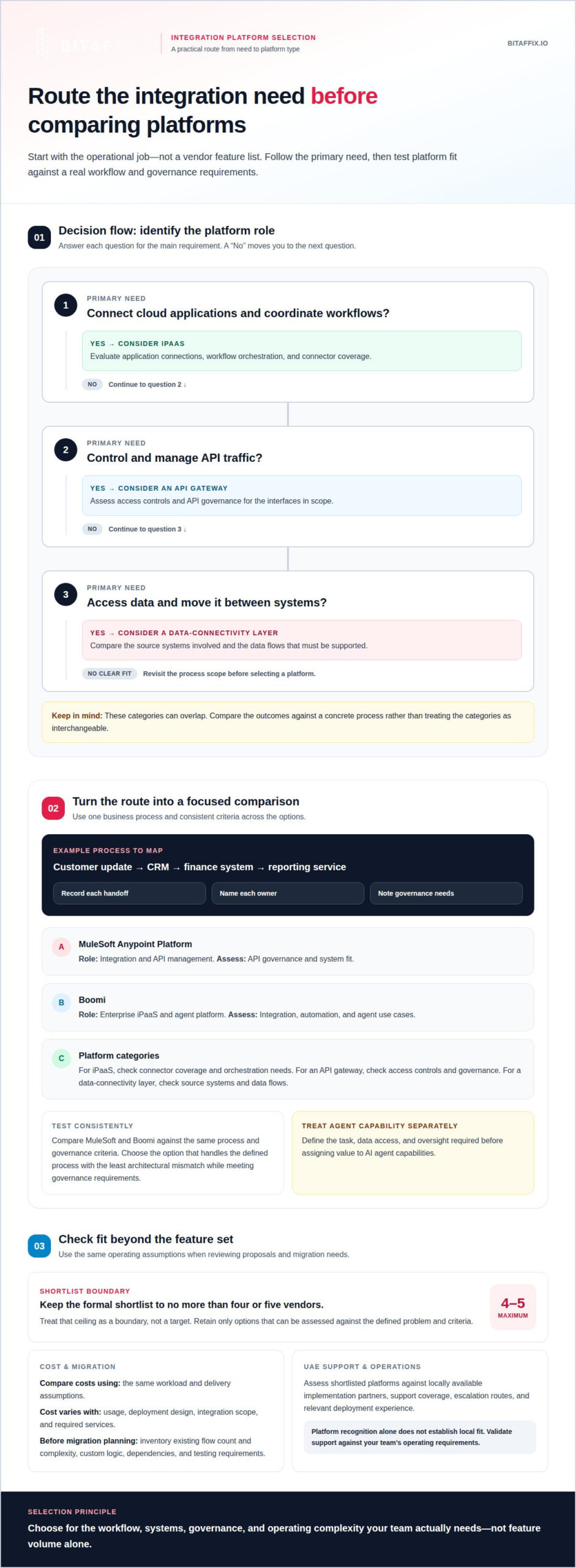
Choosing between iPaaS, API gateways, and data-connectivity layers
Choose an architecture based on the work each layer must perform. An iPaaS coordinates application integrations, an API gateway manages API access, and a data-connectivity layer focuses on connecting sources.
Connector Libraries and Availability
Prebuilt connectors can simplify familiar application connections, but their availability alone does not establish fit. A connector may support common actions but lack a required operation or data field. For example, an invoice process may need approval status and payment details, not just access to the finance application.
Compare connectors against the actual source systems, supported actions, authentication approach, and transformation needs. Identify gaps that require configuration or a different integration pattern. Test representative data and error handling. An iPaaS can coordinate connectors across applications, while a gateway controls access to exposed APIs.
Platform Comparisons with MuleSoft
MuleSoft’s Anypoint Platform provides a reference point for integration and API management. Compare Boomi, Informatica, SnapLogic, and Azure Logic Apps against the same workload, governance requirements, deployment model, and connector needs. Their suitability depends on the architecture and use case, rather than a universal ranking.
For a consistent evaluation, test a defined application flow and record the systems, data transformations, and operational owners involved. Decide whether the main requirement is workflow coordination, data handling, or API access. Then assess each platform’s fit for that role, including implementation effort and the skills needed to maintain the resulting architecture.
Connectivity means more than counting connectors. Test the required operations across each source and destination. Governance should cover ownership, access, and change control. Data handling should match whether the process moves or transforms records, or exposes APIs. Deployment must align with where systems run and how teams operate them.
An iPaaS can suit coordinated application workflows; a gateway can suit controlled API exposure. A data-connectivity layer may be a better fit for analytical access than process orchestration. For example, a reporting pipeline and a customer-facing API need different controls, even when they use the same source system.
Replacing MuleSoft can create risks, including missed dependencies, changed data mappings, and disrupted error handling. Reduce these risks by documenting interfaces and owners, prioritizing critical workflows, and migrating in tested stages. Validate monitoring, access controls, and rollback procedures before retiring each existing integration.
Enterprise and hybrid integration
Hybrid integration connects applications and data across cloud services and on-premises systems. An integration platform must support these boundaries while preserving clear ownership, monitoring, and change control. A midsize enterprise might run finance software in a private data centre while using cloud-based customer service tools.
Established integration platforms may have dozens or hundreds of API connections embedded in daily operations. Replacing or extending them calls for an architecture view, not just a connector inventory. Map each connection to its source, destination, business process, and owner. For example, trace how an order moves from an online storefront to inventory, billing, and customer notifications.
Hybrid and multi-cloud deployment
For a multi-cloud design, identify which systems exchange data across each environment. A retailer might use one cloud for its storefront, another for analytics, and on-premises software for warehouse operations. The integration platform should fit the deployment model and the team’s operating practices. Assess where integrations run, how they reach each system, and how teams monitor failures across environments.
A visual design interface can make workflow logic easier to understand, but it does not remove the need for architecture decisions. Define which system owns each record and how updates move between environments. For a customer address change, specify whether the CRM or billing system is authoritative. Then test duplicate updates, unavailable endpoints, and recovery procedures before expanding the workflow.
Hybrid on-premises integration
On-premises systems can remain essential because they support established processes or specialized applications. For example, a manufacturer may connect production systems with cloud-based planning tools while keeping operational records on-site. Assess network paths, identity controls, data movement, and operational responsibilities for each connection. These details determine whether a platform can support the required pattern without unnecessary complexity.
Use a staged implementation to reduce disruption. First, document existing interfaces and dependencies. Next, select a low-risk workflow that still represents the hybrid architecture. Connect its systems, test normal and failure paths, and compare results with expected business outcomes. Then move higher-impact workflows in planned groups, keeping existing connections available until replacements pass acceptance tests.
- Deployment fit: Map cloud and on-premises systems, including where each integration executes.
- Data ownership: Name the authoritative source for customer, order, and finance records.
- Operational control: Assign monitoring and incident responsibilities across cloud and internal teams.
- Implementation sequence: Test a representative workflow before migrating dependent connections.
Hybrid readiness depends on how well the platform supports actual system boundaries and operating practices. A faster implementation is useful only if it preserves traceability and control. Compare deployment options against a real workflow, such as synchronizing an on-premises inventory record with a cloud order system, and document the access, recovery, and ownership decisions needed for reliable operation.
What are the best MuleSoft alternatives for midsize enterprises?
No single platform is best for every midsize enterprise. Assess Boomi, Informatica, SnapLogic, and Azure Logic Apps alongside MuleSoft. Match a defined business process to each platform’s role, then compare governance, deployment, implementation effort, and ongoing ownership.
Use these distinctions to shape a practical shortlist:
- Boomi: Assess it as an enterprise iPaaS and agent platform. Test a representative application flow and any agent use case against your governance requirements.
- Informatica: Consider it when data integration and management are central requirements. Evaluate how it fits your data sources, transformations, and downstream uses.
- SnapLogic: Compare its integration-platform fit against the systems and processes in scope. Test a defined data flow instead of relying on general platform descriptions.
- Azure Logic Apps: Assess it when your architecture includes Microsoft services and workflow automation needs. Map an end-to-end process and identify the operating responsibilities it creates.
- Other iPaaS platforms: Include suitable options that address your application and workflow requirements. Evaluate them against the same use case and governance criteria as named vendors.
MuleSoft’s Anypoint Platform remains a relevant benchmark for teams prioritizing API-led integration and API management. Distinguish its role from workflow-focused or data-centric options. A customer-facing API and an internal invoice approval process may require different capabilities, even when they use the same finance system.
Compare each candidate against one shared use case. Identify the systems involved and the data they exchange. Assess connector fit, governance controls, deployment requirements, and the skills needed for ongoing maintenance. Include operational tasks such as monitoring failures, managing changes, and assigning owners. A successful demonstration alone does not show how well a platform fits daily operations.
For the final decision, connect every requirement to evidence: a tested workflow, documented control, or clear deployment design. Keep the shortlist focused on platforms that address the defined need. This makes trade-offs visible without treating feature count as a measure of value.
Choose Boomi or MuleSoft when the use case calls for broad integration capabilities; assess Azure Logic Apps for workflow needs; and consider Informatica when data management is the priority. Evaluate SnapLogic against your integration patterns. The strongest fit meets essential requirements and remains manageable within your operating model.
BitAffix
BitAffix can support midsize enterprises whose integration priorities include coordinating business processes and automating operational workflows. Its workflow automation offering can help structure handoffs between teams, such as routing a banking request through review and approval. Kanban Task Automation can also help teams organize and track work linked to those processes.
Turn to BitAffix when your platform assessment identifies workflow execution and task coordination as priorities alongside system interoperability. Its Secure Document Management & Archiving and pre-built Banking solutions may also support related operational needs. Assess these offerings against the specific requirements of your platform architecture.
Contact BitAffix to discuss how its offerings align with your integration and workflow priorities.
Set the next integration priority
Connect platform selection to an operational outcome. Choose a process where clearer ownership, controlled information flow, or fewer manual handoffs would make a practical difference. A shortlist of MuleSoft alternatives for midsize enterprise integration is useful only if it leads to an architecture your teams can govern and maintain.
BitAffix can support the process layer around that architecture. Its Workflow Automation and Kanban-Based Process Automation offerings address how work moves between people and teams, while Secure Document Management & Archiving supports document handling. These capabilities can complement an integration strategy when the goal includes more than connecting systems.
Bring your priority workflow and integration objectives to BitAffix to discuss the next step. A focused conversation can help clarify where platform decisions end and operational automation begins, giving your team a disciplined basis for moving forward.
Build an integration approach that supports reliable operations today and deliberate change tomorrow.
Frequently Asked Questions
How do leading iPaaS platforms compare for API management, EDI, and application integration?
Leading iPaaS platforms differ in how they balance API control, EDI exchanges, and application workflows. Compare each against a specific transaction, such as receiving a supplier order through EDI, validating it, and updating an inventory application. Then assess API access controls and exception monitoring. This shows whether one platform covers the full process or whether separate integration components are needed.
Which MuleSoft alternatives support hybrid and on-premises deployments?
Boomi, Informatica, SnapLogic, and Azure Logic Apps are alternatives to assess for hybrid or on-premises requirements. Deployment fit depends on each platform’s available runtime and connection design, so compare those details against a real system boundary. For example, map how an on-premises finance application exchanges records with a cloud service, including where processing occurs and how teams manage failures.