
A digital task list tracks work; enterprise workflow management software coordinates how work moves across teams, systems, approvals, and records. Effective enterprise workflow software onboarding establishes clear process stages, accountable owners, access controls, and audit trails from the outset. This gives organizations a structured way to standardize repeatable work while maintaining oversight as operations grow.
That structure matters. A workflow delivers value when people can follow it, systems exchange the right information, and leaders can see work status. Organizations in the UAE also need an approach that reflects their operational requirements and governance priorities.
This guide explains what enterprise workflow software does and how to assess its benefits, scalability, security, compliance capabilities, and audit trails. It also covers practical adoption, from mapping a process and planning onboarding to measuring how well the workflow performs in day-to-day operations.
Key Takeaways
- Map a high-volume or high-impact process, including its steps, stakeholders and pain points, before selecting workflow software.
- Assess whether the platform integrates with existing systems and gives teams clear visibility into task progress.
- Plan for scale and adoption together: workflows must remain usable as operational demands grow.
- Build governance into workflow design with role-based access, audit trails, version control and appropriate data-residency considerations.
- Measure workflow completion, bottlenecks and skipped steps to identify where process improvements can deliver practical value.
1. What is enterprise workflow management software?
Enterprise workflow management software coordinates repeatable work across people, systems, and approval steps. For employee onboarding, it can assign tasks to HR, a hiring manager, and IT, then track each task from preparation through completion. A workflow might capture the employee’s hiring and start dates, identify the required IT package, and sequence the necessary actions. This replaces scattered handoffs with a process that makes ownership and progress visible.
An enterprise automation tool should do more than move tasks between queues. It should support configurable stages, approval routing, notifications, records, and reporting, while giving authorized users visibility into progress. For example, a new hire’s workflow can prompt HR to prepare documents, ask IT to arrange network access, and alert the hiring manager when assigned actions remain open. Make the expected outcome and the person responsible for each step clear.
Integration links those workflow steps to the systems where employee and task information already resides. An HR system may provide employee details that trigger onboarding tasks, while Microsoft 365 tools can support workplace communication and document collaboration. The workflow design needs clear rules for which system owns each data field. Without that definition, a changed employee record could be overwritten, duplicated, or passed to the wrong task.
Connectors provide a managed path between applications; custom connectors may be needed when a system lacks a suitable integration. In either case, test representative full-flow scenarios before relying on the connection. Run the complete process through every relevant system, including approvals, failure handling, and record updates. Representative full-flow integration tests should run for 72 hours. That test window can expose intermittent failures that a single successful transaction would miss.
Implementation time has no universal duration. It depends on process complexity, the number of systems involved, data quality, approval rules, and how much user testing the rollout requires. A workflow using one established connector and a straightforward approval path has fewer dependencies than onboarding that spans HR, Microsoft 365, identity access, and several departments. Separate process mapping, configuration, integration testing, user feedback, and rollout to make the schedule understandable.
Common automation risks include inaccurate employee data, unclear task ownership, connector failures, and workflows that preserve outdated steps. A missing access request, for example, can leave a new employee unable to use required systems on their first day. Map the process with HR, IT, managers, and the people who use it regularly. Test exceptions such as a changed start date, review failed integrations, and assign an owner to maintain the workflow after launch.
2. Software selection, scalability and user adoption
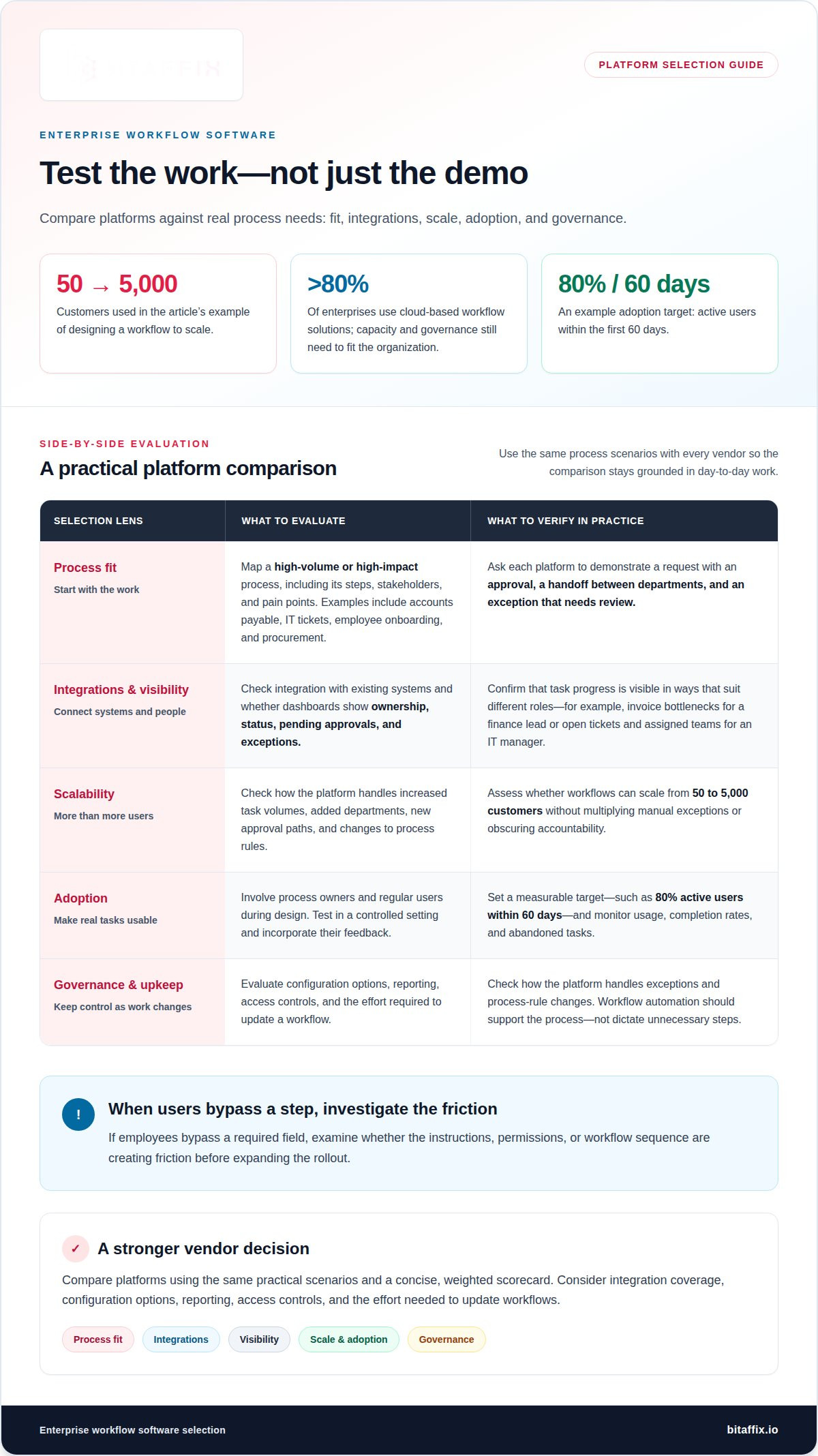
Choose a platform based on the work it must coordinate, not a feature list alone. Start by mapping a high-volume or high-impact process, including its steps, stakeholders, and pain points. Accounts payable, IT tickets, employee onboarding, and procurement are common internal candidates. Mapping helps reveal stalled approvals, repeated data entry, and unclear handoffs. It also gives stakeholders a concrete process to use when evaluating platforms.
Assess each platform against the systems and decisions your workflow depends on. Integrations with existing systems help maintain continuity, while task-level visibility lets managers monitor progress and spot delays. Check whether dashboards show ownership, status, pending approvals, and exceptions in a way that suits each role. A finance lead may need to see invoice bottlenecks, while an IT manager needs visibility into open tickets and the teams assigned to them.
Scalability means more than supporting additional users. Design workflows to scale from 50 to 5,000 customers without multiplying manual exceptions or obscuring accountability. Test how the platform handles increased task volumes, new departments, added approval paths, and changes to process rules. More than 80% of enterprises use cloud-based workflow solutions, so cloud deployment is a common selection consideration, but capacity and governance still need to match the organization’s operating model.
Compare vendors using the same practical scenarios. Ask each platform to demonstrate a request that requires an approval, a handoff between departments, and an exception that needs review. Evaluate integration coverage, configuration options, reporting, access controls, and the effort needed to update a workflow. A concise, weighted scorecard helps decision-makers distinguish a useful enterprise platform from one that only performs well in a polished demonstration. Workflow automation capabilities should support the process, not dictate unnecessary steps.
Adoption depends on whether employees can complete real tasks without confusing workarounds. Involve process owners and regular users during design, then test the workflow in a controlled setting and incorporate their feedback. Set a measurable adoption target, such as 80 percent active users within 60 days, and monitor usage alongside completion rates and abandoned tasks. If employees bypass a required field, investigate whether instructions, permissions, or the sequence create friction before expanding rollout.
Choose an initial workflow with visible value and manageable dependencies, then use its performance to guide the next rollout. A procurement request can expose approval delays; an IT ticket process can reveal unclear routing. Track the baseline, workflow completion, and recurring exceptions so leadership can distinguish adoption problems from process-design gaps. To discuss which processes fit automation, review your workflow requirements with the team.
3. Compliance, security, and audit trails
Build security controls into each workflow stage instead of adding them after launch. Role-based access should reflect job responsibilities: an HR coordinator may update employee records, while a manager approves assigned tasks. Limit access to the information each role needs, and review permissions when responsibilities change. For organizations operating across the UAE, data residency requirements may also affect where workflow records and supporting documents are stored. Align storage decisions with applicable obligations and contractual commitments.
Audit trails make workflow activity traceable. Record who submitted a request, who approved it, when each change occurred, and which document version applied. For example, a procurement approval should retain its decision history alongside the request and supporting evidence. This record helps teams reconstruct how a decision moved through the process and identify missing approvals, unexplained edits, or records that need follow-up.
Version control helps preserve reliable evidence. When an onboarding form or approval template changes, distinguish the current version from earlier records. Reviewers can then see which instructions applied when an employee completed a task. Secure document archiving supports organized retrieval, while defined retention and access practices help teams manage records consistently. Connect each record to its relevant task, approval, and responsible owner.
Compliance reporting should turn workflow activity into useful oversight. Configure dashboards to show overdue approvals, incomplete evidence, access exceptions, and recurring process delays. A compliance lead can use these views to prioritize follow-up, while an operations manager can identify bottlenecks affecting several teams. Reports should distinguish an open task from a documented exception, so leaders can assess status without treating every delay as a control failure. Consistent fields make reporting more useful across departments.
Scale controls alongside the process. When an organization adds departments or approval stages, review role assignments, data access, and reporting rules together. Test whether users can view only the records needed for their roles, and confirm that workflow changes preserve earlier audit history. For AI-supported steps, set guardrails and require human review and approval for consequential decisions. Automation can handle routine routing, while authorized people retain decision-making responsibility.
Keep AI agents within defined guardrails, with a human reviewing and approving consequential decisions. This makes human judgment an explicit checkpoint for significant outcomes and clarifies the limits of an agent’s role in the workflow.
4. Benefits of enterprise workflow management software
Employee onboarding shapes how quickly a new hire understands responsibilities, accesses tools, and contributes. A sequenced workflow can coordinate welcome information, required documents, system access, and manager check-ins. It gives the employee a clear path instead of disconnected requests. Shared task status also helps HR and managers spot delays and see who needs to act next.
Digital onboarding can also support retention and productivity by helping new employees feel supported. AIHR’s 2025 employee onboarding report found that 88% of organizations using digital onboarding tools reported significant improvements in employee retention and productivity. Forbes reported that digital onboarding solutions accelerate new employee ramp-up by 60 percent. These findings describe reported outcomes, not a guaranteed result for every implementation.
The operational value extends beyond an employee’s first days. Workflow management can reduce repetitive handoffs, clarify task ownership, and standardize recurring approvals. For example, completing one request can trigger the next action, while a dashboard shows overdue work and recurring bottlenecks. Teams can spend less time chasing status and more time resolving exceptions that need judgment.
Measure return on investment against a baseline, not an assumption. Before and after a workflow change, track completion time, manual follow-ups, skipped steps, and rework. A shorter cycle may indicate improved throughput, while fewer incomplete submissions may reflect clearer instructions. Compare the results with implementation and maintenance effort, then review whether the improvement remains useful as teams and workloads change.
For a practical assessment, examine a recurring purchase-order request from submission to final approval. Compare its completion time, follow-up messages, and returned forms before and after workflow changes. This ties potential staff-time savings to a specific process and measurement period. It also helps distinguish better coordination from changes caused by request volume or staffing.
For employee onboarding, evaluate both process performance and human experience. During the first 90 days, monitor engagement and employee satisfaction alongside workflow completion. Gather feedback from new hires and managers through surveys, interviews, and performance metrics. If a task repeatedly stalls, identify whether unclear ownership, missing information, or poor sequencing causes the delay. Adjust the workflow, then observe whether the change improves completion and the new hire’s experience.
support, since onboarding can help new hires feel supported and reduce anxiety. In 2026, enterprise onboarding is a long-term strategy for engagement, retention, and productivity rather than paperwork.
5. Enterprise workflow software definition and purpose
Enterprise workflow software provides the operating layer that defines how work moves through an organization. It connects a business event, such as a submitted purchase request, to assigned tasks, approvals, records, and completion criteria. Unlike a static checklist, it applies rules as work progresses and preserves the sequence of actions. Its purpose is to make repeatable processes visible, consistent, and manageable across teams.
A workflow has a start condition, defined stages, decision points, and an end state. For a supplier request, submission can trigger a review, route the request to an approver, and record the decision. If information is missing, the process can return the request for correction rather than advance it. These rules make exceptions part of the process design instead of leaving them as invisible email workarounds.
Workflow automation handles predictable actions, while people remain responsible for judgment. A system can route a document for approval, send a reminder, and preserve a signed decision record. An authorized manager still evaluates the request and approves or rejects it. This division provides operational control without confusing automated routing with business authority. It also gives teams a traceable account of each transition.
Boards can make tasks across stages easier to follow, especially when teams need to see ownership and status. A Kanban board, for example, may show work awaiting review, in progress, or completed. Enterprise workflow software adds orchestration to this visual view: rules assign work, approvals control transitions, and records capture outcomes. The board displays progress; the workflow governs how tasks advance.
Enterprise scale comes from standardizing the core process while defining how legitimate exceptions work. A procurement workflow might use the same submission fields across departments, then route different request types to the appropriate reviewer. Clear ownership prevents tasks from becoming stranded between teams. Defined access and records also help organizations manage visibility without exposing every document to every user. Core workflow platform features should support these operational needs.
The practical test is whether a workflow improves control over a real business process. Define the desired outcome, such as a complete approval record or fewer requests returned for missing information. Then monitor whether the process achieves that outcome consistently. If the workflow adds steps without improving visibility, accountability, or execution, refine its design. This purpose-led approach keeps automation tied to business operations, not technology for its own sake.
BitAffix: Workflow Automation
BitAffix provides Workflow Automation for organizations that want to structure repeatable processes, approvals, and handoffs. It suits teams that have mapped a process and need clearer task ownership and progress visibility. Kanban Task Automation supports visual task coordination, while Secure Document Archiving helps organize documents. Banking Sector Solutions support workflows tailored to the banking sector.
For enterprise workflow software onboarding, start with a defined process, its stakeholders, and the outcomes it must support. BitAffix’s workflow automation offering is a relevant next step when manual coordination makes those processes difficult to manage consistently.
Contact BitAffix to discuss your workflow requirements.
Turn workflow change into an operating capability
The next stage is sustained ownership. Assign a process owner to coordinate operational priorities, manage change requests, and keep teams aligned as responsibilities evolve. Give employees a clear way to raise friction points, then review their feedback as part of routine process governance. This keeps workflow design connected to the work people actually do.
A disciplined approach to enterprise workflow software onboarding also creates a foundation for thoughtful expansion. Treat each new workflow as part of an operating model, with defined decision rights and accountable owners. As processes change, communicate what changed, why it matters, and how affected teams should respond. Clear communication helps maintain confidence as the organization modernizes its operations.
Choose the next step based on your organization’s priorities and the processes that matter most. A focused discussion with BitAffix can help translate those priorities into a practical path forward.
Build a more coordinated way of working, one deliberate improvement at a time.
Frequently Asked Questions
What is enterprise workflow management software?
Enterprise workflow management software coordinates business processes through digital tasks, rules, and records. Its value comes from connecting actions across departments, rather than digitizing a single form. For example, a completed employee profile can initiate separate requests for payroll setup, equipment preparation, and manager review. Each team handles its part within a shared process, helping prevent disconnected requests and unclear handoffs.
What are the key features to look for in enterprise onboarding workflow software?
Look for configurable process stages, clear ownership, role-based access, searchable records, and reporting suited to onboarding responsibilities. Integration options matter when employee data is held in separate systems. HR may need to see document status, for example, while IT tracks access requests. A well-designed platform should also handle exceptions, such as a changed start date, without losing the history of earlier actions.
Which enterprise workflow software platforms offer onboarding solutions?
Platforms that support workflow automation and enterprise system integration can coordinate employee onboarding. BitAffix provides Workflow Automation and Kanban Task Automation, alongside Secure Document Archiving and Middleware. These solutions support organizations seeking structured processes, task coordination, document management, or communication between enterprise systems. The right platform depends on the processes involved, existing applications, governance requirements, and how teams need to manage work.
How do leading enterprise onboarding workflow platforms compare in features and integrations?
Compare platforms by how they handle process configuration, integration, governance, records, and operational reporting. One may emphasize visual task coordination; another may focus on connecting enterprise databases or preserving documents. Evaluate each against the same onboarding scenario, such as routing a manager’s approval while updating related records. This reveals practical differences in process visibility, exception handling, and coordination across teams.
What are the steps to implement onboarding workflows in enterprise software?
Begin by defining the desired employee experience and assigning a process owner. Map the decisions, tasks, data sources, and exceptions that shape the journey. Configure the workflow, connect the required systems, and test both routine cases and scenarios such as delayed documents or changed roles. Run a controlled pilot with HR, IT, and managers. Use their feedback to refine instructions and responsibilities before wider deployment.
How can onboarding workflow software integrate with HRIS, payroll, identity, and document systems?
Integration typically connects the workflow to systems that hold employee, payroll, identity, or document information. Define which application owns each field, what event starts a transfer, and who can access the resulting record. For example, an approved employee profile could trigger a payroll setup task. Middleware can help enterprise databases and legacy platforms communicate, while clear data mapping reduces duplicate or conflicting records.
How can organizations measure the ROI and effectiveness of onboarding workflow software?
Assess value by comparing process effort and employee readiness before and after implementation. Track measures such as the time needed to provision role access, requests returned for correction, and manager readiness before an employee starts. Pair operational data with feedback from new hires and managers. Review results by role or department to identify what works well and where the experience needs refinement.