
Automation value is determined by the workflow, not the industry label. In the UAE, industry-specific workflow automation costs depend on factors such as process complexity, system integrations and whether AI, robotic process automation or human-assisted steps are involved. The return depends on what those workflows improve, from processing speed and accuracy to staff capacity and output.
Growing organisations need more than a generic tool. Banking, insurance, energy, education and automotive workflows each involve distinct handoffs, records and controls. Effective industry-specific workflow automation reflects those operational realities instead of applying the same template everywhere.
This guide explains how automation differs across industries, what shapes implementation and operating costs, and how to assess ROI against measurable workflow outcomes. It also covers where AI and robotic process automation fit, when human oversight matters, and how to connect automation choices to productivity gains.
Key Takeaways
- Match automation to the industry’s real workflows, handoffs and control requirements rather than applying a generic template.
- Compare AI, robotic process automation and human-assisted workflows by the task each can reliably support.
- Assess monthly costs through platform needs, integrations, process complexity and ongoing support, then weigh them against expected operational value.
- Measure ROI through outcomes such as reduced manual effort, faster processing, fewer errors and increased production capacity.
- Prioritise repeatable, high-friction processes first to build a practical automation roadmap and expand with confidence.
Automation technologies, including AI and robotic process automation
In the UAE, requirements depend on the industry, the data handled and existing controls. Automation should preserve applicable access, approval, recordkeeping and retention controls. Choose technology according to the task, its complexity and the decisions people need to oversee.
Automation Technology Options
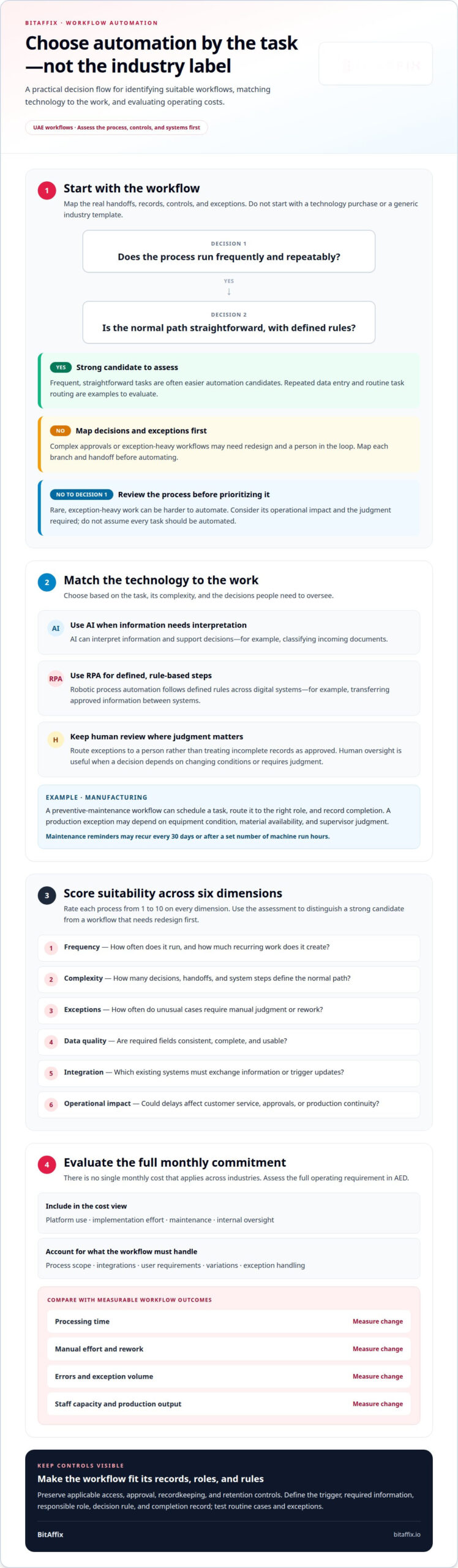
Artificial intelligence interprets information and supports decisions, while robotic process automation follows defined rules across digital systems. The distinction matters: AI can help classify incoming documents, while RPA can transfer approved information between systems. In manufacturing, maintenance reminders can recur every 30 days or after a set number of machine run hours. Human review remains useful when exceptions need judgment.
Start with process selection, not a technology purchase. A 2×2 matrix compares frequency with process complexity: frequent, straightforward tasks are often easier automation candidates than rare, exception-heavy work. For example, repeated data entry may suit rule-based automation, while a complex approval involving changing conditions may need a person in the loop. Very complex workflows can also become difficult to read, as the National Center for Biotechnology Information notes about workflow approaches.
Manufacturing makes that distinction visible. A preventive-maintenance workflow can trigger a scheduled task, route it to the right role and record completion. Yet a production exception may depend on equipment condition, material availability and supervisor judgment. Map those branches before automation; otherwise, updates can follow the wrong path or conceal a handoff. A survey of 101 manufacturing chief operating officers found 2% said AI was fully embedded across their operations in 2025, illustrating that adoption can remain limited even in digitally focused environments.
Documentation Delays and Workflow Management
Workflow management defines how information, approvals and tasks move from initiation to completion. Clear process definitions matter because paper forms can stall between departments, forcing staff to re-enter details and wait for signatures. An invoice, for example, may pass through receipt, validation, approval and payment. Digital routing makes each handoff and exception visible.
To reduce delays, define each process’s trigger, required information, responsible role, decision rule and completion record. Then identify where paper enters, such as a scanned form or signed maintenance sheet. A digital document workflow can route the record, request missing fields and preserve an audit trail. It should send exceptions to a person rather than treating every incomplete record as approved.
Technology choices must also reflect sector-specific controls. Banking workflows may require structured approvals and controlled access; manufacturing processes may need traceable maintenance records. The relevant requirements depend on the organization’s activities and data. Map those controls into each workflow before automating, then test routine cases and exceptions. A UAE-focused workflow automation approach can align digital routing with defined process steps, while keeping oversight points explicit.
How much does workflow automation cost per month?
There is no single monthly cost that applies across industries. Pricing for automation depends on process scope, integrations, user requirements and ongoing support. In the UAE, assess the full operating requirement in AED, including platform use, implementation effort, maintenance and internal oversight.
Compare the expected monthly commitment with the manual work a process consumes. An invoice workflow, for example, may involve document intake, validation, approvals and exception handling. A simple task-routing process has different integration and oversight requirements. Often, the main cost challenge is not the visible workflow itself, but the systems and variations it must handle.
A structured suitability assessment can rate each process from 1 to 10 across six dimensions. Use the results to distinguish a strong automation candidate from a workflow that needs redesign first:
- Frequency: How often does the process run, and how much recurring work does it create?
- Complexity: How many decisions, handoffs and system steps define the normal path?
- Exceptions: How often do unusual cases require manual judgment or rework?
- Data quality: Are required fields consistent, complete and usable?
- Integration: Which existing systems must exchange information or trigger updates?
- Operational impact: Would delays affect customer service, approvals or production continuity?
Automation can support many business functions, but readiness varies by process. A school admissions enquiry, an insurance claim intake and a banking approval each involve different data, roles and controls. Start with a focused use case, then measure processing time, rework and exception volume. These results help determine whether the next workflow can follow the same pattern or needs a tailored design.
Scaling across teams or UAE locations introduces governance demands. Shared workflows can standardize common steps, while local teams may need distinct approval paths, records or escalation rules. Separate the core process from approved variations. This helps avoid duplicating entire workflows when only one handoff or decision rule differs.
Customization becomes risky when every team creates its own version. Divergent rules increase maintenance effort and make updates harder to coordinate. Before expanding, standardize shared definitions, assign ownership and document exceptions. Keep a person responsible for cases that depend on context or incomplete information.
Use a workflow assessment booking page to discuss process scope, integrations and operating needs before budgeting.
Operating costs, ROI, and production output
Automation can change operating costs by reducing manual effort, repeated data entry and inconsistency in process execution. Measure these effects against the full cost of running each workflow, including platform operation, integration maintenance, exception handling and employee oversight. A process that saves time but creates frequent correction work may deliver little net value.
Start with a baseline. For an invoice process, record the time employees spend receiving, checking, routing and reporting each document. Then track the same stages after automation. De Agostini saved 500 hours per month in invoicing through automation, illustrating how repeated administrative work can release substantial staff capacity.
Hours saved are only one part of ROI. Connect process measures to operational outcomes: shorter approval cycles can improve cash visibility, while fewer production handoff delays can support steadier output. A manufacturer, for example, can track completed maintenance tasks, missed service windows and machine downtime together. This shows whether automation improves production, rather than simply moving tasks faster.
Include ongoing operating demands in the calculation. An automated workflow still needs reliable source data, clear ownership and a route for exceptions. If a supplier invoice arrives with missing fields, the process should flag it for review instead of routing it as complete. That review takes employee time, so record exception volume alongside routine processing.
Data quality can limit returns. PwC’s Digital Trends in Operations survey found that 87% of operations leaders said poor data quality limited the value they received from digital initiatives. In practice, inconsistent product codes can disrupt inventory reporting, while incomplete customer records can trigger rework. Improving data consistency may therefore matter as much as adding automation.
Use a balanced scorecard to assess operating value across each workflow:
- Labour capacity: Compare staff time spent on routine steps before and after deployment.
- Processing quality: Track corrections, duplicate entries and incomplete records.
- Cycle time: Measure elapsed time from submission to approval or completion.
- Production output: Connect task completion to throughput, service continuity or delivery readiness.
- Operating effort: Record support, maintenance and exception-review work.
Review the measures together, not in isolation. Faster processing alongside rising errors can increase downstream costs. Fewer errors with unchanged output may still free employees for higher-value work. Regular reporting can reveal whether results hold as demand and team workloads change.
For UAE operations, assess each workflow against its own business outcomes rather than relying on a generic return estimate. Compare the recurring effort to maintain the process with measurable improvements in capacity, quality and output. Expand only when evidence shows the workflow performs consistently in routine cases and exceptions.
Workflow automation market segmentation by industry
Configurable workflow platforms and sector-focused systems can support industry processes. The right fit depends on integrations, governance and exception handling. Compared with general-purpose tools, industry-specific workflow automation reflects sector processes directly, while broader platforms offer adaptable building blocks that teams configure around their needs.
Platforms for Industry-Specific Processes
Platforms for industry-specific processes provide workflow controls that can be configured around sector tasks, records and approvals. They matter because a bank’s approval sequence differs from a school’s admissions process. Evaluate whether the platform can route tasks between existing systems, record decisions and send exceptions to accountable staff. In the UAE, workflows should also fit the organization’s internal governance and data-handling practices.
A platform’s category alone does not determine whether it fits. A configurable workflow management system can support processes across departments, while a sector-focused platform may offer workflows closer to a particular operating model. A utility company handling regulatory reporting, for example, needs controlled data collection and review. A school processing admissions enquiries needs routing, follow-up and counselling booking. Define the process first, then assess how much configuration each approach requires.
Market segmentation becomes clearer when mapped to actual work rather than industry names. Education businesses can automate admissions enquiries, counselling booking and WhatsApp continuity. Real estate teams can route lead qualification, site visits and follow-up. Clinics can coordinate appointment booking, reminder calls and support triage. These examples share a need for reliable handoffs, but their records, decisions and customer journeys differ.
Defining Industry-Specific Automation
Industry-specific automation adapts triggers, decision paths and records to a sector’s actual processes. It matters because a generic task flow may miss the handoffs that shape service quality, such as a banking approval or an automotive service request. The goal is not to relabel a template, but to reflect the work, information and outcomes that define each operation.
Consider manufacturing. A machine-maintenance workflow can assign a task based on a schedule or machine run hours, then record completion for operational visibility. An energy organisation may instead automate budget approvals or reporting handoffs. The workflow creates value by matching these distinct triggers and ownership rules to each process, not by using the same sequence across industries.
General-purpose tools can suit teams with common task patterns, such as approvals, reminders and status updates. Industry-focused solutions are more relevant when workflows depend on sector-specific records, specialized review paths or structured customer journeys. The trade-off is flexibility versus process alignment: broad configurability supports varied uses, while closer sector fit can reduce the gap between a platform’s workflow model and daily operations.
For a UAE organisation planning digital transformation, segment demand by workflow and business outcome. Identify the operational group, initiating event, required decisions and completion record. Then compare candidate platforms against that map. A bank, university and automotive business may all need approvals, but their decision rules and evidence requirements call for distinct workflow designs.
What is industry-specific workflow automation?
Industry-specific workflow automation applies digital rules, task routing and system connections to processes shaped by a sector’s work. Each workflow brings together a defined trigger, required information, decision points, responsible roles and a completion record. For a UAE organisation, that means reflecting how teams handle transactions, service requests and approvals rather than simply applying an industry label to a generic template.
The distinction is operational. A logistics workflow might start when a shipment status changes, route an exception to a coordinator and notify the team responsible for the next handoff. A university process might start with an application, check required information and send it to the appropriate review stage. Both use automation, but their triggers, records and decision paths serve different outcomes.
A practical design links an industry and use case to its channel journey, business outcome, conversion path and performance tracking. That connection helps teams identify where automation improves the process, rather than digitizing every existing step without examining its purpose. A service organisation, for example, can map how an enquiry arrives, who qualifies it, how it becomes a scheduled appointment and how completion is recorded.
Define each workflow through five elements:
- Trigger: Name the event that starts the process, such as a submitted request or status change.
- Information: Specify the fields and documents each decision requires.
- Decision path: Record the rules for routine cases and the route for exceptions.
- Ownership: Assign each task to a role, team or authorized reviewer.
- Outcome: Choose a measure that reflects the intended result, such as completion time or fewer incomplete submissions.
Keep the initial scope focused. Select one to three priority industry or ideal-customer combinations, then define one to two priority workflows for each. This concentrates design effort on processes with clear operational outcomes and helps teams decide what to standardize before expanding. Industry-specific workflow automation works best when its scope reflects a defined operational need.
It doesn’t mean every team needs a separate platform or entirely unique process. A shared foundation can support common steps, while approved variations account for different roles, records or approval paths. Document which rules remain consistent and which depend on each workflow’s purpose. For instance, an invoice decision could route deviations beyond a defined tolerance, such as ±5%, for human review.
Measure performance against the process outcome, not automation activity alone. Track whether the intended handoff is completed, whether exceptions reach the right reviewer and whether the resulting record supports reporting. A task moving automatically does not, by itself, prove better service or output. These measures help assess whether industry-specific workflow automation delivers the intended operational result.
BitAffix: Workflow Automation
BitAffix helps organisations structure repeatable processes with Workflow Automation, Kanban Task Automation and Secure Document Archiving. These solutions support teams that need clearer task ownership, coordinated handoffs or organised digital records. For banking operations, BitAffix also offers Banking Sector Solutions designed for sector-specific processes.
Turn to BitAffix when manual steps cause delays, teams need consistent task visibility or document handling interrupts process flow. A focused discussion can clarify the workflow, its handoffs and the outcomes your organisation wants to improve, then identify how automation can help.
Contact BitAffix to discuss your workflow automation needs.
Build a Clear Path from Process to Performance
Automation becomes a lasting capability when teams treat it as part of operational governance, not a standalone technology project. A well-governed approach to industry-specific workflow automation gives process owners clear responsibility for maintaining decision rules, reviewing exceptions and aligning changes with business priorities. That discipline helps organisations adapt workflows as responsibilities and operating needs evolve.
Make the next step a focused discussion about one process that matters to your organisation. Define the outcome it should support, the people responsible for decisions and the information needed to keep work moving. BitAffix can help assess how its automation capabilities fit that operational context and where a structured workflow can support your priorities.
Set a clear direction, align the workflow with the work itself and give your team a sound foundation for progress.
Frequently Asked Questions
What is workflow automation, and why do growing MSMEs need it?
Workflow automation uses software to route information and tasks through defined business steps. Growing MSMEs can use it to keep routine work moving as responsibilities spread across employees. A purchase request, for example, can move from submission to manager approval and finance review, with its status visible at each handoff. This can reduce manual coordination and give staff more time for customer service and other higher-value work.
How do you choose a business automation toolkit?
Choose a toolkit by matching its capabilities to one clearly defined process and its constraints. Map the systems involved, the information exchanged, the people responsible for decisions and the exceptions that need review. A procurement process, for example, may need supplier records, approval routing and a way to track open requests. Consider governance, reporting and interoperability alongside ease of configuration, so the toolkit fits operational needs.
What is a workflow?
A workflow is an organized sequence of tasks that moves a request or information toward a defined outcome. It identifies what starts the process, who handles each step and what completes it. An employee expense request, for example, may move from submission to review, approval and reimbursement. A clear workflow makes ownership and handoffs understandable, even before software automates any part of it.
What is the difference between a task list and workflow automation?
A task list records work someone needs to do; workflow automation also coordinates what happens between tasks. A team member may see “review supplier form” on a list, while automation can route the form to that person after submission and notify the next approver after review. Use a task list for personal tracking. Use automation when work depends on handoffs, rules, status changes or consistent follow-through across people.
What is workflow automation in simple words?
Workflow automation moves routine work through agreed steps instead of relying on someone to pass every item along manually. After a customer submits a service request, for example, the system can assign it to the appropriate team and record its status. A person can still make decisions or handle exceptions. Software coordinates repeatable steps, while staff oversee work that requires judgment.
Which industries benefit most from workflow automation?
Industries with repeatable processes, frequent handoffs or document-heavy work can benefit. Industry-specific workflow automation can tailor process routing to sector needs instead of forcing every team into one generic sequence. Banking and insurance teams may coordinate approvals and records, while schools and universities can manage enquiries and application stages. The strongest opportunity depends on whether a process has clear steps and a measurable operational purpose.
What are common workflow automation use cases by industry?
Use cases reflect how each sector serves customers and manages internal work. Education organisations can route admissions enquiries and counselling bookings; real estate teams can qualify leads and schedule site visits. Clinics can coordinate appointment booking and reminders. Finance teams can route unusual invoice entries for review. These examples work best when workflows reflect actual roles, information needs and decision points, rather than a generic sequence.
How much does sector-tailored workflow automation cost?
The cost of industry-specific workflow automation depends on workflow scope, integrations, user requirements and ongoing operational support. For UAE budgeting, assess recurring and implementation expenses in AED, then compare them with expected savings in staff time, rework and processing delays. A straightforward approval flow has different requirements from a process spanning several systems and departments. Estimate costs against the defined use case and its expected operating outcomes, not an industry-wide average.