
The fastest workflow to build isn’t always the right one to scale. The Kissflow vs. enterprise-governed workflow automation decision comes down to how much autonomy business users need and how tightly the organization must control workflow design, access, change, and oversight. Teams prioritizing rapid business-user building may favor a different approach from enterprises that need governance embedded across workflows.
It’s reasonable to want both speed and control. The challenge is choosing an approach that helps teams improve processes without creating fragmented rules, inconsistent approvals, or operational blind spots. The right fit depends on how your organization balances business-led configuration with centralized standards and accountability.
This comparison examines business-user workflow building, governance controls, certifications, uptime, customer outcomes, and security. It also offers a practical decision guide for enterprise teams in the UAE, helping you assess which approach fits your governance requirements, implementation priorities, and plans for growth.
Key Takeaways
- Match workflow-building freedom to your team’s delivery model, while keeping IT oversight aligned with enterprise requirements.
- Assess approval paths, conditional routing, and escalation controls against the decisions your workflows need to govern.
- Compare certification scope and uptime commitments as distinct measures of assurance and service availability.
- Use customer outcomes and implementation experience to judge whether a platform’s operating model fits your organization.
- Choose security and governance controls that support consistent workflows across teams, systems, and sensitive processes.
Business-user building with IT governance versus developer-led delivery
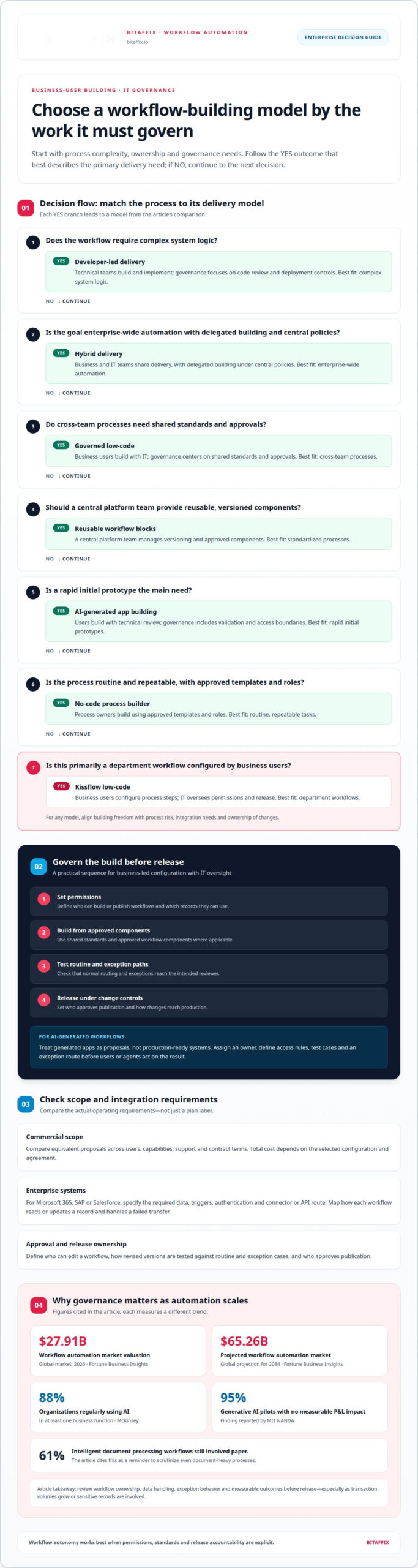
The key question in the Kissflow vs. enterprise governed workflow automation comparison is who can build and change processes. Kissflow’s low-code workflow tools let business users configure process steps, while IT oversees access, data, and releases. For example, a finance team could map invoice approvals and route exceptions to a designated reviewer. A developer-led approach places more design and implementation responsibility with technical teams.
Business-led workflow building can shorten the path from a documented task to a working process. IT governance still matters: define who can publish workflows, which records they can use, and how changes reach production. A practical sequence is to set permissions, build from approved components, test routine and exception paths, then release under change controls. This helps prevent teams from creating conflicting approval rules.
To compare Kissflow pricing plans and enterprise contract costs with alternatives, assess each proposal’s commercial model and included scope, such as users, capabilities, support, and contract terms. The total depends on the selected configuration and agreement, so compare equivalent requirements rather than relying on a plan label alone.
Can Kissflow integrate with enterprise systems such as Microsoft 365, SAP, and Salesforce? Integration depends on the required data, triggers, authentication, and available connector or API route for each system. Include those systems as explicit design requirements, then map how each workflow reads or updates a record and handles a failed transfer.
AI-generated enterprise apps provide another way to start building. A team might use a prompt to draft a form or process, then apply governance before users or agents act on the result. Every generated workflow still needs an owner, access rules, test cases, and a defined exception route. These controls are particularly important when transaction volumes grow or sensitive records are involved.
| Building approach | Primary builder | Governance focus | Best fit |
|---|---|---|---|
| Kissflow low-code | Business users | Permissions and release oversight | Department workflows |
| Governed low-code | Business users with IT | Shared standards and approvals | Cross-team processes |
| No-code process builder | Process owners | Approved templates and roles | Routine, repeatable tasks |
| Developer-led delivery | Technical teams | Code review and deployment controls | Complex system logic |
| AI-generated app building | Users with technical review | Validation and access boundaries | Rapid initial prototypes |
| Reusable workflow blocks | Central platform team | Versioning and approved components | Standardized processes |
| Hybrid delivery | Business and IT teams | Delegated build with central policies | Enterprise-wide automation |
Choose the model by process risk, integration needs, and who must own changes; teams standardizing workflow automation can align business-led configuration with controlled delivery.
Market growth makes governance choices more consequential: Fortune Business Insights valued the global workflow automation market at $27.91 billion in 2026 and projected it to reach $65.26 billion by 2034. McKinsey reported that 88 percent of organizations regularly used AI in at least one business function, while MIT NANDA found that 95 percent of generative AI pilots produced no measurable P&L impact. These findings support treating AI-generated workflows as proposals, not production-ready systems. Review ownership, data handling, exception behavior, and measurable outcomes before release. Even document-heavy processes need scrutiny: 61 percent of intelligent document processing workflows still involved paper.
Approvals, conditions, and escalation
Approval design defines who can authorize a transaction, under what conditions, and what happens when action stalls. When evaluating a Kissflow workflow, map each approval stage, version change, test case, and release control before deployment. Validate these requirements against the proposed configuration rather than assuming every process needs the same route.
Start by documenting the decision path. For an expense request, identify the requester, budget owner, and final approver, then specify the amount or department conditions that determine routing. A routine request might follow one path, while missing documentation could send an exception back to its owner or to a designated reviewer. Clear conditions prevent ambiguous handoffs and make decisions easier to audit.
Only 35 percent of leaders said all AI tools went through proper approval channels in October 2025. That finding makes ownership and escalation relevant even when a workflow includes AI-assisted steps. Name the person accountable for reviewing an agent’s output, set the point where human approval becomes mandatory, and record the reason for any override.
Assess Kissflow’s approvals, versioning, testing, and change management by tracing a proposed workflow change from draft to release. Define who can edit it, how the revised version is tested against routine and exception cases, and who approves publication. Establish the control path for the specific workflow and operating model under consideration.
Use this sequence to make the review concrete:
- Assign owners: identify the requester, approver, process owner, and escalation recipient.
- Write conditions: specify what routes a record forward, back for correction, or to an exception queue.
- Set escalation: identify the next responsible role when an approval remains unresolved.
- Test changes: run routine and exception examples before releasing a revised workflow.
- Preserve audit trails: capture decisions, timestamps, changes, and stated reasons in the process record.
Integration adds another control point. If an approval depends on data from Microsoft 365, SAP, or Salesforce, define which system supplies the decision field and how the workflow responds when that record is unavailable. Test both a valid response and a failed transfer, then make the exception visible to an owner rather than silently advancing the request.
Choose a model that makes approval ownership, conditional routing, and escalation understandable to business teams and IT. To map those requirements into a governed process, discuss your approval workflow.
Platform certifications and uptime commitments
Certification evidence and uptime commitments answer different questions. A certification describes an assessed control framework; an uptime commitment sets a service availability target under contract. Assess each platform using current evidence and terms that apply to the intended service, rather than treating either as a blanket guarantee.
Begin with the certification record. Identify the exact platform service, hosting scope, covered locations, assessment period, and exclusions in the supporting document. A certification covering one corporate function may not apply to every product component or integration. For example, a workflow using an external identity provider also depends on that service.
Names such as ISO/IEC 27001 and SOC 2 can help structure a procurement review, but the label alone does not establish fit. Ask what system boundary the report covers, which controls were assessed, and whether the document applies to the service your team will use. In the UAE, this gives procurement, security, and legal teams a clear basis for reviewing the same evidence.
Uptime needs equally careful reading. Locate the service-level commitment, its measurement window, and the remedy available if the target is missed. Distinguish the platform’s stated availability from the end-to-end availability of a process that also depends on Microsoft 365, SAP, Salesforce, or another connected system. A workflow may be accessible while a dependency prevents a task from completing.
Use a practical review sequence:
- Match scope: connect each certification or report to the exact platform and service under review.
- Read the commitment: identify the uptime target, measurement period, exclusions, and remedy.
- Map dependencies: record identity, data, and integration services that affect each workflow.
- Test recovery: define how teams handle a delayed approval or unavailable connection.
- Assign ownership: name the internal contact who evaluates evidence and tracks service incidents.
For Kissflow, do not assume a certification or uptime figure without reviewing the current platform documentation and contract. Record the commitment and scope for the selected service, then compare them with alternatives using the same criteria. This keeps procurement specific and ensures contractual details, not marketing language, guide the decision.
For critical processes, assess the operational impact of disruption. A delayed employee request might be manageable through a manual route, while a payment approval could need a defined fallback and reconciliation record. Document the process owner, acceptable delay, and recovery step before deployment. This helps determine whether the platform’s commitment supports the business process, not just the software.
A sound decision connects evidence to operational design: assess certification scope, contractual uptime terms, dependencies, and recovery steps together.
Customer experiences and implementation outcomes
Customer outcomes matter only when the project scope and measurement are clear. Gordon Food Service reported reaching results in 90 days, but that timing alone doesn’t define the result or establish a benchmark for another organization. Use case studies as context, then examine the workflow, baseline, deployment scope, and outcome described. A short rollout for one department differs from a multi-system enterprise programme.
Assess implementation in stages, whether you are considering Kissflow or another platform. First, select one process with a clear owner and operational purpose. Map its current steps, handoffs, exceptions, and records. Configure the solution around that process, then test it with representative users before expanding. This shows whether the platform fits the work before broader adoption.
Implementation models shape how teams work. In a business-led model, process owners can configure routine steps while IT manages integrations and release controls. A developer-led model gives technical teams more responsibility for architecture and custom logic. A hybrid model assigns roles deliberately. For example, HR may own an employee request process while IT governs identity, data access, and connections.
Compare outcomes using operational evidence, not broad claims. Record completion time, rework, unresolved exceptions, and user adoption before launch, then review the same measures afterward. Keep the process scope consistent. If the workflow expands from one department to several, separate the results of the new rollout from the original baseline.
Use these steps to evaluate customer experiences:
- Define the baseline: document the current process, owner, handoffs, and recurring delays.
- Set the outcome: choose a measure tied to the process, such as fewer manual transfers.
- Record scope: note departments, integrations, custom logic, and data involved.
- Review adoption: collect user feedback and identify steps that create confusion.
- Plan expansion: carry proven workflow models forward, then assess each new process separately.
In the UAE, include relevant business, technology, and risk stakeholders in implementation planning. A banking workflow, for example, may have different owners and records from a school admissions process. Assess how each platform supports the actual process, its integrations, and its operating model, not just how quickly a demonstration can be configured.
Useful case evidence identifies the process, deployment scope, measured outcome, and timeframe. These details help distinguish a repeatable implementation model from results shaped by one organization’s circumstances. A disciplined comparison connects customer experience to the work your teams need to do.
The CFO Survey found that Nearly 60 percent of companies implemented technology to automate tasks over the prior year. That finding provides a reason to ask which tasks a proposed workflow will automate, rather than treating implementation itself as an outcome. Teams can connect the selected process to a clear operational purpose, then check whether automation reduces the specific friction recorded in the baseline. If the evidence is mixed, retain the scope and review exceptions and user feedback before extending the model. The survey finding offers context, not a substitute for process-level measurement.
Enterprise governance and security controls
Evaluate governance across identity, data, workflow changes, and oversight. For each platform, map the relevant controls to the processes and records it will handle.
Treat enterprise SSO, SCIM, data residency, and compliance certifications as distinct requirements. Assess each against the identity, hosting, and assurance scope your deployment needs; one capability does not establish the others.
Complexity, Scalability, and IT Governance Limitations
Complexity, scalability, and IT governance are related but distinct criteria. For Kissflow, assess whether the workflow logic, transaction volume, integration pattern, and change controls fit the proposed configuration. Complex branching or cross-system dependencies can increase design and oversight needs. Scaling also requires clear ownership, access rules, and support as processes extend across teams.
No single limitation applies to every workflow. A finance approval with several exception paths may need closer technical oversight than a simple internal request. Assess fit against the actual process, data, and control requirements.
Risks in Regulated Workflows
Regulated workflows carry risks when access, decision records, or document handling do not meet internal control requirements. For example, a finance process might route a sensitive record to the wrong role or lack an audit trail explaining an override. Assess these design and operational risks for any platform rather than assuming they apply to a particular deployment.
For Kissflow, identify the controls each regulated process needs, then evaluate how the proposed configuration addresses them. Consider data access, record retention, change approval, integration failures, and human review of exceptions. A certification label alone does not show that a workflow meets every organizational requirement.
Begin enterprise evaluation with a process inventory and control map. For each workflow, identify its owner, data types, user roles, approval points, and connected systems. Test representative scenarios, including rejected requests, changed permissions, and unavailable integrations. Document the results and assign responsibility for remediation before production use.
Implementation also needs ongoing oversight. Define who reviews access changes, approves workflow revisions, and preserves decision records. For a visual workflow, trace every branch from entry to completion, including exceptions. For document processes, clarify storage, retrieval, and access expectations. These steps show whether governance works in practice.
Choose Kissflow when its verified controls and operating model fit your process. If your requirements call for more centralized oversight, evaluate an approach that provides that fit. Base the decision on documented requirements, tested workflows, and accountable ownership.
BitAffix: Workflow Automation
BitAffix offers Workflow Automation for organizations seeking structured process execution and clearer handoffs. Turn to it when teams need to coordinate approvals, recurring tasks, or information moving between departments. For work organized around visual task boards, Kanban Task Automation can support task coordination; Secure Document Archiving addresses document storage needs. Banking Sector Solutions are relevant when financial workflows require sector-specific process considerations.
Start by defining the process, its owners, approval points, and records. That gives the workflow design a clear operational foundation. Explore workflow automation solutions as a next step aligned with the governance criteria in this comparison.
Contact BitAffix to discuss your workflow needs.
Make the Next Workflow a Deliberate Choice
Your decision in the Kissflow vs. enterprise governed workflow automation comparison should define an operating model, not just a platform preference. Choose a process that matters to the organization, identify who owns its outcomes, and agree how teams will govern changes as it evolves. This turns evaluation into a practical foundation for adoption.
Before moving forward, align business, IT, and risk stakeholders on what success means for the process. Set boundaries for access and data, clarify who approves changes, and decide how teams will respond when the workflow reaches an exception. A shared decision framework maintains momentum while keeping accountability visible as automation expands.
The next step is to discuss your workflow priorities and governance requirements with BitAffix. Bring the process you want to improve and the outcomes your teams need to support.
With clear ownership and a practical starting point, your team can move forward with confidence.