
The strongest hybrid integration alternatives give you deployment control suited to where your systems and data reside. The right fit should connect on-premises and cloud environments while supporting clear API mapping, dependable connectors, enterprise governance, and security controls that match your requirements.
A capable automation platform may still need careful evaluation for hybrid environments, especially around integration architecture and security. Connector coverage matters, as do the platform’s approach to private networks, access, and data movement between environments.
This comparison explains how to assess alternatives against those operational priorities. You’ll see how API mapping, connector coverage, enterprise capabilities, and security approaches differ, then use a practical decision guide to identify the model that fits your integration landscape in the UAE.
Key Takeaways
- Choose an alternative by how well its deployment model connects on-premise systems with cloud services while preserving operational control.
- Assess API mapping by the complexity of transformations, error handling, and the level of developer control your integrations require.
- Compare connector coverage against the applications and systems your workflows actually need to connect.
- Evaluate enterprise capabilities for governance, scalability, and support for both low-code workflows and advanced scripting.
- Examine how each platform secures data movement across hybrid environments, including access controls and network boundaries.
Why Seek Integration Alternatives?
Hybrid integration alternatives vary in how they connect on-premises systems, private environments, and cloud applications. Compare deployment control, who can build workflows, and the operational work required to run each platform before choosing an approach.
Technical-User Focus and Deployment Bottlenecks
Some platforms put API configuration and workflow logic in the hands of technical builders. This can suit teams with developers who manage integrations, but changes may slow down if every workflow depends on a small group. Compare who can build, test, approve, and maintain automations. For example, a finance team may need to adjust an invoice approval step without waiting for an integration specialist to update the process.
Hybrid and Private-Cloud Deployment Flexibility
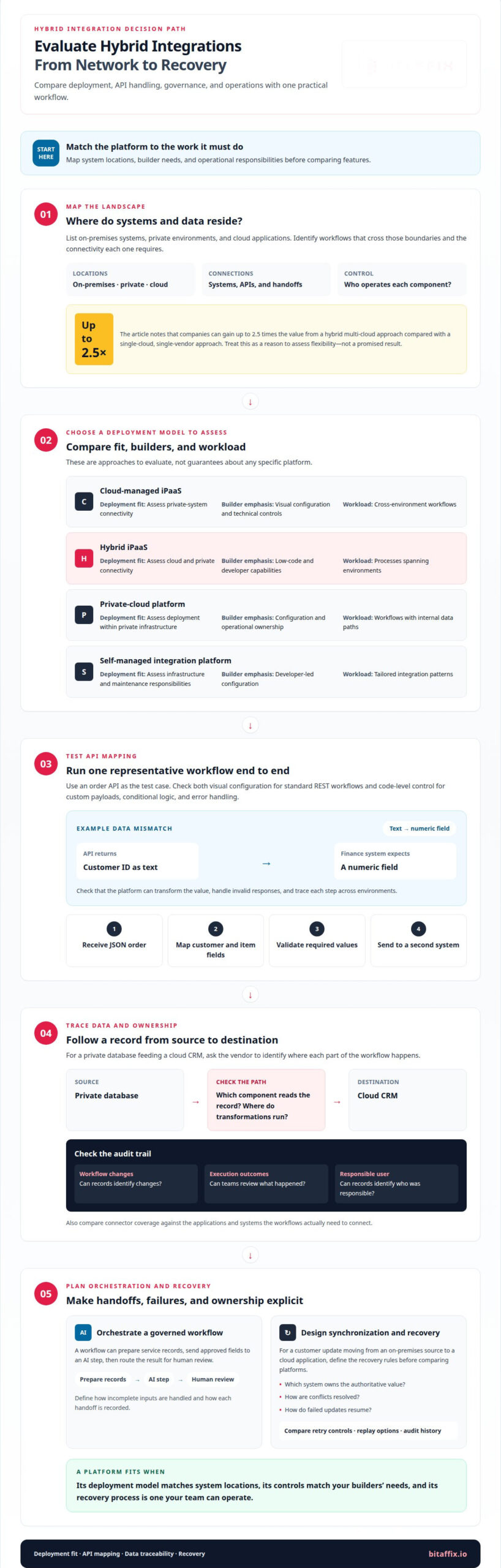
Hybrid and private-cloud alternatives differ in where their integration components run and how they connect to protected systems. A cloud-managed service with a runtime near an internal database creates a different operating model from a platform deployed within private infrastructure. Companies can gain up to 2.5 times the value from a hybrid multi-cloud approach compared with a single-cloud, single-vendor approach. Use this as a reason to assess flexibility, not as a promised result.
On-Premises Agents and Deployment Plans
Some integration platforms use on-premises agents to access internal systems while coordinating workflows through a broader service. Compare agent placement, permitted network paths, administration, and release procedures. For a workflow moving customer records from a private database to a cloud application, map each connection and handoff. Large deployments also need a disciplined process for managing changes across workflows and environments.
Use the table to clarify which deployment model fits your operating requirements. These categories describe approaches to evaluate, not guarantees about any specific platform.
| Option | Deployment fit | Builder emphasis | Workload to assess |
|---|---|---|---|
| Cloud-managed iPaaS | Assess private-system connectivity | Visual configuration and technical controls | Cross-environment workflows |
| Hybrid iPaaS | Assess cloud and private connectivity | Low-code and developer capabilities | Processes spanning environments |
| Private-cloud platform | Assess deployment within private infrastructure | Configuration and operational ownership | Workflows with internal data paths |
| Self-managed integration platform | Assess infrastructure and maintenance responsibilities | Developer-led configuration | Tailored integration patterns |
Choose by matching system locations, builder needs, and operational responsibilities to the platform’s deployment model.
Developer-focused API integrations and data mapping
API integration involves more than establishing a connection. Teams need predictable mappings, controlled transformations, and useful records when a workflow fails. For example, an order API may return a customer identifier as text while a finance system expects a numeric field. The platform should let teams transform the value, handle invalid responses, and trace each step across environments. Make this a core test when comparing Workato alternatives for on-premise and hybrid integration.
Compare how platforms handle API configuration. A visual builder can speed up standard REST workflows, while code-level controls help developers manage conditional logic, custom payloads, and error handling. Test a representative process: receive a JSON order, map customer and item fields, validate required values, then send the result to a second system. This shows where the builder supports governance and where developers need direct control. Practical tests help distinguish Workato alternatives for on-premise and hybrid integration by implementation fit.
Trace data paths and audit records
Ask each vendor to explain how a sample record moves from source to destination. For a private database feeding a cloud CRM, establish which component reads the record, where transformations run, and which systems retain logs. Review whether audit records identify workflow changes, execution outcomes, and the responsible user. These details help enterprise teams investigate failed updates based on evidence, not assumptions about platform behavior.
Informatica is worth assessing when enterprise data integration and governance are central to the decision. Compare its fit using the same API scenario, not just a feature checklist. Map source fields, transformation rules, validation, and failure handling. Then assess whether developers can maintain those rules across workflows and environments without creating separate, undocumented logic for each integration.
Orchestrate pipelines, AI workflows, and recovery
Data pipeline orchestration coordinates movement and transformation across systems. AI workflow orchestration can add model inputs, outputs, and review steps. For example, a workflow might prepare service records, send approved fields to an AI step, then route the result for human review. Define how the platform handles incomplete inputs and records each handoff. This makes the process easier to govern than an isolated API call.
Data synchronization and disaster recovery also need explicit design. For a customer update moving from an on-premises source to a cloud application, define which system owns the authoritative value, how conflicts are resolved, and how failed updates resume. Compare retry controls, replay options, and audit history using that scenario. A platform fits when its controls align with the recovery process your team can operate.
- Mapping: Test field conversion, validation, and conditional logic with a real API payload.
- Governance: Trace data movement and workflow changes through available audit records.
- Orchestration: Include pipeline steps, AI handoffs, and human review where relevant.
- Recovery: Define ownership, conflict handling, and failed-update recovery for synchronized records.
Translate these criteria into a governed process with BitAffix workflow automation planning.
Integration connectors and pre-built integrations
Connector breadth matters only when it covers the applications and systems your workflows actually use. Leading platforms offer more than 5,500 pre-built integrations, but that headline count doesn’t show whether a specific connector supports the required actions, fields, or deployment path. For a UAE organization linking a private ERP system with a cloud CRM, test that exact pairing and its critical operations.
Workato’s connector library offers a starting point for assessing supported applications, but coverage can change as products and APIs evolve. A connector that handles basic customer records may not support a newer endpoint or less common action. Compare current connector details with your workflow requirements, including authentication, available operations, data limits, and error responses. Product changes can affect connector behavior and the maintenance effort your team needs to plan for.
Assess hybrid and on-premises connectivity separately from cloud application coverage. A pre-built connector may connect to an application, while a private system may still need an approved route through the integration platform. Trace a sample transaction from source, through any runtime or agent, to destination. For example, map an internal inventory update to a cloud order-management application and identify each handoff.
Connector quality also depends on how integrations handle real operating conditions. Test a normal record, a missing optional field, and a rejected request. Then check whether the platform provides useful error details and supports a controlled retry. These tests show whether a connector can support a production workflow, not just establish an initial connection.
Pricing models can affect connector access. Vendors may package capabilities by plan or define availability by connector type, usage, or deployment needs. Compare the plan’s connector entitlements with the workflows you intend to run. For example, a platform that supports your cloud CRM may still require a different plan or setup for an on-premises database connection. Assess fit across all required applications rather than choosing by catalog size alone.
Migrating Workato recipes and workflows can be straightforward or substantial, depending on connector equivalents, custom logic, and deployment differences. Inventory triggers, actions, mappings, and exception paths, then rebuild and test each workflow on the target integration platform.
- Coverage: Match every required application and operation to a connector.
- Connectivity: Trace how on-premises data reaches cloud applications.
- Quality: Test missing fields, rejected requests, and recovery behavior.
- Pricing: Compare connector availability within the applicable pricing model.
Test the new platform to confirm that triggers, mappings, exception paths, and private-system routes work as intended. Record differences, assign ownership for connector changes, and monitor runs after launch to catch issues before they disrupt dependent processes. If an equivalent connector is unavailable, assess whether an approved alternative preserves the workflow’s controls and data handling.
Two-thirds of organizations adopting automation solutions report strong productivity and efficiency gains, while 40 percent report meaningful cost reductions.
Enterprise iPaaS alternatives
Enterprise integration platforms differ in deployment control, governance, and operational ownership. Compare each option against a representative process, such as synchronizing records between an on-premises ERP and a cloud application.
Enterprise Hybrid Integration
Hybrid integration platforms connect cloud services with systems running in private infrastructure or on-premises environments. Their capabilities vary in runtime location, connection management, and infrastructure responsibilities. A cloud-managed platform may suit teams seeking a central interface, while a self-managed approach gives IT teams more responsibility for runtime operations. Compare both against the same invoice approval process.
An enterprise iPaaS comparison should look beyond the builder interface. Assess role-based access, deployment promotion, monitoring, and change control across development and production environments. For example, trace an employee-record update from an internal HR system to a cloud payroll application. Identify which team owns each connection, where failures appear, and how administrators review workflow changes.
Performance, Scalability, and High Availability
Performance, scalability, and high availability vary with workload, runtime placement, network paths, and platform architecture. A hybrid workflow may run at a different speed when moving large records from a private database than when processing small cloud events. Compare platforms using the same payload, transformation, and destination. Review how each handles increased demand, component failure, and recovery without assuming one architecture guarantees better results.
Enterprise integration platform alternatives can also vary in their native process automation capabilities. Some emphasize integration orchestration; others combine connectivity with broader workflow design. For a procurement process, map vendor onboarding, document review, and approval handoffs. Check whether each platform can represent these steps clearly, assign ownership, and preserve operational visibility without splitting the process across disconnected tools.
Use a consistent evaluation sequence to compare enterprise iPaaS options:
- Deployment: Identify which components run in cloud, private, and on-premises environments.
- Governance: Review permissions, promotion controls, and workflow change records.
- Performance: Test a representative data volume and transformation path.
- Resilience: Examine recovery behavior when a connection or runtime becomes unavailable.
- Operations: Assign ownership for monitoring, updates, and incident response.
These criteria distinguish platforms by operating model, not just interface. A team with established infrastructure operations may prefer greater deployment control, while one prioritizing centralized process automation may value a unified management experience. In either case, document the expected workflow, system boundaries, and recovery responsibilities before comparing vendor capabilities.
An evaluation can also consider who will create and maintain workflows. The 20% of a company who can code may build and manage automations for the other 80%. That makes the intended balance between specialist control and broader workflow ownership worth examining alongside deployment and governance. Consider whether the platform’s operating model fits the teams expected to design, review, and run each process, and whether responsibilities remain clear when an automation changes or needs attention.
For a representative process, identify who can make changes, who approves them, and who responds to failures. Then assess whether the platform makes those handoffs visible and whether workflow ownership fits your operating model.
Security approaches for hybrid integrations
An on-premises agent typically runs inside an organization’s network and brokers approved connections to integration services. Its security depends on configured encryption, network permissions, credential handling, and update procedures, which vary across platforms.
Start with a data-flow map. For a legacy Microsoft database sending records to a cloud application, identify the source, agent, integration service, and destination. Mark where data travels, where transformations occur, and which components retain logs. This shows where security controls must apply and helps avoid treating the agent as the only boundary.
Review network access precisely. Determine whether the agent initiates connections, which destinations it can reach, and whether administrators can restrict those routes. For example, a finance workflow should connect only to its approved database and target service, not receive broad access to an internal network. Where the platform supports it, assign permissions by workflow.
Review encryption at each transfer and storage point. Ask how the platform protects data moving between the agent and its service, and how it handles credentials and stored workflow information. Trace a sample customer record through each stage. Confirm that logs provide operational visibility without unnecessarily exposing sensitive field values.
Updates are another control point. Establish how the platform distributes agent updates, who approves installation, and how teams manage version changes across environments. A scheduled update process should include a way to assess workflow impact and record each change. This keeps maintenance governed and prevents agent versions from drifting unnoticed.
Visual builders can make workflow logic easier to review, but a clear interface does not replace security governance. For a data integration process involving a legacy Microsoft source, inspect who can edit mappings, change credentials, publish workflows, and view execution logs. Separate development and production permissions to reduce accidental changes to live data paths.
- Network boundary: Document permitted destinations and restrict access to required systems.
- Data handling: Trace sensitive fields through transfer, transformation, and logging.
- Identity: Control who can manage credentials and publish workflow changes.
- Maintenance: Define update ownership, approval, and version tracking for each agent.
- Evidence: Review audit records for access, configuration changes, and workflow execution.
A strong security approach aligns agent placement, network access, encryption, and operational ownership with the data path. Evaluate each control using a representative integration before selecting a platform.
BitAffix
BitAffix is a practical next step when integration decisions lead to broader workflow and process-automation needs. Its workflow automation helps structure repeatable business processes, while secure document archiving supports controlled document handling. Banking sector solutions address workflows within that industry.
Turn to BitAffix when your teams need to organize operational steps around integrations, not just select an integration platform. Define the process, identify handoffs, and clarify how documents move through it. BitAffix’s workflow automation, Kanban task management, middleware integration, and secure document archiving can bring those operational steps together.
Contact BitAffix to discuss your workflow and process automation needs.
Set the next integration decision in motion
The right Workato alternatives for on-premise and hybrid integration should support an operating model your organization can govern over time. Treat platform selection as an architectural decision, then connect it to the business processes that depend on reliable information moving between teams and systems.
BitAffix supports this next step with Workflow Automation, Kanban Task Automation, and Secure Document Archiving. These capabilities help structure repeatable work, coordinate tasks, and manage business documents within a broader operational approach. Define the process outcome first, then align the workflow and supporting automation with it.
Build a clear path from integration strategy to controlled execution. A focused discussion can help shape the next step for your organization.
A hybrid architecture can evolve with discipline and purpose. Start with the business process you need to strengthen.
Frequently Asked Questions
What Features Should I Consider When Choosing Enterprise Automation Platforms?
Prioritize governance, operational visibility, and fit with your organization’s process ownership. For example, a procurement workflow should preserve approval authority when a request moves between departments. Assess role management, exception handling, audit history, and how teams change workflows after launch. Also consider whether business users can manage routine adjustments while technical teams retain control over sensitive integrations and production releases.
Which iPaaS platforms support on-premise agents or hybrid deployment?
Workato provides on-premises agents, while platform deployment models vary across providers. BitAffix supports on-prem, private cloud, and hybrid deployment. Compare each model against a real operating scenario, such as sending an internal inventory update to a cloud system. Establish where integration components run, which team administers them, and how the design supports your network boundaries and release processes.
Which integration platforms support private cloud, customer-managed infrastructure, and data residency in the UAE?
Separate deployment control from data residency: private-cloud or customer-managed infrastructure alone does not establish where every record is stored or processed. BitAffix offers on-prem, private cloud, and hybrid deployment options. For an implementation in the UAE, document required data locations and trace storage, processing, backups, and logs through the proposed architecture. Assess those details against your organization’s contractual and governance requirements.
Which platforms offer the strongest SAP, Oracle, Microsoft, and legacy-system connectors for on-premise integration?
No connector is the strongest choice for every SAP, Oracle, Microsoft, or legacy-system workflow. Evaluate the exact operations your process needs, such as reading an invoice, updating a supplier record, or handling rejected data. Compare supported connector actions with your system version, authentication approach, and deployment design. An end-to-end test offers a more useful basis for selection than a broad connector count.
How should an organization choose and deploy a hybrid integration platform?
Start with one business-critical workflow and define its source, destination, data owner, and failure response. Then map network boundaries and assign responsibility for platform administration, workflow changes, and incident handling. Run a controlled pilot using realistic data and operational exceptions. For example, test a delayed response as well as a successful transaction. Use the results to refine governance before expanding to additional processes.