
Replacing a spreadsheet isn’t always the right first move. The better approach is to match each process to the right system. Practical workflow automation alternatives to spreadsheets include workflow platforms, Kanban task automation, database tools, internal apps, document management systems, ERP suites, Manufacturing Execution Systems, and Industrial IoT platforms. Each addresses a different need, from routing approvals to tracking production and equipment performance.
Spreadsheets remain useful for flexible analysis and straightforward records. But repeated data entry, manual handoffs, and multiple versions of the same information can make a purpose-built system a more consistent way to manage work. The right choice depends on where the bottleneck lies and how much structure, integration, and governance the process needs.
This guide compares the main alternatives by operational fit, strengths, and trade-offs. It explains which options can reduce manual entry, support internal apps and interactive workspaces, and help teams coordinate across functions. It also offers a practical decision guide for UAE organisations deciding which processes to move beyond spreadsheets and which are still better managed with them.
Key Takeaways
- Match the system to the work: production tracking, equipment monitoring, inventory, and approvals call for different capabilities.
- Map where information is entered, reviewed, and handed off to identify which manual steps create the greatest operational friction.
- Prioritise tools that connect data capture with clear ownership, structured approvals, and records teams can access reliably.
- Use internal apps and interactive workspaces to give teams a more guided way to submit information and manage shared tasks.
- For smaller businesses, compare tools by process complexity, integration needs, governance, and the level of administration they require.
Comparison of spreadsheet alternatives
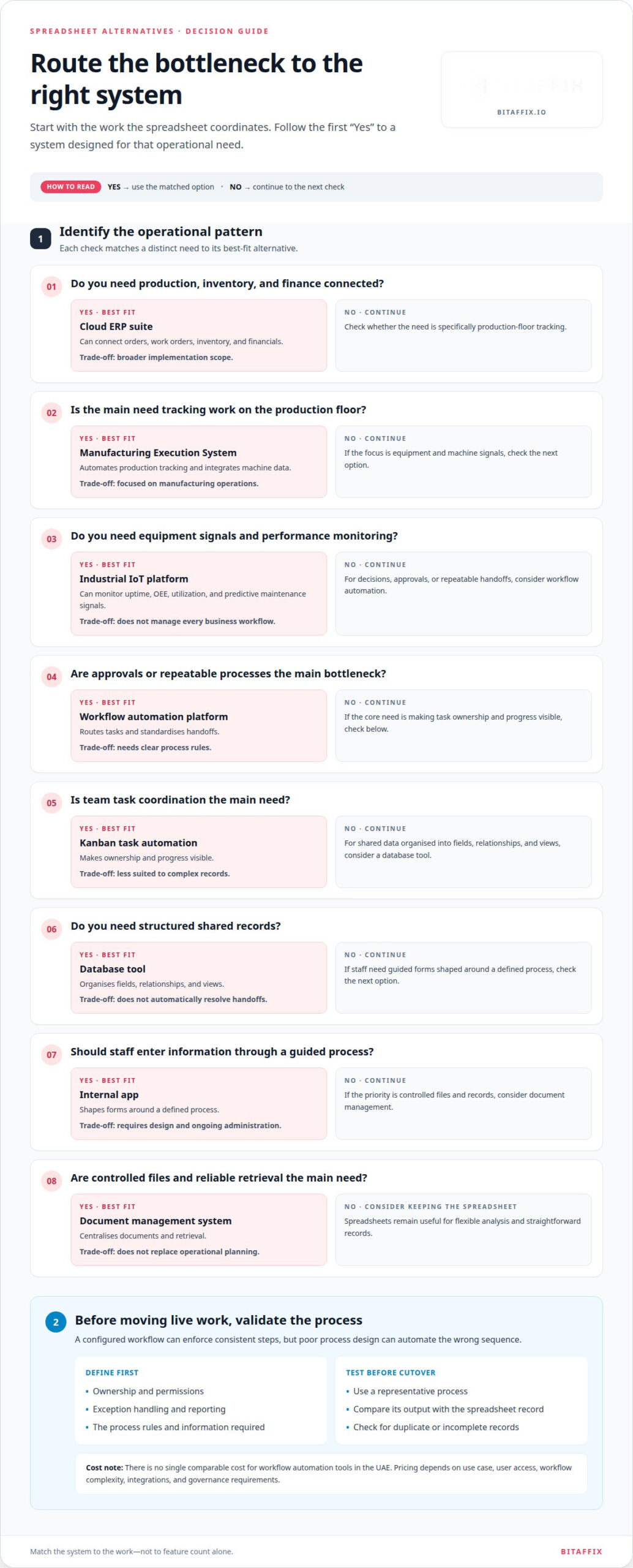
The right replacement depends on what the spreadsheet currently coordinates. A shared task list needs different controls from production monitoring or financial planning. Compare workflow automation alternatives to spreadsheets by process fit, data structure, integration needs, and governance, not by feature count alone.
There is no single comparable cost for workflow automation tools in the UAE. Pricing depends on the use case, user access, workflow complexity, integrations, and governance requirements.
Use this comparison to narrow your options. Each addresses a distinct operational pattern:
| Alternative | Best fit | Operational strength | Key limitation |
|---|---|---|---|
| Workflow automation platform | Approvals and repeatable processes | Routes tasks and standardises handoffs | Needs clear process rules |
| Kanban task automation | Team task coordination | Makes ownership and progress visible | Less suited to complex records |
| Database tool | Structured shared records | Organises fields, relationships, and views | Does not automatically resolve handoffs |
| Internal app | Guided staff data entry | Shapes forms around a defined process | Requires design and ongoing administration |
| Document management system | Controlled files and records | Centralises documents and retrieval | Does not replace operational planning |
| Cloud ERP suite | Production, inventory, and finance | Can connect orders, work orders, inventory, and financials | Broader implementation scope |
| Manufacturing Execution System | Production-floor tracking | Automates production tracking and integrates machine data | Focused on manufacturing operations |
| Industrial IoT platform | Equipment and machine signals | Can monitor uptime, OEE, utilization, and predictive maintenance signals | Does not manage every business workflow |
For example, a team managing leave approvals may need workflow automation, while a factory tracking machine output may need a Manufacturing Execution System. A cloud ERP suite can suit operations that need production and inventory modules alongside financials. Industrial IoT platforms focus on equipment signals, rather than general task ownership.
Replacing spreadsheets also involves trade-offs. A configured workflow can enforce consistent steps, but poor process design can automate the wrong sequence. Migration may leave duplicate or incomplete records, and restrictive forms can reduce the flexibility teams value in spreadsheets. Before moving live work, define ownership, permissions, exception handling, and reporting. Test a representative process and compare its output with the spreadsheet record.
For teams standardising approvals and task handoffs, a structured workflow automation approach can provide a more governed alternative to spreadsheet coordination.
Choose the option that addresses the main bottleneck while preserving the data and oversight the process needs.
Replacing manual data entry and paper processes
Start with a process that causes repeated data entry or paper handoffs, such as a purchase request. Before choosing an automation route, map its fields, owners, decisions, and records.
Migrating Spreadsheet Workflows
Migration moves a defined spreadsheet process into a structured platform; it does not mean copying every workbook unchanged. Document the source columns, remove obsolete fields, assign owners, and define what happens when information is missing. Unlike scanning paper forms, migration also redesigns how records move between people. Test the new workflow against representative spreadsheet entries before retiring the old process.
For a supplier onboarding tracker, identify the authoritative record and required information first. Map each column to a form field, decision rule, or reference record. Clean up duplicate supplier names and standardise formats before importing data. Keep a controlled copy of the original workbook during validation so reviewers can compare records and resolve discrepancies. Set a cutover point only after users can complete the new workflow.
Automating Spreadsheet-Based Approvals
Approval automation turns rows, email reminders, and manual status updates into a routed decision process. First define the submission fields, approval criteria, decision owners, and exception path. For an expense request, the workflow can collect the amount, purpose, and supporting documents, then route the record to the designated reviewer. Unlike basic data migration, this formalises decisions and handoffs, not just stored information.
- Replace free-text entries with defined fields, such as requester, department, purpose, and requested amount.
- Set the routing rule, such as sending a department request to its assigned approver.
- Record approval, rejection, or returned-for-correction status with a reason.
- Test standard submissions and exceptions, including missing fields and rejected requests.
Paper processes need a separate capture step. Convert a printed maintenance request into a digital form, then decide who reviews it and where its supporting files belong. Avoid creating a digital copy that still requires staff to re-enter the same details elsewhere. Connect the captured information to the next action, such as assigning a technician or recording a review outcome.
To manage permissions and audit trails, assign access by role, restrict sensitive fields, and retain records of submissions, decisions, and changes. Define who can view, edit, approve, and export each record, and align those permissions with the process owner’s responsibilities.
Map one live process and its exceptions before scaling automation across teams. A focused workflow mapping discussion can help structure that assessment.
Choosing tools based on operational bottlenecks
Choose a platform by finding the delay, rework, or visibility gap in a real process. Late purchase approvals, for example, need different controls from missing inventory updates or unclear task ownership.
For Arabic-language and UAE business requirements, assess Arabic content and right-to-left layout alongside English workflows. Test AED display, date formats, user permissions, and reports using representative UAE records before choosing a platform.
Begin with a process map. Follow one request from submission to completion, marking every handoff, repeated entry, approval, and exception. A procurement request might stall because the approver cannot see its supporting document. A service ticket might sit idle because no team member owns the next action. These bottlenecks show which capabilities matter most.
- Repeated entry: Select structured forms and integrations when staff copy customer, supplier, or order details between systems.
- Approval delays: Prioritise configurable routing, decision ownership, and status visibility when requests wait in inboxes.
- Unclear task ownership: Choose a shared task workspace when teams need to assign work and track progress.
- Fragmented records: Look for connected records and document access when teams search across separate files and folders.
Next, distinguish the symptom from its cause. A delayed invoice may result from missing coding fields, an unclear approval path, or a disconnected finance system. Automating reminders will not fix incomplete records. Define the required information and decision owner first, then select software that supports both. An invoice workflow, for example, needs a capture point, a reviewer, and an exception route for disputed entries.
Integration fit matters too. If a team must retype customer details after adopting a task tool, the bottleneck has moved rather than disappeared. Map the systems that create or use each record, such as a customer database, finance platform, or shared document store. Assess whether information can move between them and who maintains each connection. A well-designed handoff helps prevent duplicate records and inconsistent status updates.
For UAE teams, test regional usability with practical scenarios, not feature labels. Ask staff to enter an Arabic name, review an English approval, and produce a report showing AED values. Check that right-to-left text remains readable beside English fields. Confirm that role permissions match actual responsibilities, such as requester, approver, and administrator. These tests can reveal friction before the process depends on the new system.
Finally, weigh administrative effort against process value. A complex platform may suit cross-functional approvals, while a lightweight task board may solve one team’s assignment problem. Keep the spreadsheet for analysis if it still serves that purpose; move only work whose handoffs or data controls create operational friction. Choose a tool that removes the identified bottleneck without adding unnecessary steps.
No-code internal apps and interactive workspaces
A no-code internal app gives employees a structured interface for a defined task. An interactive workspace brings records, tasks, and collaboration together. Both can replace spreadsheet-based interactions, but they solve different problems. A facilities request form, for example, captures consistent information; a workspace helps facilities staff review requests and coordinate follow-up.
Build the app around the employee’s next action, not the spreadsheet’s existing layout. For a travel request, collect the destination, dates, business purpose, and supporting documents in clearly labelled fields. Then show the requester whether the submission is awaiting review, approved, or returned for changes. This reduces reliance on free-text cells and makes the process easier to follow.
Design the interaction around the workflow
Start with one role and one task, such as an employee submitting a maintenance request. Define required fields, validation rules, and the confirmation shown after submission. Then identify who reviews the request and what information they need. A focused design avoids reproducing every column from an old workbook, including fields that no longer inform a decision.
Interactive workspaces provide a broader operational view. A procurement team can group requests by status, assign an owner, add context to a record, and coordinate next steps. Instead of sending separate workbook copies, participants work from a shared view. Configure it so staff can distinguish new submissions from items awaiting action, while managers can review workload and exceptions.
- Forms: Capture standard details for a supplier request or service issue.
- Role-based views: Show requesters their own items and reviewers the queue they manage.
- Task boards: Organise work by stage, owner, or priority.
- Record context: Keep notes and supporting documents connected to the relevant request.
Build governance into the design. Decide which roles can submit, edit, approve, or view records before launch. For example, an employee may update a draft travel request, while an approver records a decision. Limit fields to the information each role needs. Assign a process owner to manage changes when approval responsibilities or form requirements shift.
UAE teams should test Arabic and English content in the same workflow. Enter an Arabic name beside an English department label, then review the form, status display, and exported record. Check that right-to-left text remains legible and required fields are easy to identify. If the workspace includes AED values, test how amounts appear on the relevant entry and review screens.
Use an internal app when the main need is guided data capture; choose an interactive workspace when teams must coordinate records and actions. A staged rollout can begin with one process, such as maintenance requests, then expand after staff validate the fields, permissions, and task views.
What are the best no-code workflow automation tools for small businesses?
The best fit depends on the process a small business needs to control, not its headcount. A consultancy managing client approvals needs different capabilities from a retailer tracking stock requests. Compare no-code options by workflow complexity, integrations, access controls, and maintenance effort.
Start with the simplest tool that addresses the bottleneck. A Kanban task workspace can suit a team assigning jobs across stages such as new, in progress, and complete. A workflow automation platform fits repeatable approvals that need defined routing, status records, and exception handling. A no-code internal app is useful when staff need guided forms for requests or updates.
- Task workspace: Use a Kanban board when a small team needs clear owners and visible work stages.
- Workflow platform: Select process routing for recurring approvals, such as supplier onboarding or expense review.
- Internal app: Use structured forms when free-text spreadsheet entries create inconsistent records.
- Integration layer: Consider middleware when teams re-enter the same customer or order details across systems.
For example, a UAE consultancy could capture project requests through a form, assign each to an owner, and route budget approval to a manager. If the process also requires customer details to be copied into a finance system, integration becomes part of the decision. Without it, the team may simply shift the manual data entry elsewhere.
Small businesses should assess administration before committing. Identify who will maintain form fields, access roles, workflow rules, and reports. A process with one reviewer may need straightforward routing; one involving several departments needs clear ownership and exception paths. Avoid building a complex system for a short task list that a simple shared board can manage.
For UAE operations, test real working scenarios before rollout. Enter Arabic and English names, display AED amounts, and review the output staff will use. Confirm that right-to-left text remains readable beside English labels. Test whether managers can see pending items while employees can access only the records needed for their work.
Pilot one live process, such as leave requests or purchase approvals. Compare the new workflow with the current spreadsheet by checking duplicate entry, missed handoffs, record completeness, and reporting ease. Keep the process owner involved, then adjust fields and routing rules before expanding to other teams. This helps small businesses choose a tool that fits operational needs without adding unnecessary administration.
BitAffix: Workflow Automation
BitAffix provides Workflow Automation for organisations moving from spreadsheet-led processes to structured workflows. It is a fit when approvals, repeatable handoffs, or cross-team task coordination need clearer ownership and consistent execution. Kanban Task Automation supports teams managing work visually, while Secure Document Archiving helps manage document retention and access. Banking Sector Solutions provide workflows tailored to banking operations.
Start by identifying one process, its decision points, and the records teams need to manage. This clarifies whether Workflow Automation or Kanban Task Automation better addresses the operational bottleneck. BitAffix is a relevant option when spreadsheets no longer provide the structure your team needs.
Visit bitaffix.io to explore BitAffix’s workflow automation offering.
Set the next stage of operational improvement
Choosing workflow automation alternatives to spreadsheets should lead to a deliberate operational decision, not another isolated technology rollout. Assign an executive owner, define how teams will govern process changes, and determine how new workflows will connect with existing systems. These decisions create a foundation for expanding automation without losing visibility or accountability.
For your next step, identify the process most important to business continuity, customer experience, or management oversight. Agree on what successful adoption looks like, who will maintain the workflow, and how teams will handle future changes. A clear mandate helps decision-makers move from individual improvements toward a coherent operating model.
Discuss your priorities and plan a practical path forward with BitAffix.
Clarify the next decision, then build the operating capability your organisation needs to move forward.
Frequently Asked Questions
What are the best workflow automation alternatives to spreadsheets for businesses?
Useful workflow automation alternatives to spreadsheets include workflow platforms, Kanban task systems, internal apps, and database tools. Choose according to the work: a service team can use a Kanban board to manage ticket ownership, while a finance team may need a workflow that routes expense exceptions for review. In manufacturing, a Manufacturing Execution System can track production, while an ERP suite can connect production and inventory processes.
How do workflow automation platforms compare with spreadsheets?
Workflow automation platforms structure how work moves; spreadsheets mainly organise and calculate information. A platform can guide a new supplier request through review and record each decision, while a spreadsheet typically relies on staff to update statuses and notify colleagues. Spreadsheets remain useful for flexible calculations and one-off analysis. A platform is a stronger fit when teams need consistent routing, assigned ownership, and coordinated actions across a process.