
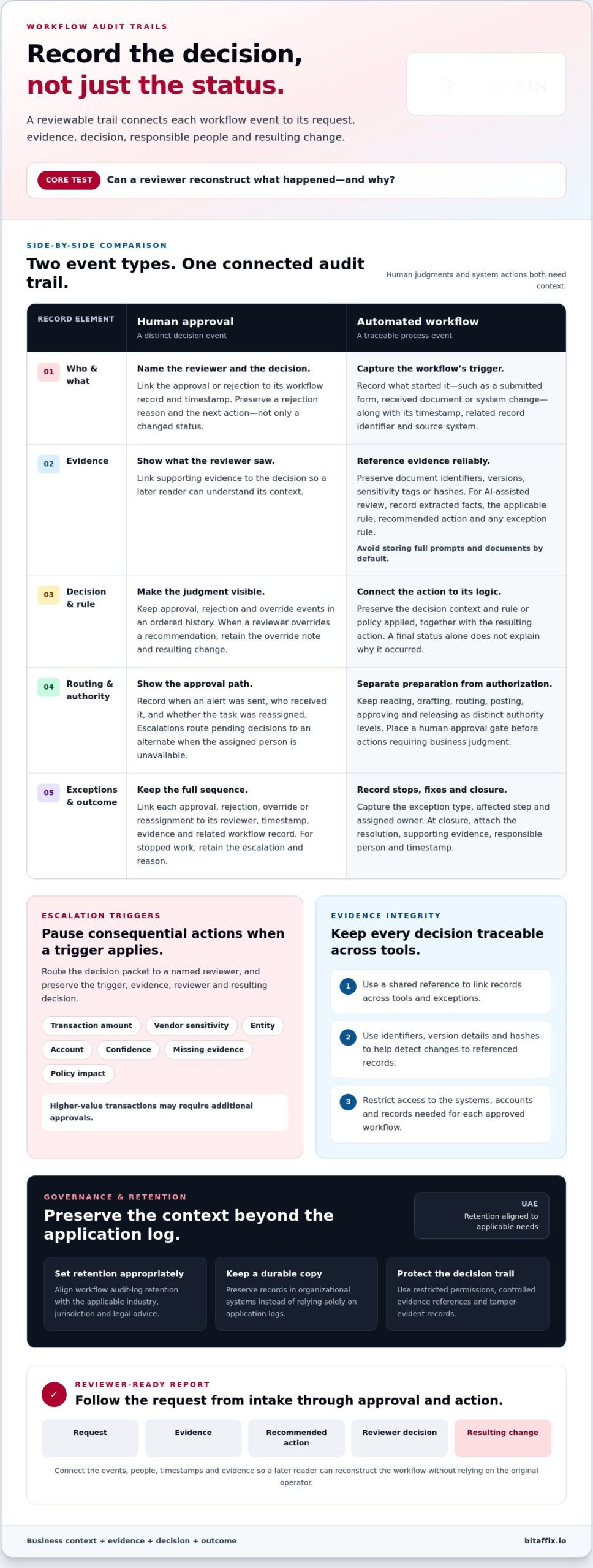
A final status is not an audit trail. Workflow automation with audit trails should record the request, supporting evidence, decision and rule or policy applied, people involved, timestamps, approvals or rejections, overrides, and resulting changes. This context lets a reviewer reconstruct not only what happened, but why.
Recording activity is essential, but logs without context leave gaps. A technical log may show that a system action occurred; a workflow audit trail connects it to the business reason, evidence, and approval behind it. Human decisions need the same visibility as automated steps.
This guide explains what to capture for each workflow event, how to make approval records clear and reviewable, and how to use exceptions and overrides to improve processes. It also covers audit data in regulated SaaS environments, including how controlled access, retention, and durable records support governance. The result is a practical framework for balancing operational speed with accountability and compliance needs in the United Arab Emirates.
Key Takeaways
- Capture the request, source evidence, policy or rule applied, decision, approver, timestamp, and resulting change so reviewers can reconstruct each workflow.
- Make human approvals visible by recording reviewer identity, approval or rejection, decision context, and any override; route higher-risk actions for review.
- Connect workflow events with a shared identifier, and distinguish business reasons from technical system logs.
- Use overrides, recurring exceptions, and missing evidence to identify process rules and ownership paths that need improvement.
- Align audit-log management, access controls, and durable record retention with the systems and compliance needs the workflow supports.
How should human approval appear in an audit trail?
Record each human decision as a distinct workflow event, not merely a final status. A reviewer should be able to identify who acted, what they saw, and what happened next.
Approval Visibility and Escalation Alerts
An approval event should show the named reviewer, decision, timestamp, and workflow record. For example, a rejection should preserve its reason and next action, rather than appear only as a changed status. This links each human approval to the specific request and makes the sequence of approvals and rejections visible.
Alerts bring pending decisions to an approver’s attention; escalations route them to an alternate when the assigned person is unavailable. Record when the alert was sent, who received it, and whether the task was reassigned. This sequence gives reviewers context for delays and shows whether the intended approval path was followed.
Approval Gates and Escalation Triggers
Place an approval gate before any action requiring business judgment, such as posting a financial entry or releasing a payment. Keep reading, drafting, routing, posting, approving, and releasing as distinct authority levels. This boundary shows which actions automation may prepare and which require a human decision.
Set escalation triggers around factors such as transaction amount, vendor sensitivity, entity, account, confidence, missing evidence, or policy impact. When a trigger applies, pause the consequential action and route its decision packet to a named reviewer. Higher-value transactions may require additional approvals. Preserve the trigger, evidence, reviewer, and resulting decision in the audit trail.
Approval History and Audit Reports
Maintain an ordered history of every approval, rejection, override, and reassignment. Link each event to its reviewer, timestamp, supporting evidence, and related workflow record. If a reviewer overrides a recommendation, preserve the override note and resulting change. This allows a later reader to reconstruct the decision without relying on the original operator.
Structure reports so reviewers can follow a request from intake through approval and action. Include the request, evidence, recommended action, reviewer decision, and resulting change. For a stopped workflow, retain the escalation and reason alongside completed events. Reviewing both outcomes shows whether approval gates captured the context needed for accountable decisions.
What should an automated workflow audit trail record?
Capture each workflow’s trigger, source evidence, decision context, and resulting action. A shared reference links these records across tools and exceptions.
Workflow Triggers and Source Evidence
Record the event that started the workflow, such as a submitted form, received document, or system change. Include its timestamp, related record identifier, and source system. These details let a reviewer trace the workflow to its origin.
Preserve references to the evidence used, including document identifiers, versions, sensitivity tags, or hashes. For an AI-assisted review, record the extracted facts, applicable rule, recommended action, and exception rule. Avoid storing full prompts and documents by default. Controlled references help reconstruct the decision while limiting unnecessary exposure.
Evidence Integrity and Access Controls
Evidence integrity means maintaining a reliable link between each decision and the material that informed it. Use identifiers, version details, and hashes to detect changes to referenced records. Restrict access to the systems, accounts, and records needed for each approved workflow. This limits unnecessary access while keeping decision evidence traceable.
Compare workflow platforms by whether they capture triggers, evidence references, decision objects, reviewer outcomes, overrides, and resulting changes. Assess how each links events across tools and controls access to records. A platform that logs only the final action provides less context than one that preserves the evidence and rule behind it.
Exception Handling and Closure Evidence
When evidence is missing or a rule fails, record the exception type, affected workflow step, and assigned owner. Preserve the event that stopped or redirected processing, rather than recording only a completed status. This distinguishes a deliberate pause from a system failure.
At closure, attach the resolution, supporting evidence, responsible person, and timestamp. For example, a corrected document should link to its new version and show which check allowed processing to resume. This record lets a reviewer verify how the exception ended and whether the workflow followed its controls.
Log Retention and Compliance Risks
In the UAE, retain workflow audit logs in line with the applicable industry, jurisdiction, and legal advice. Set the retention period to support the relevant recordkeeping and review needs, then preserve a durable copy in organizational systems. This avoids relying solely on application logs, which may not retain decision context for later review.
Security and privacy risks include exposing sensitive documents, granting excessive access, or losing context when records change. Weak controls can also leave gaps between an AI recommendation and the action taken. Reduce these risks through restricted permissions, controlled evidence references, and tamper-evident records. Teams establishing these practices can consider workflow automation as part of their process architecture.
Using audit data to improve processes
Audit data makes process performance visible at the level of individual decisions. Teams can compare completed work, stopped work, overrides, and recurring exceptions to identify friction. For example, repeated missing-invoice evidence may point to an unclear intake rule rather than an isolated operator error. Timestamps and workflow stages help distinguish recurring patterns from single delays.
Start by reviewing samples of completed and stopped AI-accounting work. Compare the available evidence, recommended action, and escalation decision. If stopped items repeatedly lack the same document type, revise the intake requirement or assign responsibility for collecting it. If completed items regularly need manual correction, inspect the rule or source data behind those outcomes.
Track operational signals together instead of treating each event as a separate issue. Finance teams can monitor overrides, aged exceptions, permission changes, and audit-trail completeness. An override may reveal that a policy rule no longer fits a transaction type. An aged exception may indicate unclear ownership. A permission change can expose a gap between an agent’s access and its approved task.
Use findings to change a defined process control, and preserve the reason for the change. Assign a named owner to maintain the AI accounting workflow’s operating manual. The owner can record which rule changed, why, and which workflow version now applies. This creates a reference for future reviews and prevents an operational adjustment from becoming an undocumented exception.
Agents can prepare, cite, route, reconcile, and escalate work while people retain visible decision authority. Audit records help teams see where automation supports the process and where human judgment repeatedly intervenes. For example, if reviewers often reject the same recommendation because evidence is incomplete, improve evidence collection before the decision point. This addresses the cause instead of adding another manual review.
Close the improvement loop by checking whether the revised process produces clearer evidence and fewer recurring exceptions. Compare later records with the original pattern, including reviewer notes and timestamps. If a change shifts problems to another workflow stage, refine the control again. This evidence-led cycle supports transparency, process integrity, and defensible operational decisions.
Audit infrastructure for regulated SaaS products
Regulated SaaS needs durable records connecting business actions with their evidence and technical events. In the UAE, audit-trail obligations depend on sector, data scope, and applicable jurisdiction. The trail can support compliance evidence, but does not establish compliance on its own.
Audit Foundations for Regulated SaaS
Build the audit foundation around event capture, protected storage, controlled access, and reviewable reporting. NIST SP 800 92 provides enterprise log management guidance, according to the National Institute of Standards and Technology. Separate business audit events from infrastructure logs: one records why an action was taken, while the other can show that an API call occurred.
Connect related events across applications with a correlation identifier created at intake. Carry it through tool calls, exceptions, and child events. Store a durable audit copy in organizational systems as well as the AI product. This helps reviewers reconstruct a decision later, even after ordinary application logs have expired.
Define which events the SaaS product must capture before setting a review threshold. Include access, data changes, workflow state changes, approvals, and system actions affecting business records. Each record should preserve the event time, actor or service identity, affected record, and result. For an AI-supported decision, retain the evidence reference and policy version alongside the action.
Design the storage layer to protect records from unauthorized alteration. Restrict write access, separate administration from review, and preserve changes as new events rather than overwriting history. These controls help distinguish a valid correction from an attempt to conceal an earlier action. Test a replay by following a record from its trigger to its final state.
Regulatory Requirements for Workflow Trails
In the UAE, organizations should map audit-trail requirements to their regulated activity, data, and governing jurisdiction. Relevant rules can differ across financial services, healthcare, and other regulated operations. A workflow record can support an internal or external review, but the required evidence and retention approach must match the obligations that apply to the activity.
SOX, GDPR, HIPAA, ISO 27001, and PCI-DSS are frameworks for which audit trails can provide compliance evidence. Their mention does not make each framework a UAE requirement. Map each applicable control to the events captured, the system holding the record, and the responsible owner. This gives compliance teams a traceable path from a control to its evidence.
Set retention according to industry, jurisdiction, and legal advice, then document the decision. Preserve records in a system that supports authorized retrieval and integrity checks. A useful trail should let an auditor reconstruct a decision six months later, including the evidence, policy context, and resulting action. Review access permissions and approval gates when workflow ownership, staffing, or system access changes.
Automated workflow logging and reporting
Set up workflow automation with audit trails by defining which events matter, linking each event to its record, and assigning an owner for review. Then test reports against completed, stopped, and exceptional workflows.
Automated Workflow Event Logging
Automated event logging captures workflow activity in a structured record that teams can filter and review. A single AI workflow might emit forty application log lines mixing traffic, cache, and AI-call events. Separate business events from technical noise so reviewers can identify what changed and which workflow step produced it.
For each event, retain a timestamp, user or service identity, event type, related record, and outcome. Add the workflow version and exception status where relevant. For example, a document-routing event should identify the document reference, destination, and whether routing succeeded. This structure supports focused review without treating every system message as business evidence.
Maintain a correlation ID from intake through connected tools and child events. It lets an operator follow a single request across a workflow, even when technical logs appear in different systems. Define event ownership too: name the team responsible for monitoring failures, correcting incomplete records, and escalating unresolved exceptions.
Audit Reporting
Audit reporting turns logged events into views for operational, security, and compliance reviews. Organize reports around a workflow, record, time period, or exception type. A reviewer investigating a stopped request should be able to filter by its identifier and see the event sequence, rather than search through unrelated application messages.
Use reporting to monitor overrides, aged exceptions, permission changes, and audit-trail completeness in AI accounting workflows. Present each measure alongside its underlying records, so a trend leads to reviewable evidence. For example, an increase in aged exceptions can prompt a team to inspect assignment and escalation paths.
Provide role-appropriate views for internal teams and external auditors. Limit each view to relevant records while preserving enough context for review. Keep report definitions and access changes traceable; otherwise, a changed filter could hide events that an earlier report displayed.
Setting Up Workflows with Audit Trails
Begin with one business workflow and map its triggers, actions, exceptions, and reporting needs. Decide which records support reconstruction, who owns each event, and where the durable audit copy belongs. Then configure consistent event fields across connected systems, including correlation IDs and source references.
Test the configuration with completed and stopped examples. Confirm that a reviewer can follow each event, locate its evidence, and identify the responsible owner. Check that missing evidence creates a visible exception rather than a silent workflow gap. Test role permissions using an account that should have limited access.
Finally, compare reports with the underlying event records and review them with process owners. Correct missing fields, unclear ownership, and noisy alerts before expanding to other workflows. This controlled rollout helps teams refine operational reporting while keeping governance visible at each stage.
BitAffix: Workflow Automation
BitAffix provides Workflow Automation for organizations seeking more structured operational processes. Turn to it when work moves across teams, tasks, or document records and you need to assess how automation fits your operating model. Kanban Task Automation supports task coordination, while Secure Document Archiving helps manage document storage needs. Banking Sector Solutions support organizations operating in that sector.
Use the audit-trail principles in this guide to define the events, approvals, and records your workflows need to preserve. Then consider how workflow automation, task coordination, and document archiving fit those requirements. Contact BitAffix or visit bitaffix.io to discuss your workflow needs.
Turn audit design into operational practice
Strong governance starts with clear decisions about ownership, evidence, and oversight. The next step is to translate those decisions into workflows that support your organization’s operating model. Treat workflow automation with audit trails as an ongoing capability: review how teams use it, refine controls as processes change, and keep accountability aligned with each action.
BitAffix provides Workflow Automation, Kanban Task Automation, and Secure Document Archiving. These offerings can help organizations structure work, coordinate tasks, and manage business documents. A focused discussion about your workflow can connect your operational priorities with a practical automation approach.
With clear ownership and a deliberate implementation path, your organization can advance automation while keeping governance visible. Start with the workflow that matters most, then build on a sound foundation.
Frequently Asked Questions
Should an AI workflow log full prompts and documents?
Usually, record controlled references instead of full prompts and documents. A document ID, version, sensitivity tag, and hash can help reviewers identify the source while limiting unnecessary exposure. For example, a workflow may retain the invoice reference and extracted amount, while storing the original file in its controlled document system. Preserve full content only when the business purpose requires it, with appropriate access restrictions and retention controls.
What is the difference between a system log and an audit trail?
A system log records technical events; an audit trail connects business actions to their operational context. During an incident, an API log might show that a request failed, while a workflow record can show which case triggered it and whether processing stopped. Teams need both perspectives to investigate technical faults and determine their impact on business records. Keeping the views distinct helps reviewers avoid treating every system message as business evidence.
What is workflow automation with audit trails?
Workflow automation with audit trails combines automated business processes with records that make activity reviewable. For example, an employee expense process might route a claim, apply a policy rule, and request a reviewer’s decision. Its audit trail shows how the claim moved through the process and where a person or automated step changed its status. Teams use that record to support accountability, investigate discrepancies, and assess process controls.
Which workflow automation platforms offer audit trails?
Platform capabilities vary, so compare how a system links business records, decisions, and technical events, and how it supports access controls and reporting. In the UAE, BitAffix provides Workflow Automation and Kanban Task Automation, which help enterprises track operational audit trails. Consider how these capabilities fit the workflows, records, and review responsibilities your organization needs to manage.
How do workflow automation tools record and retain audit logs?
Workflow tools can record events as they occur, then organize them by workflow, record, or correlation ID. A durable copy should also be stored in organizational systems, rather than relying only on the automation product. Set retention according to applicable industry, jurisdiction, and legal advice. For example, finance and healthcare records may have different obligations, so teams should document the rationale and apply access controls to retained logs.
What events and user actions should an audit trail capture?
Capture events that can change a record, its permissions, or its processing outcome. For a document workflow, these include submission, edits, routing, access changes, approval, rejection, and closure. Preserve the actor or service identity, timestamp, affected record, and relevant before-and-after values. Also record failed or stopped actions. These events can reveal whether a control prevented an unintended change or an exception needs investigation.
How do leading workflow automation platforms compare on audit trail features?
Compare whether platforms capture workflow triggers, evidence references, decision objects, reviewer outcomes, overrides, and resulting changes. Also assess how they link events across tools and control access to records. Platforms that log only final actions provide less context.