
Disconnected systems create friction well before they fail. Enterprise Application Integration (EAI) connects business applications through middleware, APIs, or an enterprise service bus that coordinates communication. Enterprise database integration software helps exchange and align data across databases, giving teams more consistent information to work with.
When customer, finance, and operational data sit in separate systems, manual transfers and inconsistent records can slow decisions and complicate collaboration. Integration coordinates how those systems exchange information while allowing each application to retain its role.
This guide explains how EAI works, when enterprise integration becomes necessary, and how database and software choices affect compatibility with existing systems. It also covers practical selection criteria, including interoperability, data governance, security, and implementation scope, to help decision-makers assess an approach that fits the organization’s operating model and growth.
Key Takeaways
- Recognize when siloed data is slowing decisions, weakening consistency, or creating friction between teams.
- Choose databases and integration approaches that fit your existing systems, data governance needs, and operating model.
- Understand how point-to-point, hub-and-spoke, and service bus patterns coordinate communication across enterprise applications.
- Evaluate integration software for interoperability, security controls, scalability, and the level of operational oversight it supports.
- BitAffix connects workflow automation, Kanban task automation, secure document archiving, and banking sector solutions to operational needs.
How do you know if your business needs enterprise data integration?
Integration becomes valuable when separate systems produce conflicting records, repeated manual work, or delayed decisions. In a UAE organization, everyday processes can reveal the need, such as reconciling customer details across finance and service platforms.
Enterprise Data Integration Scope
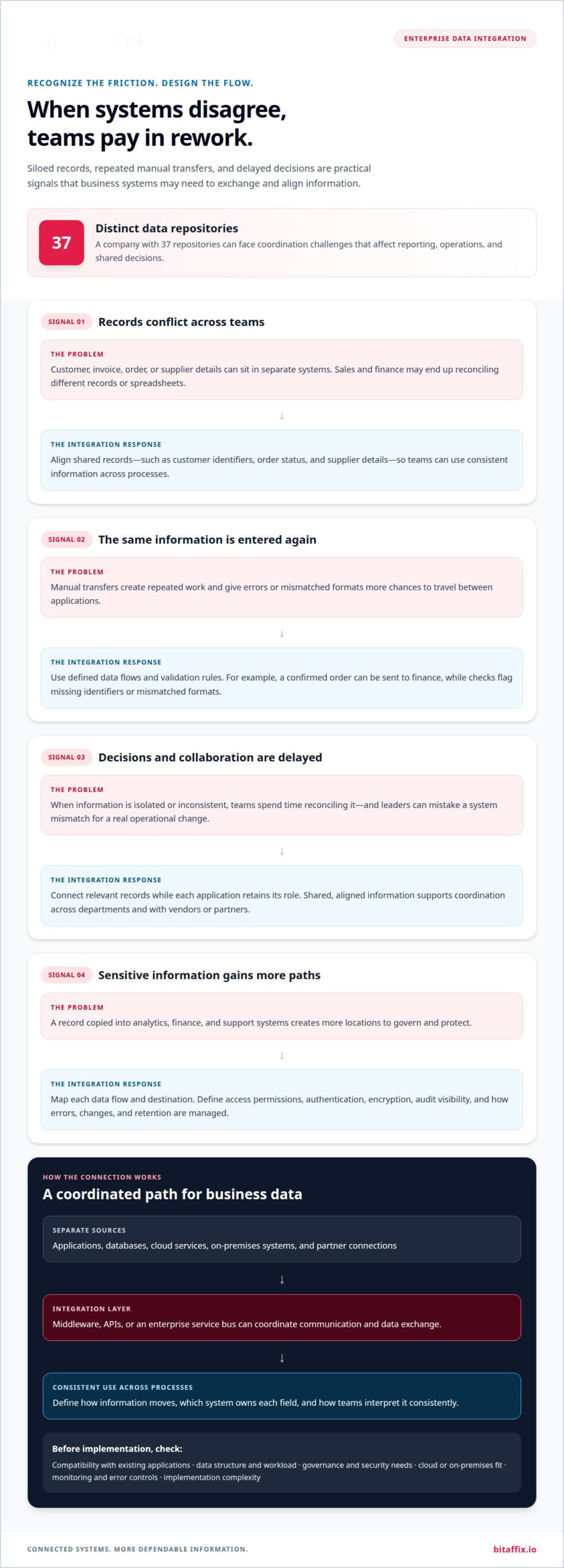
Enterprise data integration connects data from separate applications, databases, and platforms so an organization can exchange, align, and use information across business processes. Its scope can include databases, cloud services, on-premises systems, and partner connections, rather than a single database migration. A company with 37 distinct data repositories faces coordination challenges that affect reporting, operations, and shared decisions. Integration defines how data moves between sources and how teams interpret it consistently.
Reducing Data Silos
Data silos form when departments manage information in isolated platforms without dependable connections to other teams. Integration reduces these barriers by aligning shared records, such as customer identifiers, order status, and supplier details. Sales and finance teams can then use consistent customer and invoice data instead of reconciling separate spreadsheets. A shared view supports coordination across departments and with vendors or partners. It also helps leaders distinguish a genuine operational change from a mismatch between systems.
Operational Efficiency and Data Accuracy
Integration can improve efficiency by replacing repeated manual transfers with defined data flows. For example, when an order platform sends a confirmed purchase to finance, staff spend less time re-entering the same fields. Validation rules can flag missing identifiers or mismatched formats before information reaches another application. These controls support data accuracy and consistency, while clear ownership establishes which system supplies each field. The practical result is fewer reconciliation steps and more dependable reports.
Enterprise data integration platforms vary in their supported sources, transformation controls, monitoring, governance, and implementation complexity. To compare capabilities and usability, check whether a platform connects the organization’s actual applications, makes data flows understandable, and gives administrators practical control over errors and access. Deployment models and support for cloud or on-premises environments also differ, so fit depends on existing systems and internal operating capacity.
Security, Privacy, and Compliance Risks
Integration creates more paths for sensitive information to move, making access control, authentication, encryption, and audit visibility important design considerations. A customer record copied into analytics, finance, and support systems creates more locations to govern and protect. Map each data flow, identify who can access it, and define how errors, changes, and retention are managed. Secure document archiving can support controlled storage of business records within an organization’s information practices.
For UAE operations, assess data residency and transfer requirements by data category, sector, applicable regulator, and hosting arrangement. These factors determine which obligations apply to each flow. Security, privacy, and compliance reviews should map data destinations and access permissions, then assess relevant rules and contractual commitments before deployment.
Database selection criteria and integration with existing systems
Choose a database based on its compatibility with current applications, data workloads, governance needs, and analytics requirements. Integration design then determines how those systems exchange dependable information.
Integrating Enterprise Business Systems
Enterprise system integration connects applications and databases so information can move across business processes. It is useful when an organization needs unified records without requiring every department to adopt one platform.
An ERP system typically uses a shared database across business units, while CRM, SCM, and HR platforms support distinct workflows. Integration connects the relevant records. For example, an approved purchase in an ERP can update supply-chain planning, inventory availability, and finance reporting without repeated data entry.
Payroll integration shows why field definitions matter. HR may hold employee details, while payroll calculates pay using approved hours and compensation records. A consistent employee identifier and clear data ownership help prevent mismatched records. Analytics is also more useful when reports draw on aligned definitions rather than conflicting extracts.
Select a database based on its data structure, transaction patterns, query needs, security controls, and compatibility with existing applications. Handling operational records may matter more than analytics performance for a transaction-heavy system. Before implementing a connection, consider how data will move, which application owns each field, and how the design can accommodate future platforms.
Middleware provides a bridge between systems with different interfaces or data formats. It can coordinate exchanges between an ERP and CRM, or between inventory software and a supplier platform. A middleware integration solution can support these connections while preserving the distinct roles of each application.
Integration Software Costs
Enterprise database integration software is priced according to the project, with a quote provided after a request. The estimate depends on scope, connected systems, data volume, deployment model, transformation needs, governance, and ongoing operational requirements.
Connecting two well-documented applications is different from integrating ERP, CRM, SCM, HR, and external suppliers. Legacy interfaces, inconsistent data formats, and complex approval rules can add design and testing work. A unified plan should account for implementation and the effort needed to maintain mappings as systems change.
Middleware selection also shapes the operating model. Some platforms offer visual configuration through a governed low-code workflow engine; others require more technical management of transformations and exceptions. Compare how each option presents data flows, supports monitoring, and handles failed exchanges. These capabilities affect the internal skills and oversight needed after launch.
For a practical estimate, define the business processes, source and destination systems, data ownership, and required outcomes. A focused integration scope makes trade-offs clearer before implementation begins. For example, an organization can prioritize a supply-chain inventory flow before adding payroll analytics. A discussion about the integration scope can help clarify those decisions through an integration planning discussion.
What is Enterprise Application Integration (EAI) & How it Works?
Enterprise Application Integration (EAI) coordinates data exchange between business applications through defined connections and shared rules. Its architecture determines how systems communicate as the organization’s infrastructure grows.
Enterprise Integration Patterns
Integration patterns define how applications connect, helping organizations balance simplicity, control, and scalability. Point-to-point integration creates a direct connection between two systems, such as a sales platform and a finance database. It can suit a limited exchange, but every new connection adds another dependency to manage.
Hub-and-spoke architecture routes exchanges through a central hub, which can standardize transformations between applications. An enterprise service bus extends this approach with a shared communication layer for routing and orchestration. These patterns can reduce scattered connections, but the right choice depends on the number of systems, how often they change, and infrastructure requirements.
Enterprise Service Buses and APIs
An enterprise service bus is middleware that acts as a central hub for communication between applications. It can route a message from a Microsoft business application to a finance platform, transform its format, and send it to the right destination. Central control can simplify changes when an application’s interface evolves.
APIs provide defined ways for applications to communicate and share data. An API can expose a specific function or data resource, while an ESB coordinates messages across multiple systems. EAI can use both: APIs connect services, and the bus manages broader routing rules. Governance should specify which systems can call each interface and how failed exchanges are handled.
Database Integration Methods
ETL extracts data, transforms it before loading, and suits processes that need standardized information at the destination. ELT loads extracted data first and then transforms it within the target platform. Change data capture (CDC) identifies database changes and passes them onward, while real-time integration moves events with minimal delay.
Choose the method based on the business task, not the label. A nightly analytics report may suit ETL or ELT, while an order status update may need CDC or real-time exchange. These approaches differ in where transformation occurs, update timing, and destination workload. Data quality rules still matter: a faster pipeline can transmit an inaccurate field just as quickly.
Implementation Steps and Consulting
Implementation typically follows four stages: map systems and data owners, define exchange rules, configure and test connections, then monitor live flows. For example, a team can pilot one order exchange before extending the approach to more applications.
Integration consulting translates process requirements into architecture decisions, data mappings, and test cases. Consultants can assess whether point-to-point links, a hub, or an ESB best fits the existing environment. They can also define exception handling, access boundaries, and ownership for each data field. This work helps limit manual reconciliation and gives teams a clear operating model as integrations expand.
Enterprise integration definition and benefits
Enterprise integration links an organization’s systems, services, information, and business processes into coordinated operations. Its value comes from helping related work cross organizational boundaries with clearer ownership and governance.
Enterprise Integration Definition
Enterprise integration connects web-based services, architecture, content, design, and business processes so they can operate as parts of one organization. It does not require every team to use the same application or database. Instead, defined connections let existing platforms exchange information and support a shared process. For example, a company website, product catalog, and order-handling workflow can use aligned information.
This scope matters when a business process crosses departments or systems. A website update may depend on approved product content, while an internal team maintains the underlying records. Integration connects these activities, letting each system retain its function while exchanging relevant information. Clear governance defines data ownership, permitted access, and how changes reach connected services.
Transformation involves more than moving records. A connected process can coordinate information, rules, and actions across applications. For example, a vendor update may need to reach procurement records and a partner-facing service. Documenting the source, destination, and purpose of each exchange helps teams understand how the process works and where accountability sits.
Enterprise Integration Benefits
Enterprise system integration can improve consistency and collaboration by giving teams and business partners aligned information. A supplier and procurement team, for example, can use the same product or delivery status instead of reconciling separate records. Shared, current information can reduce misunderstandings and help both parties coordinate their next actions.
Integration can also improve efficiency by reducing duplicate entry between connected processes. If a service request passes from a website to an internal workflow, staff can focus on reviewing it rather than copying its details. Defined transformations help preserve meaning when systems use different field names or formats.
For leaders, connected information can support more coherent operational reporting. A report combining relevant service activity and process data can help teams identify where work slows or records diverge. The benefit depends on sound governance: teams need agreed definitions, accountable data owners, and clear rules for resolving conflicts. Without those controls, integration may spread inconsistent information instead of improving coordination.
Enterprise integration can also support collaboration with vendors and partners by structuring how information crosses organizational boundaries. A defined exchange clarifies responsibilities and handoffs, while access controls help limit information to its intended purpose. These practices connect technical architecture with business operations, allowing organizations to coordinate processes without discarding useful existing systems.
Enterprise integration software selection
Choose enterprise database integration software by matching its capabilities to your organization’s architecture, data flows, governance requirements, and operating capacity. Prioritize compatibility with existing systems and the business processes integration must support, rather than selecting features in isolation.
Start with a specific use case, such as synchronizing customer records between a CRM and an ERP. Then assess the platform against practical criteria:
- Connectivity: Confirm it supports the databases, applications, APIs, and cloud or on-premises environments in your data flow.
- Transformation: Check how it maps fields, handles different formats, and validates records before sending them onward.
- Monitoring: Determine how administrators can trace exchanges, identify failed transfers, and manage exceptions.
- Governance: Assess access controls, audit visibility, data ownership, and rules for sensitive information.
- Operations: Consider configuration effort, required technical skills, maintenance responsibilities, and the ability to support future changes.
Architecture shapes the right choice. Point-to-point connections may suit a stable exchange between two systems, while shared middleware may better support multiple applications. For example, an organization connecting CRM, ERP, and analytics platforms should map each required flow before choosing a design. The map shows which system owns each field, where transformation occurs, and which teams manage exceptions.
Evaluate data integration tools using real records and process conditions. A test should include incomplete customer details, changed product codes, and a failed destination connection. These cases reveal whether validation and error handling meet operational needs. A polished interface alone cannot show whether the underlying data flow preserves meaning across systems.
Give security and governance equal weight. Define who can access each connection, what data can move, and how teams review activity. In the UAE, include applicable data residency and regulatory considerations in the architecture assessment. Requirements can depend on data type, sector, and hosting arrangement, so design decisions should reflect the organization’s actual obligations.
Finally, compare the full operating model, not just the initial configuration. Identify who maintains mappings when a CRM field changes, who resolves rejected records, and how teams monitor integration. A focused pilot can clarify these responsibilities before broader deployment. The best fit connects priority systems while keeping data flows observable, governed, and manageable.
BitAffix
BitAffix helps organizations connect integration priorities with the workflows teams use every day. Its Workflow Automation and Kanban Task Automation offerings support structured task and process management, while Secure Document Archiving supports controlled handling of business records. Banking Sector Solutions provide an industry-focused option for financial institutions aligning operational processes.
Turn to BitAffix when disconnected processes create handoff friction, or when teams need more coordinated workflows alongside their integration plans. The right starting point depends on the processes involved, the systems they touch, and how staff manage related records. Explore workflow automation as one way to bring defined business activities into a more structured process. For routine approvals and handoffs, see how workflow automation without custom development can help teams configure process rules without a bespoke build.
Contact BitAffix to discuss your integration priorities and operational needs.
Build an integration foundation that can evolve
Treat integration as an ongoing operating capability, not a one-time technical project. As teams add applications, revise processes, or develop new data uses, architecture and governance should evolve with them. This keeps enterprise database integration software aligned with business priorities and helps avoid preserving workflows that no longer serve the organization.
Set a clear next milestone. Identify a process where fragmented information limits execution, define the outcome it should support, and assign ownership for its data flows. Establish how teams will review performance, resolve exceptions, and adapt connections as requirements change. These decisions keep modernization deliberate and accountable across business and technology leadership.
BitAffix helps organizations align operational processes with automation and information management. A focused discussion can frame the next step around your priorities, existing environment, and desired direction. Start with the business outcome, then shape an integration approach that can support it as the organization evolves.
Move forward with clarity by building an integration strategy around the work that matters most.
Frequently Asked Questions
How do businesses choose the right integration approach?
Choose an approach that fits the process, data sensitivity, and systems involved. For example, a reporting feed may tolerate scheduled updates, while order status may require faster exchange. Map who owns each record, who uses it, and what happens when data fails validation. Then compare architecture options against those requirements, including how teams will monitor exchanges and manage changes over time.
What are the common challenges in implementing enterprise integration?
Common challenges include inconsistent field definitions, legacy interfaces, unclear data ownership, and limited visibility into failed exchanges. A customer record may use different identifiers in a billing platform and a service application. Teams should agree on field meanings and ownership before connecting those systems. Testing should also cover rejected records and unavailable destinations so operational teams know how to diagnose and resolve exceptions.
What is enterprise database integration software and how does it work?
Enterprise database integration software coordinates data exchange between databases and business applications. It can extract records, transform fields into compatible formats, and deliver them to a destination system. For example, a data flow could send approved product updates from a catalog database to an order application. Monitoring and validation help teams identify failed transfers or values that need review.
What are the leading enterprise database integration platforms in 2026?
There is no single leading platform for every organization; the right choice depends on architecture, connectivity, governance, and operating needs. BitAffix offers middleware alongside enterprise workflow solutions and was highlighted in “2026 UAE Emerging Tech.” That recognition does not establish a universal ranking. Compare platforms against your actual systems and integration use cases, then assess how each supports governance and ongoing operations.
Which databases, cloud platforms, and applications do these tools support?
Integration support varies by platform and deployment design. Start by listing the systems in scope, such as an ERP database, a CRM application, a cloud service, or an on-premises platform. Map the required connections and data formats, then assess connector availability and interface compatibility. Include partner systems when information must cross organizational boundaries, and account for planned system changes.
What performance, scalability, and reliability benchmarks should buyers compare?
Compare performance using the same representative workload across candidate solutions. Measure processing time, the delay between source updates and destination availability, and behavior during peak activity. Assess scalability by examining how the architecture handles additional sources and larger data flows. For reliability, review failure visibility, retry handling, recovery procedures, and monitoring. Set acceptance criteria based on the organization’s operational requirements rather than generic benchmarks.