
A faster approval chain isn’t necessarily a more controlled one. Effective approval workflow automation must preserve decision rights, make ownership visible, and handle exceptions without sending every request back to email. When requests stall in inboxes or follow inconsistent approval paths, speed alone won’t solve the underlying control problem.
Clear rules make the difference. Teams need approval logic that reflects roles and thresholds, routes routine decisions efficiently, and sends unusual or higher-risk requests to the right people. They also need a reliable view of status, overdue decisions, and the evidence behind each outcome.
This guide explains how to design, deploy, and govern approval workflows without sacrificing accountable human decisions. You’ll learn how to map roles and outcomes, reduce avoidable hand-offs, build flexibility for exceptions, and connect workflows with existing enterprise systems. BitAffix provides enterprise workflow automation, approval-chain support, SLA tracking, audit trails, and middleware to help orchestrate approvals across departments. The result is a structured approach to moving decisions forward while maintaining operational oversight.
Key Takeaways
- Define decision rights, ownership, and outcomes before configuring approval routes.
- Use approval workflow automation to apply clear thresholds while preserving a path for exceptions.
- Compare single-owner, sequential, parallel, threshold-based, and exception-routed patterns against the decision at hand.
- Roll out in controlled steps, from process mapping and testing to piloting and refinement.
- Govern rule changes, access, integrations, and reviewable outcomes to support consistent enterprise operations.
Approval Workflow Automation Starts with Clear Decision Rights
Approvals stall when no one can tell who owns the next decision, which rules apply, or whether a request is still active. Adding notifications may make activity more visible, but it won’t resolve unclear authority or inconsistent handling. Start by defining the decision, then determine how the workflow should support it.
Approval workflow automation is the software-managed routing of a request to authorized decision-makers, the capture of their decisions, and the handling of the resulting outcome through traceable records. A trigger starts the process; defined decision rights guide the route; an outcome moves the request forward, returns it for changes, or escalates it. The record shows what happened and who acted.
That structure distinguishes a workflow from a reminder. A notification says that someone should act. A workflow rule determines who must act, what information they need, and what happens after approval, rejection, or a request for more information. The core mechanics of a workflow engine include routing, conditional logic, and tracking transitions between process states. These mechanics support the policy; they don’t establish who has authority to decide.
Automation should support accountable human judgment, not replace it. It can route routine requests consistently and surface exceptions for review, while designated people retain authority over decisions that require context or discretion. The process owner defines the decision policy; the workflow applies that policy and records actions. BitAffix’s enterprise workflow capabilities support approval chains, SLA tracking, audit trails, and cross-department operations.
Which approvals benefit most from automation?
Prioritize recurring requests with identifiable triggers, named decision owners, and repeatable outcomes. Invoice, leave, procurement, contract, and operational-change approvals can fit this pattern when teams can define the required information and decision criteria. Rare, ambiguous, or highly discretionary decisions need careful human-led assessment before any part of the process is automated. A workflow may still coordinate reviews, but it shouldn’t imply that complex judgment follows a simple rule.
What an approval workflow must define
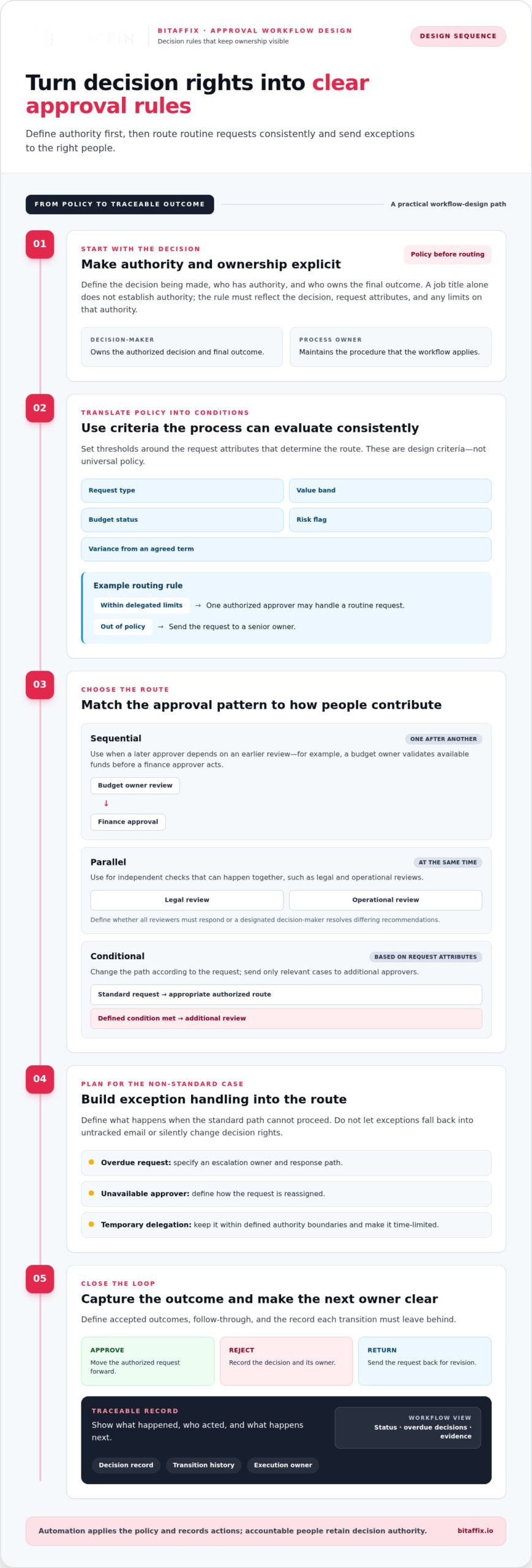
Document each participant’s role before configuring a route. The requestor submits information; the process owner maintains the procedure; approvers assess defined criteria; and an accountable final decision-maker owns the outcome. These roles may belong to different people, and the workflow should make that distinction visible.
- Request: Required fields, supporting documents, and the event that starts the process.
- Decision: Criteria, authorized approvers, response windows, and accepted outcomes, such as approve, reject, or return for revision.
- Follow-through: The person or system responsible for execution, plus the record of each decision and transition.
Separate approval from review, acknowledgement, and execution. A reviewer provides input; an acknowledger confirms receipt; an executor carries out an authorized action. Treating these as distinct steps prevents a completed review from being mistaken for approval and gives each action a clear owner.
Design Approval Rules for Routing, Thresholds, and Exceptions
Translate decision authority into routing rules before configuring the workflow. A job title alone doesn’t establish authority: the rule must account for the decision being made, the request’s attributes, and any limits attached to that authority. A department head may own one type of approval but only review another. Frameworks for establishing clear decision rights help teams distinguish decision-makers from contributors and other participants.
Set thresholds around criteria the process can evaluate consistently, such as request type, value band, budget status, risk flag, or variance from an agreed term. For example, a routine request within delegated limits might need one authorized approver, while an out-of-policy request goes to a senior owner. Treat these as design examples, not universal policy. Explicit thresholds reduce unnecessary hand-offs by directing standard requests to the appropriate authority and reserving additional review for defined conditions.
Choose sequential, parallel, or conditional routing
Select the route based on how people contribute to the decision. Sequential routing fits cases where a later approver depends on an earlier review, such as a budget owner validating available funds before a finance approver acts. Parallel routing fits independent checks, such as legal and operational reviews that can happen at the same time. Conditional routing changes the path based on request attributes, sending only relevant cases to additional approvers.
Keep the logic legible. If a request needs both sequential and parallel stages, define where one stage ends and the next begins. Specify whether parallel reviewers must all respond or whether a designated decision-maker resolves differing recommendations. Fewer unnecessary steps should not mean less clarity about who holds final authority.
Make exception handling part of the design
A reliable route defines what happens when the standard path cannot proceed. Set an escalation owner and response path for overdue requests, unavailable approvers, and reassignments. Allow temporary delegation only within defined authority boundaries, and make it time-limited. A delegation should not quietly become a permanent change in decision rights.
Give incomplete submissions a clear return path. The requestor should know what information is missing, who must provide it, and whether the decision window pauses while the request is corrected. Keep the item visibly pending correction rather than treating it as approved, rejected, or lost from the queue.
- Rejection: Record the decision and reason, then close the request or return it for a new submission according to policy.
- Reassignment: Identify the authorized replacement and preserve the transfer in the record.
- Timeout: Escalate to a named owner rather than silently advancing the request.
- Material exception: Pause automated progression and route the case to a human decision-maker with the relevant context.
BitAffix’s enterprise workflow automation supports approval chains and operational tracking. Explore workflow automation capabilities as part of a governed approval design.
Compare Approval Workflow Patterns Before You Automate
Choose a route to match the decision, not to make a process look more controlled. Procurement, HR, finance, and operational-change requests can each use different patterns depending on who holds authority, whether reviews depend on one another, and which attributes change the required decision. More approvers don’t automatically mean stronger oversight. Each person in the chain needs a defined responsibility.
Routing rule: select the pattern based on dependency, independence, and decision authority. Use this comparison to identify a starting point, then adapt it to the organization’s documented policies.
| Pattern | Suitable condition | Principal trade-off | Control requirement |
|---|---|---|---|
| Single-owner | One authorized person can decide, such as an assigned manager reviewing a routine leave request. | Direct and simple, but depends on clear ownership and availability. | Define the owner’s authority and reassignment path. |
| Sequential | A later decision depends on an earlier review, such as finance acting after a budget owner’s assessment. | Preserves dependency, but each hand-off can extend the cycle. | Specify stage order and what each approver decides. |
| Parallel | Independent stakeholders can assess a change or contract at the same time. | Reduces waiting between reviews, but differing responses may need resolution. | Set response requirements and name the final decision-maker. |
| Threshold-based | Request attributes, such as value or risk category, determine the authority required. | Routes routine cases efficiently, but unclear criteria can misroute requests. | Document thresholds, boundary cases, and rule ownership. |
| Exception-routed | A policy deviation or unusual request needs specialist or senior review. | Creates flexibility, but poorly defined exceptions can become the default route. | Define exception triggers, reviewer, and resolution path. |
Match the routing pattern to the decision
Map dependencies first. If a later approver needs an earlier assessment, use a sequential route. If stakeholders can make independent assessments, run those reviews in parallel and define how conflicting input reaches the decision-maker. Use threshold-based routing when a request’s attributes change who must decide, such as sending a finance request for additional review when it falls outside a documented budget condition.
Keep the distinction between input and authority explicit. A reviewer may identify concerns without holding approval rights. Don’t add an approver unless that person owns a defined decision, control, or required review. This discipline helps approval workflow automation reflect how the organization actually governs decisions.
Identify signs that a process is not ready
Pause configuration when teams can’t identify the accountable owner, explain the criteria, or resolve frequent informal workarounds. Those are signs of a process-design issue, not a software-setting problem. Document unresolved policy choices, including who decides disputed cases and how exceptions are treated, before automating the affected branch. Otherwise, the workflow will encode ambiguity and make it harder to see where the process needs correction.
Implement Approval Workflow Automation in Controlled Steps
Deploy in stages, with accountable owners and clear checkpoints. Before configuration begins, assign a process owner to maintain decision policy and a system owner to oversee workflow configuration and technical operation. This separation keeps policy decisions with the business while giving system changes a defined owner.
- Map the process. Document the trigger, required information, decision points, outcomes, hand-offs, exceptions, and systems involved. Mark where requests enter and where completed decisions must appear.
- Configure the workflow. Translate approved rules into routes, statuses, permissions, and response windows. Keep the logic aligned with the documented process rather than adding steps to compensate for unresolved policy.
- Test the paths. Validate approved, rejected, incomplete, reassigned, overdue, and exception cases, including boundary conditions that change the route.
- Pilot the process. Start with a bounded workflow and a defined group of users. Confirm who handles support issues and who reviews requests to change policy or configuration.
- Monitor performance. Track completion time, overdue items, rework, and escalation frequency. Compare results with the process baseline and investigate bottlenecks rather than assuming the route needs more approvers.
- Refine with control. Review findings with the process owner, document approved changes, and test revised rules before applying them more broadly.
Test decision logic and operational hand-offs
Use representative requests that cover both the standard route and documented exceptions. Check that each approver receives the information and supporting records needed to make a decision, and that the workflow prevents an incomplete submission from advancing as if it were ready. Test each outcome end to end: confirm that approval, rejection, return for correction, or escalation triggers the intended next action and updates the request’s status accurately.
Include integration checks in the same test plan. Verify that triggers read the right event from the source system and that outcome updates reach the intended destination. Where a workflow depends on enterprise databases or legacy platforms, define the data transferred, the system of record, and how failed or duplicate updates are handled. BitAffix middleware supports data transfer between enterprise databases and legacy platforms, helping connect approval processes to existing systems.
Pilot, monitor, and improve the workflow
A pilot reveals operational friction that a test environment may not capture, such as unclear instructions or hand-offs users routinely bypass. Give participants a simple way to report issues, then classify each finding as a policy gap, training need, integration issue, or configuration change. This prevents a software adjustment from masking a process problem.
Review performance with the process owner at planned intervals. Look for recurring overdue stages, incomplete submissions, reassignment patterns, and exceptions that appear more often than expected. Change routing rules only when the evidence and decision policy support the change. BitAffix’s enterprise workflow automation capabilities support a governed rollout.
Scale Enterprise Approval Automation with Governance and Integration
Scaling an approval process means extending its reach without losing control of its rules. Define governance before adding teams, request types, or system connections. Assign an owner for approval policy, an owner for workflow changes, and an accountable lead for exception rules. When these responsibilities remain clear, teams can adapt a process without quietly changing who holds decision authority.
Maintain control as processes and teams expand
Set a controlled change path. Record the reason for each rule change, who approved it, when it takes effect, and which workflows it affects. Establish access boundaries so only authorized people can change rules or manage approver assignments. Keep outcomes reviewable by preserving the decision, relevant request context, and resulting status. These controls help teams distinguish a policy change from a configuration correction.
Before extending a workflow to another department, review its performance with the process owner. Look for recurring exceptions, overdue stages, reassignments, and workarounds. These patterns may indicate that the process needs refinement before it scales. Avoid copying a route across teams simply because their requests appear similar; confirm that decision authority and operating rules align.
Keep audit-trail design focused on what the organization needs to review, such as decision identity, timing, request version, and outcome. Treat detailed audit-trail design as a separate area for deeper guidance rather than allowing it to obscure the governance model here.
Connect workflows to enterprise systems
Map each data exchange before connecting a workflow to enterprise platforms. Identify the source of each required field, the system that owns the authoritative record, and where the final decision or status update must go. For example, an approval may need information from an existing business system and then return its outcome to the platform that manages the request. Define how the process handles missing, outdated, or conflicting data so users can identify issues instead of relying on silent assumptions.
Middleware can support data transfer between enterprise databases and legacy platforms, helping workflows operate alongside existing systems. It complements workflow automation: the workflow orchestrates requests, decisions, and next steps, while middleware supports the movement of information across connected platforms. BitAffix offers both enterprise workflow automation and middleware for these complementary roles.
Scalable approval automation depends on governed rules and interoperable systems, so teams can extend consistent decision processes without losing oversight. A disciplined approach to approval workflow automation brings decision ownership, controlled changes, and system connections into one operating model. Explore BitAffix enterprise workflow capabilities to support governed approvals across enterprise operations.
Make the Next Approval Your Starting Point
Choose one approval process where clearer ownership and a more visible path would improve day-to-day operations. Use it to establish a disciplined model, then extend that model as teams and systems are ready. The next step isn’t to automate every decision at once. It’s to put approval workflow automation to work in a way that supports the organization’s authority structure and operating needs.
BitAffix brings enterprise workflow and task automation together with approval-chain support, SLA tracking, and operational audit trails. Its middleware connects workflows with enterprise databases and legacy platforms, supporting integration across existing systems. These capabilities provide a foundation for orchestrating approvals while maintaining visibility and operational control.
Explore BitAffix enterprise workflow automation and identify a practical starting point for your approval processes. Build with purpose, preserve accountable decisions, and move forward with confidence.
Frequently Asked Questions
What is approval workflow automation?
Approval workflow automation uses software to coordinate request decisions and record what happens at each stage. It can make a request’s current state visible, such as awaiting review, returned for information, or completed, and help teams identify where work is waiting. Unlike a reminder alone, the process can connect a decision to a defined next step. Human approvers retain responsibility for decisions that require judgment.
How do you automate an approval process?
Start with one recurring request type and document how a complete request enters the process, what information supports a decision, and how the result should be recorded. Then configure the route, test normal and unusual cases, and introduce it to a bounded group before expanding. For example, a procurement request might need a purchase purpose and cost centre before it can be reviewed. Refine the process using pilot feedback.
Can approval workflows have multiple approvers?
Yes. A workflow can involve several approvers, provided each has a clear role in the decision. For independent reviews, the process may require every designated reviewer to respond or allow a defined quorum. These rules differ from a final approval: reviewers can provide input while one accountable decision-maker retains authority to approve or reject. Specify how conflicting responses are resolved so the request doesn’t remain in an undefined state.
What happens if an approver does not respond?
The workflow should follow a documented overdue path rather than silently approving a request or leaving it unattended. It can flag the item, notify an escalation owner, or route it to an authorized alternate under a time-limited delegation. Keep the request’s status clear while it waits. The process owner should define response windows and escalation rules according to the importance and operating needs of each request type.
What is the difference between sequential and parallel approval?
Sequential approval sends a request to approvers in a defined order, so one person’s review can inform the next decision. Parallel approval lets independent reviewers assess the request at the same time. For example, technical and financial reviewers may work concurrently if neither depends on the other’s findings. Parallel routing can reduce wait between reviews, but the workflow still needs a clear rule for reconciling different recommendations and recording the final decision.
How do you measure approval workflow performance?
Measure elapsed time from submission to decision, time spent at each stage, the share of overdue requests, and how often requests return for correction. Compare similar request types and review periods, since a shift in request complexity can affect averages. Also monitor escalations and reassignments to identify bottlenecks or unclear ownership. Use these measures to guide process review, not to encourage approvers to make decisions without adequate assessment.
Can approval workflow automation integrate with legacy systems?
Yes, approval workflow automation can work with legacy environments when the integration design defines how information moves between systems. Identify which platform owns each key record, what data the workflow needs, and where it must send the outcome. Middleware can facilitate data transfer between enterprise databases and legacy platforms. Plan for failed or incomplete exchanges so teams can identify and resolve discrepancies without treating an update as successfully completed.