
An agreement isn’t the workflow. A service level agreement sets service goals and responsibilities; workflow SLA management software connects those commitments to tasks, owners, deadlines and escalations. That distinction matters when work crosses departments, because a delay at one handoff can affect the service another team delivers.
Clear targets and documented agreements give teams a useful foundation. But without operational coordination, people may not know who owns the next action, whether a deadline is at risk or when to escalate an issue.
This guide explains how workflow SLA management software differs from traditional agreements and which performance measures can make service delivery easier to assess. It also covers ways to adapt review practices to different workflows and coordinate handoffs across departments. The focus is practical: connect service goals to everyday work, establish clear ownership and give teams a consistent response when performance changes.
Key Takeaways
- Traditional agreements define service commitments; workflow tools connect those commitments to task ownership, deadlines and escalation paths.
- Track measures that reflect the service itself. ETSI identifies resource performance and availability, order completion time, repair commitments and customer contact performance as possible SLA measures.
- Match review frequency to the work: review high-volume or customer-facing SLAs monthly, and lower-volume internal SLAs quarterly.
- Set clear ownership and escalation conditions across departments, such as escalating a vendor setup request when legal review is still missing after two business days.
- When agreed service levels are missed, use a pre-agreed adjustment program and examine whether the workflow, handoff or target needs to change.
What is the difference between SLA software and traditional service level agreements?
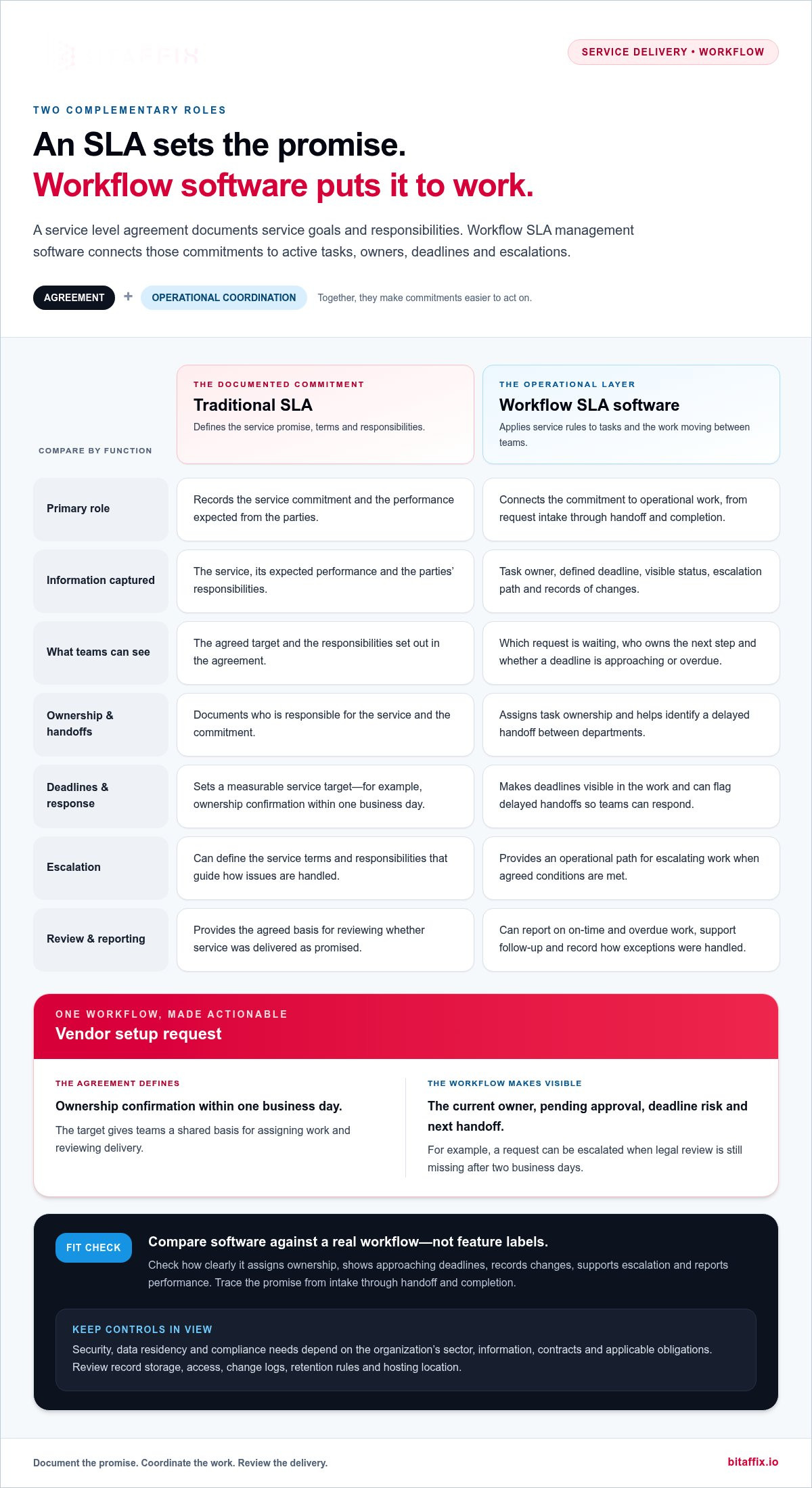
A traditional service level agreement defines a service promise; software connects that promise to active work. For a vendor setup request, teams can assign an owner, set a target and flag a delayed handoff.
SLA Definitions and Service Promises
An SLA is a documented commitment that defines a service, its expected performance and the parties’ responsibilities. A measurable promise gives teams a shared basis for assigning work and reviewing delivery. For example, a vendor setup SLA can require ownership confirmation within one business day. The agreement defines the target; workflow controls make it visible and actionable.
Comparing Workflow SLA Software
Workflow SLA software applies service rules to operational tasks, while a traditional agreement records commitments and terms. Products differ in how they connect deadlines, ownership, escalations, reporting and integrations. Compare those capabilities against a real workflow, such as vendor onboarding, rather than relying on feature labels. A good fit makes the promise traceable from request intake through handoff and completion.
Leading workflow SLA management software products should be compared by how clearly they assign task ownership, show approaching deadlines, record changes and support escalation. For a UAE organization, test these functions against an actual process and its reporting needs, not a generic demonstration.
Security, data residency and compliance requirements depend on the organization’s sector, information types, contracts and applicable obligations. Before deployment, map where SLA records are stored, who can access them, how changes are logged and which retention rules apply. A financial workflow and an internal facilities request may need different controls. Review hosting location and access governance separately.
There is no single UAE price for workflow SLA software. Cost depends on factors such as workflow scope, integrations, user access and hosting requirements; compare written quotes in AED, with the price provided after a quote request.
Core features should connect each commitment to a task owner, a defined deadline, a visible status and an escalation path. Reporting should distinguish on-time work from overdue work, while change records show how teams handled exceptions. For a customer-facing SLA, review performance regularly and revise targets when service conditions change.
The distinction matters most when teams need to act on commitments, not merely document them. An agreement can state a service target, but a board can show which request is waiting, who owns the next step and whether the deadline is at risk. That operational view supports consistent decisions and helps managers distinguish a missed target caused by a delayed handoff from one caused by an unrealistic service promise.
What metrics should teams track for SLA management?
Track measures that reflect the service promise and the workflow delivering it. A dashboard becomes useful when every measure has a defined source, owner and review action.
SLA Metrics and Dashboards
An SLA metric turns a service commitment into an observable measure, while a dashboard groups measures for review. Together, they help leaders distinguish a missed target from a delayed handoff. For example, a vendor setup dashboard can show request status, current owner, elapsed time and the next pending approval.
ETSI identifies resource performance and availability, order completion time, repair commitments and customer contact performance as possible SLA measures. Select only measures tied to the service being promised. A repair workflow could track fulfilment of commitments, while a customer support process could monitor contact performance. Combining unrelated measures can obscure the cause of a missed target.
Build the dashboard around decisions, not display volume. Give each measure a clear definition, reporting period and responsible role. Show work approaching its target separately from overdue work, so teams can intervene before a breach. For example, a procurement manager can filter vendor requests by pending legal review, then identify the handoff that needs attention.
SLA Performance Metrics
SLA performance metrics show whether completed work met its agreed service conditions. A single completion figure can hide recurring delays or uneven delivery across request types. Compare performance by workflow, service category and responsible team to identify where an operational change could help.
Useful measures include on-time completion, time to resolution, time awaiting approval, reopened requests and escalation frequency. Define each consistently. For on-time completion, compare requests completed within the agreed target with all requests completed in the same reporting period. For approval delay, measure time spent waiting at that stage, rather than attributing the entire request duration to one team.
Interpret measures together. If a service meets its completion target but escalations rise, teams may be relying on intervention to maintain results. If approval waits grow while active handling time stays stable, focus on the approval handoff. Record the cause and resulting action alongside the dashboard trend, so a later review can assess whether the change addressed the issue.
Use the dashboard to assign follow-up, not simply report performance. A manager can review overdue work, confirm its current owner and record the next action. Teams refining their workflow measures can discuss their SLA measurement approach in the context of the processes they need to manage.
Adapting SLA frameworks
Set rules around the service’s actual work, not a generic template. To define deadlines and escalations, identify the request, assign an owner, set a target and specify what happens when that target is at risk.
For example, a vendor setup workflow can set a one-business-day target for confirming request ownership. That target covers a specific action, not the entire setup process. Separate milestones can govern later approvals or completion, helping teams locate delays without confusing ownership confirmation with the final service outcome.
Translate each commitment into an operational rule:
- Define the trigger: Start the clock when a complete vendor setup request enters the agreed workflow.
- Assign ownership: Name the role responsible for confirming receipt and moving the request forward.
- Set the threshold: Record the one-business-day ownership target in the workflow, using the same definition across teams.
- Specify escalation: Identify who receives an alert when ownership remains unconfirmed after the target.
- Record exceptions: Note missing information or a blocked approval, so the team can distinguish a process delay from an incomplete request.
Clear rules prevent a deadline from becoming a detached dashboard label. A request awaiting supplier documents, for instance, should show its status and next required action. The workflow can preserve the original target while making the reason for delay visible. That distinction supports fair reviews and gives managers evidence to refine the process.
Review frequency should reflect the workflow’s volume and customer impact. High-volume or customer-facing SLAs merit monthly review, while lower-volume internal SLAs can often be reviewed quarterly. A quarterly review of internal equipment access requests, for example, can identify recurring approval bottlenecks and assess whether the target still matches the work.
Set a response plan before performance changes. According to ETSI, a program for adjusting service levels should be agreed in case performance deviates from the agreed level. Define who assesses the deviation, what evidence they review and how changes to targets or processes are documented. This gives teams a controlled response instead of allowing informal threshold changes after missed commitments.
Use each review to compare the target with workflow evidence. If vendor setup ownership confirmations repeatedly miss the one-business-day target, examine intake completeness, assignment logic and team capacity. Keep the agreed measure stable while investigating causes; revise it only through the established adjustment program. This preserves accountability while allowing the framework to adapt as service conditions change.
Common SLA management mistakes
SLA controls fail when teams set targets without matching them to operational events. A support desk can avoid that gap by checking each commitment against request stages, ownership rules and escalation actions.
Use these failure patterns to identify where a service framework needs correction:
- Starting the clock too early: If a support ticket starts its SLA timer before required details arrive, staff may appear late while waiting for customer information. Define the start event, such as receipt of a complete ticket, and record incomplete submissions separately.
- Tracking only final completion: A repair request may miss its deadline because inspection, parts approval or technician assignment stalled. Measure key stages as well as final resolution, then locate the delay before changing the overall service target.
- Leaving pauses undefined: A ticket waiting for customer evidence can distort elapsed-time reporting if teams handle pauses inconsistently. Specify which statuses pause the clock, who applies them, and what record explains each pause.
- Applying identical targets to different work: A password reset and a complex account access investigation require different handling. Group requests by service type and complexity, then set targets that reflect their distinct steps and dependencies.
- Escalating without a clear owner: An alert that reaches a shared mailbox may not prompt action. Assign escalation to a role, such as the service desk lead, and state what decision that role must make when a ticket breaches its threshold.
- Changing targets without evidence: If managers extend a deadline after repeated misses, they can conceal a process problem. Review ticket histories, approval waits and rework first, then document the reason and approval for any revised commitment.
Dashboards can mislead when they combine unlike cases. A service team reporting one average resolution time, for example, may hide a small group of long-running access investigations. Separate service categories and show overdue work alongside completed requests. This gives managers a clearer view of current exposure, rather than letting routine tickets mask stalled cases.
Finally, don’t treat an alert as a resolution. When an automated board flags a delayed approval, the assigned owner still needs to investigate the cause, contact the blocking team and record the next action. Review whether the escalation led to a decision and whether that decision cleared the work. This closes the loop between a service commitment and the operational response behind it.
Cross-department workflow coordination
A service commitment often depends on several teams, not just one queue. In a vendor setup, procurement may collect supplier details, legal may review terms and finance may approve payment information. Coordination means making each handoff visible, assigning an owner and preserving a shared view of progress. Without that structure, one department can meet its target while the request stalls between teams.
Map the workflow around handoffs, not just departments. For each transition, define the event that transfers responsibility, the receiving role and the information required. For example, procurement should route a complete vendor file to legal, while the workflow records when legal accepts it. That timestamp distinguishes time waiting for assignment from time spent reviewing the file.
Use a shared work record to keep context attached to the request. A vendor setup item should show its current owner, status, pending action and relevant documents. If legal needs a revised clause, record the request against the item rather than relying on a separate email thread. Procurement can then see what is blocking progress without duplicating the legal review.
- Make handoff acceptance explicit: The receiving team acknowledges the request and flags missing information.
- Keep ownership clear: Assign each active stage to a role, such as the legal reviewer or finance approver.
- Show dependencies: Mark payment approval as dependent on legal review when that sequence governs the work.
- Record decisions: Capture why a request returns to procurement, such as an incomplete supplier document.
Escalation should follow the dependency, not merely notify a general group. In the vendor setup example, escalate when legal review is missing after two business days. Route the alert to the role able to resolve the blockage, such as the legal team lead, and include the pending request and prior handoff details. Procurement can stay informed without becoming responsible for legal’s decision.
Shared dashboards can reveal recurring bottlenecks across departments. If vendor requests repeatedly wait at legal review, compare the queue, missing information and return reasons. A manager can then distinguish capacity pressure from incomplete submissions. Track both handoff delay and the full request outcome, so teams can improve the relevant stage without shifting blame between departments.
Coordination also requires consistent definitions. Agree whether a timer continues during a documented information request, and apply that rule across procurement, legal and finance. Review exception records together, then update the workflow when responsibilities or dependencies change. This creates a traceable process: each team sees its next action, each handoff retains context, and managers can identify where service delivery slows.
BitAffix: Workflow Automation
BitAffix provides Workflow Automation for organizations seeking to align service commitments with operational processes. It’s a relevant option when SLA ownership, handoffs or escalation paths need clearer coordination across teams. Start by mapping the process: identify where requests enter, which roles act at each stage and where work commonly pauses. This gives teams a practical foundation for structuring automation around defined responsibilities and service goals. For processes involving sensitive records, BitAffix also provides Secure Document Archiving. The priority is to connect the framework to the work teams actually perform, rather than add rules that remain separate from daily operations. Contact BitAffix to discuss your workflow automation needs.
Turn service commitments into operational practice
Choose a workflow where ownership and handoffs shape the service experience. Define the process boundary, identify the teams involved and decide how leaders will review changes. This gives your organization a focused starting point for applying workflow SLA management software without imposing a uniform framework on every department.
BitAffix provides Workflow Automation and Kanban Task Automation for structured work management. Secure Document Archiving supports processes where records need to remain organized alongside operational work. The right combination depends on the workflows and information your teams manage. For teams evaluating whether to move beyond manual tracking, explore workflow automation alternatives to spreadsheets and match the system to the process’s needs.
Bring a representative process to the discussion, including its key handoffs, service goals and recurring obstacles. That context helps frame a practical conversation about aligning workflow controls with your operating model.
Make the next workflow clearer, more accountable and easier to govern.
Frequently Asked Questions
Can small businesses effectively use enterprise SLA software platforms?
Yes, if the platform supports the business’s actual workflows without adding unnecessary administration. A small business managing customer support and supplier approvals may start with a few clearly defined service commitments, owners and escalation rules. Choose a system that can represent those processes and provide useful oversight. Avoid adopting controls the team cannot maintain or that don’t help employees make timely decisions.
How does SLA software integrate with existing business systems?
SLA software can exchange information with business systems through integrations, connectors or middleware. For example, a customer request captured in a service system may need to pass its status and owner to a workflow board. Define which system owns each data field, what information moves between systems and how teams handle transfer errors. This prevents conflicting records and clarifies where staff should update a request.
How often should SLAs be reviewed?
Review high-volume or customer-facing SLAs monthly, and lower-volume internal SLAs quarterly. A customer support team can use its monthly review to assess whether request categories and service targets still match current operations. An internal equipment-access process may suit a quarterly review. Revisit the framework sooner if the workflow, service scope or recurring exceptions change, so an outdated target doesn’t guide current decisions.
What happens when SLA software detects a potential service level breach?
The system can flag work nearing or exceeding its target according to configured rules. A service desk lead might receive an alert for an unresolved customer request, then review its owner, status and latest action. The team can reassign work, escalate a blocker or document an exception, depending on the agreed process. Treat the alert as a prompt for human action, not proof that the service issue is resolved.
What industries benefit most from implementing SLA software solutions?
Industries with service commitments spanning repeatable processes can benefit, particularly when work passes between teams. Banking and insurance workflows may involve approvals and document handling; energy and automotive operations may coordinate service requests across functions. Schools and universities also manage processes involving multiple administrative teams. The strongest fit depends on whether clearer ownership, measurable service goals and traceable handoffs address a real operational need.
What is SLA management?
SLA management is the ongoing governance of service commitments, from defining expectations to reviewing performance and addressing exceptions. For example, an IT team can classify support requests, assign the right service target and review unresolved cases during operational meetings. Effective management also records who approved changes and why. That history helps teams distinguish a valid process adjustment from an informal change that undermines consistent reporting.
What is an SLA and why does it matter?
An SLA, or service level agreement, documents the service expected between parties, including performance measures and responsibilities. A shared agreement helps customers and providers interpret delivery consistently. For example, a facilities agreement might distinguish urgent safety-related repairs from routine maintenance requests. Clear categories and criteria reduce disagreement about whether the service met its commitment and provide a basis for discussing exceptions.
What is workflow SLA management software and how does it work?
Workflow SLA management software connects service commitments to the operational tasks that deliver them. Teams define process rules, assign work and use status information to monitor progress against targets. For instance, an access request can move through manager approval and IT fulfilment, with each stage recorded for review. This helps teams understand the process behind a missed commitment, not just its final status.