
Automating every department can still leave the work between them stalled. A 2026 Deviniti and Speakwise study found that 55% of organizations face daily operational friction from disconnected handoffs. Cross department workflow automation addresses this gap by coordinating shared work, rather than digitizing tasks inside individual teams.
When departments use different steps, records, and priorities, a handoff can lose its owner or status. Legacy systems can make information harder to share, and repeated follow-ups consume time without moving work forward. Effective automation connects teams while preserving the accountability and oversight each department needs.
This article explains how to map end-to-end processes, assign clear ownership, and make handoff status visible. You’ll learn how to standardize shared steps, select workflows to automate, and connect legacy platforms through middleware. It also covers governance practices that keep approvals, service-level expectations, and audit trails visible as work moves across the organization. Workflow and Kanban task automation can help teams coordinate execution while preserving departmental responsibilities.
Key Takeaways
- Use cross department workflow automation to coordinate shared process stages, not just tasks within individual teams.
- Map the full workflow and clarify who owns each outcome, decision, and handoff before configuring automation.
- Prioritize a bounded, repeatable process with visible delays and measurable results as a starting point.
- Set baseline measures, test workflow changes, and review end-to-end performance as you roll them out.
- Combine task visibility, system connectivity, and governance controls to support accountable operations at scale.
Cross-Department Workflow Automation: Where Operational Silos Disrupt Work
Automating a department’s queue can speed up its own tasks while leaving the wider process unchanged. Cross department workflow automation coordinates connected stages across teams and systems, so work advances with the information, decisions, and accountable owner each stage requires. For example, a purchase request may pass from a business manager to procurement and then Finance. Automating only the request form won’t resolve a delay if procurement can’t see that approval is complete or Finance relies on a separate status record.
Workflow orchestration coordinates the process; task automation executes an individual step. This distinction reflects the broader discipline of business process management, which examines, models, executes, and improves processes across organizational boundaries. Orchestration defines how steps relate, what event triggers the next handoff, and how teams handle exceptions. Task automation can support that design, but it doesn’t establish end-to-end ownership on its own.
How cross-department workflows differ from single-team automation
A contained team task has a local purpose and a clear working context. A department might automate how it assigns a new case. A cross-department process has a shared outcome that depends on several teams completing different responsibilities in sequence or in parallel. Each handoff must carry enough context for the next team to act. Timing matters too: a downstream step should start when its prerequisite is complete, not when someone happens to notice a message.
Shared process design doesn’t require departments to surrender their decision rights. Procurement can retain responsibility for supplier checks, while Finance retains budget approval. The common workflow makes each role, transition, and outstanding decision visible against the overall outcome. This preserves local accountability while establishing a consistent route through the process.
Where silos interrupt the end-to-end process
Silos become operational barriers when one team completes its work but the next team can’t see that the handoff is ready. Staff may copy information into another system, send a separate message, or follow up to confirm status. Separate records can then show different owners, priorities, or completion states. An exception may sit unresolved because each team assumes the other owns the next action.
Look for these signals before choosing an automation approach:
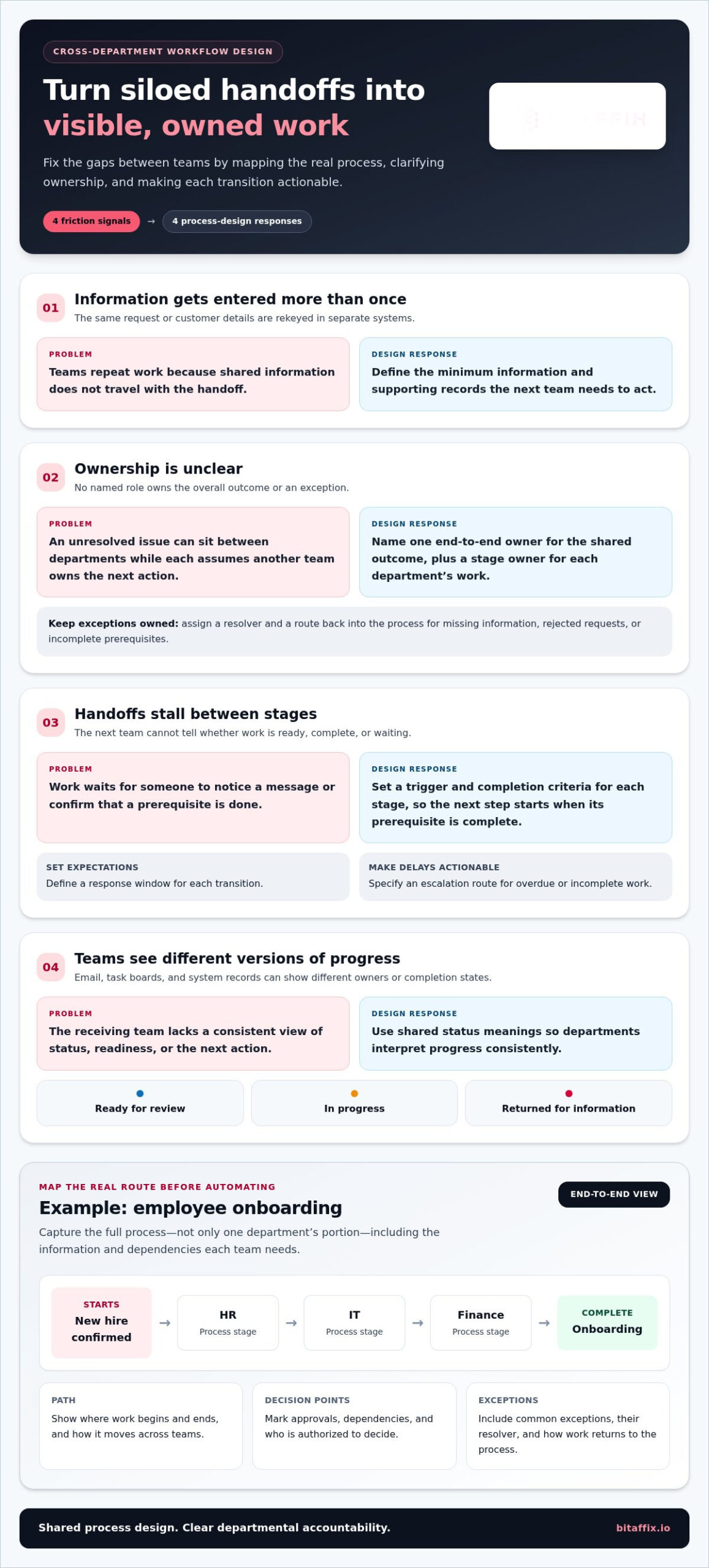
- Repeated data entry: Teams rekey the same request or customer details in separate systems.
- Unclear ownership: No named role takes responsibility for the process outcome or an exception.
- Stalled handoffs: Work waits between stages because readiness, required information, or the next action isn’t visible.
- Fragmented status updates: Emails, task boards, and system records give teams different views of progress.
These symptoms point to a process design gap, not simply a need to automate more tasks. Start by mapping how work actually travels, including who owns each transition and what information must move with it.
Design Cross-Department Workflows Around Ownership, Handoffs, and Shared Data
Design the process before configuring its automation. Map the real path work follows, including informal approvals, repeated data requests, dependencies, and exceptions. Show where work begins and ends, which decisions affect its route, and what each participant contributes. Teams can then validate the shared design before technology makes the steps repeatable.
Take employee onboarding. The process may begin when a new hire is confirmed, then move through HR, IT, and Finance before onboarding is complete. Mapping only HR’s portion would miss equipment provisioning, payroll setup, and dependencies between those activities. The map should show both the sequence and the information each team needs to proceed.
Map process stages and define accountable ownership
Name one end-to-end owner accountable for the overall process, its performance, and unresolved cross-team issues. Then identify a stage owner for each department’s work. These roles serve different purposes: stage owners control local execution, while the end-to-end owner addresses gaps between stages and keeps the shared outcome in focus. Research on overcoming operational silos reinforces the value of coordinating across functional boundaries rather than relying on teams to align informally.
Record the trigger and completion criteria for every stage. Mark decision points, required approvals, dependencies, and the role authorized to make each decision. Capture common exceptions, such as missing information, rejected requests, or incomplete prerequisites. Assign each exception a resolver and a route back into the process so it doesn’t disappear into an unowned queue.
Standardize handoffs without removing departmental control
A handoff is actionable only when the receiving team knows what arrived, why it’s ready, and what it must do next. Define the minimum information and supporting records that travel with each transition. Set shared status meanings, such as “ready for review,” “in progress,” and “returned for information,” so departments interpret progress consistently without changing their internal decision rights.
Specify service expectations for each transition, including the expected response window and escalation route for overdue or incomplete work. Keep department-specific controls in place while standardizing shared triggers, status updates, and exception handling. This lets teams preserve necessary oversight and gives the process owner a reliable view of flow.
- Start and finish: Define the event that opens the process and the condition that completes it.
- Ownership: Name the end-to-end owner, stage owners, decision-makers, and exception resolvers.
- Handoffs: Specify triggers, required information, status definitions, service expectations, and escalation paths.
- Controls: Preserve departmental approvals and clarify which records support each decision.
Before configuration, document the process boundaries, accountable owners, decision rights, handoff triggers, required data, service expectations, and exception routes. This gives stakeholders a concrete basis for review and prevents automation from locking in ambiguous rules. Once those design choices are clear, workflow automation can coordinate the defined stages while departments retain responsibility for their work.
Which Cross-Department Workflows Should You Automate First?
Prioritize operational friction and readiness, not how complicated a process looks on a diagram. A useful first candidate runs often, crosses clear team boundaries, and has repeatable rules that teams can describe. It should also have visible delays or status gaps and an outcome stakeholders can measure. Compare candidates against the same criteria rather than choosing whichever problem has the loudest sponsor.
Use practical criteria to rank candidate processes
Review how frequently each process runs, how many teams contribute, and where work waits. Look for repeated follow-ups, duplicate data entry, and handoffs that lose visibility. Then confirm that owners can define completion consistently. A process with unclear decision rights or highly variable exceptions may need design work before automation. Complexity alone isn’t a reason to proceed: automating unstable rules can make inconsistent execution faster without improving the end-to-end result.
Use a shared comparison template. Record observations rather than imposing universal thresholds; each organization can decide which factors matter most.
| Candidate process | Handoff frequency | Delay exposure | Repeatability | Visibility gaps | Owners and outcome measurable? |
|---|---|---|---|---|---|
| Employee onboarding | Assess locally | Assess locally | Assess locally | Assess locally | Yes / partly / no |
| Purchase-to-pay | Assess locally | Assess locally | Assess locally | Assess locally | Yes / partly / no |
| Customer implementation | Assess locally | Assess locally | Assess locally | Assess locally | Yes / partly / no |
Apply the framework to common enterprise examples
Employee onboarding spans HR, IT, facilities, and managers. Assess whether start dates, access requests, equipment needs, and completion status move predictably between owners. Purchase-to-pay connects procurement and Finance through request review, purchasing steps, and invoice handling. Look for recurring waits or repeated entry while retaining each department’s approval responsibilities.
Customer implementation typically connects Sales, Operations, and Support. Candidate steps may include transferring agreed requirements, preparing delivery, and confirming readiness for ongoing support. Compare the process against the same criteria. Keep the scope bounded to a clearly observable outcome rather than trying to automate every customer variation at once.
Choose a candidate with a manageable scope, accountable owners, and a result teams can track from start to finish. Record the current process and its baseline measures before configuration. If the comparison reveals missing ownership, inconsistent completion rules, or exceptions that teams cannot route reliably, address those design gaps first. A measured starting point gives the implementation team a defined process to test and refine.
Implement Cross-Department Workflow Automation in Measured Stages
A controlled rollout turns a process design into an operating workflow without obscuring where delays or errors originate. Before configuration, capture a baseline across the full process: elapsed time from start to completion, time waiting at handoffs, rework, and relevant SLA performance. Record how each measure is defined and which system or team supplies the data. This provides a consistent point of comparison after cross department workflow automation begins.
- Map the current process and baseline. Record the actual sequence, systems, owners, exceptions, and current performance. Separate active work time from waiting time where the data allows, so a shorter departmental queue isn’t mistaken for faster end-to-end completion.
- Configure the agreed workflow. Translate approved stages, handoff triggers, decision rules, and exception routes into workflow logic. Keep department-level responsibilities intact, and make each transition explicit before connecting systems.
- Test representative scenarios. Validate the standard path as well as incomplete information, rejected approvals, delayed responses, and failed system exchanges. Confirm that records update as intended and that someone can identify and resolve an exception.
- Deploy in a controlled stage. Introduce the workflow to a defined process scope and participating users. Provide a clear route for reporting issues, and observe real handoffs before expanding to other teams or process variations.
- Review and refine. Compare results with the baseline, examine exceptions with process owners, and adjust rules deliberately. Keep a record of changes so teams understand what changed and why.
Connect workflow stages to enterprise systems
Trace where each stage creates, updates, or stores information. Identify the authoritative source for each data element, such as the system that owns a request status or approval record. Where enterprise databases and legacy platforms need to exchange information, middleware can support communication and data transfer between them. Define how the workflow handles an incomplete or failed exchange, who owns correction, and how the process resumes without creating conflicting records.
Measure outcomes and refine the rollout
Assess the process as a whole. Track end-to-end completion time, handoff delays, rework, and SLA performance where relevant. Keep these distinct from department-level activity counts, such as tasks completed or approvals processed. A team can improve its local count while the overall process remains delayed. Review exceptions with participating departments, gather user feedback, and refine the workflow before broadening adoption.
BitAffix workflow automation supports coordinated processes across teams and systems. Explore BitAffix workflow automation.
Scale Cross-Department Workflow Automation with Enterprise Governance
Scaling automation requires more than connecting additional teams. A governance model keeps access, accountability, and process changes under control as workflows expand. Cross department workflow automation should make progress visible to the right roles while preserving each department’s authority over its decisions. This lets leaders monitor end-to-end performance without blurring operational responsibilities.
Govern shared workflows while preserving operational control
Define who owns the process, who administers its rules, and who can approve changes. Set role-based visibility so participants can act on assigned work while process owners oversee relevant handoffs, exceptions, and service-level expectations. Establish escalation paths for stalled work and a change-management practice that records what changed, who approved it, and when it took effect.
Maintain traceability across the process. Operational audit trails can help teams understand how work progressed, where decisions occurred, and how exceptions were handled. Keep process documentation aligned with the live workflow, including departmental responsibilities and approval boundaries. Review the documentation when rules, teams, or system dependencies change. Governance should provide consistent oversight, not create a new approval layer for every routine task.
Extend automation across departments and systems with BitAffix
Enterprise workflows often combine approvals, task execution, records, and information held in different systems. BitAffix workflow automation supports approval chains, SLA enforcement, and operational audit trails. Kanban task automation makes task status and handoffs more visible, helping participating teams coordinate work while retaining their defined responsibilities.
Where a process depends on enterprise databases or legacy platforms, BitAffix middleware supports communication and data transfer between systems. Establish which system owns each record and how teams should address incomplete exchanges, so integration supports process continuity rather than creating competing versions of the truth. Secure document archiving supports processes that require structured records, access controls, and searchability.
These capabilities support organizations coordinating complex operations across banking, insurance, energy, automotive, and educational institutions. The governance model should scale with that operational complexity: clarify who can see and act on each stage, preserve departmental decision rights, and maintain a traceable record of process activity.
Choose one high-friction workflow as the next step. Define the outcome it must deliver, the teams involved, and the governance boundaries that must remain in place. Then assess how enterprise workflow, task automation, integration, and records management can support that process. Explore BitAffix enterprise automation solutions.
Turn One Shared Workflow into a Clear Next Step
Choose a process where coordination across teams affects an outcome your organization values. Define what better performance should look like, who will own the result, and how teams will recognize progress. That focus gives cross department workflow automation a practical starting point and keeps future expansion tied to operational priorities rather than automation for its own sake.
As you plan the next step, consider how workflow and task automation, middleware integration, and secure document archiving can work together to support the process. SLA tracking and operational audit trails help keep execution visible, while structured records and access controls support accountable information handling. The aim is to strengthen coordination without weakening the oversight each department needs.
BitAffix brings these enterprise capabilities together to support organizations managing connected processes across teams and systems. Explore BitAffix enterprise automation solutions and identify a clear, manageable path toward more coordinated operations.
Frequently Asked Questions
What is cross-department workflow automation?
Cross-department workflow automation coordinates work that moves between teams, so a process can advance based on agreed events, information, and decisions rather than informal follow-ups. For example, a completed review can make a case ready for the next team without someone manually relaying its status. Departments still perform their own work, while the shared process links those contributions to one outcome.
How does cross-department workflow automation reduce operational silos?
It gives participating teams a consistent view of the current stage and what must happen next. In a facilities service request, for instance, the team assessing an issue can pass its findings and status to the team responsible for resolving it. Clear transitions reduce reliance on private spreadsheets and repeated status messages, while defined owners help prevent requests from being overlooked between teams.
Which business processes are best suited to cross-department automation?
Processes with recurring steps, clear decision rules, and identifiable owners are strong candidates. Consider contract review, where legal, procurement, and business teams may each contribute a decision, or access requests that require a manager’s authorization and a service team’s action. Start with a process whose completion can be defined consistently. Highly variable work may need clearer rules before teams automate its routing.
Can workflow automation connect departments that use different enterprise systems?
Yes. Integration can pass agreed information between systems, including enterprise databases and legacy platforms. Begin by identifying which system owns each key record, then define how fields map between systems and what happens if a transfer fails or required data is missing. Cross department workflow automation should make exchange errors visible and assign a resolution owner, rather than allowing teams to proceed with conflicting or incomplete records.
How do you measure the success of a cross-department workflow?
Measure whether the process delivers a complete, correct outcome, not just whether each team closes its assigned tasks. Track indicators such as the share of cases completed without rework, the age of unresolved exceptions, and whether required approvals are present. Define each measure before rollout, then compare like-for-like process cases over time. This shows whether coordination is improving without mistaking higher activity for better results.
What challenges should organizations address before automating workflows across departments?
Resolve inconsistent process definitions, unclear data ownership, and competing interpretations of status before configuration. Teams should also agree who can view sensitive records, who approves rule changes, and how unusual cases return to a responsible owner. A review with representatives from every participating function can surface differences that a process map may miss. Addressing them early helps avoid encoding conflicting practices into the workflow.