
The lowest subscription is not always the lowest operational cost. In the UAE, operational task tracking software costs depend on the plan, user count, and capabilities your workflows need. Compare the total cost in AED with the work the system must coordinate. Remote and field teams also need a reliable way to record progress and keep task status visible.
Price matters, but so does operational fit. A plan suited to office-based work may not give distributed teams the structure they need to assign tasks, manage handoffs, and maintain consistent oversight.
This guide explains what influences software costs and how to assess options for your team. It also covers practical ways to monitor office, remote, and field operations, helping you compare usability, governance, and team-wide visibility before deciding.
Key Takeaways
- Compare plan features and total team costs in AED, not just the advertised starting price.
- Match software capabilities to each team’s workflows, governance needs, and working environment.
- Set clear task ownership and progress signals to make project status visible across teams.
- Use free plans or trials to assess practical limits before committing to a paid tier.
- Consider workflow automation when manual handoffs and repetitive task updates create operational friction.
How much does task management software cost?
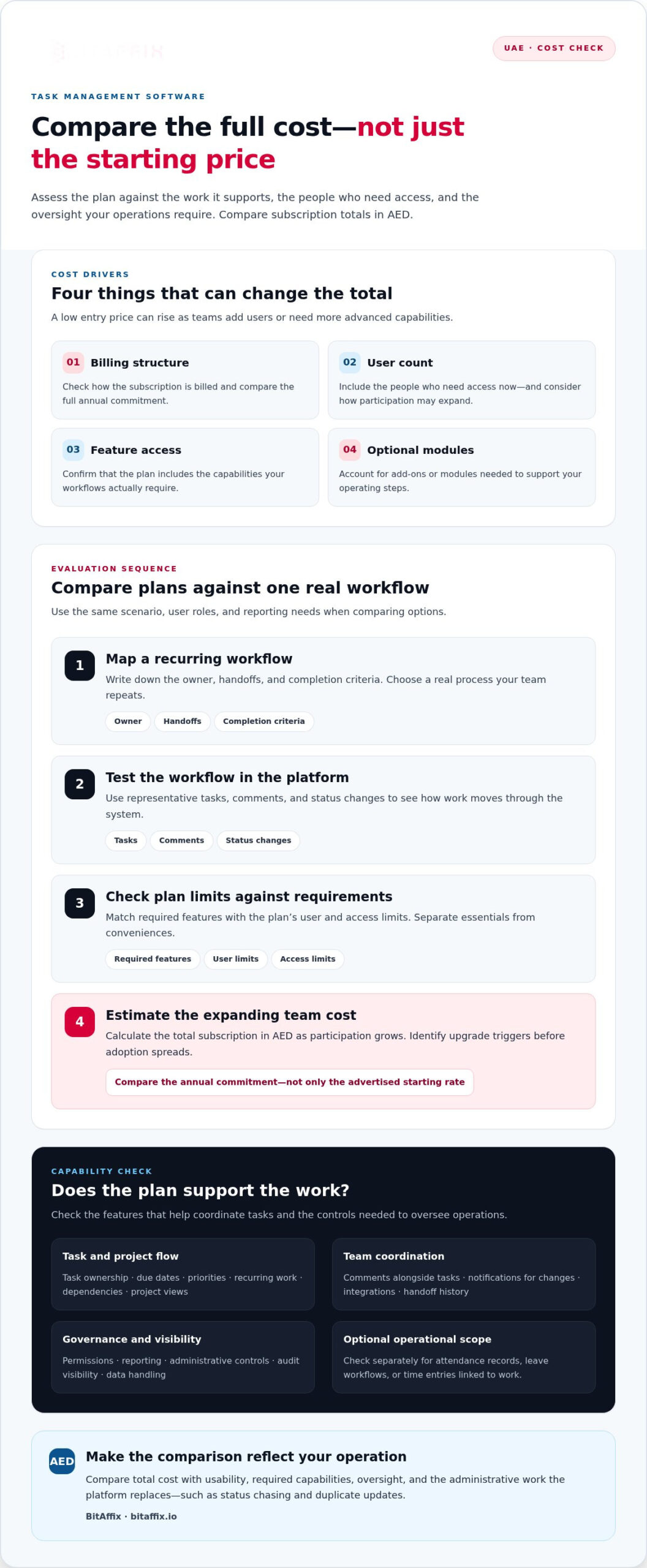
In the UAE, compare task management software costs in AED with the work each plan supports. Subscription totals commonly depend on billing structure, user count, feature access, and optional modules. A low entry price can rise as teams add users or need advanced controls. Compare the full annual commitment, not just the advertised starting rate, before choosing a system.
Start with the functions your team needs. Check whether the platform supports task ownership, due dates, priorities, recurring work, dependencies, and project views. Comments should keep decisions alongside the relevant task, while notifications should flag changes that need action. For operational task tracking software, assess permissions, reporting, integrations, and administrative controls too. These capabilities determine whether the platform can support structured operations, rather than simply store individual reminders.
A to-do list app generally suits personal reminders or a few straightforward tasks. A task management system organizes work across people, projects, and repeatable workflows. For example, a service team may need to assign a request, record comments, track its status, and preserve its handoff history. Project management software adds planning tools such as milestones, dependencies, and workload views for teams coordinating connected deliverables.
Small teams can prioritize a simple interface and essential task views. Growing teams should examine how the system handles departments, permission levels, reporting, and changing workflows. Use a practical evaluation sequence:
- Map one recurring workflow, including its owner, handoffs, and completion criteria.
- Test that workflow using representative tasks, comments, and status changes.
- Compare the required features with the plan’s user and access limits.
- Estimate the total subscription in AED as participation expands.
This approach reveals upgrade triggers before adoption spreads. A custom workflow may require additional fields, approvals, or integrations, so compare configuration options with actual operating steps. Separate essential capabilities from conveniences, then compare plans using the same scenario, user roles, and reporting needs. This produces a more useful cost comparison than feature counts alone.
Attendance, leave, and timesheet management require a separate scope check. Some teams need only task ownership and progress records; others also need attendance records, leave workflows, or time entries linked to work. Treat these as distinct requirements during evaluation. Define how each process will be organized, who can access its records, and whether reports meet management needs. A clear scope helps avoid paying for functions the workflow will not use.
Finally, assess security and governance alongside price. Review encryption, access controls, audit visibility, data handling, and relevant compliance requirements for sensitive information. Compare the total cost with the administrative work the platform replaces, including status chasing and duplicate updates. The right choice balances capability, usability, and oversight while keeping recurring expenses clear in AED.
Choosing software for different team needs
Choose a platform based on your team’s actual workflow, industry controls, and collaboration patterns. Match its structure to how people assign work, share updates, and review delivery.
Team Collaboration and Integrations
Assess how teams coordinate across departments and existing applications. A marketing team might need shared boards and links to Google Workspace, while an operations group may prioritize connections to internal systems. Map each handoff, then test whether integrations keep task details accessible without duplicating updates. Review what data moves between applications, who can access it, and whether connected tools report consistent statuses. Collaboration works best when the platform supports the process instead of becoming another disconnected destination.
Task Assignment and Communication
Task assignments should make responsibility and next steps clear. Give each task an owner, deadline, priority, and completion condition; use comments to record decisions alongside the work. Check how the system alerts colleagues to changes and supports discussion without obscuring current status. For example, a supervisor can assign an inspection, while the employee posts progress and flags a dependency. The result is a traceable handoff, not scattered messages.
Team size changes what matters most. A compact team may prefer a shared board and simple permissions, while a larger organization may need separate workspaces, role-based access, and consolidated reporting. Test the platform with representatives from the teams who will use it. Include managers, administrators, and frontline staff, since each role faces different workflow demands.
Industry needs also shape the evaluation. A school may coordinate approvals and recurring administrative work; a financial services team may focus on controlled access and documented handoffs. List the processes that must remain consistent, then compare the platform’s configuration and oversight tools with those steps. Don’t choose features just because they appear in a plan. Prioritize capabilities that support real work and responsible access.
Use a short, structured evaluation:
- Map a representative workflow from request to completion.
- Test assignment, comments, notifications, and connected applications.
- Review permissions and reporting for each relevant role.
- Ask users to complete their actual tasks on desktop and mobile.
Finally, make sure the platform can adapt as teams reorganize. Flexible boards and configurable workflows can support different operating patterns while maintaining consistent governance. Compare how updates appear to owners and managers, and whether reports distinguish blocked work from completed tasks. A focused pilot reveals friction before wider adoption and helps decision-makers assess fit across functions.
Real-time task and project progress monitoring
Set up tracking by mapping the workflow, defining status stages, assigning owners, and choosing progress views. Then test an active project to confirm updates give managers and contributors a shared, useful picture.
Managing Multiple Projects
A platform for multiple projects should separate work clearly while showing shared dependencies. Use distinct workspaces or boards for each project, then review a portfolio view that highlights blocked tasks, deadlines, and resource conflicts. For example, a team coordinating a client rollout and an internal process change needs project-level detail without losing sight of competing priorities.
Agile workflows benefit from boards that show work moving through stages and allow frequent reprioritization. Traditional workflows may rely on defined milestones, approvals, and planned handoffs. Choose a platform that reflects how your teams deliver instead of forcing every project into one method. Check that managers can compare project status without flattening distinct workflows.
Shared Projects and Task Ownership
Shared projects need clear responsibility at the task level. Assign one accountable owner, identify contributors, and record dependencies so colleagues know who acts next. A task such as approving a supplier document can show its owner, required reviewer, and current status in one place. This reduces ambiguity when work crosses teams or departments.
Use comments to record decisions tied to specific tasks, not as a substitute for status updates. Define how owners signal blocked work, revised deadlines, and completion. Managers can then distinguish a task awaiting approval from one that has not started, rather than relying on a general project label.
Project and Team Progress Tracking
Useful progress views connect task activity to delivery milestones. Monitor completed, active, and blocked work alongside upcoming deadlines. A project lead can scan the board for immediate exceptions, then use reporting to identify recurring delays across teams. Choose metrics that prompt action, such as overdue tasks or unresolved dependencies, rather than tracking activity without an operational purpose.
Keep status definitions consistent across workspaces. If “in review” means something different to each team, cross-project reports become hard to interpret. Document each status and specify who updates it. This gives contributors a common operating language while preserving the details each project needs.
Setting Up Task Tracking
Start with one workflow that reflects real work. Define its stages, completion criteria, task owner, and approval points before configuring the platform. Then create a test project, assign sample tasks, and move them through each status. This reveals unclear handoffs before teams rely on the workspace for live coordination.
Next, set permissions and decide which updates managers need. Train users with a practical example, such as submitting a request, completing a review, and flagging a blocker. Review the first project cycle with contributors, clarify confusing fields, and standardize the workflow before using it across other teams.
Why Does Your Team Need a Free Task Management Tool?
A free plan can help a team test its workflow before taking on subscription costs. It also shows whether core features support real priorities, collaboration, and visibility, or simply organize a basic task list.
Distinguish a free plan from a free trial. A free plan usually remains available with restricted features or usage limits, while a trial temporarily opens paid capabilities. Task management software free trials commonly last 14-30 days. Use that window to test a representative process, such as receiving a client request, assigning work, recording updates, and closing the task.
Free plans vary by provider, so inspect their limits before building a team workflow around one. Look for restrictions on users, active projects, storage, integrations, reporting, automation, and access permissions. A solo user may manage comfortably with basic boards and task ownership. A growing team can hit limits when departments need shared visibility or managers need consolidated reporting.
Evaluate the plan through a practical test:
- Choose one recurring workflow with clear priorities and handoffs.
- Set up sample tasks, owners, due dates, and status stages.
- Test comments, notifications, and any integrations the team relies on.
- Review which actions or reports require a paid tier.
- Estimate the subscription total in AED using expected users and required features.
This final step separates a useful trial from a feature demonstration. Ask a project lead and a contributor to use the same task management tool. Check whether each can identify ownership, find updates, and report blockers without transferring information to separate spreadsheets. If automation requires a paid tier, consider whether manual handoffs will remain manageable as work expands.
Free plans can support early adoption, but their constraints may shape the operating model. A project cap can force teams to archive work often; restricted integrations can fragment updates. Record each limit alongside the workflow it affects. Then compare the cost of a paid tier with the time and coordination needed to work around that limit.
Paid tiers typically divide capabilities into entry, mid-level, and advanced packages. Compare permissions, automation, integrations, and reporting with actual team requirements, not package labels. In the UAE, assess the subscription in AED and account for user count and billing period. Don’t pay for unused functions, but don’t let a free tier conceal a critical operational constraint.
A free option is most useful when it tests adoption and reveals plan boundaries. A defined trial process gives decision-makers evidence about productivity, collaboration, and visibility before they choose a long-term tier.
Remote and field employee task tracking
Remote and field teams work beyond a shared office, so task records need to connect execution with oversight. A technician completing an equipment inspection, for example, needs clear instructions, a deadline, and a way to report completion. Managers need access to the same task timeline without relying on scattered calls or messages. A management tool should make work status visible while accounting for different working environments.
Start by structuring work around outcomes, not constant presence. Assign each task an owner, a location or service context where relevant, a due date, and completion criteria. A field employee can then record a result or blocker against the assigned job, while a coordinator reviews the project view. This supports accountability without treating frequent check-ins as proof of completed work.
Consider how employees will access the workflow during a shift. Test the platform on the devices and networks they actually use, including the steps to open tasks, read instructions, and submit updates. If connectivity can interrupt work, assess how the team records progress and communicates delays. Define a fallback, such as notifying a coordinator through the agreed channel, so a blocked task does not disappear from the project timeline.
Use consistent status definitions across office, remote, and field teams. For example, “scheduled,” “in progress,” “blocked,” and “completed” help coordinators distinguish planned work from active jobs. Specify what evidence completes each stage, such as a submitted inspection record or customer handoff. Clear criteria streamline review and reduce follow-up questions about what a status means.
Build a practical structure for distributed work:
- Group tasks by project, site, service route, or operational function.
- Include deadlines, ownership, dependencies, and required completion details.
- Give field staff a direct way to report blockers and changed priorities.
- Review overdue and blocked tasks during the team’s established check-in.
- Use reporting to identify recurring handoff delays and workflow gaps.
Keep the operating model proportionate. A simple field checklist may need only task ownership, instructions, and a completion update. A multi-team project management workflow may require approvals, dependencies, and visibility across workspaces. Choose a structure that fits the work, then test it with an employee, coordinator, and manager. Their perspectives reveal whether instructions are practical and progress reports support timely decisions.
For UAE teams coordinating office and field operations, standardize task definitions while allowing relevant project details to vary. Review the workflow after a delivery cycle, identify repeated delays, and refine assignments or handoffs. Workflow automation alternatives to spreadsheets can help teams choose a better-fit system when manual coordination becomes difficult to manage.
BitAffix: Workflow Automation
BitAffix helps teams structure repeatable operational processes with Workflow Automation. When handoffs rely on manual updates, teams can use workflow automation to organize how work moves between stages and owners. Kanban Task Automation supports visual task flows, while Secure Document Archiving organizes document handling. These capabilities help teams coordinate recurring tasks and their associated records more consistently.
Start by identifying a workflow that creates repeated coordination effort, such as routing an internal request or managing a document approval. Define its stages, ownership, and required records, then consider where automation can support the process. BitAffix also offers Banking Sector Solutions for banking operations.
Visit bitaffix.io to discuss workflow automation for your operational processes.
Turn task visibility into a stronger operating model
Make your next step a focused operational decision. Identify one recurring workflow where unclear ownership, manual handoffs, or scattered updates slow execution. Then define the status changes, approvals, and records that would make progress easier to manage. This gives your team a practical basis for assessing operational task tracking software against real work, not abstract feature lists.
When coordination depends on repeatable processes, BitAffix offers Workflow Automation and Kanban Task Automation. Secure Document Archiving supports document handling within those processes. Align the platform decision with your governance needs, team structure, and the work employees must complete across locations. A clear process foundation helps teams scale coordination without losing operational control.
Start with one workflow, learn from its use, and extend the structure with purpose. Your team can move toward more consistent execution with a clear operational model.
Frequently Asked Questions
How should you choose the best PM tool for your business?
Choose a tool that fits your operating model, not one with the longest feature list. Identify who creates work, who approves it, and who needs portfolio visibility. Then test a representative workflow with employees from the teams involved. For example, procurement may need approval checkpoints, while field operations may prioritize clear job instructions and progress updates. Assess administration and reporting needs before choosing a platform.
What is operational task tracking software and what features should it include?
Operational task tracking software helps teams assign, organize, and monitor work tied to business processes. Useful capabilities include ownership, due dates, status changes, comments, approvals, and reporting. Teams handling sensitive records should also assess permissions and document controls. For example, a purchase request workflow can record its owner, approval stage, and supporting files, giving staff and managers a shared record of progress and decisions.
What are the best operational task tracking software tools for businesses in 2026?
The right option depends on whether your priority is personal task organization, project coordination, or governed enterprise workflows. For organizations automating cross-department processes, BitAffix offers visual workflow and Kanban task automation, alongside reporting and integration capabilities. Assess the platform against your process requirements, access model, and existing systems. A small team managing simple tasks may need a lighter platform, while complex approvals call for stronger workflow controls.
How do task tracking platforms compare on workflow automation, reporting, and integrations?
Compare platforms by testing one process from start to finish. Check whether automation routes work to the right role, reporting reveals overdue or blocked items, and integrations move relevant data between systems. Also examine whether reports can be filtered by department or project, and whether administrators can see integration errors. These checks expose operational differences that feature labels alone may not show.
How much does task tracking software cost in the UAE?
Costs depend on the provider’s billing model, user count, plan features, and required integrations. For a UAE comparison, assess each subscription and associated charges in AED, using the same user count and capability requirements. Separate essential functions from optional modules, then calculate the expected commitment for the billing period. Enterprise governance, reporting, and administration needs can also affect which plan is appropriate.
Which task tracking tools offer free plans or trials?
BitAffix offers a free plan and a free trial for paid plans; free trials commonly last 14-30 days. Use a free option to test a real workflow rather than only exploring sample data. Check how the plan handles users, projects, storage, and integrations, then assess whether its limits affect daily work. A trial is useful for evaluating paid features before deciding whether they suit your team.
What integrations should task tracking software support?
Prioritize integrations that reduce duplicate entry in your actual workflow. Common candidates include business databases, email and calendar systems, document repositories, and reporting tools. Map the information each connection should exchange, such as request details flowing into a task or completion data reaching a dashboard. Also assess access permissions, data synchronization, and error visibility so integrations support governance as well as convenience.
What are the security, privacy, and data residency risks of task tracking software in the UAE?
For sensitive information, review encryption, access controls, audit visibility, data handling, and relevant compliance requirements. The article provides no specific guidance on UAE data residency.