
Records create value only when teams can find and govern them. A secure document archiving system in the UAE gives enterprises a structured repository to store records, control access and retrieve information when needed. UAE data protection requirements and sector-specific regulations call for careful oversight of personal and financial information.
Centralizing documents reduces the friction caused by scattered files, inconsistent versions and manual searches. Effective document management connects capture, scanning, indexing, storage, retrieval and archiving, so records remain accessible throughout a governed lifecycle instead of disappearing into disconnected folders.
This guide explains why enterprises need document management, how digital workflows support daily operations, and what to consider when archiving physical and electronic records. Learn how metadata and access controls improve findability, how retention and deletion schedules support lifecycle governance, and how deployment choices shape an effective system. The focus is practical: stronger oversight and reliable records access tailored to UAE organizations.
Key Takeaways
- Set access permissions, information rights and audit trails to strengthen control over sensitive records.
- Structure capture and indexing so teams can retrieve the right document without searching disconnected files.
- Digitise physical records with consistent imaging and metadata to make them easier to manage and access.
- Define retention, archival and deletion processes around each record’s lifecycle and applicable requirements.
- Use BitAffix Secure Document Archiving and Workflow Automation to support governed records management and connected processes.
Why do you need a document management system?
A document management system gives an organization a controlled repository for records, with structured access and retrieval. In the UAE, it also helps teams oversee personal and financial information under applicable requirements.
The best secure document archiving systems in the UAE combine role-based access, searchable metadata, version tracking and audit trails. Compare how each system applies these controls across departments, collaboration and records workflows.
Role-Based Access and Information Rights
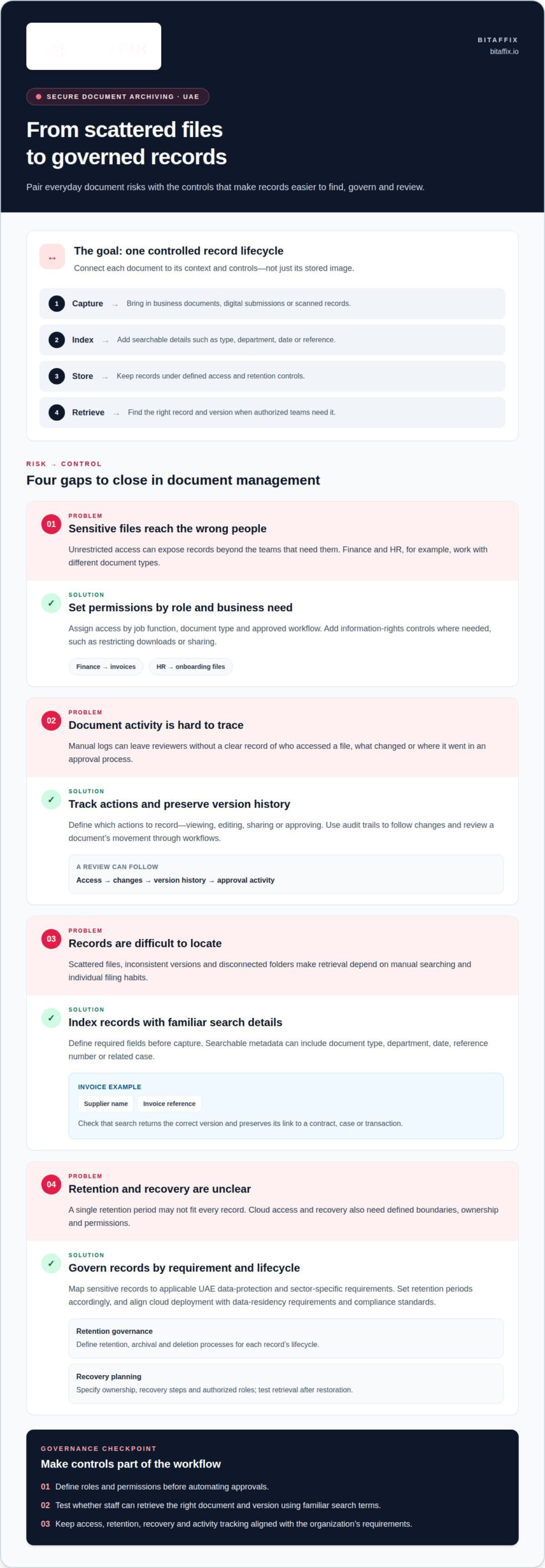
Role-based access control assigns permissions according to a person’s job function. For example, finance staff may access invoices, while HR staff handle onboarding files. Information rights management adds controls over sensitive files, such as restricting downloads or sharing in a cloud document management system. Review permissions by role, document type and business need, then align them with approved workflows. This structure supports secure collaboration without giving every department unrestricted access.
Audit Trails and Activity Tracking
Audit trails record document access and changes, helping teams trace activity around a file. A reviewer can follow its version history, identify changes and see whether it moved through an approval workflow. Define which actions the organization needs to track, such as viewing, editing, sharing or approving. Consistent tracking gives compliance teams a clearer record for internal reviews and audits, with less reliance on manual logs.
UAE Protection and Retention Requirements
UAE data protection requirements and sector-specific regulations call for careful oversight of personal and financial information. Map sensitive records to the requirements that apply and establish retention periods accordingly. Requirements depend on the information and the organization’s sector, so do not apply a single retention period indiscriminately. A secure document archiving system in the UAE should support controlled access and retention governance aligned with those obligations.
Cloud access can support teams working across locations, while centralized permissions keep sensitive files within defined boundaries. Document management systems can restrict downloads or sharing, and organizations should align cloud deployment with UAE data residency requirements and applicable compliance standards. Recovery planning should also specify how authorized teams restore access to records after disruption. Define ownership, recovery steps and permissions before they are needed.
Digital signatures and approval workflows can connect a document to its review process. Teams can route a contract for approval, retain its current version and track its progress between departments. Workflow automation can reduce manual hand-offs, but permissions still determine who can view, change or approve each record. Define roles before automating a process, then review whether access and activity records meet the organization’s governance needs.
Electronic document capture, indexing, storage and retrieval
A reliable records process connects capture, classification, storage and retrieval. Each step should preserve the document’s context, not just its image.
Compare UAE archiving providers by their retrieval processes, stated service levels and controlled destruction procedures. Assess how they locate records, report progress and document deletion instead of assuming that speed or service terms are the same across providers.
Electronic Capture and Indexing
Capture brings documents into the management system from business processes, digital submissions or scanned records. Indexing assigns searchable details, such as document type, department, date, reference number or related case. For an invoice, a consistent index might include the supplier name and invoice reference. Define required fields before capture begins, then test whether staff can find records using familiar search terms.
Searchable Archive Retrieval
A searchable enterprise document archive lets authorized teams locate records through indexed details instead of browsing folders manually. Search by reference, document category or date, then narrow results using available metadata. Check that the system returns the correct version and preserves its connection to a contract, case or transaction. For records used across departments, shared classification terms make retrieval more consistent.
Audit Trails and Historical Records
Audit trails can capture document access and changes, connecting a historical record with activity around it. During an audit, teams need to retrieve the file and understand its place in the record history. Test a realistic request, such as finding an earlier contract version and tracing its changes. This checks both search accuracy and whether the archive preserves enough context for review.
Barcodes can connect a physical file to its digital index. Assign a unique barcode to a file or storage unit, record the identifier in the archive, and use it to locate the corresponding item. This supports filing and searching when organizations maintain paper records alongside electronic documents. Set consistent naming and barcode rules so staff can identify the right item without relying on personal filing habits.
Plan backup and recovery around the records teams must restore and the authorized roles that need access. Document the recovery sequence, account for stored records and indexes, and test retrieval after restoration. Historical records should be readily accessible during audits to help limit administrative disruption. Include retrieval and destruction in the same operating process: assign retention periods, apply controlled deletion schedules and preserve a record of completed actions.
Map a sample record from capture through search, retrieval and authorized deletion to expose process gaps. Discuss your document workflow as a practical next step.
Document scanning, imaging, indexing, and storage
Scanning turns paper records into images, but a usable enterprise archive needs more than image files. Set standards for image quality, indexing, classification and document storage before processing begins.
Start by grouping records by business purpose, such as contracts, invoices or personnel files. Remove clips and prepare pages so the scanner captures complete, readable documents. Check that every scan includes all pages, attachments and relevant markings. For a signed contract, confirm that the signature page and appended schedules stay together in the digital record.
Use a consistent workflow for each batch of records:
- Identify the record category and prepare pages for scanning.
- Scan each file and confirm that text, stamps and signatures remain legible.
- Apply agreed indexing fields, such as record type, date and reference.
- Review sample files, correct classification errors and store approved images.
Optical character recognition (OCR) can make printed text searchable within scanned images. It supports searches for visible text, while indexing adds structured fields to narrow results. For example, an employee name may appear in the document text, while a case reference provides a precise index value. Review OCR output on low-quality or handwritten pages, where recognition may be incomplete. Keep the image as the visual record and treat extracted text as a search aid.
Classification gives records a consistent place in the enterprise archive. Build categories around how teams use documents, then define required fields for each category. An invoice might need a supplier, invoice reference and transaction date; a contract might need parties, status and related matter. Use the same field names across departments so searches do not depend on local naming habits. Clear classification also helps identify missing metadata before records enter storage.
Storage should preserve the connection between an image and its supporting information. Keep the scanned file, index values and relevant attachments together as one record. When a corrected scan replaces an unreadable image, retain the appropriate version history and identify the current approved copy. A quality review can compare the digital file with its paper original, checking page order, orientation, legibility and completeness before acceptance.
For phased digitization, prioritize records by operational use, retrieval needs and document condition. A team might begin with active contracts, then process older files using the same indexing rules. Track each batch from preparation through review and final storage, including exceptions such as damaged pages or missing attachments. This creates a repeatable process for converting physical records without adding incomplete scans to the searchable archive.
Scanning and digitising physical records
Physical records become operationally useful when digitization connects each image to its business context. For a UAE enterprise, plan scanning, review, classification and storage as one controlled process.
Bulk digitization starts with an inventory. Group files by record type, department, date range or business process, then identify damaged pages, duplicates and confidential material. This preparation helps teams set scanning priorities and handling rules before processing a large batch. For example, active contracts may need digitization before closed project files because staff still use them in current workflows.
EDC reports that 75% of organizations are accelerating digitization to improve efficiency. A digitisation programme should translate that objective into practical steps: set priorities, prepare records, scan, review, index and store. Assign ownership for each stage, including exceptions such as missing attachments or unreadable pages. Track each batch through a register, so teams can reconcile physical files with completed digital records.
Quality checks protect operational continuity. Review scanned files for legibility, page order, completeness and orientation before releasing them into the archive. Compare a sample with its paper original, including signatures, stamps and attachments. If a contract’s schedules are separated during preparation, reunite them with the main document before indexing. Record unresolved exceptions and assign them to an accountable team for resolution.
Digital-first operations depend on records employees can find and use within established workflows. A centralized archive can bring digitized files together across departments, while permissions govern access to sensitive records. Connect storage to the organization’s document management software and define how staff submit, review and retrieve files. This reduces reliance on local folders and manual hand-offs without disrupting the business process around each record.
UAE organizations can deploy an electronic document management system in the cloud, on-premise or in a hybrid environment. For sensitive and personal data, align the storage location and deployment model with UAE data residency requirements and applicable compliance standards. Choose an arrangement based on data governance, operational needs and how authorized teams access records. Also account for where copies, indexes and recovery data reside.
UAE organizations can combine physical records storage and digital archiving, or manage records digitally. Define whether the operating model needs both: for example, retain selected originals while staff use scanned copies for routine workflows. Set record-level retention periods according to applicable regulatory requirements. Financial, tax, HR and legal records should follow the schedules relevant to their categories and obligations, with controlled deletion once retention ends.
Implement digitization in manageable batches, then review retrieval and workflow performance before expanding. A pilot involving one record category can reveal indexing gaps, scanning exceptions and storage constraints. Use the findings to refine procedures, train teams and standardize the next batch. This creates a repeatable route from paper files to centralized digital access.
Document archiving
Archiving governs what happens after a document leaves an active process. A defined lifecycle moves records from current use to controlled storage, then to authorized deletion when retention ends. This helps an organization preserve records for business and compliance needs without treating every file as permanent.
Start with a retention schedule organized by record category. Set each period according to applicable regulatory requirements, then assign an owner to maintain the schedule. An invoice, employment record and signed contract may follow different retention rules. Avoid applying one blanket period to all three. Document the rule, its owner and the event that starts the retention period, such as contract closure.
Automation can move a record into an archive when it reaches a defined point in its lifecycle. Connect the trigger to a process, such as completion of contract approval or closure of a case. Preserve its classification and retrieval context during the transition. Controlled deletion schedules then identify records eligible for disposal, while approvals and deletion logs make the final action accountable.
Deployment choices shape where an organization stores archived records. An electronic document management system can run in the cloud, on-premise or in a hybrid environment. For cloud storage, align deployment with UAE data residency requirements and relevant compliance standards. Map each record, its index and any recovery copy to the chosen arrangement. This gives governance teams a clearer view of where records reside and how authorized staff access them.
Archiving also affects operational productivity. According to EDC, document-handling inefficiencies can account for 21% of productivity loss. EDC reports a 60% productivity increase for companies using digital document workflows. These figures point to the process impact of document handling, not a guaranteed outcome for each organization. Map the hand-offs that consume staff time, then prioritize archiving steps that reduce repeated searches or manual filing.
For a UAE government department or enterprise, connect archiving to related processes rather than treating it as a separate repository. A completed procurement file, for example, can move from approval into retention with its supporting records and classification intact. Scanning can bring paper files into the same lifecycle, while enterprise middleware software in the UAE can support integration with business workflows, route records for review and archive them at the right stage. Define triggers, permissions, retention rules and deletion approvals before implementation. This makes governance part of everyday operations.
BitAffix: Workflow Automation
BitAffix provides Workflow Automation and Secure Document Archiving for enterprises seeking structured records processes. These solutions are relevant when document handling relies on repeated manual hand-offs, disconnected approvals or inconsistent archiving practices.
Use industry-specific workflow automation to organize document-related processes, while secure archiving supports governed storage and retrieval. For example, an enterprise can map how approval stages connect with records management and identify where a structured workflow could improve coordination between departments. BitAffix’s Banking Sector Solutions also address sector-specific operational needs.
Define the records, processes and governance priorities that matter most to your organization before planning the next step. This gives the discussion a clear focus, from document lifecycle requirements to workflow needs. Contact BitAffix to discuss secure document archiving and workflow automation for your enterprise.
Set a Clear Direction for Records Governance
Make the next step a focused review of how records support your organization’s work. Identify the processes that cause the greatest search delays, the teams that need dependable access, and the governance decisions that require clear ownership. This gives your enterprise a practical foundation for planning a secure document archiving system in the UAE around its operational priorities.
BitAffix provides Secure Document Archiving, Workflow Automation and Kanban Task Automation. These solutions can help organizations bring records management and connected work processes into a more structured operating model. Start with the record categories and workflows that matter most, then define the outcomes your teams need from a modernized approach.
A well-defined direction helps leaders align records access, process ownership and governance priorities. Take the next step with a clear view of what your organization needs to improve.
A well-governed records strategy can strengthen the foundation for confident, effective operations.
Frequently Asked Questions
What should you look for while choosing eDMS?
Choose an eDMS that fits your records governance, daily processes and integration needs. For a secure document archiving system in the UAE, assess search accuracy, version handling, permissions, retention controls and export options. Test a realistic task, such as retrieving a contract by reference and identifying its current approved copy. Map how the system connects with existing business applications and how administrators manage access when staff change roles.
Why eDMS for Businesses in UAE?
An eDMS gives UAE businesses a structured way to manage records across departments and processes. It can support consistent access, reduce reliance on local file stores and help teams retrieve information for operational reviews. For example, a finance team can organize invoices by supplier and transaction reference. Align deployment and governance with relevant UAE data residency requirements and the organization’s applicable compliance standards.
What security certifications should UAE archive providers have, such as ISO 27001?
Evaluate certifications as evidence of a provider’s security management practices, not as a substitute for reviewing its controls. ISO 27001 is a recognized information-security management standard. Ask which organization and services the certificate covers, whether it remains valid, and whether the archive environment falls within its scope. Then compare that evidence with your internal governance requirements, access model, incident processes and obligations for the records you intend to store.
How do UAE document archiving systems handle encryption, access controls, and audit trails?
These controls work together: encryption protects stored or transmitted data, permissions restrict access, and audit trails record relevant activity. Evaluate how administrators assign access by role, review permissions and remove access when responsibilities change. Check how the system records document views, edits, downloads and approvals, and how teams can export logs for review. Use a sample sensitive record to assess the full control path.
How do you migrate paper archives to a secure digital document management system in the UAE?
Migrate in controlled batches, starting with a clearly defined record category. Inventory the files, flag damaged or restricted records, set indexing rules, then scan and quality-check each batch before release. For example, a contract migration can verify that signatures and schedules remain with the correct file. Reconcile scanned records against the inventory, assign ownership for exceptions and keep physical originals under the organization’s established handling process.
What are the risks and disaster recovery options for document archiving in the UAE?
Key risks include unauthorized access, corrupted files, incomplete backups and failed retrieval after disruption. Set recovery priorities by record category, then document who can restore access and how teams validate restored files and indexes. Test the recovery process with representative records, including attachments and version history. For cloud deployments, assess data residency alignment and how recovery copies are governed, accessed and included in continuity planning.
What are the best secure document archiving systems in the UAE?
BitAffix Secure Document Archiving and Workflow Automation support governed records management and connected processes. A system should also provide role-based access, searchable metadata, version tracking and audit trails.
How do UAE document archiving providers compare on retrieval speed, service levels, and destruction?
Compare providers’ retrieval processes, stated service levels and controlled destruction procedures. Assess how they locate records, report progress and document deletion.