
The best Kanban software keeps work visible without sacrificing control. The right kanban task automation software connects tasks to existing workflows, automates repetitive handoffs, and gives leaders oversight through permissions, dashboards, and reporting. Automation should reduce friction, not add rules that are hard to maintain.
Teams need more than a digital board. They need clear ownership, useful integrations, and a reliable view of blocked work, deadlines, and progress. Kanban is especially useful when work arrives continuously and priorities can shift without disrupting tasks already underway.
This guide explains which features support effective Kanban workflows, from customizable stages and task automation to role-based permissions and business-system integrations. You’ll also learn how dashboards and reports reveal flow and bottlenecks, which teams benefit most, and how to assess the capabilities that fit your operating needs in the UAE.
Key Takeaways
- Shape board stages around the work your team actually handles, then make ownership, priority, and task status easy to see.
- Assess integrations, role-based permissions, and templates for how well they support connected workflows and consistent governance.
- Use work-in-progress limits to control multitasking and bring blocked tasks into view before they slow delivery.
- Choose dashboards that reveal cycle time, throughput, and bottlenecks so teams can assess completed work, not just activity.
- Match Kanban automation to continuous workflows, and consider workflow automation when repetitive handoffs need clearer coordination.
What is Kanban in Project Management?
Kanban makes work visible as it moves through defined workflow stages. A typical software board might use states such as To Do, In Progress, Code Review, and Done.
Visualizing Kanban Workflows
A Kanban board represents a workflow as columns, with each task moving from one stage to the next. This visual structure helps teams identify ownership, blocked work, urgent items, and approaching deadlines without relying on separate status updates.
Kanban task automation software combines this board view with rules that handle repetitive actions. A software team might use Backlog, Development, Testing, UAT, and Production to show how work advances. Scrum uses fixed-length sprints, while Kanban supports continuous flow and lets teams reprioritize backlog work without disrupting active tasks.
For a project manager, this visibility clarifies where work is accumulating and which dependencies could delay delivery. A board can support software development, product launches, client implementations, and internal transformation projects. Teams can start with their existing workflow, then refine stages as real work reveals gaps.
Custom Boards, Swimlanes, and Task Cards
Custom boards adapt Kanban stages to a team’s process, while swimlanes group tasks by team, product, or workstream. A marketing board might move content through Ideas, Content Writing, Review, SEO, and Published. An HR board could track Request, Approval, Interview, Offer, and Onboarding.
Swimlanes can organize departments, value streams, portfolios, programs, products, and team-specific workstreams. They help teams separate related work without hiding its place in the larger workflow. For example, an enterprise board can group work by department while showing each task’s stage.
A task card can hold a title, description, priority, due date, owner, attachments, comments, checklist, and progress updates. These details make each handoff more actionable. Owners, due dates, and priorities clarify assignments, while dependencies show which tasks rely on others before advancing.
Automating Tasks and Assignments
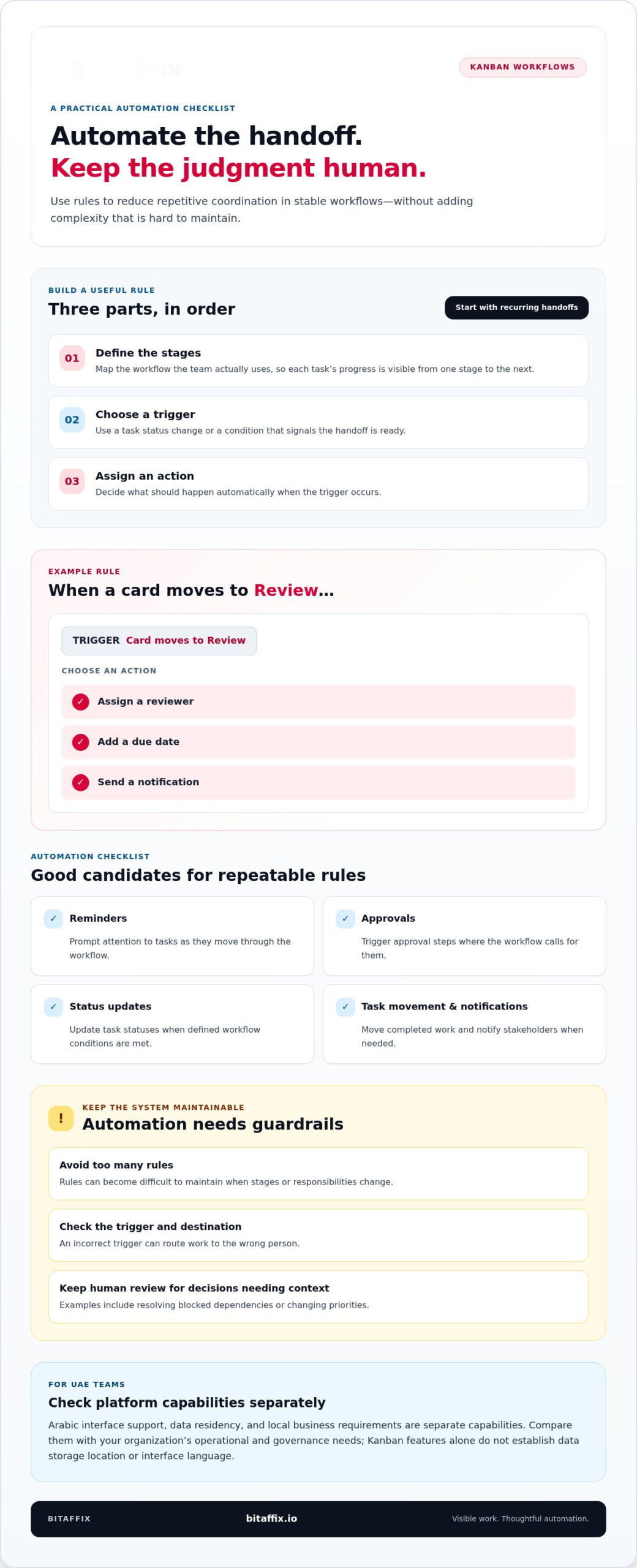
Automated Kanban workflows apply rules when a task changes status or meets a condition. To set them up, define the stages, choose a trigger, and assign an action. For example, moving a card to Review can assign a reviewer, add a due date, or send a notification.
Automation can also send reminders, trigger approvals, update statuses, move completed work, and notify stakeholders. These rules reduce manual coordination when the workflow is stable. Start with recurring handoffs, then review whether each rule still fits how teams handle work.
Automation has limits. Too many rules can become difficult to maintain when stages or responsibilities change, and an incorrect trigger can route work to the wrong person. Keep human review for decisions that need context, such as resolving blocked dependencies or changing priorities.
For UAE teams, Arabic interface support, data residency, and local business requirements are separate platform capabilities. Compare them directly against the organization’s operational and governance needs; Kanban features alone do not establish where data is stored or which language an interface supports.
Integrations, permissions, and templates
Integrations connect board activity with the systems teams use to manage information and delivery. Permissions and templates help standardize collaboration without forcing every project workflow into one method.
Start by mapping where a task’s information lives. A development team using GitHub or GitLab may connect version-control activity with board work, making handoffs easier to follow. The value comes from reducing duplicate updates and keeping task context close to the work.
For teams using Microsoft 365 and SharePoint, assess how a Kanban platform handles document references and work handoffs. For example, a task card could point staff to a project document stored in SharePoint, while the board tracks its review stage. Confirm that the integration supports the team’s actual information flow, rather than adding another disconnected step.
Business applications can include customer, finance, or operational systems. Map the event that should connect them to the board, such as a new request creating a task or a completed review updating a project record. This clarifies which integrations support delivery and which add complexity without improving visibility.
Free-plan features vary by platform. Compare available automation, integrations, permissions, and reporting with the workflow you need to manage; a free tier may support basic board use while limiting advanced capabilities.
Permissions and Collaboration Features
Role-based permissions control what different users can view or change, while collaboration features keep task discussions connected to delivery. This matters when a project includes internal teams and external stakeholders with different responsibilities.
For example, a project lead may manage board structure while team members update assigned tasks. Evaluate permissions alongside reporting and business-system integration, so access rules support governance without interrupting routine collaboration.
Templates and Optional Features
Templates provide a reusable starting point for recurring workflows, such as software review or client implementation. They help teams organize stages consistently while leaving room to adapt a board to their process.
Optional features should solve a defined operational need. A team might prioritize integrations with GitHub or GitLab, while another needs permissions and reporting across several workstreams. Select capabilities based on required handoffs, information access, and oversight.
When board rules need to align with connected systems, coordinated workflow design can help bring those requirements into view before automation expands.
What makes the best Kanban software?
Effective Kanban software makes progress visible and helps teams control how much work moves at once. Work-in-progress limits and targeted automation rules can expose bottlenecks without adding unnecessary process.
Work-in-Progress Limits
Work-in-progress limits cap the number of tasks allowed in a workflow stage or swimlane. They help teams focus on completing active work before pulling more tasks forward, making overloaded columns and bottlenecks easier to spot.
For example, a software team can set a limit of 2 for Code Review. Another team might allow three cards in Code Review, prompting reviewers to clear pending work before developers start more tasks. The appropriate limit depends on the team’s capacity and how complex its reviews are.
Limits can apply to columns and swimlanes. In one workflow, a team might cap In Progress at four cards and Review at two. These are examples, not universal targets. A Kanban tool should let teams adjust limits as real work reveals where tasks accumulate.
When a column reaches its limit, the visual signal prompts the team to address the constraint instead of starting more work. Members can help clear reviews or resolve blocked dependencies, then move tasks forward. This supports flow control while keeping progress visible.
Automation Rules, Triggers, and Actions
Automation rules connect a trigger, such as a card changing status, to an action, such as assigning a reviewer. The process is straightforward: an event occurs, the system checks its conditions, then performs the selected task.
For example, when a card moves to Review, a rule can assign a reviewer, add a due date, or send a notification. Other rules can send reminders, update statuses, trigger approvals, move completed work, or notify stakeholders. Each action should support a clear handoff.
Choose rules based on recurring work, not hypothetical edge cases. If a review stage changes often, adding numerous rules early can make them difficult to maintain. Start with a stable trigger and a specific action, then refine the automation as teams use it on real work.
A useful Kanban tool makes its rules understandable to the people responsible for workflow changes. Teams should be able to identify the trigger, condition, and resulting action, such as “card enters Review” and “assign reviewer.” Clear logic helps prevent unexpected task movement.
Automation should support judgment, not replace it. A rule can route a task to a reviewer, but people still need to assess blocked dependencies or reprioritize work. The strongest setup combines controlled limits with a small set of transparent actions.
Dashboards, reporting, and real-time visibility
Dashboards turn Kanban board activity into a view of workflow status, delivery, and constraints. The right reports help teams move beyond task management to informed decisions about completed work.
Dashboards and Real-Time Visibility
A dashboard summarizes board activity so teams can see current work without reviewing every card individually. It can surface items in progress, blocked tasks, urgent work, approaching deadlines, and completed work.
For example, a project lead can compare status across several boards and identify where a handoff is stalled. Team members can open the relevant card, review its activity, and coordinate the next action. That visibility supports timely decisions while keeping task details connected to the board.
Dashboards are most useful when they reflect the workflow teams actually follow. A template with stages that do not match current work can distort the picture. Align dashboard views with board status, ownership, and the work-in-progress limits used to manage flow.
Reporting and Performance Metrics
Kanban reporting turns activity into measures of flow, output, and bottlenecks. Useful reports include cycle time, throughput, and bottleneck analysis, helping leaders understand how work moves rather than simply count active cards.
Charts can track flow and blocked work alongside completed items. If a report shows work accumulating before review, managers can examine that handoff and its dependencies. They can then address the underlying constraint instead of treating a full column as a reason to start more tasks.
Choose analytics that support a clear operational decision. A team reviewing delivery can focus on completed work and throughput, while a manager investigating delays can examine cycle time and bottleneck patterns. Consistent definitions matter, so teams compare equivalent work and stages.
Cycle Time and Throughput Reporting
Cycle time measures how long a work item takes from a defined start point to completion. Throughput measures how many items finish during a period. Together, these metrics show both delivery duration and completed volume.
For example, a team can define its start point as entry into Development and completion as movement to Done. That shared definition makes cycle-time reporting meaningful across Kanban boards. Throughput then shows how many items reached Done during the reporting period.
Use these measures to investigate flow, not rank members by raw task counts. Rising throughput alongside longer cycle time may mean more work is finishing while tasks wait longer in the system. Review blocked items, handoffs, and current WIP limits to understand the pattern.
Reliable reporting depends on consistent board updates. If members leave cards in outdated statuses, cycle-time charts and bottleneck analysis lose accuracy. Regularly reviewing board data helps teams keep dashboards aligned with actual work and focus improvement on completed value.
Benefits and users of Kanban software
Kanban suits teams managing a continuous stream of work rather than a fixed, one-time project plan. A service desk, for example, can track requests as they arrive, assign owners, and move items through stages as priorities change. The backlog remains visible, while active work continues without every new request disrupting delivery.
This flexibility helps teams respond to change. A product team can reprioritize backlog items as new information emerges while keeping current tasks moving through their existing stages. Because Kanban allows changes at any time, the board gives members a shared view of what needs attention and what is underway.
Kanban also helps teams visualize work across handoffs. An operations group coordinating a request across departments can track dependencies and see which step is holding up progress. If work is blocked, the board makes the constraint visible, so members can focus on resolving it rather than starting additional tasks.
Task ownership supports coordination. Assigning an owner, due date, and priority clarifies who is responsible and what needs attention next. When a task requires contributions from multiple people, tracking multiple assignees can help balance workloads. Automated reminders can prompt action as deadlines approach.
For teams handling recurring work, kanban task automation software can reduce manual coordination. A task entering a review stage might trigger a reviewer assignment or notify the relevant channel. These actions help maintain consistent handoffs, while people retain responsibility for decisions that require context.
Kanban supports delivering smaller increments of value more frequently. A product team can move completed pieces of work forward as they are ready, instead of waiting for a large, fixed plan to finish. Tracking completed work alongside blocked items helps the team understand how delivery flows across the board.
The clearest benefit comes when teams use the board to improve their actual workflow. Start with current stages and real tasks, then adjust as recurring delays or changing priorities become visible. An IT service team might refine how requests move between assignment and resolution; an operations team might clarify cross-team dependencies. In both cases, the board supports adaptation without obscuring ownership or progress.
Kanban fits teams that need continuous visibility and flexible prioritization. It is less suited to work that depends on a rigid sequence with no room to reprioritize. For ongoing work, combine clear task ownership, visible dependencies, and practical automation to coordinate flow while keeping the backlog responsive.
BitAffix: Workflow Automation
BitAffix provides Workflow Automation and Kanban Task Automation for organizations coordinating repeatable work across defined stages. These solutions are useful when manual handoffs, task assignments, or recurring updates make it harder to maintain a clear flow of work.
For document-heavy processes, BitAffix Secure Document Archiving supports the records side of an established workflow. Its Banking Sector Solutions address sector-specific operational contexts. To identify a useful starting point, outline the workflow, its handoffs, and the coordination issues you want to address. This keeps the discussion focused on operational needs rather than assuming every process needs the same automation.
Contact BitAffix to discuss your workflow automation requirements.
Set Your Workflow Up for What Comes Next
Choose kanban task automation software with your operating model in mind, not simply the number of features on a comparison page. The right fit should support how teams coordinate today and let them adapt as responsibilities, priorities, and connected processes change.
Define the workflow outcome you want to improve first. Then align the board structure, automation, and governance with that objective. This keeps technology decisions grounded in operational needs and gives teams a clear basis for refining their approach over time.
BitAffix provides Workflow Automation, Kanban Task Automation, and Secure Document Archiving. These solutions can help organizations align task coordination with broader workflow and document processes.
With a clear operational goal and a considered automation approach, your team can build a more coordinated foundation for its next stage of work.
Frequently Asked Questions
How does Kanban work?
Kanban manages work by showing tasks as cards moving through stages on a board. A team can start with a customer-support queue: requests arrive, a team member picks one up, and the card advances through investigation and resolution. The board makes status and ownership visible. Teams adjust priorities as needs change while keeping active work moving through its established process.
What Kanban metrics should I track?
Track cycle time, throughput, blocked work, and work-item age to understand delivery from different angles. For example, a support team can review older unresolved tickets alongside its completed ticket count. That comparison may reveal whether a growing backlog reflects limited capacity, complex requests, or delayed approvals. Choose metrics tied to decisions your team can make, rather than collecting charts without a clear operational purpose.
What are the 4 principles of Kanban?
There isn’t one universally agreed list called “the four principles.” A practical four-part summary is to visualize work, limit work in progress, manage flow, and improve collaboratively. These practices help a team see how tasks move and where delays form. They also support incremental change: for example, a team can adjust one handoff after reviewing actual work instead of replacing its entire process.
What is a simple example of Kanban?
A facilities team can track maintenance requests with a board containing New, Assigned, In Progress, and Resolved stages. Each card records the issue, responsible technician, and relevant updates. If a repair depends on a part, the team can flag that dependency and keep the request visible until work resumes. This simple setup gives staff a shared operational view without requiring a complex project structure.
What are the best kanban task automation tools for teams in 2026?
The best fit depends on workflow complexity, governance needs, and the systems a team must connect. Compare platforms for configurable boards, role-based permissions, reporting, and automation that supports real handoffs. For enterprise workflows, BitAffix provides Kanban Task Automation alongside Workflow Automation. Assess how a platform fits your processes, especially where approvals, task ownership, or cross-department coordination affect delivery.
Which kanban software integrates with Slack, Microsoft Teams, Jira, and Google Workspace?
Choose a platform that supports the specific connections your team needs across Slack, Microsoft Teams, Jira, and Google Workspace. Check whether each connection can pass the required information, such as task status, comments, or notifications, and support the workflow direction you need. For example, a team may want a board update to notify a collaboration channel while keeping task ownership in its project system.